Search Results for 'private'
-
AuthorSearch Results
-
March 30, 2015 at 1:43 am #236911
In reply to: CPT per each BP-User
Pietro
ParticipantThank You dandp …
…
Mmm … it doesn’t seems to be enough … I do not really need custom fields into the bp-profiles … I need to connect to any bp-user a PRIVATE Custom Post Type. Something like a post. But personal, which nobody can see, except administrators for instance, or people who is allowed by the user itself …
… I hope it is more clear …
I will keep thinking about this. Hopefully I will find a way.Thank You.
PietroMarch 28, 2015 at 6:59 pm #236821In reply to: Closed community
bp-help
Participant@willmaginn
If you don’t like plugins then you will have to write code and place in bp-custom.php preferably which really isn’t much different than having a plugin installed because you will still have to use hooks just like a plugin does, or in your themes functions.php which really isn’t much different or you could edit templates which would be even more tedious. I suggest you reconsider your position on the plugins because it is the simplest method for a closed community. I developed two plugins myself that tackles this issue though they are premium plugins one is Private BP Pages and the other is Private Community For BP. I think there are other plugins on the repo that also provide a closed community but I haven’t tested any of them because my own plugins performs the way I need it too. Good luck!March 28, 2015 at 5:33 pm #236820In reply to: Help for BuddyPress Site to Change the World
rosyteddy
ParticipantSince this thread contains a good amount of discussion, I will humbly beg to share some point of views
“”At one time, WordPress Joomla Drupal and other such software defined the standards for blogging or cms – they were open in all aspects and no product of a private, closed, biggie company equaled their efficacy and reach. They lead and biggies followed. But in the last 5 or 7 (or ?10) years no such software has come up. Unfortunate but true. Its now a world where facebook and the like are ……. Will there be another WordPress or Drupal or Joomla? Time will tell. But probably no. Sad but true. NO!””
“Stallman was one of the first to grasp that, if commercial entities were going to own the methods and technologies that controlled computers, then computer users would inevitably become beholden to those entities. This has come to pass, and in spades. Most computer users have become dependent on proprietary code provided by companies like Apple, Facebook, and Google, the use of which comes with conditions we may not condone or even know about, and can’t control; we have forfeited the freedom to adapt such code according to our needs, preferences, and personal ethics.” http://www.newyorker.com/business/currency/the-gnu-manifesto-turns-thirty
Wishing you all the best @planetearthlings
March 22, 2015 at 7:55 pm #236400In reply to: Private message sent to admin e-mail
vildvittra
ParticipantOk, thank you, but I don’t understand how the user can do it wrong. I don’t see any different options for sending a private message. There is just “Send”, how can it go wrong?
March 22, 2015 at 7:43 pm #236396In reply to: Private message sent to admin e-mail
danbp
ParticipantAny ideas on what may have caused this ?
That question was answered here.
It’s the user who did it wrong, so guess there is no technical solution.
The “from” wordpress@mysite.com is a default address which redirect to site admin address (the one you indicate when you setup WP).
This can (and should be) changed, as its a common trick used by spammers. Read here how to do this.
March 21, 2015 at 8:42 pm #236354Mickey
ParticipantStatus of groups is all public, in fact i have no private groups at all, public (2) private (0) Hidden (0) when I go to groups menu.
These are my active plugins:
Adminimize
AG Custom Admin
Agreeable
Better Search Replace
BP Login Redirect
BP Profile Search
Buddypress – Who clicked at my Profile?
BuddyPress Cover Photo
BuddyPress Members only
BuddyPress Real Names
Custom Login URL
Email Login
K Elements
MAYO – Login Screen
Revolution Slider
rtMedia for WordPress, BuddyPress and bbPress
TM Replace Howdy
WPBakery Visual Composer
WPi Custom Logout
Go Daddy Quick SetupMarch 21, 2015 at 8:23 pm #236353ParticipantIf you have to invite users to join a group, this group i not public, but private or hidden.
So again, which plugins are you using ? And if you could provide an url it would be easier to answer/help you.
March 21, 2015 at 6:44 pm #236336Participantsomehow I wrote set to private I just noticed, they are all set to Public viewing.
March 21, 2015 at 6:33 pm #236330ParticipantIt’s unclear: do you have public or private groups ?
– Groups set for public viewing not showing up.
– There are groups on the site which are set for private viewing.Privacy settings are different for these types of groups.
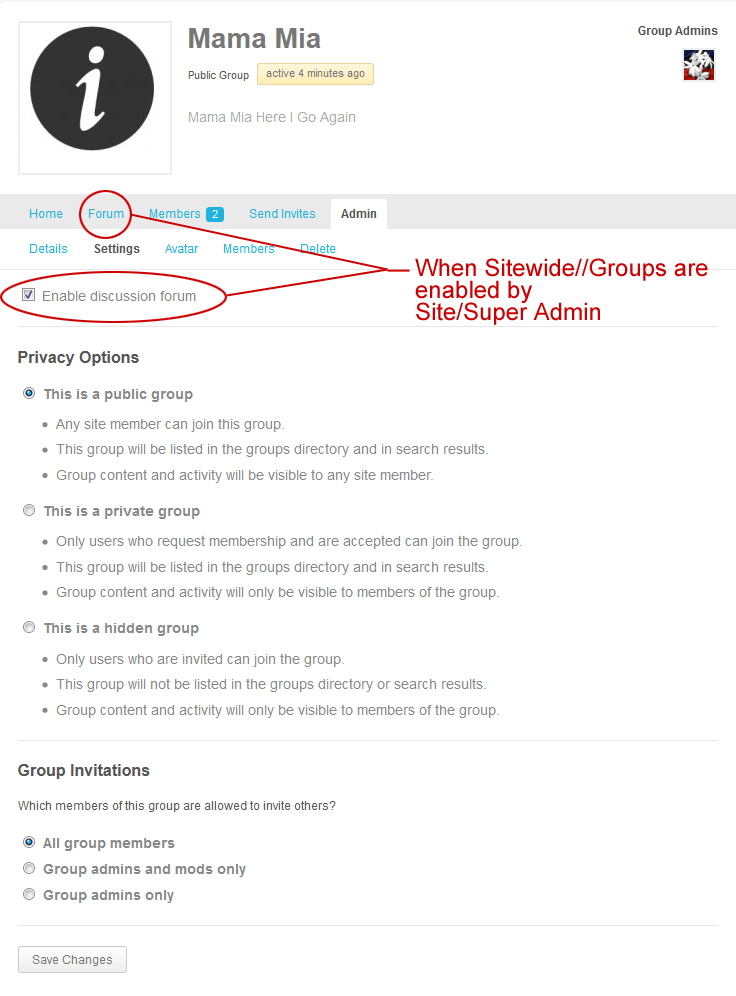 March 18, 2015 at 8:51 am #236185
In reply to: Users are Automatically Activated
angslycke
Participant@danbp True indeed, but with my previous setup with BuddyPress 1.9.2 I was able to control the spam registrations since they were never activated (I used BuddyPress Pending Activations to manually activate new users) and therefore they could never log in. They were not seen in the activity stream either.
This is my setup: https://buddypress.org/support/topic/create-private-membership-site-with-buddypress/
I’ve now upgraded s2Member which had no effect, and also deactivated the BuddyPress Automatic Friends plugin which didn’t have any effect either. The new user shows up as pending in the Users screen for about 1 minute after registration, but is then automatically activated.
March 18, 2015 at 8:24 am #236182In reply to: Users are Automatically Activated
ParticipantHi!
I recently upgraded my site with a new theme (BuddyBoss Boss. theme) and am running WP 4.1.1 and upgraded from BuddyPress 1.9.2 to 2.2.1.
I have a setup where I redirect the activation e-mail to the site admin to be able to manually control new members and verify their information before activating them and letting them log in. This is a cruical function for my site since it’s a private network.
After the upgrade I noticed that some spam users were automatically activated and able to log in without my manual activation. The users are automatically activated, the same issue as @RussAdams is experiencing. I’ve tried deactivating a few plugins (BuddyPress Pending Activations, BuddyPress Auto Group Join) but this issue persists. In BuddyPress 1.9.2, everything was working as expected.
Browser sessions doesn’t seem to be the issue since clearly people on other computers have been able to create accounts which were automatically activated as well.
This is a very serious issue for my site since I no longer have the control over new users and spam users can log in after activating. Did you get this sorted out?
March 17, 2015 at 4:10 am #236147In reply to: Disallow Non logged users on certain pages
RomanSB
Participant@saish_neugi the Plugin Private Buddypress works well also. It isn’t being updated anymore, but I’ve tested it and still works without errors.
March 15, 2015 at 3:15 pm #236040Clive Hetherington
ParticipantHi Rosy, it’s a private invite site discussing aspects of the make up of reality although I’ve some public sites which don’t attract the same comment enthusiasm because it’s a very specialist area. Discussions of earth as a simulation: public discussions are here: http://www.soul-healer.com/simulation-argument/
It works the same way for me – you only get about 4 lines of the comment in the AS. I think only for Activity Updates there is a ‘More’ link. So, basically with BP you cannot read all of the comment in the AS AND you cannot actually easily find the comment on the original pages either. With a tabbed side bar setup you can list most recent comments and clicking on those will take you to your page comment BUT it’s only feasible to list the last 30 comments or so in the sidebar.
Yea, I’ve managed to avoid FB and the Twitter things. Those are not for ‘focused, inquiring’ decent ‘comprehensive’ discussions.
Basically, if you are suspicious then you’d notice that ‘reality’ doesn’t like focused ‘serious’ discussions it’s likes twittering and in the moment passing remarks – it’s helps greatly to stop people figuring out fundamentals about reality . . . haha
March 13, 2015 at 3:17 pm #235952In reply to: Change Group Member Slug
Security
Participanttry checking using an incognito or private window after adding the above line your site and browser may be loading a cached version of your site due to which you won be able to see the changes
ThanksMarch 12, 2015 at 2:59 pm #235875In reply to: display only one group activity stream on homepage.
Participant@martni You can get some ideas here:
https://premium.wpmudev.org/forums/topic/adding-a-single-group-activity-stream-to-bp-social-home-page
https://buddypress.org/support/topic/resolved-filter-custom-activity-stream-to-display-only-new-groups-new-topics-new-replies/Another way may be, making the other groups private, if that suits you / your site at all.
Thanks
March 11, 2015 at 1:41 am #235825Participanthttp://seventhqueen.com/support/forums/forum/kleo/kleo-general-questions
Hi @sjjenkins
This should not be very difficult. Some small change in the template file but since they have no downloadable version its difficult to say.
This may contain some clue –Showing some profile fields in member’s profile header not working after update
Just curious, how does the Whats New box looks like when you use
buddypress-activity-privacy, buddypress-activity-plus and any Media plugin like rtmedia ?
Whats your site (if its not private) url ?Thanks.
March 7, 2015 at 10:04 pm #235620Henry Wright
ModeratorHi @pieter
Try this
function filter_private_message_email_body( $email_content, $sender_name, $subject, $content, $message_link, $settings_link, $ud ) {

    $content = substr( $content , 0, 140 );

    $email_content = sprintf( __(
'%1$s sent you a new message:
Subject: %2$s
"%3$s"
To view and read your messages please log in and visit: %4$s
---------------------
', 'buddypress' ), $sender_name, $subject, $content, $message_link );

    return $email_content;
}
add_filter( 'messages_notification_new_message_message', 'filter_private_message_email_body', 10, 7 );
This will make the message 140 characters. Feel free to change the 140 to another number.
March 7, 2015 at 2:46 pm #235603Participanthi @rosyteddy,
guess the mytery sit here: http://localhost/wordpress/userA/Multisite (subdomain or subdirectory) need that wordpress stays at the site root. At least for a default install.
SSite: hxxp://my_site.com
MS: hxxp//my_site.comMS subdomain: hxxp//wouah.my_site.com
MS subdirectory: hxxp//my_site.com/wouah/A local install (wamp, mamp or xamp) is mostly in a ‘www’ folder at your hard disk root C://
(recommended path) Refer to your software documentation for more details about installing Wamp/Mamp/Xamp – at least about localhost in URL. In the latest version (wamp 2.5), this is no more used. In my case, the local URL is http://my_site/wp-admin/….C://www represent the private part of the site path. The equivalent of /var/your_account/htdocs/ on a production server.
The same path scenario goes localy
C://www/my_site (avoid confusion and don’t use WordPress as site name)
My_site folder contains all WP directories and files:My_site/wp-admin
My_site/wp-content
My-site/wp-include
My_site/wp-config.php and so on…At the end of the install, you got a htaccess file containing:
# BEGIN WordPress
<IfModule mod_rewrite.c>
RewriteEngine On
RewriteBase /
RewriteRule ^index\.php$ - [L]
RewriteCond %{REQUEST_FILENAME} !-f
RewriteCond %{REQUEST_FILENAME} !-d
RewriteRule . /index.php [L]
</IfModule>
# END WordPress
The important things here are rewrite engine on and rewrite base /, where the slash means “start to manage site URL’s form this point”, which is /…/…/var/your_account/htdocs/<- from here !!!
Before installing BuddyPress, activate pretty permalinks to what you want, EXCEPT default. Save. I do this before, because WP likes also pretty permalinks, and so i don’t forget to do it after i finished with a BP install.
Install BP and setup (or at least control if they exist) the choosen component page(s).
If you do this, you won’t have 404 or other issues, no matter if you use MS or subdirectories or subdomain. WP alone will work, and BP too.
The most important advice if you want to work localy, is to setup correctly apache (mod_rewrite is not activated for ex.). And if you use it with windows, to double-check anything, including HOST file where you have to declare manually each of your local sites (since wamp 2.4 – don’t remember exactly)
# localhost name resolution is handled within DNS itself.
127.0.0.1       localhost
::1             localhost

127.0.0.1       my_site
::1             my_site

127.0.0.1       my_other_site
::1             my_other_site
March 7, 2015 at 1:36 pm #235598In reply to: [Resolved] Friend button styling
KS
ParticipantThanks Dan.
I did search across every file (using Brackets), so I found the .js and .php files where it’s used, but those classes were not found in any CSS file in my installation. Sorry, ‘looking’ was probably misleading. I meant I had searched thoroughly, using any one of a number of appropriate tools 🙂
I did find *some* of the attributes of the button, but not, for example, where the ‘Add friend’ button is getting its colour from, which is different to the ‘Send private message’ button for example. Some CSS has to be differentiating those two buttons, surely? And the colour in mine doesn’t appear anywhere in any CSS except for a class that isn’t applied to these buttons at all.
March 5, 2015 at 8:40 am #235488In reply to: Actifity feed, Note vs message
whoaloic
ParticipantThank you Henry for your answers.
Note is what I call “What’s new” message in Activity Stream.
That’s why you called public message or mentions?
It’s like a tweet finally ?For private messages, I notice that user could send a message to all users so I was wondering what’s the point of Friends connexion.
I was thinking that only users who are friends could send messages.Than you for the “favorite” button trac. It looks encouraging.
March 4, 2015 at 5:24 pm #235457ParticipantHi,
leave groups & request membership use the same button, depending the context. See reference.
Try this if you use only private groups
function xyz() {
global $groups_template;
   if ( bp_is_active(group) )
      return '';
}
add_filter( 'bp_get_group_join_button', 'xyz' );
Reference: wp-content\plugins\buddypress\bp-groups\bp-groups-template.php:2747
March 4, 2015 at 3:00 pm #235453In reply to: Actifity feed, Note vs message
ModeratorHi @whoaloic
What do you mean by “note”?
Messages can be either public or private. Private messages work kind of like chat, and can be seen only by the ‘thread’ participants. Public message are ‘front-end’. You can public message someone by prefixing their username with the @ symbol. Public messages are also known as mentions.
Regarding favourites, see this Trac ticket for how the feature will be improved over the next few versions.
Hope this information helps.
March 4, 2015 at 9:58 am #235448ParticipantHello,
I would like the users not be able to leave groups or request membership buttons.
I have set groups to private.Cheers
March 1, 2015 at 8:31 pm #235312In reply to: Search Activity/ Groups
Jozef de Beer
ParticipantI am having the same issue. The regular WordPress search box will not display any content from my Groups page. I think it is hilarious that when I go to create a group, under settings the public and private options say that group content will show up in search results. I have tried relevanssi and that didn’t help.
February 25, 2015 at 9:47 pm #235154In reply to: Trouble Creating new groups
Reginald
ParticipantYes for now what I have Managed to do is to open a private browser and log in to my account from there and create a group that way it will allow me to create new Groups, but I just can’t create them regularly, and it will not let me go pass the Settings Screen, but when I go to check my Groups the New one is Added.
-
AuthorSearch Results


