I’m trying to create a plugin that adds an xprofile field to allow admin to choose a custom taxonomy to use as a profile field. I’ve cribbed from the BuddyPress XProfile Image Field plugin by Alex Githatu and some of the class from the datefield xprofile class.
I have the category open up the form for options and have a select populated by relavant values inthe xprofile fields admin screen.
But when submiting that, validation fails with “These field options are invalid.”
(The field is a select : <select name="field-settings[taxsel]" id ="taxsel-value" class="taxsel-value" >)
I can’t seem to find or make sense of any documentation on how to have buddypress accept my field type option.
Wordpress is 4.9.5, BuddyPress 2.9.4
Any advice or pointers would be very much appreciated.
I’m not sure what of my code to post, in the main plugin file I have
add_filter( 'bp_xprofile_get_field_types', array( $this, 'bpxp_taxsel_field_add_field_type') );
and in that function:
$taxsel_field_type = array(BP_XProfile_TaxSel_Field::FIELD_TYPE_NAME => 'BP_XProfile_Field_Type_TaxSel');
and I see the field tupe if I dump the $field_types after the array merge there.
Thanks in advance
Thank you.
However, I am using a plugin that sends an email invite to people whoare to become users.
They fill in a simple registration form, then submit it.
And then log in to the website.
At that point, they have access. They haven’t gone through any Buddypress registration forms.
So I can’t hook those actions.
At what point in the user registration process do the xProfile fields get created/populated for a new user. eg. When does the default Name field get populated in the user registration process.
And is there a corresponding action I could hook?
I’ve tried xprofile_get_field_data using this code:
$args = array(
    'field'     => 'Nickname'
);

$result = xprofile_get_field_data($args);
print ("<br><br>");
print ("XProfileData");
print ("<br>");
var_dump($result);
But all it does is return “FALSE”
That xprofile field definately exists
Thanks to someone on WPMU dev, I tried this:
$profile_data = BP_XProfile_ProfileData::get_all_for_user( 1 );
echo '<pre>';
print_r($profile_data);
echo '</pre>';
This returns the Profile fields…
So I realised looking at this page:
Profile Fields Loop
That I have no idea how it’s getting its data.
There’s no arrays or variables being set. There’s these functions:
bp_has_profile()
bp_profile_groups()
and so on.
But none of these do any assignments of variables or results.
I suspect my PHP/programming knowledge is way out of date. Because there’s something sophisticated or hidden going on here with those functions that I just don’t understand.
As usual glad to be pointed at background reading…
I’m trying to set some code that copies the data from a new user across to xProfile fields.
But I’m wondering when that field creation triggers…
SO that I can insert the function into the correct location using add_action
I’m hoping that by the time WordPress gets to the ‘user_register’ function, and the actions being added, that the xProfile fields have been created…??
So I’m having a really frustrating time getting BuddyPress to show all groups and fields, even if they have no data in them.
I found this page:
Profile Fields Loop
It talks about the bp_group_has_profile() function. And parameters that can be applied. BUT that function is NOT in the example code on that page.
I tried applying some of that information to
public_html/wp-content/plugins/buddypress/bp-templates/bp-legacy/buddypress/members/single/profile/profile-loop.php
But bp_group_has_profile does not exist in the above file.
How does this information apply to showing all the fields and Profile Groups?
When I search for the individual functions (like bp_profile_group_has_fields) in the BuddyPress site, they don’t seem to exist…
Are these standard functions?
I’m very confused about how to make this work.
I also found this page:
https://wordpress.stackexchange.com/questions/243884/how-to-display-profile-fields-with-no-data-in-buddypress-profile-view
But that involves removing bits, rather than using function calls… Is this the way to do it?
Thanks for any insight
Hi,
I’ve created some custom fields for user profile and tryed some themes.
At registration page I have dates and radio that always goes on new line (also date day,year and month are really too large).
What can I do?
Is also possible to have profile fields under (and not beside) account data?
Thanks!
Thanks @venutius.
I’m actually using Paid Memberships Pro plugin for my memberships management and they just recently released a BP integration which takes care of the xprofile fields plugin problem as I was told by one of their tech support. It is better installed when you just create your site as they still have to create syncing issues between their fields and regular old xprofile fields for older members – currently this syncing is not available but will be. So as a result I will have to manually move the data over from the members prior to using their integration (about 200 people but it’s doable) . I’m waiting for the code to be installed on my site by their tech support to do this.
But if anyone is interested, they should check out PMPro for managing bp or other memberships, it really is great and it’s always supported. I am using the Pro version which is expensive per year however you get great tech support and they will go into your site to modify things and help you install various add ons and integrations. This BP integration plugin is available in free version too I believe. If you have a serious memberships site where you do or intent do make money, it’s worth to pay for the yearly fee though for support and access to more add ons.
I’ve tried other membership plugins and just wasn’t working for me.
Hopefully the old xprofile fields plugin can be cloned by someone for those who are not going to use PMpro. It’s odd that there are not many options for this plugin and it’s not supported as it’s very essential.
Here’s PMPro info:
Paid Memberships Pro
The integration plugin below, you need the above memberships plugin installed though:
Paid Memberships Pro – BuddyPress Add On
Yes! bp_get_member_user_id() did the job.
My working code now is:
//Add fields in the member directory results
function add_info_to_members_loop() {
	global $wpdb;
	$dateOfBirth = array();
	$user_id = bp_get_member_user_id();
	$dateOfBirth = $wpdb->get_col("SELECT value FROM {$wpdb->prefix}bp_xprofile_data WHERE field_id = 2 AND user_id = $user_id");
	$dob =  $dateOfBirth[0];

$today = date("Y-m-d");
$diff = date_diff(date_create($dob), date_create($today));
$state = bp_get_member_profile_data( 'field=State' );
echo 'Age '.$diff->format('%y')  . ' - In ' . $state;
//This will output i.e.: Age 35 - In New York
}
add_action( 'bp_directory_members_item', 'add_info_to_members_loop' );
Thank you @venutius!
This is happening in functions.php to fire up in members_loop:
Even though the Date of Birth is a private field I still need to pull it so I can calculate and display the user’s age. The below code works fine when I’m logged in as Admin but returns 0 when I’m logged in as a regular user which made me realize it’s probably because it’s set to private.
$dod = bp_get_member_profile_data( 'field=Date of birth' )
How do I get the field value straight from wp_bp_xprofile_fields?
The below isn’t working. I’m assuming it’s terribly wrong. I think I need to include in the db query the userID because it only pulls one value no matter who the user is but how do I get the displayed user’s ID (if that’s the case to begin with)? I managed to get this to work when viewing one’s profile page but I can’t seem to do it in members_loop.
//Add fields in the member directory results
function add_info_to_members_loop() {
//$dateOfBirth = bp_get_member_profile_data( 'field=Date of birth' );//This isn't working

global $wpdb;
$dateOfBirth = array();
$dateOfBirth = $wpdb->get_col("SELECT value FROM {$wpdb->prefix}bp_xprofile_data WHERE field_id = 2");
$dob = $dateOfBirth[0];

/*This will work when I finally get the date of birth
$today = date("Y-m-d");
$diff = date_diff(date_create($dob), date_create($today));
$state = bp_get_member_profile_data( 'field=State' );
echo 'Age '.$diff->format('%y')  . ' - In ' . $state;
*/
}
add_action( 'bp_directory_members_item', 'add_info_to_members_loop' );
Thank in advance.
they don’t help they are so slow. The only requirements are calling the xprofile fields into a template file
add_action(‘bp_after_profile_edit_content’,’edit_appointment_settings_xprofile’);
// Displays Editable Fields for Appointments+ email and phone
function edit_appointment_settings_xprofile(){
// Only Logged in users can make these edits
$profileuser = wp_get_current_user();
?>
<h3><?php _e(“Appointments+ Settings”, ‘appointments’); ?></h3>
<form method=”post” action =” “id=”appointment-edit-form” class=”standard-form”>
<table class=”form-table”>
<tr>
<th><label><?php _e(“My email for A+”, ‘appointments’); ?></label></th>
<td>
<input type=”text” style=”width:25em” name=”app_email” value=”<?php echo get_user_meta( $profileuser->ID, ‘app_email’, true ) ?>” <?php echo $is_readonly ?> />
</td>
</tr>
<tr>
<th><label><?php _e(“My Phone”, ‘appointments’); ?></label></th>
<td>
<input type=”text” style=”width:25em” name=”app_phone” value=”<?php echo get_user_meta( $profileuser->ID, ‘app_phone’, true ) ?>”<?php echo $is_readonly ?> />
</td>
</tr>
<input name=”action” type=”hidden” value=”save_xprofile” />
// Add other fields like location etc .. here if needed
</table>
<div class=”submit”>
<input type=”submit” action = “” name=”appointment-edit-form-submit” id=”appointment-edit-form-submit” value=”Save” />
</div>
<?
}
So what you do is create a shortcode similar to what you did for the profile pages but it’s within the appointments+ files. I can adjust the code to create the shortcode USER_PHONEr . Here is an example of custom code for a drop down on profile that was included into email templates
if($r->travel_type==2){
$address=$r->address;
$travel_type=”Photographer Travel to Me”;
} else {
$sql = “SELECT * FROM wppl_friends_locator where member_id=”.$r->worker;
$squad=$wpdb->get_results( $sql );
if($squad){
$address=$squad[0]->formatted_address;
}
else{
$address=””;
}
$travel_type=”Travel to Photographer”;
}
but instead of all the travel type and address stuff I need to call the xprofile fields database then find id 206 and display that info.
Thank You
Thank you so much for replying. There is quite a lot of data on the plugin page. I need to display it within a backend email template. I am already able to show xprofile fields on the profile. Any ideas?
I am running WordPress 4.9.5 with the Sweetdate Theme. Buddpypress 2.9.4 http://housing.digitalelegance.com/members/
I am trying to get a few of the profile fields to show up under the member name on the members page. I tried to edit the member-loop.php and nothing was showing up. At the moment I have hidden the following areas through CSS
.search-item .date {display:none;}
.search-item .search-body{display:none;}
I need some real world help in displaying these fields. Any other information you may need, just ask. Thank you
1. take a look at this page, it shows the general principles https://codex.buddypress.org/themes/theme-compatibility-1-7/template-hierarchy/ also you can look at the BP Template Overloader plugin, it’s designed to make this process more accessible.
Basically you create a buddypress directory in your child theme directory and replicate the directory path to the buddypress/members/register.php file.
Regarding 2, how did you do that? I’ve not got it as an option, I’m aware there’s plugin that added a TOS checkbox, not seen it done directly from the xProfile fields.
But if you did add it as a xProfile field, BP will by default show it in the profile page if the user has set it to publicly visible.
you might like to check out that plugin, I don’t think it uses xProfile fields: BuddyPress Simple Terms And Conditions
1. One way to achieve this would be to overload the BuddyPress register page and replace the current section that adds the username with code that populates this field from the username field.
2. Not sure about that one, I take it this is being added by a plugin? if it’s creating an xprofile field then by default it will show up in profile, unless set to not be shown by the user. There’s a couple of options I think, either add some code to force this to not be displayed or else overload the profile page and set it up to display the profile fields you want to display.
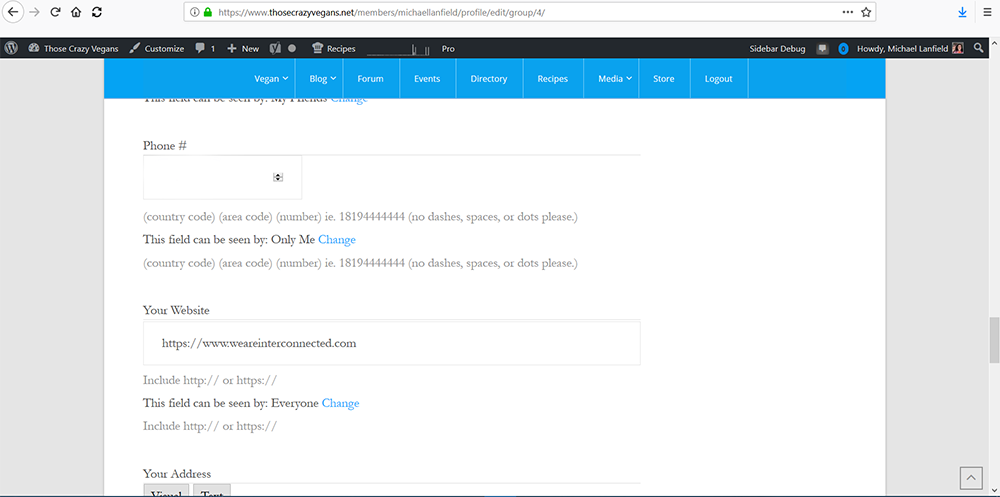
Hello. here is my site https://www.thosecrazyvegans.net
When I add a description to extended profile fields it shows up as 2 descriptions. I would like to remove the bottom ones. This happens to every new field I add that has a description.
Here is the screenshot of what I am talking about. I don’t do anything different. I just add a description to the new field in Profile Fields.
https://www.thosecrazyvegans.net/screenshot5.png
@vapvarun, I just noticed that when I click on “Settings” it takes me to this page:
http://mobileweb.guru/webdev/crowdwel/members/james/settings/
However, the display is the same as:
http://mobileweb.guru/webdev/crowdwel/members/james
There are no options to edit the profile fields.
@vapvarun, thank you for your swift response.
I have managed to get some test fields to show. I have almost got the profile page to where it needs to be but how do I get rid of the name above the avatar?
http://mobileweb.guru/webdev/crowdwel/members/james/
Thank you,
James
@jgflores
As per my understanding
— BuddyPress does not save any data related to IP address inside cookies.
— All the profile fields which you have created for your users are kept inside your WordPress database only, not linked to any 3rd party application. If you are using Akismet plugin for spam protection for BuddyPress, they will check logged in member IP address to cross check with their spammer’s database log, again that’s not the BuddyPress thing.
@orero It will suggest using Gravity form user registration add-on, it will give you WordPress user meta and BuddyPress xprofile fields mapping option as well as gravity form fields.
https://www.gravityforms.com/add-ons/user-registration/, it will take care of all user and field validation as well.
As a free option, you can check https://wordpress.org/plugins/frontend-registration-contact-form-7/
Thanks.
yeah, that plugin is useful, but it’s only one way. It only goes from BP to WP not WP to BP.
It also has limited WP profile fields available. Although that’s easy enough to fix by adding items to the array in the plugin…
The core problem is that once you have BP, there’s two different places to change the basic profile data. Having BP be able to take over the appropriate WP profile areas would make things so much easier….
@normancates you can check for https://wordpress.org/plugins/bp2wp-full-sync/ plugin, it will allow mapping your xprofile fields with WordPress User Fields.
That’s awesome.
Why is this not a standard part of Buddypress? (Rhetorical question)
IMO, any fields should be designated (or able to be designated) as linked to the WP profile information.
THis is a CONSTANT source of confusion for me and any users. Because some plugins use the WordPress profile info, and some the Buddypress info.
I get that they probably need to do that. But at least let us synchronise the data.
Including display name options…
Please, BP / WP developers, slam an interface on this and let us keep our data consistent.
Cheers,
Norm