Skip to:
Content
Pages
Categories
Search
Top
Bottom

Search Results for 'spam'

Viewing 25 results - 876 through 900 (of 3,350 total)
  • Author
    Search Results
  • petdailypress
    Participant

    Wordpress version 3.8, Buddypress 1.9, bbPress 2.5.1, Website: bekindtodogs.com

    I am testing out the register page and my testers are all telling me they can’t get past the register page. They enter their info, do the spam test, and then it just loops back to Registration without moving on to the next step.

    I am thinking there is something I need to do with my Activate page. I have a page called Activate, which is set in the Buddypress settings, but that page doesn’t have any bbPress Template like the Register page does. Isn’t there supposed to be a bbPress Activate Template?

    I deactivated the plugins “Are You A Human?” and “Buddypress Xprofile Custom Fields Type” but that didn’t seem to matter.

    Please help!

    #175775
    talk2bks
    Participant

    It seems that those spamming my site are using wordpress’ default way of creating an account and not registering through buddypress. When I go to the users admin, all of the users that used buddypress were given the default forum role of “participant”. The spammers don’t have this role.

    Because of my current setup, I installed the Members plugin and created a new role. Then I made the buddypress form show up only for those that I have confirmed. I would recommend that this be added to future buddypress installs as an option.

    #175263
    Henry
    Member

    Also, perhaps the emails are being sent but falling into user’s spam folders. Perhaps ask them to check

    #175254
    Matt McFarland
    Participant

    A great plugin that I use (is free) that has greatly reduced registration spamming is WANGUARD (check it out here: https://wordpress.org/plugins/wangguard/) works great with buddypress and bbpress

    #175253
    ride2719
    Participant

    I’m hoping that this is my final post on this thread. I found a plugin called BuddyPress Security Check that, so far, has stopped the spam registrations. Thanks to Shea Bunge for the plugin. This may be one of those short-lived fixes where the spammers figure it out eventually, but it’s working right now.

    #175214
    ride2719
    Participant

    OOPS… My last post was INCORRECT (there doesn’t seem to be a way to delete posts). I thought it was working to use a required xProfile field, but it just took longer to get going. The spam registrations started up again and I had to disable registrations.

    SO, I’m still looking for help on how to diagnose the problem, or a work around for fixing it.

    Can I re-install BuddyPress and/or bbPress without losing my settings?

    Thanks, Rick.

    #175157
    shanebp
    Moderator

    First you said:
    >I disabled registrations using “Registration is disabled” from the network admin settings/network settings and the spam registrations continue.

    Now you say:
    >– disable registrations (network admin) and the automatic reg stops

    Not sure why things have changed, but it’s a clue.

    btw – did you change the salts in your wp-config ?
    https://codex.wordpress.org/Editing_wp-config.php#Security_Keys

    #175135
    aces
    Participant
    #175134
    shanebp
    Moderator

    >Forums are enabled (it’s a primary purpose for the site)

    Understood, but try deactivating bbPress.
    If the spam regs stop, you know it’s a bbPress issue and you can post a bug report on their site.

    If they don’t stop, at least you know it’s not bbPress.

    #175131
    ride2719
    Participant

    Follow up comments:

    I am using the theme Prose (child of Genesis) from Studio Press if that matters.

    I would be willing, as a stop-gap measure to manually register people, but the spam registrations are bypassing the “registration is disabled” setting.

    Rick.

    #175125
    ride2719
    Participant

    I am being inundated with spam registrations (hundreds).

    Running a network install of WP version 3.7.1
    Running BuddyPress 1.8.1 and bbPress 2.5

    Very generic settings, as far as I know.

    Forums are enabled (it’s a primary purpose for the site)

    I disabled registrations using “Registration is disabled” from the network admin settings/network settings and the spam registrations continue.

    My search of the forum did not seem to bring clarity to this problem (I’m probably missing something) except that it’s a known problem.

    Side issue: viewing users from the network admin section, there is a category called “Users with Unconfirmed Email Address (7168)”. When I click on the link I get “You do not have sufficient permissions to access this page”. Does anyone know how to view this category. I’d like to delete them.

    Please help!!
    Rick.

    #175066
    JeremyPark123999
    Participant

    Hi, I am not entirely sure if this should be posted on the wordpress forums or here. I think that since this PHP script is using data in the buddypress registration page, that here is the place.

    Anyway, I am trying to set up a website for my Minecraft Server that I have been hosting for the past few months. I am using the code below to only allow players with a premium Minecraft account to register on the website, in order to block spammers. The link in the code (http://www.minecraft.net/haspaid.jsp?user=) will print a boolean changing if the account name is valid or not. The name is put after the “=” and if it is valid, “true” will be printed, and if it isn’t valid “false” will be printed.

    I am trying to make it that the name is checked before the account is made. What should happen is that the username is taken and checked on the Minecraft database, and allow the user to register if “true” is echoed, and if “false” is echoed, the registration will not be allowed to continue.

    The issue is, that I am really not skilled in PHP at all, and I can’t find out why this code isn’t working. It makes no visible change to anything, and registration continues as if it wasn’t there. If anyone could give me a hand here, that would be great. Here is my Code.

    <?php
    /*
       Plugin Name: Minecraft Username Validator
       Description: Minecraft username Validation
       Version: 0.1
       Author: JeremyPark123999
    */
    
    /* Register actions */
    add_action('registration_errors', 'verify_mc_account', 10, 3);
    add_action('admin_menu', 'add_mcval_options');
    
    /* Check account on minecraft.net */
    function verify_mc_account( $errors, $login, $email ) {
    	//$user_info = get_userdata(1);
    	$user_info = get_user_by('login', $login );
    	$options = array(
            'timeout' => 5,
        );
        $mcacct = wp_remote_get('http://www.minecraft.net/haspaid.jsp?user='.$user_info->user_login);
    
        if ( $mcacct == 'false' ) {
            if ( $mcacct == 'false' ) {
                $errors->add('mc_error',__('<strong>ERROR:</strong> Minecraft account is invalid.'));
            } else {
                $errors->add('mc_error',__('<strong>ERROR:</strong> Unable to contact minecraft.net.'));
            }
        }
        return $errors;
    }
    /* Activation/Deactivation */
    function set_mcval_options() {
        add_option('hide_me', 'false');
    }
    
    function unset_mcval_options() {
        delete_option('hide_me');
    }
    
    register_activation_hook(__FILE__, 'set_mcval_options');
    register_deactivation_hook(__FILE__, 'unset_mcval_options');
    
    /* Add admin menu */
    function add_mcval_options() {
        if ( get_option('hide_me') != "true" ) {
            add_options_page('Minecraft Validator Options', 'Minecraft Validator', 8, 'mcval-options', 'mcval_options');
        }
    }
    
    /* Display options page */
    function mcval_options() {
        ?>
    <?php }
    

    My website is at tumbleweed-mc.net

    #175040
    neelesh7
    Participant

    extended-profile

    Hi,

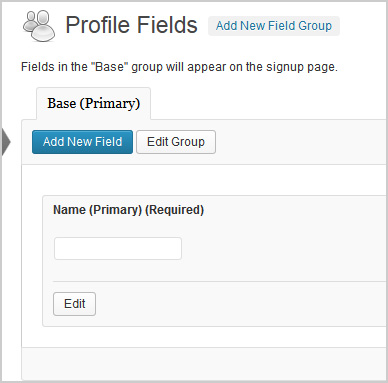
    The pic above shows what the extended profile field should look like. I had a plugin called Buddypress Real Names which allowed me to delete that field above. Silly me, now my extended profiles are not working. It shows blank under profile fields on my registration page and does not send a confirmation email to new users. However, if extended profiles are turned off, all works fine.

    1. Which version of WordPress are you running?
    3.7.1

    2. Did you install WordPress as a directory or subdomain install?
    Directory

    3. If a directory install, is it in root or in a subdirectory?
    root

    4. Did you upgrade from a previous version of WordPress? If so, from which version?
    No

    5. Was WordPress functioning properly before installing/upgrading BuddyPress (BP)? e.g. permalinks, creating a new post, commenting.
    Wordpress seems to be working fine

    6. Which version of BP are you running?
    1.8

    7. Did you upgraded from a previous version of BP? If so, from which version?
    No

    8. Do you have any plugins other than BuddyPress installed and activated? If so, which ones?
    Yes.
    Admin Toolbar Remover
    All In One WP Security
    AVH First Defense Against Spam Plugin
    BP Profile as Homepage
    BuddyPress
    BuddyPress Activity Plus
    BuddyPress Activity Privacy
    BuddyPress Wall
    Contact Form
    Custom Meta Widget
    Disable RSS
    Dynamic Widgets
    Email Login
    EU Cookie Law Compliance
    Facebook Friends Inviter
    Google Analytics for WordPress
    Google XML Sitemaps
    Restrict Usernames
    Velvet Blues Update URLs
    W3 Total Cache
    WordPress SEO
    WP-SpamFree
    WP Block Admin
    WP Content Filter
    WP FLogin

    9. Are you using the standard BuddyPress themes or customized themes?
    Standard

    10. Have you modified the core files in any way?
    No

    11. Do you have any custom functions in bp-custom.php?
    No

    12. If running bbPress, which version? Or did your BuddyPress install come with a copy of bbPress built-in?
    Not running bbPress

    13. Please provide a list of any errors in your server’s log files.

    14. Which company provides your hosting?
    Mweb

    15. Is your server running Windows, or if Linux; Apache, nginx or something else?
    Unix

    #175034
    Asynaptic
    Participant

    I need an interface that organizes all the forum related tasks. I’m finding the setup with BuddyPress & bbpress to be a little intimidating.

    It sounds like you just need a forum, which would be bbPress. The reason bbPress and BuddyPress are separate plugins is that this allows people to pick and choose according to their needs. What you need to figure out first is, what do you want and need?

    To learn more about how to use bbPress, check out the official guides here: https://codex.bbpress.org/

    There are also plugins specifically to add functionality to bbPress, such as spam control and other neat things:

    Plugins

    Hope that helps.

    #175033
    Aleksandrrazor
    Participant

    Hello,

    The company has developed a module CleanTalk spam protection for formidable form.

    I suggest considering a plug-in for automatic site moderation and spam protection. The service employs ways of spam protection, invisible for the visitors and there is no CAPTCHA!

    How it works: the plug-in redirects a message (registration in the site) from the site visitor to CleanTalk moderation server, then the service checks the message and the sender according to many aspects and gives a response whether to post the message or to mark it as spam, in case of doubt the comment will be redirected to manual moderation.

    #174959
    Stefan S
    Participant

    Hi, i haver problem with translating the timestamp that is showened in the activivty-feed.

    Everythin else is translated by the language-file. Any idea how i change the tuimespams to swedish?

    #174644
    harpeml
    Participant

    Hi, I want to allow all HTML. We are in a closed environment and spam, etc. is not a concern.

    #174541
    Jose Conti
    Participant

    Hi @ubernaut

    Yes, if WangGuard detect a user as splogger and you mark it as not splogger, he is flagged as “Checked Forced”. That will force to WangGuard to accept that user as good user at your WordPress.

    But if you mark a user as Splogger, and then, you mark it again as Not Splogger, he is flagged as Checked user and he is removed from WangGuard database.

    #174537
    modemlooper
    Moderator

    your first admin profile page

    #174535
    joyceswiss
    Participant

    Thanks, I have uploaded the plugin to wordpress. But I didnt understand what you said earlier: “Log in with new admin and visit profile page of old admon then in admin bar there will be link to unmark”

    Where do i find the profile page?

    #174532
    modemlooper
    Moderator
    #174531
    joyceswiss
    Participant

    I have downloaded it, but it is in .gz format. I tried uploading it to wordpress plugins but it failed.This page appeared when I tried:

    The package could not be installed. PCLZIP_ERR_BAD_FORMAT (-10) : Unable to find End of Central Dir Record signature

    #174529
    modemlooper
    Moderator

    click download gist button and then upload it to WordPress

    #174527
    Asynaptic
    Participant

    I would like to offer two ideas for consideration:

    1) Integrating basic anti-spam capabilities into core
    2) Improving performance via fragment caching

    1) I realize that there are already good plugins that deal with spam, both comment and multisite blogspam. But being spam, it is a cat and mouse game and I feel that buddypress should have some basic anti-spam protection out of the box. For example, a hidden text field via css as a honeypot. Users who are not at all comfortable coding or editing files can turn this on or have it on by default (rather than try to follow guides like this: http://www.pixeljar.net/2012/09/19/eliminate-buddypress-spam-registrations/)

    2) This was touched on in the recent buddypress panel discussion:

    (caching: 19min – 22min)

    After spam, the biggest issue that I’ve heard is with performance. I think we should start to address this. For more info and details see this thread.

    One of the challenges of using caching plugins like WT3 is that they don’t work for signed in members of buddypress sites. But a fragment caching system can still cache parts of the page which are ‘static’ and would not change as a result of the user activity.

    #174526
    joyceswiss
    Participant

    Sorry but how do I install this plugin into wordpress?

Viewing 25 results - 876 through 900 (of 3,350 total)
Skip to toolbar