Search Results for 'theme'
-
AuthorSearch Results
-
April 8, 2016 at 8:48 pm #252257
In reply to: Show additional fields on member profile header
ngoegan
ParticipantDoes “your theme” here mean my theme twenty twelve? Or do they mean some other buddypress theme folder?
Template compatibility also runs a check to see if two directories or folders exist in a theme:
‘buddypress’
‘community’
If either of these two folders exist in your theme and they contain BP template files then those files will be used in preference to the bp plugins versions.April 8, 2016 at 8:32 pm #252255In reply to: Show additional fields on member profile header
shanebp
ModeratorEdit this file:
buddypress\bp-templates\bp-legacy\buddypress\members\single\member-header.phpIf you have cover images enabled, edit this file:
buddypress\bp-templates\bp-legacy\buddypress\members\single\cover-image-header.phpEither way, you should be creating template overloads.
April 8, 2016 at 7:02 pm #252250In reply to: New Email Template (Self defeating?)
BackpackersUnion
ParticipantHi @djpaul
I wanted to follow up on the unsubscribe link and see if you were able to catch this screen shot (The link had disconnected in the above comment) and if you had any thoughts/ideas?
I want to move away from an ’email plugin’ solution for the new email feature because I think it’s the future, but I’m fighting like crazy to avoid another child theme template for such a small tweak.
Has anyone else expressed interest in being able to customize the link and do you think the screen shot above is a viable solution?
Thanks Paul!
April 8, 2016 at 4:03 pm #252245In reply to: Post comments not appearing in activity stream?
Mathieu Viet
ModeratorHi there, let’s try to reply to one problem at a time!
Now the posts do appear in activity stream, but not the comments. If i comment on a post, the stream doesn’t show the comments, but if i comment on a post via activity stream, the comment is then seen on a post and on the activity stream.
I guess, this means the BuddyPress “Site Tracking” is active.
1/ WordPress Administration > BuddyPress Settings > Options Tab – Activity Settings section:
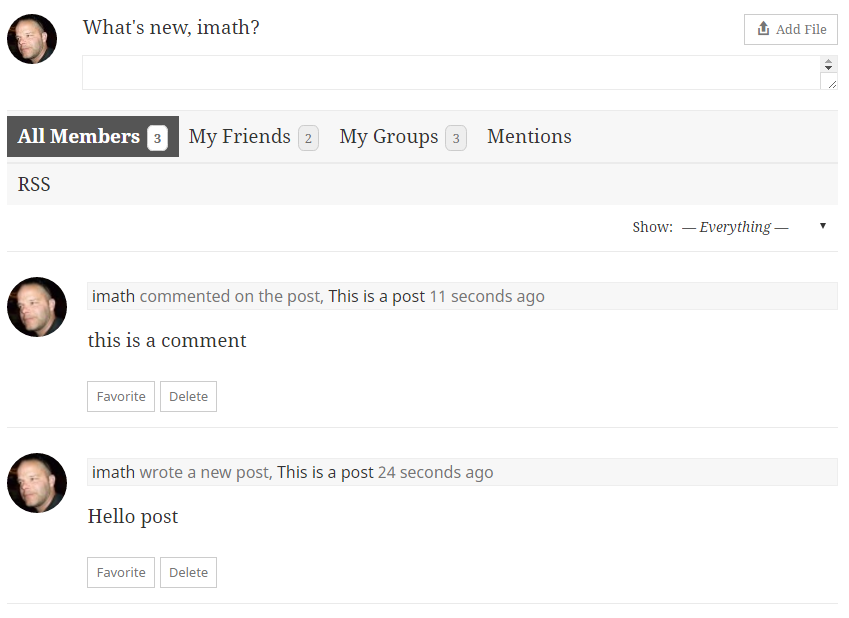
Setting ‘Allow activity stream commenting on blog and forum posts’ is not checked. It means when a post or a comment is posted, then an activity will be generated, but it’s not possible to add an “Activity comment” to the generated activities. Just tested with latest WordPress and BuddyPress 2.5.2 and it works as expected:
2/ WordPress Administration > BuddyPress Settings > Options Tab – Activity Settings section:
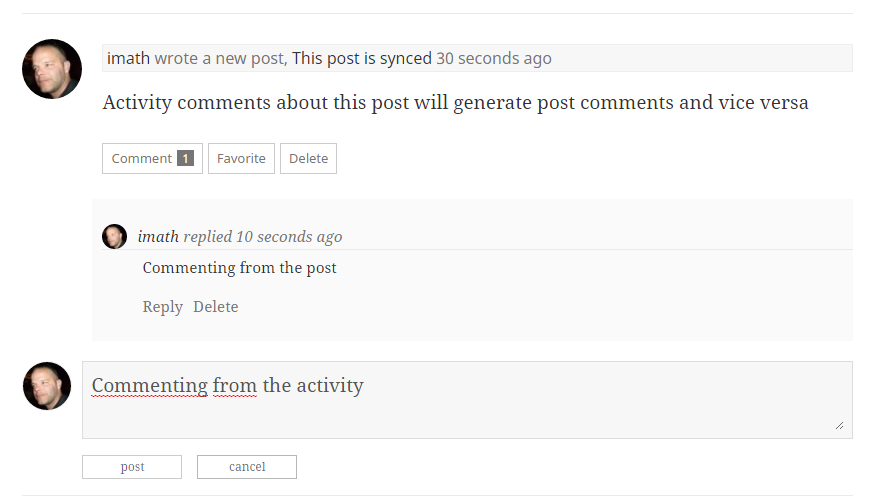
Setting ‘Allow activity stream commenting on blog and forum posts’ is checked. This means you chose to synchronize comments between the Post object and the corresponding activity object. So a comment on the activity about the post will generate a regular post comment and a regular post comment will generate an activity comment on the activity about the Post. Just tested with latest WordPress and BuddyPress 2.5.2 and it works as expected:
Now @cmavrikas is talking about something else i think. He wants the activity comments to also be displayed like regular activities: in stream mode.
I then advise to use another filter to avoid parsing args / checking the current object of the Ajax querystring:function activity_comments_stream_mode( $args = array() ) { return array_merge( $args, array( 'display_comments' => 'stream', ) ); } add_filter( 'bp_before_has_activities_parse_args', 'activity_comments_stream_mode', 20, 1 );I just tested it, and again it’s working fine in latest WordPress / BuddyPress 2.5.2…
I advise you to deactivate plugins/come back to a default WordPress theme and do the opposite work to find the plugins or theme that prevents this regular behaviors.
April 8, 2016 at 1:23 pm #252241Moderatorwhat code should I place and where?
I’ve provided the code to use.
And explained that you need to find the code that displays the avatar on post pages – it’s somewhere in your theme.April 8, 2016 at 8:55 am #252221danbp
ParticipantThere is no need to modify the member loop. You just have to add the function into one of the file i mentionned.
By doing this with bp-custom.php, you don’t need to alter your curent theme and by the way, it will also work in case you use another theme.
April 7, 2016 at 8:35 pm #252206In reply to: URGENT! No “read more” links on posts in activity
haagsekak
ParticipantIs anyone else having this problem? Was working in twentyeleven theme.
now using twentysixteen so could there be a change in code??Please can someone help?
Thank you, thank you!
April 7, 2016 at 8:12 pm #252204In reply to: Filtering Title in BuddyPress
BobSD99
ParticipantHi Henry – thanks for response. As confirmed by both the Codex (Code Reference) and my successful use of this method in the same installation outside of BuddyPress, $title is indeed an array.
In fact, I tested my function without the
if ( bp_is_group() ){conditional, and the filter works on the pages NOT created/affected by BuddyPress, which confirms BuddyPress is bypassing this filter.For testing purposes, I modified the function as follows:
// test parameters passed to document_title_parts filter
function test_groups_title( $title ){

	print_r( $title );
	exit;

}
add_filter('document_title_parts', 'test_groups_title', 10);
And BuddyPress pages output the following array:
Array
(
    [title] =>
    [site] => My-Website.com
)
Which suggests that BuddyPress is neither supplying data to this array nor utilizing it for the title output.
I did a grep of BuddyPress and bbPress and I am finding calls to the deprecated
wp_title()function:$ grep -r 'wp_title' ../plugins/b*press/* ../plugins/bbpress/includes/core/filters.php:add_filter( 'wp_title', 'bbp_title', 10, 3 ); ../plugins/bbpress/readme.txt:* Fix custom wp_title compatibility ../plugins/buddypress/bp-core/bp-core-filters.php: * @see wp_title() ../plugins/buddypress/bp-core/bp-core-filters.php: * @see wp_title() ../plugins/buddypress/bp-core/bp-core-filters.php: * Filters the older 'wp_title' page title for BuddyPress pages. ../plugins/buddypress/bp-core/bp-core-filters.php:add_filter( 'wp_title', 'bp_modify_page_title', 20, 3 ); ../plugins/buddypress/bp-core/deprecated/1.5.php: * @deprecated Use wp_title() ../plugins/buddypress/bp-core/deprecated/1.5.php: * Now, just simply use wp_title(). ../plugins/buddypress/bp-core/deprecated/1.5.php: * @deprecated Use wp_title() ../plugins/buddypress/bp-core/deprecated/1.5.php: _deprecated_function( __FUNCTION__, '1.5', 'wp_title()' ); ../plugins/buddypress/bp-core/deprecated/1.5.php: $title = wp_title( '|', false, 'right' ) . get_bloginfo( 'name', 'display' ); ../plugins/buddypress/bp-themes/bp-default/header.php: <title><?php wp_title( '|', true, 'right' ); bloginfo( 'name' ); ?></title> ../plugins/buddypress/bp-themes/bp-default/archive.php: <h3 class="pagetitle"><?php printf( __( 'You are browsing the archive for %1$s.', 'buddypress' ), wp_title( false, false ) ); ?></h3>I guess this means I can and should hook in to the older (deprecated)
wp_title()function? I’m a bit new to BuddyPress and WordPress, so maybe I’m missing something obvious, or barking up the wrong tree here….April 7, 2016 at 1:35 am #252180In reply to: CSS causing cover image to disappear.
mfalk75
ParticipantOK, so this is the code I have put into my child theme:
// COVER IMAGES

// Add css style for background cover images

function bp_legacy_theme_cover_image_css( $settings = array() ) {

$theme_handle = 'bp-child-css';

$settings['theme_handle'] = $theme_handle;

$settings['callback'] = 'bp_legacy_theme_cover_image';

return $settings;

}

function bp_legacy_theme_cover_image( $params = array() ) {

if ( empty( $params ) ) {

return;

}

return '

#buddypress #header-cover-image {

height: ' . $params["height"] . 'px;

background-image: url(' . $params['cover_image'] . ');

}

';

}

add_filter( 'bp_before_xprofile_cover_image_settings_parse_args', 'bp_legacy_theme_cover_image_css', 10, 1 );

add_filter( 'bp_before_groups_cover_image_settings_parse_args', 'bp_legacy_theme_cover_image_css', 10, 1 );
I get this error: Fatal error: Cannot redeclare bp_legacy_theme_cover_image() (previously declared in /home3/xxx/public_html/mysite.com/wp-content/themes/valenti-child/functions.php:49) in /home3/xxx/public_html/mysite.com/wp-content/plugins/buddypress/bp-templates/bp-legacy/buddypress-functions.php on line 1928
Could someone point me in the right direction,…this is driving me nuts!
April 7, 2016 at 12:47 am #252178Participanthmm, thanks, I don’t get it either. I am editing the file in my child theme at this location: mysite.com/buddypress/members/members-loop.php It’s definitely editing the website as if I delete this part then the last update from a member does not appear. Your code makes the status update appear but it just don’t limit it. I even tried changing 50 to 10 and still long updates. Thanks for your help. Not sure what to do now.
April 6, 2016 at 12:59 pm #252165ModeratorIt works here.
You need to put it in a template overload of this file:
buddypress\bp-templates\bp-legacy\buddypress\members\members-loop.phpReplace the update code with this:
<span class="update"><?php $args = array( 'length' => 50 ); bp_member_latest_update( $args ); ?></span>April 6, 2016 at 8:33 am #252159In reply to: Only images in activity stream
nownesx
ParticipantI have a good knowledge of php, but I’m not a super programmer. developing themes for wordpress. BuddyPress documentation for plugins is poor.
Can you give me some guidance about? what are the files involved than post-form.php?April 5, 2016 at 4:52 pm #252151In reply to: Parameter 1 valid call back error
Paul Wong-Gibbs
KeymasterIt’ll be BuddyPress in conjunction with something else. What theme are you using? What other plugins are active?
April 5, 2016 at 3:29 pm #252144Henry Wright
ModeratorCan you try adding this to your theme’s functions.php:
add_filter( 'bp_core_avatar_original_max_filesize', function() {
    return 5120000; // 5mb
} );
April 5, 2016 at 3:14 pm #252143ma3ry
ParticipantAs I said in my original post “I have tried it with all plugins deactivated and with twenty-fifteen theme.”
However I just got another clue. I reinstalled BuddyPress and this time when I tried to upload an image I got the following different error.
“Upload Failed! Error was: That photo is too big. Please upload one smaller than 200 B”
200 bytes is pretty darned small. Why would this be?
Does this info help at all?
April 5, 2016 at 3:03 pm #252142In reply to: Parameter 1 valid call back error
justplaindoug
ParticipantBuddy press is the source of the problem. When I deactivate it the error goes away. There is a lot of themes and plugins installed, and I have deactived everything except buddypress and get the error.
April 4, 2016 at 10:04 pm #252122In reply to: Parameter 1 valid call back error
KeymasterUnfortunately, that error message isn’t super-useful to pinpoint where the problem might be.
On my dev environment, I have no trouble running WP-CLI commands.What theme are you using? What other plugins are active?
April 4, 2016 at 8:01 pm #252112In reply to: button does not appear, “Send Update”
ModeratorCan you post some information about your install?
- Active theme
- Plugins activated
- BuddyPress version
- WordPress version
Thanks!
April 3, 2016 at 4:06 pm #252066In reply to: CSS causing cover image to disappear.
ParticipantHey guys, I’m having same issue but I can’t seem to figure it out. I’ve tried messing with the code and implementing it into my child themes function.php but no luck. Can someone give me a sample of code I can try. @bertl11 how did you get it working?
April 2, 2016 at 1:05 am #252026In reply to: Adjusting the height of a iBuddy theme assistance
ronnsys
ParticipantExcuse the typo, that should say iBuddy theme in use
April 1, 2016 at 4:04 pm #252007In reply to: User login doesn´t work properly
ParticipantOla,
BP doesn’t handle login and has no captcha system. BP offers only a login widget. Do you use it ?
Apparently, some stylesheets aren’t loaded properly.
Deactivate Total cache and bwp-minify and see if it remains.
Once done, enable Twenty Fifteen or Sixteen and give a try.If it works, you have to check the theme AND your child-theme.
https://buddypress.org/support/topic/when-asking-for-support-2/
April 1, 2016 at 8:04 am #251994In reply to: [Resolved] upgrade to 2.5.2 from 2.5.1 fatal error
mcpalls
Participantsolved after upgrade theme
March 31, 2016 at 9:08 pm #251980mln83
ParticipantHi @djpaul,
Sounds great. I would probably recommend using Google Fonts since they are readily available. I don’t know how much work it would be to add it into Email customization and whether there would be resistance towards the big G? Anyway, many themes already utilize these font types so it would make it easier for people to match customization with theme layout.
Image for a logo would be a great alternative option.
Thanks again for creating the email interface for BP 2.5+ 🙂
Best regards,
MichaelMarch 31, 2016 at 4:07 pm #251970In reply to: Storing/Syncing with WP User meta
valuser
ParticipantThe second ask — i can’t usefully contribute!
for the first ask
Assuming your new user fills in her/his profile fields on registration
Something like the following MIGHT work.
On FIRST login a user is redirected to say .$user -> user_login.’/profile/change-avatar/’;
then add something like this to the functions.php file of your theme
function alaiam(){

global $current_user, $wpdb, $bp;

get_currentuserinfo();

$user_id = get_current_user_id();

$firstname = xprofile_get_field_data( "First Name" ,$user_id);
update_user_meta( $user_id, 'first_name', $firstname);

$lastname = xprofile_get_field_data( "Last Name" ,$user_id);
update_user_meta( $user_id, 'last_name',$lastname);

$gender= xprofile_get_field_data( "Gender" ,$user_id);
update_user_meta( $user_id, 'gender',$gender);

$xdob= xprofile_get_field_data( "Date of Birth" ,$user_id);
update_user_meta( $user_id, 'dob',$xdob);

/*and so on.........*/

add_action('bp_before_profile_avatar_upload_content', 'alaiam', 10, 0);
March 31, 2016 at 9:58 am #251953In reply to: Profile Picture not Working
mjdevelopz1
ParticipantPlease disregard. Themify updated the theme and fixed the issue way faster than I thought they would.
-
AuthorSearch Results


