Skip to:
Content
Pages
Categories
Search
Top
Bottom

Search Results for 'theme'

Viewing 25 results - 26 through 50 (of 31,072 total)
  • Author
    Search Results
  • #337731
    tofigh
    Participant

    I use twenty-twenty four theme
    And permalink structure is set to custom structure

    #337706
    emaralive
    Moderator

    What WordPress theme are you using? Also, when you are in the wp-admin area, go to Settings > Permalinks and make sure the “Permalink structure” is not set to “Plain”.

    #337701
    emaralive
    Moderator

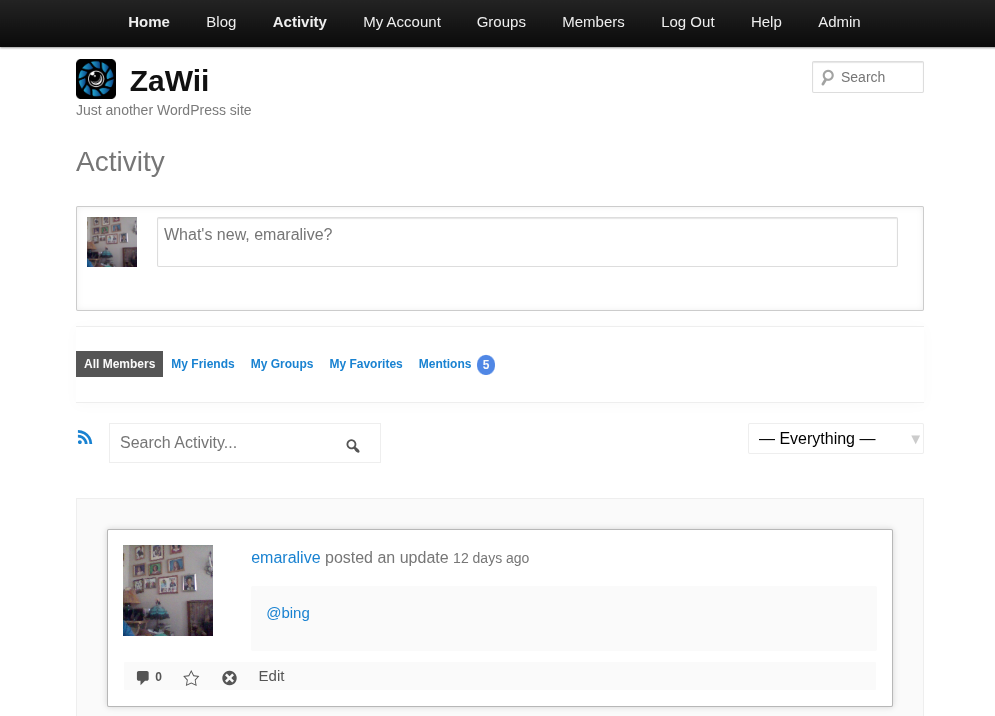
    What might help is that you include a screenshot of the menus and what a page looks like with no content. For example, the following is a screenshot of a page (with content) when the “Activity” menu item is selected:

    Additionally, what WordPress theme are you using?

    #337665
    roracle
    Participant

    I used the /avatar block in my header, as I want users to be able to access it from anywhere.

    The avatar shows up in the editor and on any page that is NOT BuddyPress. If the page IS a BuddyPress page, the avatar simply doesn’t load at all.

    The header is a row with the images used to link the users to different parts of the site. They are equally spaced. On normal pages: 4 items, one being the avatar. On BuddyPress pages: 3 items, avatar suddenly decides to go Amelia Earhart on me.

    What am I doing wrong, and how this be fixed?

    Using Twenty Twenty-five theme and FSE with Gutenberg. Fresh install of WordPress, latest version as of today, as well as a fresh install of BuddyPress.

    Thank you in advance.

    #337508
    flamuren
    Participant

    Hi,

    I use the Reign theme for buddypress and bbpress.

    I have classic widget plugin installed.

    I have some of the buddypress widgets, but not all of them. Also there seems to be an issue that widgets has dissapeared.

    Do widgets dissappear when I press “delete” in the widget area on the right where I edit specific widget areas of the website? I thought i only removed them from that widget area. Very confusing.

    If this is the case, how would I get them back again?

    These widgets is the ones i refer too: https://codex.buddypress.org/themes/buddypress-widgets/

    Best regards,

    Flamur

    smelendez
    Participant

    After extensive troubleshooting by my support and the support from the technical team of the WordPress theme I use, we both came to the conclusion that the issue seems to happen upon activating the Elementor Pro plugin. We have both been able to replicate the issue on a default WordPress theme such as the Twenty Twenty One theme, so is it possible that it could be an incompatibility between BuddyPress and Elementor Pro or vice versa?

    We managed to replicate the issue in a clean environment, no custom code, no additional plugins, just Elementor, Elementor Pro and BuddyPress.

    #337481
    lillivalentino2025
    Participant

    I would like to instal Buddy Press, however it is stated that it is not tested with my current WP version. Details follow. What would you advise, please?
    Current WP version: 6.8.1
    Theme:Mero Blog by Kantipur Themes
    Thanks a lot for any help I can get

    smelendez
    Participant

    Hi, thank you for your reply. Yes, it is a strange issue and I understand that it must be some incompatibility or something similar with the new versions. Because as I show in the video I attached in my previous reply, I have deactivated all my custom scripts and I was activating all the plugins one by one (after having previously deactivated all of them) until I got to Elementor Pro and detected the issue again. In my plugin list (you can see it in the video) I do not have the BP classic plugin. The BP related plugins I have are:

    – BuddyPress v14.3.4
    – bbPress v2.6.13
    – BP Profile Search v5.8.3
    – BuddyPress Xprofile Custom Field Types v1.2.7
    – BuddyPress Profile Completion v1.1.0
    – Block, Suspend, Report for BuddyPress v3.6.4
    – BuddyPress Follow v1.3-alpha
    – Buddy Notification Bell v1.0.4.

    During my tests, I deactivated all of these except for BuddyPress, BuddyPress Xprofile Custom Field Types, BP Profile Search and bbPress which are the plugins that came with the theme I use in WordPress.

    smelendez
    Participant

    I am currently using:

    – WordPress v6.8.1
    – Theme: Sweetdate by SeventhQueen v3.9.2
    – BuddyPress v14.3.4
    – Elementor v3.29.2
    – Elementor Pro v3.29.2

    I have noticed a strange behavior occurring on BuddyPress group and profile pages. Specifically, the issue is:

    When visiting a BuddyPress group, sometimes:

    – If the user is not a member, they are automatically added to the group without clicking the join button.

    – If the user is already a member, they are automatically removed from the group without clicking the leave button.

    When visiting a user profile, sometimes:

    – If the visitor is not a friend, a friend request is automatically sent.

    – If they are already friends, the friendship is automatically cancelled.

    It seems like if the “Join Group”, “Leave Group”, “Add Friend” and “Cancel Friendship” buttons are being triggered automatically upon loading the corresponding pages. This does not happen every time, so it has been difficult for me to replicate it to show it to you, but it occurs frequently enough to negatively affect the user experience.

    In an effort to identify the cause, I have done the following tests:
    – Deactivated all custom scripts.
    – Deactivated all plugins except those required for WordPress and the theme to function correctly.
    – Cleared and purged all caches.

    While running these tests, the issue did not occur. However, as I began reactivating plugins one by one (still with my custom scripts deactivated), I found that the issue reappears when Elementor Pro is activated. This leads me to believe the problem may come from a conflict between Elementor Pro and BuddyPress, the theme, or WordPress itself.

    I am sharing a video where I was able to replicate the issue: https://drive.google.com/file/d/1uuLIc-hGQHHq5BGY3b5M3pklMMEQqKyx/view?usp=sharing

    Do you have any idea what could be causing this behaviour, and if it is an incompatibility with BuddyPress?

    Thank you all in advance.

    urbanscom
    Participant

    Hi and first of all thanks for your plugin and the support
    I m using Tutor LMS pro on a fresh new wordpress installation.
    I decided to install the Buddypress addon but i hav a problem regarding the template

    WordPress version 6.8.1
    Thème actif : Sofia (version 1.0)
    Extension actuelle : BuddyPress (version 14.3.4)
    PHP version 8.1.32

    Une erreur de type E_ERROR a été causée dans la ligne 725 du fichier /home/clients/698fbd2a837b717e3115da6da7d93852/sites/renaissance.stellalapsy.fr/wp-content/plugins/buddypress/bp-templates/bp-legacy/buddypress-functions.php. Message d’erreur : Uncaught TypeError: urldecode(): Argument #1 ($string) must be of type string, array given in /home/clients/698fbd2a837b717e3115da6da7d93852/sites/renaissance.stellalapsy.fr/wp-content/plugins/buddypress/bp-templates/bp-legacy/buddypress-functions.php:725
    Stack trace:
    #0 /home/clients/698fbd2a837b717e3115da6da7d93852/sites/renaissance.stellalapsy.fr/wp-content/plugins/buddypress/bp-templates/bp-legacy/buddypress-functions.php(725): urldecode(Array)
    #1 /home/clients/698fbd2a837b717e3115da6da7d93852/sites/renaissance.stellalapsy.fr/wp-includes/class-wp-hook.php(324): bp_legacy_theme_ajax_querystring('', 'activity')
    #2 /home/clients/698fbd2a837b717e3115da6da7d93852/sites/renaissance.stellalapsy.fr/wp-includes/plugin.php(205): WP_Hook->apply_filters('', Array)
    #3 /home/clients/698fbd2a837b717e3115da6da7d93852/sites/renaissance.stellalapsy.fr/wp-content/plugins/buddypress/bp-core/bp-core-template.php(1157): apply_filters('bp_ajax_queryst...', '', 'activity')
    #4 /home/clients/698fbd2a837b717e3115da6da7d93852/sites/renaissance.stellalapsy.fr/wp-content/plugins/buddypress/bp-activity/bp-activity-filters.php(560): bp_ajax_querystring('activity')
    #5 /home/clients/698fbd2a837b717e3115da6da7d93852/sites/renaissance.stellalapsy.fr/wp-includes/class-wp-hook.php(326): bp_activity_heartbeat_last_recorded(Array, Array)
    #6 /home/clients/698fbd2a837b717e3115da6da7d93852/sites/renaissance.stellalapsy.fr/wp-includes/plugin.php(205): WP_Hook->apply_filters(Array, Array)
    #7 /home/clients/698fbd2a837b717e3115da6da7d93852/sites/renaissance.stellalapsy.fr/wp-admin/includes/ajax-actions.php(3503): apply_filters('heartbeat_recei...', Array, Array, 'front')
    #8 /home/clients/698fbd2a837b717e3115da6da7d93852/sites/renaissance.stellalapsy.fr/wp-includes/class-wp-hook.php(324): wp_ajax_heartbeat('')
    #9 /home/clients/698fbd2a837b717e3115da6da7d93852/sites/renaissance.stellalapsy.fr/wp-includes/class-wp-hook.php(348): WP_Hook->apply_filters('', Array)
    #10 /home/clients/698fbd2a837b717e3115da6da7d93852/sites/renaissance.stellalapsy.fr/wp-includes/plugin.php(517): WP_Hook->do_action(Array)
    #11 /home/clients/698fbd2a837b717e3115da6da7d93852/sites/renaissance.stellalapsy.fr/wp-admin/admin-ajax.php(192): do_action('wp_ajax_heartbe...')
    #12 {main}
      thrown
    TKServer
    Participant

    Circling back on this. Thanks for the response @mike80222.

    I still have this issue. When I send a message to a single user, another user is added to the conversation thread. Since this is a production site, it is hard for me to “disable all plugins and themes” to test! I’ve disabled a few so far but still is an issue. I’ll keep trying the rest of the plugs if I can.

    flamuren
    Participant

    Hi,

    I love buddypress and wpjm combo. Its free and helps people get jobs, which is my private project.

    However I am not so tech savy and not any real coding.

    My question is if its possible, within reason, to add two choices on the member page, to filter out two user classes/types (wpjm candidates and employers).

    Today I have active members and “my friends” as tabs and also a search member field under that. I would like to add candidates and employers, to filter out those users. Mainly employers – since it woud be nice for candidates to reach out if it seems good match.

    I guess find the teamplate for members, add it to my child theme and ad buttons, and then connect the buttons with a filter option in the child theme function file?

    Best regards,

    Flamur

    webstudiolvmm
    Participant

    I am using version: 6.8.1 and BuddyPress Version 14.3.4
    I develop an dating website and created a register form, but if I add field to upload image is not uploaded and the page get issue like that
    https://prnt.sc/bALFPL871QJU

    Support from theme redirect to you guys

    Thanks

    #337221
    devansh17
    Participant

    I am using LeranDash to sell the courses and also want to create a community using buddypress. So while using buddy press plugin along with the LearnDash plugin it gives registration error if some new client want to register on the website.
    I am using Divi theme as well.

    Please provide me the solution how I can use both the plugins.

    Earl_D
    Participant

    Hey thanks so much appreciate the help. I will let you know. Does this go in the functions files right? I ask because there is a header php file in my child theme as well. Also wondered about the BP custom file.

    #337159
    jasperdemann
    Participant

    BB said:
    “I checked our BuddyBoss demo and found that there is no active menu color for the user dropdown menu. So, the design you’re seeing is entirely related to your website’s theme. BuddyBoss doesn’t provide any default active color styling for those menu items.”

    BuddyX Pro said:
    “Upon discussing your concern, we found that this issue is related to the core functionality of BuddyPress and BuddyBoss. Unfortunately, we will not be able to fix it from our end, as it falls outside our scope of control.”

    Somebody is definitely wrong!

    No problem.
    I spent some time today finding a workaround so I’m good now, thanks.

    Earl_D
    Participant

    I am running the latest WP &:BP on the Buddy X a free theme and want to have the display name show in the profile header instead of the username. Particularly for the admin. Any help is appreciated.

    #337126
    Saeed Piri
    Participant

    Dear @inspirationacademy,
    Unhide the .messages-form .submit (Astra Pro may be hiding it) with:
    .messages-form .submit { display: inline-block !important; }
    If it’s still missing, copy the BuddyPress messages template into your child theme, add back the <button type="submit" name="send">Send</button>, then clear all caches.

    #337071
    inspirationacademy
    Participant

    With BuddyPress and LearnDash the send button is missing when trying to send a message to an instructor. How can I fix this? We use the Astra Pro theme.

    jgasba
    Participant

    Is there some recommended way to make the plugin load its necessary scripts and styles when used in the context of a pjax/ajax/pwa/no hard reload website?

    For now I’ve been tinkering but it does not work as I would want and I’m wondering if some people would have some insights to share about this.

    My issue is simple: if visit directly a page that has Buddypress components, it loads its styles and scripts properly, but not if I visit the homepage for example and then navigate to a Buddypress page. Then the server does not know it has to load.

    I’d like either to find a JS way to load the scripts and styles.. or to force BuddyPress to load them in everypage (community pages are a big part of the project)

    #337058
    jodigriego219
    Participant

    To integrate BuddyPress into your Chipotle menu site and boost user engagement, start by enabling key BuddyPress components like user profiles, activity streams, and groups to let users share reviews, customizations, and tips. Use a lightweight theme like Astra or GeneratePress for better performance, and install caching plugins like WP Super Cache to keep the site fast. You can pair BuddyPress with plugins like rtMedia for photo sharing or Youzify to enhance profiles and community layout. Keep the social features focused on food discussions and menu insights, and avoid adding too many extras to maintain a smooth user experience.

    emaralive
    Moderator

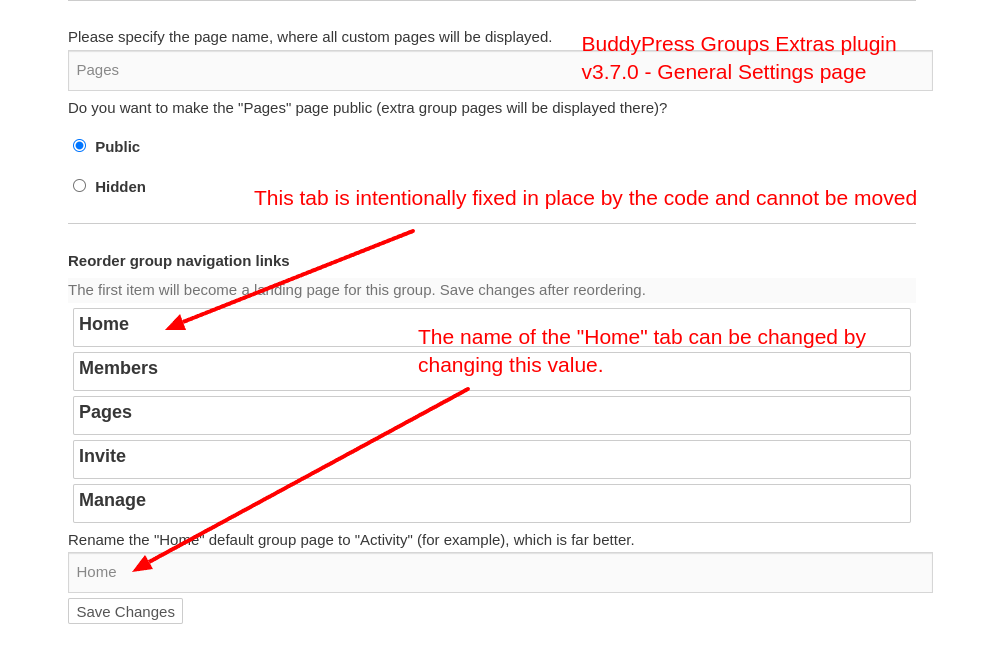
    Thanks for the screenshots, they do help. The page shown (General Settings) looks very similar to a page that is provided by the BuddyPress Groups Extras (BPGE) plugin, see the following screenshot:

    Truncated screenshot of BPGE plugin - General settings page

    As indicated in the screenshot, the Home or, in your case, the
    Activities tab is fixed in place by the code:

    
    if ( $nav['slug'] === 'home' ) {
    	$disabled = 'ui-state-disabled';
    }

    The above snippet can be found here and just indicates that the Home tab is disabled from being sortable. The following is what the element (li) has as classname (default ui-state-disabled) for a non sortable tab of which the only one is the Home tab.

    
    <li id="position_686f6d65" class="default ui-state-disabled">
         <strong>Home</strong>
    </li>

    While a sortable tab has default ui-sortable-handle as a classname.

    <li id="position_6d656d62657273" class="default ui-sortable-handle" style="">
          <strong>Members <span>1</span></strong>
    </li>

    The BPGE plugin author claims this change was due to:

    Group's "Activity"/"Home" navigation link is hard coded in BuddyPress to always be the first one, so disable its reordering.

    However, when I rollback from v3.7.0 to v3.6.10, the Home tab is now sortable and can be moved. So the reason for the change is not entirely true.

    Moving along, since the General Settings page from the BPGE plugin is similar to the page from your screenshots, we may be able to infer that there was a fork of some the code (the pages portion) from the BPGE plugin and was included in the BuddyBoss theme which AFAIK is a commercial (paid) theme, meaning I can’t verify the code within this theme due the status of free vs paid. If this is the case, then your resolve will have to come from the BuddyBoss developers. However, if the code that supports manage Page general setting resides elsewhere, e.g., custom code or 3rd party plugin, then the resolve is the responsibility of those who authored the code.

    As an aside, as it relates to the BPGE plugin, there is an appearance of wonkiness with the reordering of group tabs which appears to be a factor that caused the change to make the Home tab not sortable, however, I’m not sure if BuddyPress is causing the wonkiness,

    Having stated all of the above, it seems to me, the reason that you want the Pages tab to be the first tab is because you want that to be the landing page. Would this be a correct assumption? If so, there may be the possibility of changing the landing page to Pages, regardless of the tab order, which will depend on similar the code is similar enough to the BPGE plugin.

    Kudzai V
    Participant

    Hello! I’m using the BuddyX theme with buddypress. When someone clicks the “x” delete conversation button, the whole conversation is deleted without any confirmation message asking if the user is sure. So if you accidentally click the x, the whole conversation is gone forever. Any way to avoid this? Or does anyone know php I can add to fix this? ChatGPT’s code didn’t work.

    emaralive
    Moderator

    2) … Also there, there is no way to change things here ? Add the thumbnail on the posts list for example, or separate the “comments” and “posts” tabs,…

    Things” can be changed programmatically. Additionally, BuddyPress does not come standard with “Posts” or “Comment” tabs. The only separation for these items is via the dropdown filter selection for “Posts” or “Comments” located in the Sitewide or User Activity streams which is standard for BuddyPress.

    3) OK, really confusing.
    And if the displyed name and real name arent the same, how can a user know the real @ he has to use to tag someone ?
    BTW, i’ve made some tests and even if i use @displayname or @username, it doesnt send a notification to the user,…

    Users typically figure out who is who and for @mentions, only the username is used for notifications. For example, a scenario where there are 2 users with the same displayname which happens to be Apple, however, each has a different username because usernames must be unique. Maybe a visual will help you digest this information:

    Screenshot of @mention using the displayname

    If you are having issues with notifications, that is a different issue and might be related to some external factor such as a plugin or theme that is interfering with the notification process.

    As for Main settings, yes, those available via a UI are limited, however, programmatically, there are plenty via constants, filter hooks and action hooks.

    pharrell2
    Participant

    Sorry for the late answer, i was working on somthing else.

    Thanks for the answers 😉

    1) Weird, i didnt change something with plugin or theme.
    Also i dint install any template. I’ll take a look at this

    2) OK, thanks a lot, the ““Site Tracking” option wasnt checked 😀
    Now i can see posted blog posts and comments made.
    Also there, there is no way to change things here ? Add the thumbnail on the posts list for example, or separate the “comments” and “posts” tabs,…

    3) OK, really confusing.
    And if the displyed name and real name arent the same, how can a user know the real @ he has to use to tag someone ?
    BTW, i’ve made some tests and even if i use @displayname or @username, it doesnt send a notification to the user,…

    It is difficult to use BP as the options are only 2 single pages… :/

Viewing 25 results - 26 through 50 (of 31,072 total)
Skip to toolbar