Search Results for 'theme'
-
AuthorSearch Results
-
April 2, 2012 at 9:11 pm #132287
In reply to: creating child theme in BP
@mercime
Participant@emaarkhan if you have a WordPress theme (or a child theme thereof), install and activate the BP Template Pack plugin and go through Appearance > BP Compatibility process. Walkthrough of Twenty Ten Child theme with BP Template Pack – https://codex.buddypress.org/theme-development/theme-dev-bp-template-pack-walkthrough-twenty-ten-bp-1-5/
April 2, 2012 at 8:06 pm #132286faithcoach
MemberIs anyone there? Hello?
April 2, 2012 at 4:38 pm #132280In reply to: Avatar problem on buddypress.org
Paul Wong-Gibbs
KeymasterAvatar upload have never been allowed on this site. The theme just needs updating to remove that option. To set a picture, use gravatar.com, as suggested above
 April 2, 2012 at 8:15 am #132270
In reply to: BuddyPress and BuddyPress
RobFenech
ParticipantAlan, you don’t have to use the BP Default OR the other plugin to create your own theme. You can create whatever theme you want if you know how. Just tag your style.css with ‘buddypress’ and it will show as a buddypress ready theme. The assumption is that you’ll know how to build that template.
I would say that most people don’t really know how to go about building a template from scratch yet, but as Buddypress gets bigger and more documentation is available, then it will become more commonplace.
April 2, 2012 at 4:52 am #132263In reply to: BuddyPress and BuddyPress
alanchrishughes
ParticipantI don’t think I follow. Unless you are using the default BP theme you have to use the other plugin also. Unless you are assuming 99% of users are using the default theme, why not just make one plugin instead of two?
April 2, 2012 at 1:29 am #132256ParticipantMinor changes only to the 16 files you already revised to make full width pages:
At the top replace
``
with
``at the bottom of all 16 files including registration/register.php, delete
“
save files and you’re good to go.April 2, 2012 at 12:57 am #132254Mark
MemberOops here you go…
April 1, 2012 at 3:54 pm #132235In reply to: [RESOLVED]Hide pages from non-members
DRAGUIAN
MemberOK alternative menu etc is all set up on menus page. I am using the Elbee Elgee child theme at the moment. Do I still have to do the first step of implementing that code in the headers menu (<?php
// https://codex.wordpress.org/Function_Reference/wp_get_current_user
$current_user = wp_get_current_user();……April 1, 2012 at 3:42 pm #132234In reply to: [RESOLVED]Hide pages from non-members
aces
ParticipantYou should make a child of bp-default and backup files and db just in case…
You don’t add or remove any pages from the code. The point is that it works from the built in wordpress default menu system. ( https://codex.wordpress.org/Navigation_Menus )
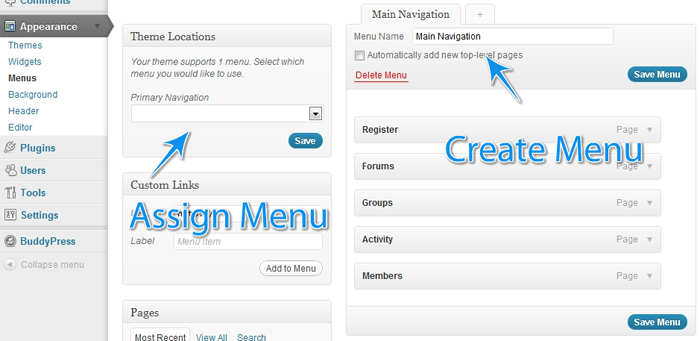
To get the second menu to appear – In your child theme’s functions.php file add:
`function register_my_menus() {
register_nav_menus( array(
‘primary’ => __( ‘Header Navigation’ ),
‘secondary-menu’ => __( ‘Alternative Menu’ ),
‘another-menu’ => __( ‘Another Menu’ )
) );
}
add_action( ‘init’, ‘register_my_menus’ );
`April 1, 2012 at 3:39 pm #132232In reply to: [RESOLVED]Hide pages from non-members
Memberfor example wp_nav_menu( array( ‘container’ => false, ‘100’ => ‘nav’, ‘theme_location’ => ‘primary’, ‘fallback_cb’ => ” ) );
} else {April 1, 2012 at 3:28 pm #132230In reply to: Buddypress breaks https
KeymasterYour browser’s warning says that some content is being served over http. You need to figure out *what* file is being requested then we can tell you if it’s a BuddyPress core problem, or your theme, or a plugin.
April 1, 2012 at 2:27 pm #132229In reply to: [RESOLVED]Hide pages from non-members
ParticipantYou shouldn’t touch wp or bp core files.
What theme are you using?
In your child theme’s header.php file you replace the `wp_nav_menu` section with either of the above ( not both ).
Then you can define two menus on appearance > menus ( primary and secondary-menu on the above example ) Set one for logged in users and one for everyone else.
April 1, 2012 at 1:17 pm #132224MemberI can not add groups or access forums. I get this message at the top of my compatibility plugin:
Your active theme does not include bbPress template files. Your forums are using the default styling included with bbPress.
Something is wrong with this on the inside. Suggestions?
http://faithteam.org/faithnotes/groups/faith-team/forum/April 1, 2012 at 1:02 pm #132223In reply to: [RESOLVED]Hide pages from non-members
MemberI prefer the first option of serving different menus whether the user is logged in or not. Should I put that code into the themes header or funtion.php? Do I need to add to the given code it to specify which pages I want to hide from logged out users. Using latest version of wordpress and buddypress
April 1, 2012 at 11:22 am #132222In reply to: Simple photo community
Barna
Memberczz : any news on the download ? will there be any documentation witch plugins to install that i need for the theme to work.
if it works pls send me a paypal email too co i would be happy to donate for uR work too.
April 1, 2012 at 9:28 am #132219In reply to: BuddyPress and BuddyPress
KeymasterBuddyPress Template (Pack) is an attempt to make it easier for people to understand how to get started to adapt their theme for BuddyPress. As it’s intended to be a single-use thing, it doesn’t make sense to go into BuddyPress core.
April 1, 2012 at 7:45 am #132218In reply to: New user is listed fifteen times in Member Directory
Hugo Ashmore
ParticipantFolks it’s very bad forum nettiquette to post in existing threads with ones own issues as things rapidly become confusing trying to respond to multiple questions in that same thread – even if original question ‘appears’ closely relate to ones own.
You need to create a new topics please.
Have you read and followed the advice / instructions in this thread?
Disabled all plugins? All the same instruction applies please follow those before posting so we know if those aspects have been ruled out.
When you have done that and issue continues please create a new thread and mention first that you have disabled all plugins and reverted to default theme to test and issue persists.
Also if you are running any caching plugins please disable those first before any other tests and see if that clears things up.
Closing this thread as it’s run it’s course.
April 1, 2012 at 3:00 am #132212In reply to: Simple photo community
jummy
MemberHello,
Does anyone know which theme this is a child theme of? It looks fantastic!
March 31, 2012 at 10:51 pm #132204In reply to: [Resolved] Two problems: One serious, one wierd!
ParticipantWhat theme were you using? Was issue resolved when you changed to bp-default theme?
March 31, 2012 at 10:50 pm #132203Participant== When i uncheck the boxes the right side of content gets cut short. It needs about 12-15px more. ==
That’s why I suggested in my previous post in D.) to copy styles used in Twenty Ten theme to correct the width of the BP elements. Look specifically for styles targetting #object-nav and #subnav
March 31, 2012 at 10:31 pm #132201MemberAnd, I can find access to groups. Is there a way to run the wizard again without loosing what I’ve done with the 16 files?
March 31, 2012 at 9:37 pm #132200MemberWhen i uncheck the boxes the right side of content gets cut short. It needs about 12-15px more.
March 31, 2012 at 9:22 pm #132197Participant@faithcoach – One issue at a time, please. We’ll address the layout of the BP template files first.
Per http://faithteam.org/faithnotes/members and other BP pages which shows unstyled BP elements ==> Enable the CSS and JS of BuddyPress in dashboard menu Appearance > BP Compatibility, i.e., uncheck the two boxes to disable CSS and JS from BP and Save.
As for the Group Forums, you need to enable it first for each group. see https://codex.buddypress.org/getting-started/installing-group-and-sitewide-forums/4/#forums-faqs
March 31, 2012 at 8:17 pm #132195In reply to: [RESOLVED]Hide pages from non-members
ParticipantOne way of doing that is by serving different menus depending whether someone is logged in or not such as
`
<?php
// https://codex.wordpress.org/Function_Reference/wp_get_current_user
$current_user = wp_get_current_user();
if ( 0 == $current_user->ID ) {
wp_nav_menu( array( ‘container’ => false, ‘menu_id’ => ‘nav’, ‘theme_location’ => ‘secondary-menu’, ‘fallback_cb’ => ” ) );
// Not logged in.
} else {
wp_nav_menu( array( ‘container’ => false, ‘menu_id’ => ‘nav’, ‘theme_location’ => ‘primary’, ‘fallback_cb’ => ” ) );
// Logged in.
}
?>
`
or another approach:
`
<?php
if ( is_user_logged_in() ) {
wp_nav_menu( array( ‘container’ => false, ‘menu_id’ => ‘nav’, ‘theme_location’ => ‘primary’, ‘fallback_cb’ => ” ) );
} else {
wp_nav_menu( array( ‘container’ => false, ‘menu_id’ => ‘nav’, ‘theme_location’ => ‘secondary-menu’, ‘fallback_cb’ => ” ) );
}
?>
`
replacing the `wp_nav_menu` bit in the ( child ) theme’s header.php file. It may need adapting depending on theme etc. Remember to make backups before editing!Then use the walled garden or similar techniques to redirect users if they try to reach the page directly…
March 31, 2012 at 6:39 pm #132193 -
AuthorSearch Results


