Search Results for 'theme'
-
AuthorSearch Results
-
April 14, 2011 at 3:06 pm #110228
In reply to: New theme – Buddypress UX
nit3watch
Participantlol need to upload a new version again.. ganna rather wait a day or two and sort out things poperly
April 14, 2011 at 2:52 pm #110226In reply to: New theme – Buddypress UX
Alan
Membernicely done ,thanks for sharing
 April 14, 2011 at 2:39 pm #110225
In reply to: New theme – Buddypress UX
Hugo Ashmore
ParticipantThe fact that the sidebars may vary in length as well as the centre content makes life harder overlapping borders works but will still result in an apparent miss-match if one sidebar is longer than the other as is the case presently. Really your only two options are using a graphic (create a border take a slice of it of a few pixels but not too few 10 or 2 wide by ~20 high add an extra div as a child of the main #content / #container (parent that wraps content and sidebars) and then you add a background to each of these two divs and use position to place the graphic in from the edges by the sidebar width alternatively you could try a technique that can work but also can lead to issues depending on the layout: give the sidebars a huge amount of bottom padding, then an equal amount of negative bottom margin and overflow hidden on the parent element rn the borders on the sidebars rather than the center element.
April 14, 2011 at 12:51 pm #110220In reply to: New theme – Buddypress UX
Participant@naijaping links at the top of the first post
April 14, 2011 at 12:34 pm #110218In reply to: New theme – Buddypress UX
Prince Abiola Ogundipe
Participantwhere can i download this theme please
April 14, 2011 at 12:28 pm #110216In reply to: New theme – Buddypress UX
ParticipantI just uploaded a new version, still in beta but making a few improvements. Note that if you have any questions, read the readme.txt first.
@hnla Im still searching regarding Faux columns, though if you could maybe have a look at the theme in the mean time I could reach a solution sooner.
Thanks and cheers
April 14, 2011 at 8:56 am #110212In reply to: New theme – Buddypress UX
ParticipantI still need to clean the theme up a bit more, left some of my personal-project stuff in there >.<
@treis if you have a look at the Buddybar widget, I have simply copied most of whats in the widget to the static-sidebar. Personally I think its a bit too much going on hence I focused it on the ‘user’.
I have added modemloopers ‘drop-down menu’ functionality so if you would like, you can simply the main navigation by having ‘community’ and groups, members, activity all under the ‘community tab’. Im just ganna finish up some things and i will upload it.
I will post some css you can use to modify the header..
I would advise not working off it as of yet, once I have a ‘stable’ version I will let you know. If you make any changes, they will be over-written when you upgrade the theme. I will try get round to it later on today. I modified the them in a day and released it the same day hence I over-looked some things.
April 14, 2011 at 6:10 am #110208In reply to: New theme – Buddypress UX
treis
MemberThis is a really good step. I’m developing a site that will most likely be used on netbooks, and the top pane navigation just takes up way too much space. This theme should give me a good base to modify and develop my own off of. Any tips? Basically what I want to do is:
(1) Move all the ‘Activity’ ‘Blogs’ ‘Groups’ etc. links to the left menu.
(2) Reduce the Header size by 2/3s or so.
(3) Make the left column a single column
(4) Get it to like facebook where the header and left pane don’t reload on clicks.
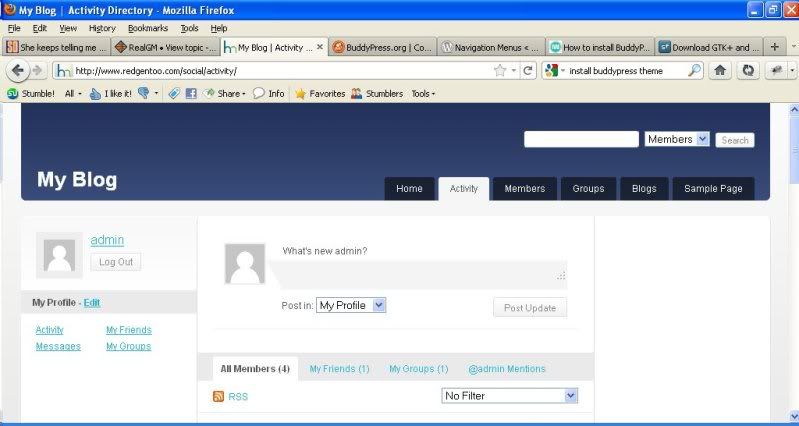
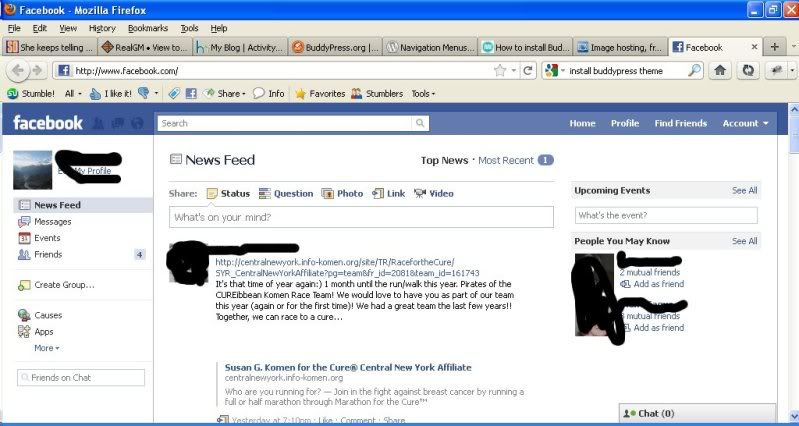
Compare the Activity screen of your theme compared to Facebook
http://i18.photobucket.com/albums/b119/treis/blog.jpg
http://i18.photobucket.com/albums/b119/treis/fb.jpgYou can see how much more information is provided on facebook and how much easier it is to navigate around.
April 13, 2011 at 4:55 pm #110162In reply to: [Resolved] – How to get two separate menus
@mercime
Participant@rickgoz Yes, it is possible to get two different menus in BP. The simplest way is to surround the links for members only with conditional
“
// the links
“An example using main navigation links in header.php of bp-default theme http://pastebin.com/uGQHhm8r
April 13, 2011 at 11:40 am #110154In reply to: how to have comment and replies collapse and expand.
Timothy Tarmon Jr
Participantthanks @janismo, and you’re correct. If you have a child theme then it would be best to post to those files.
I forgot about child themes when i took on this test. definitely something i should remember.April 13, 2011 at 11:16 am #110152In reply to: how to have comment and replies collapse and expand.
James
Participanthi @timothyjunior nice update, definitely will try.
messing with core files isn’t smth terrible, all you should have is child theme of bp-default.April 13, 2011 at 10:11 am #110150In reply to: how to have comment and replies collapse and expand.
Participantok, break out notepad++ or any text editor and make back ups these two files:
– /wp-content/plugins/buddypress/bp-themes/bp-default/activity/entry.php
-/wp-content/plugins/buddypress/bp-themes/bp-default/header.phpadd this to your header.php file within the head section :
``
now locate entry.php and replace : `
April 13, 2011 at 7:06 am #110146In reply to: Friends and Groups for BuddyPress 1.3
Donald McIntyre
ParticipantFriends should be able to be called other names like: contacts if its a business networking site like I did with mine, partners if it is a closed partership intranet for a lawfirm or accounting fir, students, collegues, etc. there should be an option wher you put something or frieds is default. Groups is groups, but the additional functionality to add is very poor, group wiki does not assing a default wiki theme, group blog does not assign a default blog theme, etc Admins sgould be able to choose the default theme for these addons…
April 13, 2011 at 6:56 am #110145In reply to: user blogs without multisite
Paul Wong-Gibbs
KeymasterDon’t know the site, but there’s only two good options. One is to enable multisite with a custom theme for each blog so that it *looks* like the same site (as your main site). Second is to only use the one blog (no multisite) and set each user up as an author. Those people could use the wp-admin interface to blog, or you could create your own posting form, or use gravity forms which has this feature.
If you used the one blog technique, you’d have to make sure your WordPress post loops only pulled out stuff written by I.e. The admin account. You could then get your PHP hat on and then write a new panel for their BP user profile which would basically do its own post loop but for that specific user ID.
April 13, 2011 at 5:29 am #110142ParticipantThis is the first time I’ve heard about this kind of behavior on a default installation even in subdomain structure. Deactivate all plugins including BuddyPress, mu-plugins and bp-custom.php as well if you have them and change theme to default twentyten theme. Clear cache. See if same behavior persists.
If it only happens with BP installed, then https://buddypress.org/community/groups/how-to-and-troubleshooting/forum/topic/when-asking-for-support/
April 13, 2011 at 4:18 am #110138In reply to: Bug install
ParticipantYou need to get your “pretty permalinks” – one of the major requirements – working first before activating BuddyPress. Deactivate BuddyPress and change theme to default twenty ten theme. Find resolution for your permalink settings at WordPress.org forums https://wordpress.org/support/forum/how-to-and-troubleshooting . Good luck.
April 13, 2011 at 3:01 am #110136In reply to: Bug install
roger.rmcc
Membereu estou utilizando o tema proprio para budypress, ja mudei o
permalinks, completei o processo de configuração do httpd.conf do
apache estou utilizando em localhost com o appserverfoi encrementado a seguinte linha no httpd.conf ( LoadModule
rewrite_module modules/mod_rewrite.so )e não obtive resultado algum as paginas activy, menbers, groups,
forums estão todas em page not found… não sei mais o que fazer
 help
help
I’m using the theme for budypress own, already changed the
permalinks, I completed the process of configuring the httpd.conf
I am using apache on localhost with the appserverwas added the following line in httpd.conf (LoadModule
rewrite_module modules / mod_rewrite.so)and not getting any results ACTIVY the pages, menbers, groups,
forums are all on page not found … I do not know what to do
= / helpApril 13, 2011 at 2:51 am #110135In reply to: LInk theme not found
ParticipantAlmost same topic as your first post which I replied to https://buddypress.org/community/groups/installing-buddypress/forum/topic/bug-install/
April 13, 2011 at 2:32 am #110131In reply to: Bug install
Participant== it returns a non-existent LINK (PAGE NOT FOUND ==
You need mod_rewrite module enabled – aka “pretty permalinks” for BuddyPress to work== Folders to be moved are Activity, menbers, Groups, Forums ==
Not sure what you mean. If you’re using the BP Template Pack to make your WordPress theme compatible with BuddyPress, the plugin will do that for during during the compatibility process.April 13, 2011 at 1:14 am #110128In reply to: New theme – Buddypress UX
Boone Gorges
Keymaster@nit3watch Thanks for the message, and thanks for sharing the theme. I can’t wait to check it out.
April 13, 2011 at 12:55 am #110127@mikey3d
ParticipantI just try it above muchad’s code and put that in your child theme function.php. It works, why? Because the characters are messing it up. Here’s workable code:
`//=Change the number of activity items to show per page
function my_custom_query_filter( $query_string ) {
$query_string .= ‘&per_page=30’;
return $query_string;
}
add_filter( ‘bp_dtheme_ajax_querystring’, ‘my_custom_query_filter’ );`April 12, 2011 at 11:15 pm #110119In reply to: Avatars are overlapping in member and group page.
Virtuali
ParticipantWell it looks like you added a massive avatar border to all your avatars, so thats why it needs that extra CSS tweak for starters.
You will need to go into your theme’s CSS, or wherever that piece is located, we can’t tell you where it is, but It could be in your theme’s default CSS.
You could inspect it with firebug, and it would tell you where it is.
April 12, 2011 at 9:59 pm #110116In reply to: New theme – Buddypress UX
ParticipantThanks hnla, Ill have a look tomorrow. I added a link to the zipped theme in the above post
I implemented the striping via css, though I saw there’s also a way to do it via php and jquery though Im not sure how to do it any other way, need more detail: style Activity Stream odd and even posts. The stripes don’t show for ‘odd’.
Also activity-comments need to show white when on a ‘odd’ – havn’t seen this covered anywhere on the forums?Last thing, is it better to have separate sidebars by calling the sidebar directly on the different pages apposed to using queries?
Just noticed I have to add padding to the activity-meta, along with other elements in the same ‘position’.
April 12, 2011 at 9:17 pm #110111In reply to: New theme – Buddypress UX
Participantfix a issue where by if the content area is ’shorter’ than the sidebars ( being ‘taller’ from widgets ), the content boarder breaks.
Research Faux columns for backgrounds running full height and overlapping borders using negative margins to create the illusion of a full height single borders.
What’s the issue with stripping and IE?
I trust that the ‘screw this’ chap has requested a full refund
April 12, 2011 at 8:27 pm #110108In reply to: New theme – Buddypress UX
KeymasterHey, nice one
Update us here when it gets approved (I assume you’re talking about the wordpress.org list?) -
AuthorSearch Results


with this code :
`
$(document).ready(function(){
$(“li#activity- div.activity-comments ul”).hide();
$(“li#activity- a.acomment-reply”).click(function(){
if ( $(“p.collapse-“).css(“display”) == ‘none’ ){
$(“p.expand-, p.collapse-, li#activity- div.activity-comments ul”).toggle(100);
}
return true;
});
$(“p.expand- a”).click(function(){
$(“p.expand-, p.collapse-, li#activity- div.activity-comments ul”).toggle(100);
return false;
});
$(“p.collapse- a”).click(function(){
$(“p.expand-, p.collapse-, li#activity- div.activity-comments ul”).toggle(100);
return false;
});
$(“li#activity- input[name=ac_form_submit]”).click(function(){
if ( $(“p.collapse-“).css(“display”) == ‘none’ ){
$(“p.expand-, p.collapse-, li#activity- div.activity-comments ul”).toggle(100);
}
return true;
});
});
<p class="expand-“>Show Comments
<p style="display:none" class="collapse-“>Hide Comments
heres a little css to work with:
`.expandable {
-moz-border-radius: 5px 5px 5px 5px;
-webkit-border-radius: 5px 5px 5px 5px;
background: none repeat scroll 0 0 #F4F6F8;
border: 1px solid #EEEEEE;
margin-bottom: 2px;
text-align: center;
text-shadow: 1px 1px 1px #FFFFFF;
}
.expandable p {
margin: 0px;
}`
remember to always back up your files, hopefully someone makes a plugin with this functionality so we can stop messing with the core of buddypress.
*Can’t believe that took me 5 hours lol