Hi there,
It’s a bit difficult to know exactly what issue you are reporting. Does it do this with the other plugins deactivated and with a default theme? also, have you overloaded any of the BP pages? if so then those pages will need to be updated. Your theme may also be overloading pages and may need to be updated.
Hi,
Before deciding to redirect from sitewide activity to user’s own activity you should know the difference between them and then decide.
– On the sitewide page a user can see activity from whole site(including his won/friends/his groups and any non related member of the site)
– On profile, a user can see his/her won activity as well as friends/groups etc but activities of group they are not member of or activity of users they are not friends with, won’t be visible,
If you still want to redirect from sitewide activity to user’s own activity, You may use the following code.
/**
 * Redirect logged in user's from sitewide activity page to profile activity.
 */
function buddydev_redirect_sitewide_activity_to_profile_activity() {

	if ( is_user_logged_in() && bp_is_activity_directory() ) {
		bp_core_redirect( bp_loggedin_user_domain() . bp_get_activity_slug() );
	}
}

add_action( 'bp_template_redirect', 'buddydev_redirect_sitewide_activity_to_profile_activity' );
PS:- you can put the code in your theme’s functions.php or in the wp-content/plugins/bp-custom.php
Best Regards
Brajesh
The next thing to check is if there is something messing with the BP pages, so deactivate all other plugins apart from BuddyPress and install a default theme such as 2016 and see if they display.
Do you want to override template files? If yes, the first step is to find out which template pack you are using(Dashboard->settings->BuddyPress->Options).
BuddyPress comes with 2 template packs
– BP Legacy
– BP Nouveau
Once you know the template pack, you can follow the following step
1. create a directory named “buddypress” in your theme
2. Now visit wp-content/plugins/buddypress/bp-templates, you will see two directories
– bp-legacy
– bp-nouveau
3. Based on your current template pack, visit that directory. You will find “buddypress” directory inside them. This is the directory of your interest. Copy files from there and maintain the path.
For example, if bp-legacy is your current template pack and you want to modify members loop,
you should copy wp-content/plugins/buddypress/bp-templates/bp-legacy/buddypress/members/members-loop.php to yourtheme/buddypress/members/members-loop.php
Note the path after the template pack is what we need to maintain. Once you override it, BuddyPress will use it form your theme.
Please do note that themes do not allow you to specify template pack while overriding template files, so if you override it for one template pack and then activate another, It can lead to a lot of issues.
My suggestion is to remove/rename the “buddypress” directory in your theme if you change the current template pack for BuddyPress.
Hope this helps.
Best Regards
Brajesh
so the directory structure should look like this:
themes/your-child-theme/buddypress/members/file.php etc. can you confirm this is what you have got?
Would you have a plugin or theme that is redirecting the buddypress default template search?
Hi there,
I want to copy buddypress files into child theme. I have copied exact path the the plugin folder have. Still it takes data from plugin folder.
Any suggestion?
Thanks,
Pradeep
Quite a few of my users also wish to be able to crop their cover photos. Is there custom code I can add to allow users to do this? I haven’t found it on any of the forum posts so far and most are over a year old. This seems to be the most recent.
For those searching, here’s the codex of cover images (group and profile) and tells you how to customize the image size that you will accept for this area, but still not telling you how to allow cropping.
BuddyPress Cover Images
I’m on Version 4.1.0
Hi @venutius
That’s right, I put again theme.
I will test. Is there a list of changes of the same type? for this new theme!
Regards
You’d have to do something like this:
function venutius_start() {

    if( function_exists( 'bp_register_template_stack' ) ) {
        bp_register_template_stack( 'venutius_register_template_location' );
	}
    // if viewing a member page, overload the template
    if ( bp_is_user()  ) {
        if ( bp_get_theme_package_id() == 'legacy' ) {
			add_filter( 'bp_get_template_part', 'venutius_replace_template_legacy', 10, 3 );
		}
        if ( bp_get_theme_package_id() == 'nouveau' ) {
			add_filter( 'bp_get_template_part', 'venutius_replace_template_nouveau', 10, 3 );
		}
	}
}
add_action( 'bp_init', 'venutius_start' );

function venutius_register_template_location() {
    return <directory>; //replace with the main directory you are putting your new template files in
}

function venutius_replace_template_nouveau( $templates, $slug, $name ) {
    switch($slug) {

	case 'members/single/profile/change-avatar' :
		if ( '<your_directory>/members/single/profile/change-avatar.php' ) ) {
			return array( 'members/single/profile/change-avatar.php' );
			break;
		} else {
			return $templates;
			break;
		}

	}
	return $templates;
}

function venutius_replace_template_legacy( $templates, $slug, $name ) {
    switch($slug) {
	case 'members/single/profile/change-avatar' :
		if ( file_exists( '<your directory>/'members/single/profile/change-avatar.php' ) ) {
			return array( 'members/single/profile/change-avatar.php' );
			break;
		} else {
			return $templates;
                        break;
		}

	}
	return $templates;
}
Something like that should work, not tested it though but you should get the idea.
That’s my question bro, I cannot find the way to do that because the folders in the two templates are same.
if there’s a function to define the folder to read files from according to the user option
Ex. get_option(‘_bp_theme_package_id’) -> [/THEME/temp1/buddypress] or [/THEME/temp2/buddypress]…
Thanks Pal
Hi there, presumably you have changed to the BP Nouveau theme, in this case the action hook name has changed from bp_before_profile_avatar_upload_content to bp_before_member_avatar_upload_content.
That would probably be best, otherwise you’d have to write your own progrmatic way of switching between the two template files depending on the theme used.
That’s down to your theme, open the page in the editor and see if there’s an option to have a one column layout applied to it.
I’d first try switching between BP Nouveau and BP Legacy in settings/BuddyPress/Options. I’d then try a default theme.
It’s doubtful anyone will sign up to see the error.
Did you check your browser’s javascript console for errors while on that page?
Did you ask the theme creators ( BuddyBoss ) about your issue ?
Are you using some code or plugin that minifys javascript ?
If so, try turning it off.
How can I edit the colors in BP extended profile area as well as the text? I need to remove the “white” background to either the color of my current theme or to something that’s not white.
Do I need to edit my sites theme CSS or is it BuddyPress CSS?
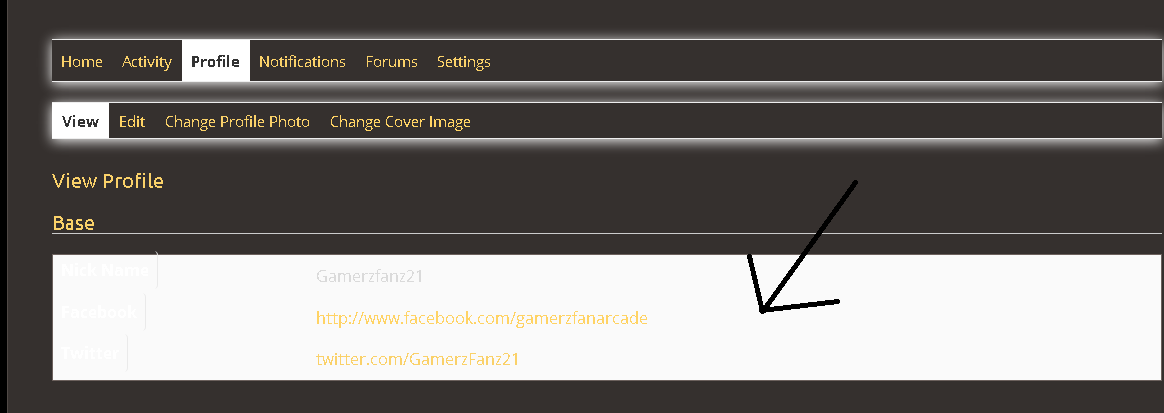
Wordpress V. 5.0.2
BP V. 4.1.0
URL: https://arcade.gamerzfan.com
Theme: Paraxe / Paraxe Child
Thanks in Advance.
Imgur allows you to upload images and provide a link to view them.
By the sounds of things you probably have a conflict. Things I would try:
1. Set BuddyPress theme to BP Legacy
2. Deactivate all other plugins apart from BuddyPress
3. Try with a default theme such as 2016.
That’s probably one for the bbPress forums then – https://bbpress.org/forums/ within each group with a forum there should be a forum menu item that links to the group forum. I’d first check there are no plugin conflicts by deactivating all other plugins except for BuddyPress and bbPress, if you still don’t get the menu item within the group then try a default theme such as 2016. BuddyPress forums are provided by bbPress, so that’s the best place to go for support.
https://bbpress.org/forums/
MAMP local
most recent everything
no plugins
PHP 7.08
pretty permalinks
all themes including 2014, 2017, 2019
Everything works fine, including /activity, but user profiles give 301 redirect loop.
I cannot duplicate your issue re friendships and woocommerce.
Just to be sure re theme issues, try switching momentarily to a WP theme like 2016.
Also try deactivating other plugins and check the issue after each one.
My guess – javascript > ajax is in a loop.
So make sure to turn off any settings ( cache plugin ? ) that minifys javascript.
Using Healthcheck, and Twenty-Seventeen Theme:
With Buddypress enabled, I can accept friend requests that have been sent.
When WooCommerce is enabled, cannot accept friend requests. Is happening on various browsers, Safari & Chrome.
See Screenshots:
https://www.dropbox.com/s/zaujx9sx74vb44u/Screenshot%202018-12-26%2008.22.48.png?dl=0
(Nonce? This is the string at bottom in Chrome during infinite spin)
Shows friend request accepted – with only BuddyPress & Theme activated, when WooCommerce is activated, infinite load when try to accept the friend request.
If WooCommerce is activated, regardless of theme (ReHub or Twenty-Seventeen) cannot a
Site: https://makyn.me
BuddyPress: 4.1.0
Wordpress: 4.9.9
WooCommerce: 3.5.3
Hi elexem,
Looks like you are getting quite a few Javascript errors:
JQMIGRATE: jQuery.fn.load() is deprecated – Orange Login plugin
JQMIGRATE: AJAX events should be attached to document: ajaxComplete – A3 lazyload assets plugin
JQMIGRATE: jQuery.attrFn is deprecated – Jannah theme
JQMIGRATE: Global events are undocumented and deprecated – Cookie Notice plugin
JQMIGRATE: jQuery.fn.size() is deprecated; use the .length property – Jannah theme.
Depricated means usually that those functions will no longer work, so they need to be seen to. The AJAX event warning may of may not be an issue, but it should be looked at.
However I doubt any of these have a bearing on the issue at hand, there’s no sign of the shortcode output. Do any other shortcodes work? Mind, the form would not display to a not logged in user.
BuddyPress does not include the code for those kinds of searches.
Please ask the support staff for your theme or for the plugin that handles your searches.
After the theme on the site is changed, the search results are reversed.
Example: Man looking for a woman – the results showed are – all registered men.
In the other case: Woman looking for a man – the results are – all registered women
In Users – Profile/Extended Profile: the gender of the members is correct.
Any solution on how to fix the search results?
Hi BuddyPress community,
I’ve been struggling with this problem for a few days now, and since i can’t find an answer i come for your help.
I want to edit some files (some functions within them) from the “public_html\wp-content\plugins\buddypress\bp-templates\bp-nouveau\includes” Directory, like “functions.php”, and “template-tags.php”. The issue i have, is that i don’t know how to edit them on my child theme (i don’t want the changes go away every time i update BuddyPress).
So the question is.. How can i edit those files in my child theme?.
Thank you very much guys. Please explain me like you were teaching a kid so i can understand (im not very experienced at this, so please bear with me).


