Search Results for 'wordpress'
-
Search Results
-
Hi,
I have a multisite install with one main domain and 3 sub domains. I have buddypress activated locally on each site rather than network-wide. I’m using the recently active members widget on one of my pages of one sub domain, but I want it to show only users from that same sub domain and not users from across the whole network. Is this possible?
Both wordpress and buddypress are running on the latest version.
Thanks!
Topic: Activation Send Delay
Hi everyone,
My friend and I are having issues with our Activation Email. While we are also sending emails by another plugin which is instant. We are using our own Host to send the emails.
Sometimes it gets sent straight away while some email providers it can take up to a day for them to get it.
Looked around and they also mostly are about Not Sending ours send just some are really late.
Does anyone else have this issue?
BuddyPress 4.1.0 – WordPress 5.0.3
Thanks.
Hi there!
I would like to display only member updates on the Activities page (Would like to avoid any other updates like profile changed, etc) – How can I achieve this? I have tried looking through the forums but unable to find a working solution – Nouveau has changed things?
Using the latest version of buddypress and wordpress.
any guidance please?
thanks
Topic: Users Not Able to Register
Recently updated my site to the newest WordPress and Buddypress updates. Everything else seems to work fine but people are not able to register. The register page is there and user is able to fill it out but after hitting submit, it just refreshes the register page and the password section is highlighted. This happens even if a strong password was used. I’ve read previous threads about this who suggested making the subdomain folder title in lowercase. Didn’t work. Also someone suggested adding www. in wordpress url in settings. That kicked me out of the site to where my username and password would no longer work. Had to restore backup to get back into my site.
(I have a placeholder page on fabambitious.com currently because of issue)
Help anyone? I want to launch my site in few days….
Hi,
whenever i try to upload a group title image (background) i can choose the image, click upload, the progressbar runs… and when it’s done, i get the message, that there was a problem during the upload of the image.
I experience this problem even with twentyseventeen theme, with WordPress 5.0.3 and Buddypress 4.1.0 as the only activated plugin.
happens in live zieltraum.de (with more complex configuration) as in staging staging2.zieltraum.de
Help please, as i have no clue, what’s the reason 🙂
Topic: New Topic Notification
Hi,
I have created a custom notification for my site when a post is published, the code used to do this is :-
// this is to add a fake component to BuddyPress. A registered component is needed to add notifications
function custom_filter_notifications_get_registered_components( $component_names = array() ) {
    // Force $component_names to be an array
    if ( ! is_array( $component_names ) ) {
        $component_names = array();
    }
    // Add 'custom' component to registered components array
    array_push( $component_names, 'publishpost' );
    // Return component's with 'custom' appended
    return $component_names;
}
add_filter( 'bp_notifications_get_registered_components', 'custom_filter_notifications_get_registered_components' );

// this hooks to post creation and saves the post id
function bp_custom_add_notification( $post_id, $post ) {
        $post = get_post( $post_id );
        $author_id = $post->post_author;

		$blogusers = get_users( array( 'role' => 'staff' ) );
		// Array of WP_User objects.
		foreach ( $blogusers as $user ) {
			bp_notifications_add_notification( array(
            'user_id'           => $user->id,
            'item_id'           => $post_id,
            'component_name'    => 'publishpost',
            'component_action'  => 'publishpost_action',
            'date_notified'     => bp_core_current_time(),
            'is_new'            => 1,
        ) );
		}
}
add_action( 'publish_post', 'bp_custom_add_notification', 99, 2 );

/**
 * Format the BuddyBar/Toolbar notifications
 *
 * @since bbPress (r5155)
 *
 * @package bbPress
 *
 * @param string $action The kind of notification being rendered
 * @param int $item_id The primary item id
 * @param int $secondary_item_id The secondary item id
 * @param int $total_items The total number of messaging-related notifications waiting for the user
 * @param string $format 'string' for BuddyBar-compatible notifications; 'array' for WP Toolbar
 */
function custom_format_buddypress_notifications( $action, $item_id, $secondary_item_id, $total_items, $format = 'string' )
{
// New custom notifications
    if ( 'publishpost_action' === $action ) {

        $post = get_post( $item_id );
		$author_name = get_the_author_meta('display_name', $post->post_author);
        $custom_title = bp_core_get_user_displayname( $post->post_author ) . ' published a new post "' . get_the_title( $item_id ) . '"';
        $custom_link  = get_permalink( $post );
        $custom_text = bp_core_get_user_displayname( $post->post_author ) . ' published a new post "' . get_the_title( $item_id ) . '"';
        // WordPress Toolbar
        if ( 'string' === $format ) {
            $return = apply_filters( 'publishpost_filter', '<a href="' . esc_url( $custom_link ) . '" title="' . esc_attr( $custom_title ) . '">' . esc_html( $custom_text ) . '</a>', $custom_text, $custom_link );
        // Deprecated BuddyBar
        } else {
            $return = apply_filters( 'publishpost_filter', array(
                'text' => $custom_text,
                'link' => $custom_link
            ), $custom_link, (int) $total_items, $custom_text, $custom_title );
        }

        return $return;

    }

	if ( 'bbp_new_reply' === $action ) {
		$topic_id    = bbp_get_reply_topic_id( $item_id );
		$topic_title = bbp_get_topic_title( $topic_id );
		$topic_link  = wp_nonce_url( add_query_arg( array( 'action' => 'bbp_mark_read', 'topic_id' => $topic_id ), bbp_get_reply_url( $item_id ) ), 'bbp_mark_topic_' . $topic_id );
		$title_attr  = __( 'Topic Replies', 'bbpress' );

		if ( (int) $total_items > 1 ) {
			$text   = sprintf( __( 'You have %d new replies', 'bbpress' ), (int) $total_items );
			$filter = 'bbp_multiple_new_subscription_notification';
		} else {
			if ( !empty( $secondary_item_id ) ) {
				$text = sprintf( __( 'You have %d new reply to %2$s from %3$s', 'bbpress' ), (int) $total_items, $topic_title, bp_core_get_user_displayname( $secondary_item_id ) );
			} else {
				$text = sprintf( __( 'You have %d new reply to %s',             'bbpress' ), (int) $total_items, $topic_title );
			}
			$filter = 'bbp_single_new_subscription_notification';
		}

		// WordPress Toolbar
		if ( 'string' === $format ) {
			$return = apply_filters( $filter, '<a href="' . esc_url( $topic_link ) . '" title="' . esc_attr( $title_attr ) . '">' . esc_html( $text ) . '</a>', (int) $total_items, $text, $topic_link );

		// Deprecated BuddyBar
		} else {
			$return = apply_filters( $filter, array(
				'text' => $text,
				'link' => $topic_link
			), $topic_link, (int) $total_items, $text, $topic_title );
		}

		do_action( 'bbp_format_buddypress_notifications', $action, $item_id, $secondary_item_id, $total_items );

		return $return;
	}
}
add_filter( 'bp_notifications_get_notifications_for_user', 'custom_format_buddypress_notifications', 1, 5 );
How can i create the same for a new bbpress topic? i’m thinking i need to change this code section but not sure how
// this hooks to post creation and saves the post id
function bp_custom_add_notification( $post_id, $post ) {
        $post = get_post( $post_id );
        $author_id = $post->post_author;

		$blogusers = get_users( array( 'role' => 'staff' ) );
		// Array of WP_User objects.
		foreach ( $blogusers as $user ) {
			bp_notifications_add_notification( array(
            'user_id'           => $user->id,
            'item_id'           => $post_id,
            'component_name'    => 'publishpost',
            'component_action'  => 'publishpost_action',
            'date_notified'     => bp_core_current_time(),
            'is_new'            => 1,
        ) );
		}
}
add_action( 'publish_post', 'bp_custom_add_notification', 99, 2 );
I am using woffice as the theme, bbpress version 2.5.14, buddypress version 4.1.0 and the latest version of wordpress
Thanks
I had created a test user a few days ago. After I logged the test account out and attempted to log back in the next day, I was shown error messages.
The error messages I am receiving are the following:
“User does not exist” – when the user actually does exist
“Email already taken” – when I go to sign up with the email linked to the account they are responding to with “user who does not exist”
If I go to sign up a new test account with a different email, I’m not receiving the activation email – I’ve checked spam.
It just simply is not letting me register or login or do anything.
I’m so confused. I don’t understand.
Hi there,
I was trouble shooting already hosted live website which is already setup buddy press wall.
BuddyPress – Version 4.1.0
BuddyBoss Wall – Version 1.3.2
BuddyBoss Media – Version 3.2.2
BuddyPress Activity Filter – Version 2.0.0
Wordpress – Version 4.9.6And user can post on there friend profile and see the posted on user wall. But when mentioned user wall doesn’t display it. Any idea what will causing this issue.
But the wall post will notify and notification will be redirect site-wide-activity page display posts on that page, not on their wall.
Hi,
i’m using latest version of WordPress and Buddypress. All seems to work fine EXCEPT for the user visability settings. I have activated the option for users to allow to change it. but the only thing i get to see is 1 table with base / visibility ( and value everyone )
it is not showing this at all.
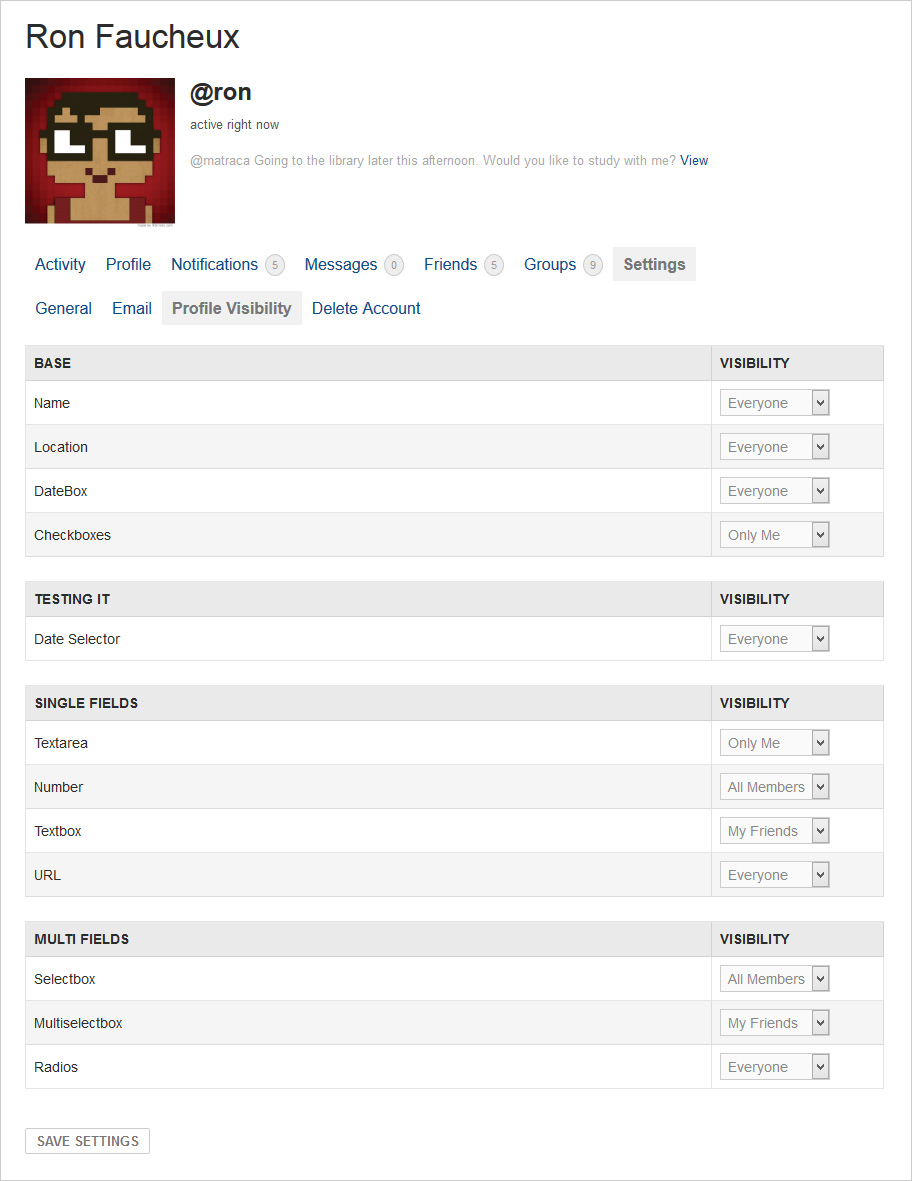
can someone help me please
Thanks


