Search Results for 'wordpress'
-
Search Results
-
hey is there any way so that we can show like and delete button of buddypress in wordpress post comment just like it shows reply and delete button in buddypress activity
Hello,
I tried to figure out a way to add a new tab which links to a page with custom content on the main /activity page right before “All Members”
buddypress version: 4.1.0
Wordpress version: 5.0.3appreciate the helps 🙂
Topic: Gutenberg breaks BuddyPress
Having updated today to WordPress 5.0.3 (and running BuddyPress 4.1.0) textarea fields (e.g. in the registration form) no longer show the TinyMCE editor. This is because with Gutenberg enabled wp_editor() doesn’t work, which is what the textarea field type uses:
/wp-content/plugins/buddypress/bp-xprofile/classes/class-bp-xprofile-field-type-textarea.php:90-118
/**
* Filters the arguments passed to <code>wp_editor()</code> in richtext xprofile fields.
*
* @since 2.4.0
*
* @param array $args {
*     Array of optional arguments. See <code>wp_editor()</code>.
*     @type bool $teeny         Whether to use the teeny version of TinyMCE. Default true.	 *     @type bool $media_buttons Whether to show media buttons. Default false.
*     @type bool $quicktags     Whether to show the quicktags buttons. Default true.
*     @type int  $textarea_rows Number of rows to display in the editor. Defaults to 1 in the
*                               'admin' context, and 10 in the 'edit' context.
* }
* @param string $context The display context. 'edit' when the markup is intended for the
*                        profile edit screen, 'admin' when intended for the Profile Fields
*                        Dashboard panel.
*/
$editor_args = apply_filters( 'bp_xprofile_field_type_textarea_editor_args', array(
	'teeny'         => true,
	'media_buttons' => false,
	'quicktags'     => true,
	'textarea_rows' => 10,
), 'edit' );

wp_editor(
	bp_get_the_profile_field_edit_value(),
	bp_get_the_profile_field_input_name(),
	$editor_args
);
The console shows the error “Uncaught ReferenceError: tinymce is not defined” which is apparently located in the tinyMCEPreInit script definition at the foot of the page.
Any ideas?
Thanks
I’m using WordPress 5.0.3 and Buddypress 4.1.0
How can I display the contents of a BuddyPress tab on the main profile page instead of on a separate tab? I’m specifically hoping to display the reviews form the BP Member Reviews plugin on the Profile page rather than a separate tab.
If you’re not familiar with that plugin, how could I show the content of the Groups tab on the Profile page? I’d like to remove all tabs and show everything on one page for each user.
Thanks!
Wordpress version: 5
Buddypress Version: 3.2.0
Theme Installed: Avada
Website: The SiteI have listed the groups on the Networking page – Networking Page.
Problem I’m having is, If I list the groups to this page within the setting, my banner and small image do not show on the page at all. If I use “Shortcodes for Buddypress”, even though I add [groups-listing] at the bottom of the page they are still showing above the banner & Image.
Any help appreciated.
Thanks
Hi,
I am using BUddyPress for my website.I want to hide the Register option from logged in users.How can I implement that?Currently I am running my site in localhost.
ThanksVersions
——–
wordpress:4.9.8
BuddyPress:4.1.0
Buddypress for learndash:1.2.5
using onleplus parallax theme,and Lerandash,paid mambership pro ,woocommerce pluginsHello. I’ve notice something else with buddypress. When someone need to Login, he is redirected to default wordpress login? Buddypress doesn’t have it’s own Login tab, like the register? And how can you remove Email approve when someone register. And every user can acces Wp-admin, isn’t there function to restrict normal users from opening that page? Any restrict function on buddypress, like only registered users to be able to open the site or pages.
Link to site: supercarsownersclub.com
Theme: Hestia
Buddypress version: Version 4.1.0
Wordpress version 5.0.3Cannot deactivate or unistanll the plugin!
Followed all the instractions, there are no plugins associated with budypress, the website theme is not depending on it eitherWhen I deactivate it I get a white page with thousands lines of errors like these…
Warning: reset() expects parameter 1 to be array, null given in /home/clients/a0427b6d18ac6444bd4caa15b9d9b12c/web/wp-content/plugins/buddypress/bp-core/bp-core-template-loader.php on line 291
Warning: current() expects parameter 1 to be array, null given in /home/clients/a0427b6d18ac6444bd4caa15b9d9b12c/web/wp-content/plugins/buddypress/bp-core/bp-core-template-loader.php on line 295
Warning: next() expects parameter 1 to be array, null given in /home/clients/a0427b6d18ac6444bd4caa15b9d9b12c/web/wp-content/plugins/buddypress/bp-core/bp-core-template-loader.php on line 301
Warning: current() expects parameter 1 to be array, null given in /home/clients/a0427b6d18ac6444bd4caa15b9d9b12c/web/wp-content/plugins/buddypress/bp-core/bp-core-template-loader.php on line 295
Warning: next() expects parameter 1 to be array, null given in /home/clients/a0427b6d18ac6444bd4caa15b9d9b12c/web/wp-content/plugins/buddypress/bp-core/bp-core-template-loader.php on line 301
Thank you in advance!
Kind regards,
SofiyaTopic: Website saya sangat lelet
Apakah ada pengaruhnya dengan kecepatan hosting?
Atau settingan WordPress saya tidak benar?
Mohon jawaban
I want all profile fields to be visible on my site. So I want to remove the subnav Settings > Profile Visibility.
I have added below command into bp-custom.php but it does not work.
function bpfr_hide_visibility_tab() {
if( bp_is_active( ‘xprofile’ ) )bp_core_remove_subnav_item( ‘settings’, ‘profile’ );
}
add_action( ‘bp_ready’, ‘bpfr_hide_visibility_tab’ );Something has changed probably because the conversation I found about this issue is two years old.
Could you please let me know updated command that I have to use ?
WordPress: 5.0.3–sk_SK
BuddyPress: 4.1.0
mamatwist.comThank you,
DanaTopic: Custom profile page.
Hi everybody,
I’ve been trying to customize the page where I want the user profile to be displayed, so that it could be treated like any other page, and choose the template, use its link and so on.
Does anyone knows a function, to add to the child theme functions, and get something like in the following picture?
For what I’ve seen searching in this forum, such function wouldn’t only solve my problems, but also the problems of many other’s.
Just in case:
for this project I’m using wordpress 5.0.3, Buddypress 4.1.0, Nirvana theme 1.5.1.1,
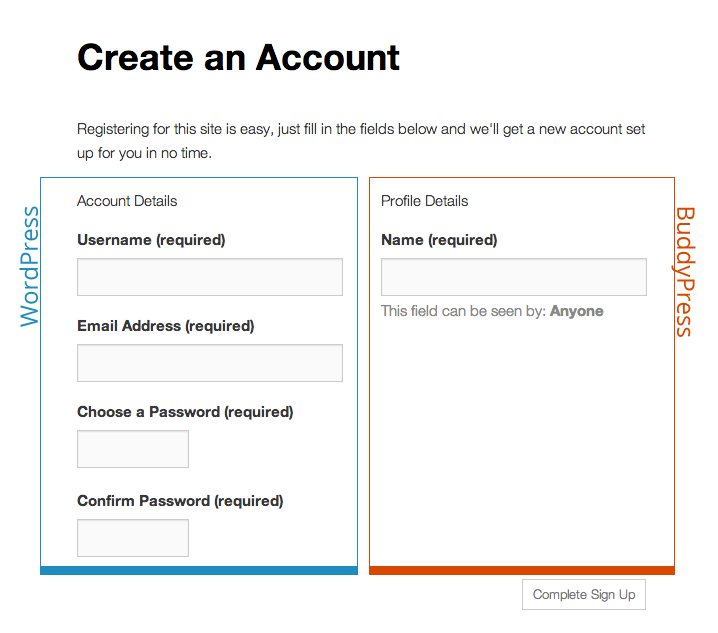
No link to the website yet.Using Buddy press I can only adds some of my custom fields under Profile Details but on my situation. how can I add new custom fields under the Account Details ??
Advance thank you for the your help
Topic: Search Group Widget
Hello Experts,
When I search a group using a BuddyPress Search Group Widget, it opens a new window which displays the matching groups and some filters as Most Active etc.
I would like to change the heading which shows on top of this page as “Groups” and rename as Community Groups.
As i checked some wordpress hooks are being used here which displays the heading automatically, please guide me which file I can change it to what I want. Thanks in advance.