Search Results for 'wordpress'
-
AuthorSearch Results
-
December 16, 2023 at 11:43 am #332325
In reply to: BuddyPress 12.0.0
Mathieu Viet
Moderatoryatesa01: I see from this other topic, it’s the Astra theme. I’m looking at it.
Here’s the ticket about the BP Blocks regression: https://buddypress.trac.wordpress.org/ticket/9037
December 16, 2023 at 9:22 am #332324In reply to: Member Nav Menu Items for WP6 FSE
Moderator12.1.0 will be a minor release. There won’t be a 13.0.0 release just like the 13th floor often lacks in building. We’ll jump to 14.0.0 for our next major release.
How long will it take us to reach 14.0.0, it depends on the number of people who will contribute to it. 12.0.0 took us almost a year and 46 people contributed to it.
December 15, 2023 at 3:45 pm #332312In reply to: BuddyPress 12.0.0
ModeratorThe Pages tab of the BuddyPress settings has been replaced by the URLs one where you can customize all BP URLs slugs. Directories, registration/activate pages are now managed ged from there. See:
https://github.com/buddypress/buddypress/blob/master/docs/user/administration/settings/urls.mdIf you need to add some of these pages to your WordPress menus, I advise you to read:
https://github.com/buddypress/buddypress/blob/master/docs/user/administration/navigations/README.mdDecember 15, 2023 at 1:42 pm #332308In reply to: BuddyPress 12.0.0
jaymzwayne
ParticipantI don’t know if this has anything to do with the new update but every time I tried to go to customize in the themes I can’t display the page correctly since the update I’ve done the classic install it seems like it’s not compatible with my themes is there a way to go back to the original WordPress
December 15, 2023 at 12:37 pm #332307In reply to: BuddyPress 12.0.0
mattobiwan1982
ParticipantHi
Can anyone tell me why when I enter the BuddyPress from WordPress settings it is not showing the Pages tab so I have no way of setting the registration, login pages etc?
Thanks
Matt
December 14, 2023 at 9:44 pm #332291In reply to: BuddyPress 12.0.0
chuchy10
ParticipantWhen BP Classic is active the WordPress menu does not work correctly: Appearance->Customize.
Appearance submenu entries using: …wp-admin/customize.php?return=…
You inactivate it and it works.Thanks for this great work!!
Gracias por este gran trabajo!!December 14, 2023 at 5:52 pm #332285Topic: new update crashed my sites
in forum How-to & Troubleshootingbeachcalsix
ParticipantI have 3 websites and after the newest plugin update, the entire buddypress system crashed. All pages buddypress related give a fatal error screen. Activity, members page, profile, etc. I reverted back to the old version and it works fine again. I thought it was a plugin conflict but it is happening on multiple sites even fresh ones.
ThanksWordpress version: 6.4.2
Buddypress version with fatal error: 12.0.0
Buddypress version that works fine: 11.4.0December 14, 2023 at 2:05 pm #332273In reply to: No One is Receiving Email Notifications
Varun Dubey
ParticipantYou can easily check if email functionality is working on your website by using a couple of test email plugins available online. https://wordpress.org/plugins/check-email/
If it’s working, email functionality should also be operational. BuddyPress uses the same approach to send emails.December 14, 2023 at 1:59 pm #332272In reply to: BuddyPress 12.0.0
Participant@erotmil Custom codes need to be checked for deprecated functions. BP v12 supports the last 2 versions. https://bpdevel.wordpress.com/2022/11/20/the-way-buddypress-loads-deprecated-code-will-change-in-version-11-0-0/
December 14, 2023 at 12:55 pm #332268In reply to: BuddyPress 12.0.0
ModeratorAbout documentation: I agree with you. Writing what we need to do is nice. It would be even greater if you could take another step: contribute to it 😅.
We’ve tried to get contributors to help us twice to update https://codex.buddypress.org unfortunately we were not able to get enough people to help us.
For this particular release, we’ve made a big shift and I personally took the time to write docs about the effects for users as I wrote into the announcement post. You can read it here: https://github.com/buddypress/buddypress/blob/master/docs/user/administration/README.md
Problem is: being in the code makes you miss important things for users. The fact we now uses the URLs BP settings tab instead of the WordPress pages we used before to set BP directory slugs and titles does not seem to be too difficult to find to me. I see reading your and some other replies it’s not that easy.
Adding directory links to WP Menus hasn’t changed that much, here’s a direct link to the doc: https://github.com/buddypress/buddypress/blob/master/docs/user/administration/navigations/README.md
December 13, 2023 at 8:46 pm #332248In reply to: BuddyPress 12.0.0
ModeratorHi @erotmil Sorry to read about this issue, I’m not sure to understand what the custom code is doing. As you’re talking about widgets I guess it may contain some
<?php dynamic_sidebar( 'name_widget_zone' ); ?>. Have you checked your error_log to see if there were some errors? About BP Classic, it contains the BP Legacy widgets, they are automatically loaded if you’re not using the Block Widgets editor, the function you mentioned was used to do this check, I believe you don’t need to care about it in your case. If your custom code is viewable from a Github Gist for example, I can look at it to see if I can find an explanation to your issue.
@claudiovillagra I understand your frustration. If I often talk about BP Classic when replying to support requests about the 12.0.0 upgrade that’s because it’s the Add-on we’ve built to “neutralize” the 12.0.0 change BP Plugins might not be ready with (even if we’ve been working on 12.0.0 and communicating about it for almost a year…). I thought Woffice was a plugin but find out it was a premium theme. Unfortunately I can’t look at their code to understand the issue. If you haven’t try BP Classic, what I would do in your case would be to put up a staging site to replicate your production site and give 12.0.0 some other tests, try BP Classic and if issues are not solved with it, try to identify the issue checking the error_log file or usingdefine( 'WP_DEBUG', true ).December 13, 2023 at 7:42 pm #332244In reply to: Buddypress invitations
ingenxcomputers
Participantthank you
can you recommend a wordpress email plugin? that will work directly with buddypress when I press ‘send invitation’
December 13, 2023 at 7:41 pm #332243In reply to: BuddyPress 12.0.0
ModeratorHi @dangbird
Thanks for your feedback, in version 11.4.0 we’ve (exceptionally) introduced a feature to display notifications only to admins to inform them about the massive change coming into 12.0.0. See https://buddypress.trac.wordpress.org/ticket/9007
This feature we called “Admin notifications” is temporarily overriding the notifications for all admin users as long as one of the admin clicks on the exclamation mark to read the important message we want him to read. This message is about when to activate BP Classic to preserve backwards compatibility required by a specific config (BP Plugins not updated for the last 4 months, the deprecated BP Default standalone theme activated or the need to still use BP Legacy widgets).
It may be the reason explaining what you saw with the Reign theme. It should disappear as soon as you read the Admin notification. Let me know if it helped you fix (or not) the issue with 12.0 for you.
December 13, 2023 at 6:07 pm #332241In reply to: BuddyPress 12.0.0
ModeratorThanks a lot for your feedback 😍. I’m happy to read you succeeded in troubleshooting issues on your side. We always try to imagine what could go wrong when we update our code but at the same time, we need to go forward. This release is very important as we’ve tried to explain as much as we could, it’s a starting point: fully complying with WordPress way of parsing requests will help us on various fields in the future. We know it’s a massive change and I feel sorry to read there are cases we were not able to anticipate: but we strongly believe it’s a needed change for the better of our next community features.
December 13, 2023 at 3:49 pm #332239In reply to: All widgets removed after update
ModeratorHi @jane-blonde
As we informed into an Admin notification after the 11.4.0 upgrade and at each 12.0.0 pre-releases. So it’s not an issue.
We’ve moved Legacy widgets into the BP Classic back compatibility add-on. Since version 9.0.0 we’ve transformed these legacy widgets as block widgets.
December 13, 2023 at 3:43 pm #332238Topic: Bug with General Profile Name
in forum How-to & Troubleshootingbastibln
ParticipantHey,
there seems to be something not working properly, independent from the theme I am using and with having no plugins activated at all:
When I enter my First and Last Name in the usual User -> Profile Dashboard from WordPress, ervything is fine. Let’s assume I choose a Nickname as well:
First Name: Tom
Last Name: Train
Nickname: TommyIn the Public Name dropdown, I choose ‘Tommy’.
Save it.Now I already have created some additional profile fields, like the gender.
If I change my data there now, from option 1 to option 2, and I save it, and I go back to the first “Profile” tab within the WordPress Dashboard, all my name declarations are gone, except Tommy.Is this a known problem for someone?
December 13, 2023 at 11:13 am #332231In reply to: BuddyPress 12.0.0
ModeratorHi @gyrus
Sorry to read about this issue.
We’ve built BP Classic a back compatibility Add-on, maybe you can try activating it to see if it solves the issue:
If not, I’ve explained into this reply how to rollback to 11.4.0 (you’ll need BP Classic anyway)
> if you want to rollback, activate BP Classic (to get the regular directory pages back into your regular WordPress pages), then deactivate BuddyPress and BP Classic. You’ll need to manually reset the « DB Version » to the one of you version, see https://codex.buddypress.org/releases/. For instance for version 11.4.0, into the wp_options table the _bp_db_version option should be 13408. Only then download and activate a previous BuddyPress version (11.4.0).
December 12, 2023 at 9:06 pm #332213In reply to: Enqueuing CSS in 12.0
ModeratorHi @lordmatt, another way to fix it is to use this filter:
add_filter( 'bp_enqueue_assets_in_bp_pages_only', 'return_false' );December 12, 2023 at 3:19 pm #332204In reply to: BuddyPress 12.0.0
Moderator@westmdresearch & @fraughtithrouble
I believe there can be errors when a plugin/theme has not been updated since the last 2 versions of BuddyPress, we only load by default deprecated functions back to 2 previous versions. I suggest you to use 2 constants in your wp-config.php file:
–
define( 'BP_LOAD_DEPRECATED', true );this will load all deprecated functions (from version 12.0 back to version 1.2)
– Errors should become deprecation notices. Errors/notices should never be output on front-end, so if some errors are output on front-end, I advise you to also usedefine( 'WP_DEBUG_DISPLAY', false );
@fraughtithrouble if you want to rollback, activate BP Classic (to get the regular directory pages back into your regular WordPress pages), then deactivate BuddyPress and BP Classic. You’ll need to manually reset the « DB Version » to the one of you version, see https://codex.buddypress.org/releases/. For instance for version 11.4.0, into thewp_optionstable the_bp_db_versionoption should be13408. Only then download and activate a previous BuddyPress version (11.4.0).
@westmdresearch I’m sorry to read about all these troubles, we took all possible precautions to avoid it on our side: beta period was extended to 4/5 months, we documented the changes, we’ve built a backcompat plugin, unfortunately we cannot test and fix all free or premium plugins, this part remains their responsibility.December 12, 2023 at 11:02 am #332192In reply to: BuddyPress 12.0.0
ModeratorHi @varadkk
The new way to customize URLs or directory titles is happening in Settings > BuddyPress then click on the URLs tab. More info about it here: https://github.com/buddypress/buddypress/blob/master/docs/user/administration/settings/urls.md
If for some reason (compatibility with a 3rd party BP plugin) you need to get this page back, you can use the BP Classic add-on.
@weathermadness with so few information I guess something is wrong with a potential third party BP plugin, have you activated the BP Classic plugin ?December 12, 2023 at 7:32 am #332182In reply to: BuddyPress 12.0.0
ModeratorHi,
It’s a deprecation notice. According to it you are still using BP Legacy Widgets. These widgets were moved into our Backwards compatibility Add-on « BP Classic »:
You can find them back downloading and activating this Add-on.
December 8, 2023 at 4:24 pm #332152December 8, 2023 at 3:52 pm #332151December 6, 2023 at 3:19 pm #332122In reply to: Buddypress profile pic to wordpress avatar
fusionbudd
ParticipantTwo ways to use your BP profile pic as your WordPress avatar:
1. Plugins:
Install and activate a plugin like “BuddyPress Default Avatar” or “BuddyPress Avatar Sync.”
These plugins automatically sync your BP profile photo with your WordPress avatar, making it a simple and hands-off solution.2. Custom code:
If you prefer a more technical approach, you can add code to your theme’s functions.php file.
This code snippet will enable syncing of the two avatars:PHP
function bp_avatar_sync($user_id) {
// Get BP profile picture URL
$bp_avatar_url = bp_core_fetch_avatar(array(‘item_id’ => $user_id, ‘type’ => ‘full’));// Update WordPress avatar URL
update_user_meta($user_id, ‘user_avatar’, $bp_avatar_url);
}
add_action(‘bp_core_avatar_uploaded’, ‘bp_avatar_sync’);Remember, both methods achieve the same result. Choose the method that best suits your technical skills and preferences.
November 24, 2023 at 4:31 pm #332027In reply to: Change “Registered on:” date
emaralive
Moderator@sbanner26, my apologies for not posting this sooner, I was contemplating various scenarios based on the limited information provided and not having access to the BP Member Export Import plugin (it doesn’t reside in the official WordPress plugin repository). That stated, let’s see what you think about the proposed:
This solution is an attempt to mitigate risk for updating a user’s registration date by utilizing a WP plugin known as Edit Registration Date. This plugin adds an editable text box to each user’s profile page, as can be seen in the following screenshot:
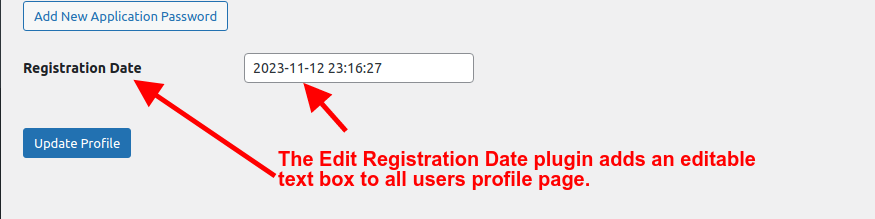
This plugin is located in the WP plugin repository at the following URL:
The author of this plugin has only tested up to WP 6.2.3; meaning, I’m not sure why the author hasn’t tested, as of yet, to the current version of WP. As an aside, I tested it with WP 6.4.1 and it works as advertised. The plan would be to install stated plugin on both sites, perform a copy & paste and then update profile for each user. After completion, you can discard this plugin,, if you choose to do so. Albeit, this is a manual effort but, to reiterate, it presents the least amount of risk for updating a user’s registration date.
Having stated the previous, this now brings up the subject as to where the fault lies with the BP Member Export Import plugin by Wbcom Designs, if any. Was it a setting that needed to be set, i.e., use original registration date or make the dates all the same? Or, is it an actual bug? If it is a bug then, this bug should be reported, as such, to Wbcom Designs by someone who has actually witnessed this anomaly.
Furthermore, you may be able to determine in which process the fault, if any, may exist since there is, apparently, a 2 (two) step process, e.g., export and import: meaning, if you import the CSV file into a spreadsheet (MS Excel, OpenOffice/LibreOffice Calc or Google Sheets) the column that represents “registration_date” (the actual DB column name is “user_registered”) will indicate whether the dates are correct or not. If the dates are correct then the export process is not at fault and if the dates are not correct, you can infer that a fault may exist with the “export” process.
If by chance and assuming the dates are incorrect as indicated by the spreadsheet, the dates can be manually corrected in the spreadsheet and then save/export the corrections as a CSV file then, utilize the import feature of BP Member Export Import plugin. Note: The video for this plugin shows that there is a checkbox “Enable checkbox to update existing users data” thus, you should enable the checkbox since you have existing users.
Last but not least, there are other solutions that are applicable but, I’m not sure they are worth the effort (that is, my effort) to convey at a practical level given that your situation isn’t one that occurs on a regular basis, at least I would hope not, however, if this proposed solution is not practical, I may reconsider my position on this. Additionally, if this is truly a fault that lies with the BP Member Export Import plugin by Wbcom Designs then, reporting this fault to the developers of stated plugin would allow them to fix this fault and then you could use the new version to repeat the export/import process but this time it would work, given that no new bugs/faults were introduced.
-
AuthorSearch Results


