Search Results for 'wordpress'
-
Search Results
-
I have a wordpress installation with BP. But BP Registration is not working.
Enabling registration will show http://festivals.my/register/ in the menu.
I check BP pages setting and it show the following link. http://festivals.my/index.php/register/
As I click on the http://festivals.my/index.php/register/ link, it somehow show me an empty page.
Theme: Twenty Seventeen
Plugin: Only BP activated.I reinstall the whole site, but still got the same problem.
No post on the net is useful for for me. Please help.
Regards
LeoI have 5 different groups on my buddypress page, and they’re setup so members get email notifications when someone posts an update in whichever group. In the email, there’s a link to the specific group that they can click on, but of course, since they’re not logged in, it takes them to the homepage, so then they have to click on login, which then takes them back to the homepage again(when Pie-Register is supposed to redirect them to the list of groups, but it doesn’t). So, then they have to go back to the email, click on the link in the email to the specific group, and finally they’re where they wanna be.
How would I go about getting the redirect from the email link to go like this:
Open email
Click on url for the group(whichever group it may be at the time)
Redirects to the login page,
which then redirects to the group in question.I’m still new to wordpress, and have a lot of older folk who aren’t as savvy with navigating around themselves. They’re used to replying via email to Meetup.com group activity.
When someone comments in the activity stream it sends the user a notification, user goes to the notification page and clicks on the notification, the notification page will just reload.
This only appears to happen with links to activity comments as activity links about new emails will take the user to their inbox when clicked. Suggestions?
Buddypress: 2.8.1
WordPress: 4.7.2Hi!
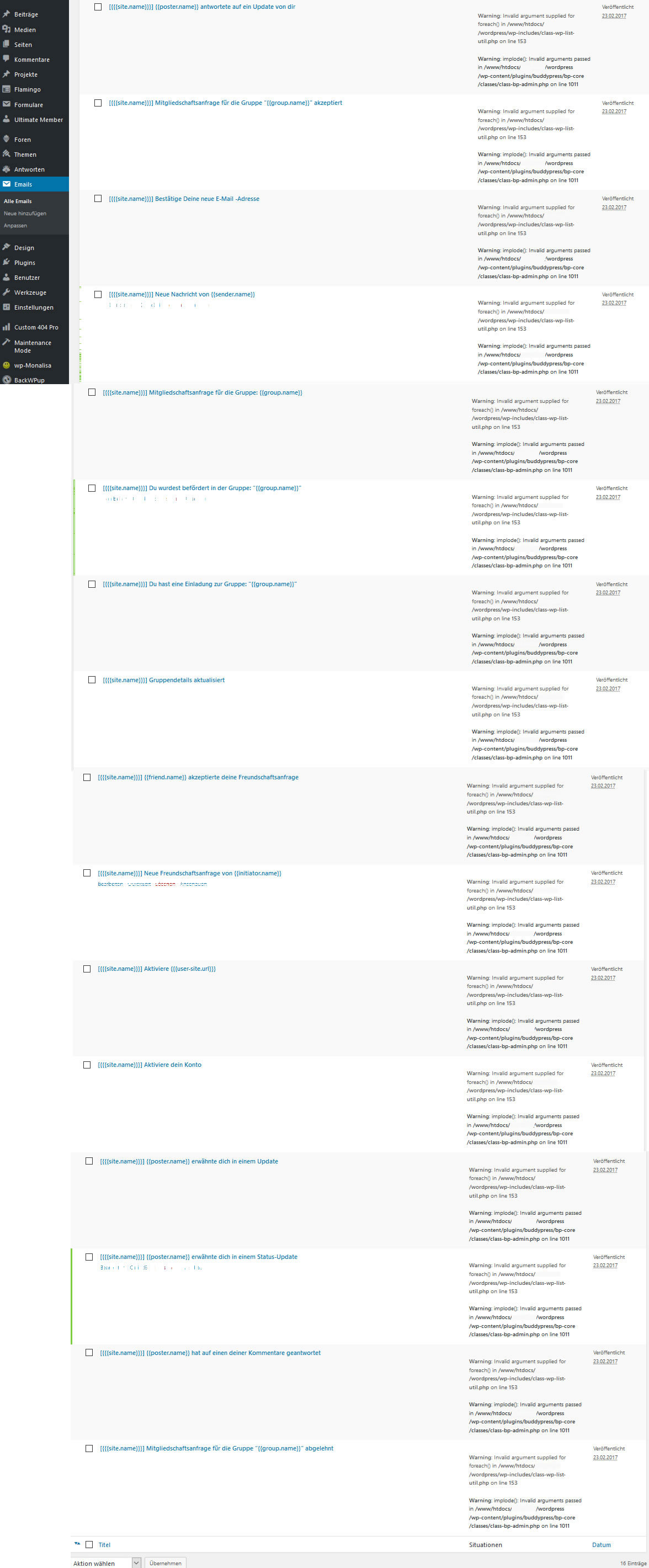
In my Plugin BuddyPress-Emails at the backend there are 2 php errors for the e-mail sample. Could you please help me with this problem?
Error-Screenshot: http://666kb.com/i/dh3uoz52p92h4a7xr.jpg
I already repaired BuddyPress and re installed it but this doesn’t work.
Link: https://www.flotter-feger.atThank You!
Error 1:
Warning: Invalid argument supplied for foreach() in /www/htdocs/XXXXXXX/wordpress/wp-includes/class-wp-list-util.php on line 153147 public function pluck( $field, $index_key = null ) { 148 if ( ! $index_key ) { 149 /* 150 * This is simple. Could at some point wrap array_column() 151 * if we knew we had an array of arrays. 152 */ 153 foreach ( $this->output as $key => $value ) { 154 if ( is_object( $value ) ) { 155 $this->output[ $key ] = $value->$field; 156 } else { 157 $this->output[ $key ] = $value[ $field ]; 158 } 159 } 160 return $this->output; 161 }Error 2:
Warning: imploded(): Invalid arguments passed in /www/htdocs/XXXXXXX/wordpress/wp-content/plugins/buddypress/bp-core/classes/class-bp-admin.php on line 10111009 // Output each situation as a list item. 1010 echo '<ul><li>'; 1011 echo implode( '</li><li>', $situations ); 1012 echo '</li></ul>'; 1013 }Serverconfiguration:
PHP-Version 5.6.29-nmm1 (64bit)
MySQL-Version 5.5.52-nmm1-logWordPress-Version 4.7.2
BuddyPress Version 2.8.1Themes: DIVI + Child-Themes
installed Plugins:
bbpress-notify-nospam Version 1.15.4
bbp-private-groups Version 3.4.1
bbpress Version 2.5.12
buddypress Version 2.8.1
gd-bbpress-tools Version 1.9
wp-monalisa Version 3.9
ultimate-member Version 1.3.83
tinymce-advanced Version 4.4.3
contact-form-7 Version 4.6.1
flamingo Version 1.5
anything-order Version 1.0.3
rocket-maintenance-mode Version 3.7.3
backwpup Version 3.3.6
akismet Version 3.3
elegant-themes-updater-master Version 1.2
custom-404-pro Version 2.0.2
printfriendly Version 3.7.3
user-role-editor Version 4.31.1Log in WP_DEBUG mode
PHP Notice: Trying to get property of non-object in /site_path/wp-content/plugins/buddypress/bp-activity/bp-activity-template.php on line 884WordPress 4.7.2
BuddyPress 2.8.1
PHP 7.1.2-3+deb.sury.org~xenial+1
https://airat.bizMy buddypress profile edit page and friends page gone wrong and not working, it keeps showing up shortcode [ wps-usermeta-change] and [wps-friends-pending][wps-friends count=”100″]. This is the only two pages I found the problem now, but maybe other pages also not working. I am using latest WordPress and buddypress version. Links: http://militaryareas.com/edit-profile/ and http://militaryareas.com/friends/. Anyone know what’s going on?
hi there
please help to answer these questions
I want to set it so admin or someone has to approve anything that users post on the
sitewide activity page
How does admin or anyone we can set moderate what the users post on the “site wide activity” page? ie how do we make this non- automatic and only show once we have approved?2) Do you have a screenshot of what the login/ register page in buddypress looks like?
I cant see this in the features page3) How do we set so that only logged in users can see the sitewide activity page?
so that this page shows a message saying user must login / register first to see the posts?
ie I want users to register first before they can see the site wide activit ystream
How would we do this?4) Is there a screen in the wordpress backend for the website developer to see all the users registered and delete them or suspend them if they are spam posters for example
Thankyou!
Topic: How to hide the RSS button