Search Results for 'wordpress'
-
AuthorSearch Results
-
January 19, 2015 at 11:47 am #232537
In reply to: Page creation for members
Henry Wright
ModeratorHi @gabsterino
There will most probably be lots in the Plugin Directory but you’ll need to test which are compatible with BuddyPress. WordPress ‘authors’ and BuddyPress ‘members’ are the same fundamentally so compatibility shouldn’t be a problem. But as I say, give them a try before going live.
January 19, 2015 at 11:40 am #232536ModeratorHey @tobyhawkins
Can you check if pagination works with the default theme activated (Twenty Fifteen) and all plugins disabled? If you still experience the problem then, I’d suggest opening a ticket on Trac. If the problem goes away then it’s likely to be theme or plugin related.
January 18, 2015 at 12:25 pm #232494In reply to: Group URL clashes with page URL
ModeratorPossibly. That’s what you’ll need to check. Quite often the problem is theme- or plugin-related. My advice is to set up a test site which replicates your production site. Then you can make changes (for testing purposes such as this) without impacting your live website.
If the problem remains after you’ve disabled all plugins and activated the default theme then you can raise a ticket on Trac. The core development team can then take a look.
January 18, 2015 at 11:48 am #232491In reply to: Group URL clashes with page URL
Ivalde
ParticipantI did believe BuddyPress was made for WordPress usage…
January 17, 2015 at 10:41 pm #232481shanebp
ModeratorBuddyPress encourages its users to find and report bugs.
And they are even happier when a bug report includes a fix!
If you have found a bug, please open a ticket on trac.January 17, 2015 at 4:18 pm #232456chatty24
ParticipantIt could be a blank WordPress page with title, “Redirecting…”
January 17, 2015 at 1:14 pm #232451In reply to: BuddyPress Users with Tags as Taxonomy
ModeratorHi @ch1n3s3b0y
Do you mean create a new custom taxonomy called users and then each time a user registers, you want a new term to be created?
If so then check out these resources:
https://codex.wordpress.org/Taxonomies
You’ll need to use
register_taxonomy()to create your new taxonomy (see here)To insert a new term you can use
wp_insert_term()(see here)When you come to write your function, hook it to the
bp_core_signup_useraction.January 17, 2015 at 12:47 pm #232447Paul Wong-Gibbs
KeymasterI’m not sure, but it sounds like your line of thought is valid. Using a cookie for this seems a bit weird, but hey, that’s how it’s been implemented at the moment. 🙂
If when you finish working through things, you still think you’re onto a bug with the missing cookie idea, please would you submit an explanation of the issue over on our bug tracker at https://buddypress.trac.wordpress.org/newticket ?
January 16, 2015 at 11:38 am #232431In reply to: Determine Profile Template File by Member Type
ModeratorTo my knowledge, this isn’t built in to the current template hierarchy.
Ref:
You could open a ticket on Trac requesting the enhancement (try searching open tickets first to make sure it isn’t already planned).
January 16, 2015 at 7:25 am #232429BuddyBoss
ParticipantDefault BP does allow to see other users’ Favorits in the Favorit tab in Profile page – why does Buddyboss kills this? At least site admin should be able to turn it on or off.
I see what you mean. We will consider adding an admin option.
Buddyboss is never meant to load every plugin but if a chosen few are bundled, it will be really good rather than re-inventing wheels at premium plugins, features of which are already available in the WP-BP repo. If users like us see thay they are well integrated into the Buddyboss look and feel there can be more sales of the Buddyboss theme actually.
I appreciate all of the feedback, very much. Our plan is to expand on these plugins and make them more feature rich, launch more premium plugins and themes, and also free plugins for the community over the year.
We launched two free plugins this week which you may be interested in:
Search all BP components in one unified dropdown:
https://wordpress.org/plugins/buddypress-global-search/Edit BP activity from the front-end:
https://wordpress.org/plugins/buddypress-edit-activity/January 15, 2015 at 7:50 pm #232420In reply to: Disable Password Change
danbp
ParticipantThe password field belongs to WordPress, so you could probably try to apply this trick.
January 14, 2015 at 5:58 pm #232299In reply to: Remove Avatar Mouseover Showing Email Address?
r-a-y
KeymasterI think I’ve noticed this in the past as well.
If you feel comfortable posting this to our ticketing system, please do:
https://buddypress.trac.wordpress.org/newticket (use the same credentials as you use here)January 14, 2015 at 3:54 pm #232273@mercime
Participant@serendipitycss3 thank you for reporting the issue. In the meantime, please go to this page https://wordpress.org/plugins/search.php?q=buddypress
January 14, 2015 at 2:41 am #231926In reply to: [Resolved] BP 2.2 beta 1 login avatar
KeymasterThanks for testing, @chubbycrow.
Going to ping @mercime for input here as she recently made changes to the avatars in widgets.
mercime – Okay to revert line 1558 from changeset 9341?
https://buddypress.trac.wordpress.org/changeset/9341Or was there a reason for the 40px declaration?
January 14, 2015 at 12:04 am #231917In reply to: xProfile Required Fields Bug
KeymasterHi @caldwellysr,
Thanks for testing the 2.2-beta.
There was a bug concerning xProfile fields, which should be addressed in:
https://buddypress.trac.wordpress.org/changeset/9345If you feel comfortable removing the lines referenced in
bp-core/bp-core-template.php, please do so and retest.Thanks again for testing!
January 13, 2015 at 11:29 pm #231915In reply to: Display filtered overview of members
ModeratorRegarding the
$wpdbobject, take a look here for more info:https://codex.wordpress.org/Class_Reference/wpdb#Using_the_.24wpdb_Object
January 13, 2015 at 9:14 pm #231913In reply to: Display filtered overview of members
barodscheff
ParticipantThank you for your answers.
I’ve tried the example from the wordpress codex:
$user_count = $wpdb->get_var( "SELECT COUNT(*) FROM $wpdb->users" );It works even when I do not use
global $wpdb;.
First question: Why does it work without global $wpdb?Second question: Why do I have to use
$wpdb->bp_xprofile_datainstead of$wpdb->ar_bp_xprofile_data? Does the prefix do not belong to the name? When I try the query in phpmyadmin I also have to use the prefix.Unfortunately my own queries still not work. I simplified my query now:
global $wpdb;
$male = $wpdb->get_var( "SELECT COUNT(*) FROM $wpdb->bp_xprofile_data");
echo $male;
January 12, 2015 at 9:14 am #231781In reply to: [Resolved] WP_DEBUG Notice for bp_setup_current_user
Moderatorcurrent_user_can()useswp_get_current_user(). Looking at the function reference for that function, I noticed “Use the init or any subsequent action to call this function”. Take a look at the Action Reference article for the list of actions run during a typical page request. The action you use will depend on what exactly you’re doing but it looks as though the earliest available when usingcurrent_user_can()isinitHope this helps 🙂
Ref:
https://codex.wordpress.org/Function_Reference/wp_get_current_user
January 11, 2015 at 10:17 pm #231764In reply to: Dear developers: Testing data and tools, please!
Participant@charlesmabe Testing data
BP – I use this plugin https://wordpress.org/plugins/bp-default-data/
bbPress – download the Sample Data https://bbpress.trac.wordpress.org/ticket/2516 and use WP importer
January 11, 2015 at 2:33 am #231736In reply to: Sidebar Pushed to Bottom
Greg Hyatt
ParticipantI using a theme called Dynamix from Themva and the plugin is BuddyPress Wall here is link to the plugin BuddyPress Wall
I am using most recent version of BuddyPress on WP 4.1
January 11, 2015 at 2:11 am #231735djsteveb
Participant@juliantrueflynn
Might also look into – https://wordpress.org/plugins/unconfirmed/I have used that to resend activations, the plugin description says it can “deleting their pending registrations,” – but not sure if that means is removes them from the database or whatever.. I have not tried using it in that manner. This plugin might also limit the amount of users you can mess with to 20 or 40 at a time – so it may be too tedious to do what you need anyhow. Haven’t played with it a while, and not sure if it’s been updated to add new functions since I used.
Others finding this thread may benefit from that plugin, or not – just a thought.
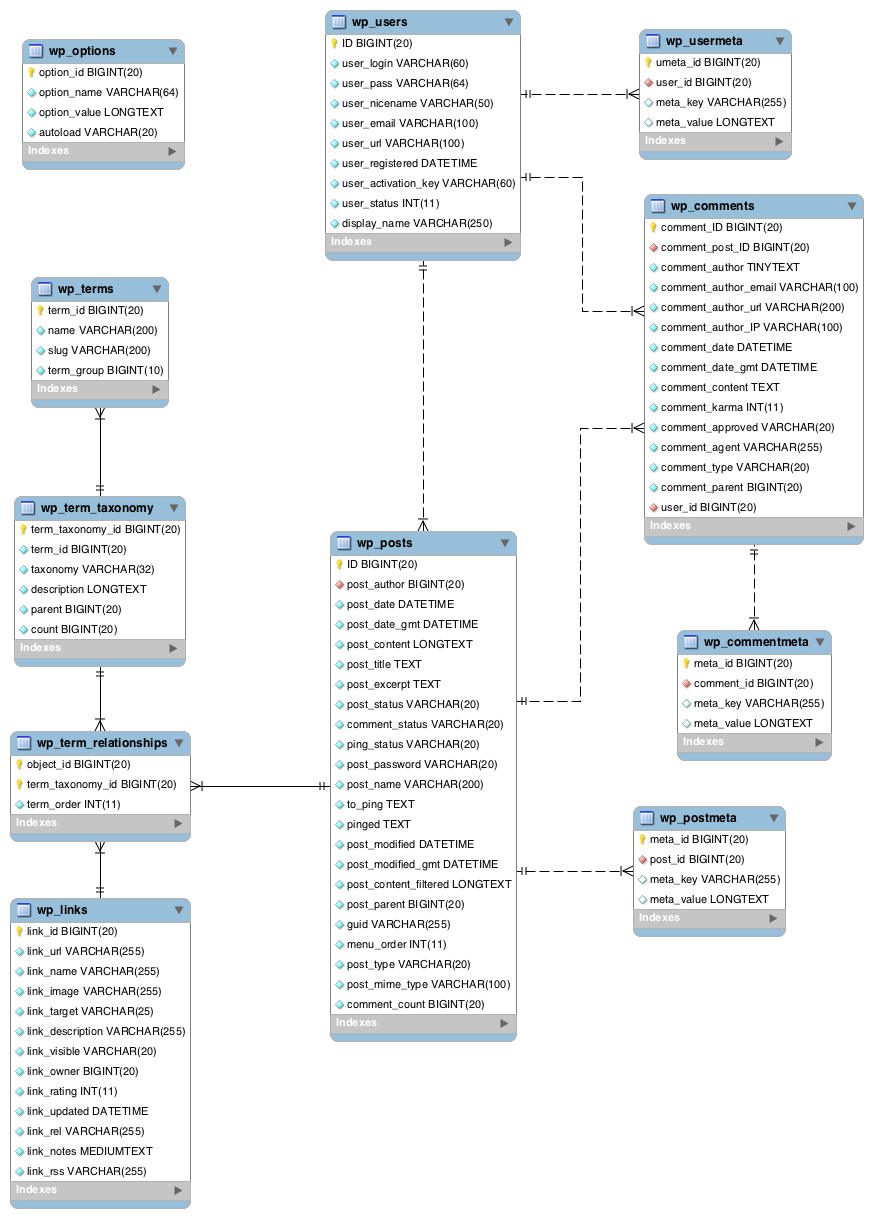
January 11, 2015 at 12:34 am #231732ModeratorYeah, see here for details of the
wp_signupstable.You may also be interested in these links:
BuddyPress database description
WordPress database description
https://codex.wordpress.org/images/9/97/WP3.8-ERD.pngJanuary 11, 2015 at 12:10 am #231731juliantrueflynn
ParticipantNevermind, found out from researching more on WordPress databases that for these pending accounts you should go into “wp_signups” database (they’re stored in 2 places). Then with phpmyadmin I am searching that table and deleting anyone using spammy emails.
January 10, 2015 at 10:25 pm #231727In reply to: Members & Media Issues
ParticipantThe theme details for that theme say:
rtMedia Ready – Add albums, photo, audio/video encoding, privacy, sharing, front-end uploads & more.I would bet that for the media tab functions of that to work, you would need to install the rtmedia plugin
( https://wordpress.org/plugins/buddypress-media/ )Of course I don’t win every bet – and don’t bet often – just a thought you might try..
January 10, 2015 at 9:55 am #231719In reply to: Adding Columns to Activity List Table in Admin
Participanthi @snarkypuppet,
for inspiration a concrete example:
https://github.com/Ipstenu/register-ip-multisite/blob/master/register-ip.phpSearch WP reference for more details:
-
AuthorSearch Results