Search Results for 'wordpress'
-
AuthorSearch Results
-
May 2, 2012 at 5:12 am #133838
@ChrisClayton
Participant@yadigit – The official way to remove it is via adding the tag ‘buddypress’ to your theme style.css comment header (the section where you tell wordpress your theme’s name).
eg.
`
/**
* Theme Name: My Themes
* Tags: buddypress, awesome
**/
`Theirs also an internal config line that you can add to wp-config.php or plugins/bp-custom.php
`define( ‘BP_SILENCE_THEME_NOTICE’, true );`May 2, 2012 at 2:40 am #133829@mercime
Participant@sarbanharble looks like you’ve not completed Step 3 of the BP Compatibility process for members, groups, activity and registration/activation pages- https://codex.buddypress.org/theme-development/wordpress-to-buddypress-theme/#step-three
Based on a quick scan of the HTML structure of The Unstandard theme, you can use the 2nd method per link above to fix alignment of the BP template files – i.e., create necessary content/files header-buddypress.php, sidebar-buddypress.php and/or footer-buddypress.php and upload these to your theme folder – instead of the 1st method which involves changing 16 BP template files.
May 2, 2012 at 2:05 am #133827In reply to: do not have associated WordPress Pages
Participant@starprintbrokers before deleting everything. Follow my instructions in my post above to change to bp-default theme etc.
May 2, 2012 at 12:26 am #133824In reply to: Getting Started…
ParticipantSanity check: When you said you activated the “default theme” in your first post, did you mean the WordPress default theme Twenty Eleven or the bp-default theme? It should be the bp-default theme. And if you’re using Twenty Eleven or any other WordPress theme, you need to install and activate the BP Template Pack plugin then go through Appearance > BP Compatibility process.
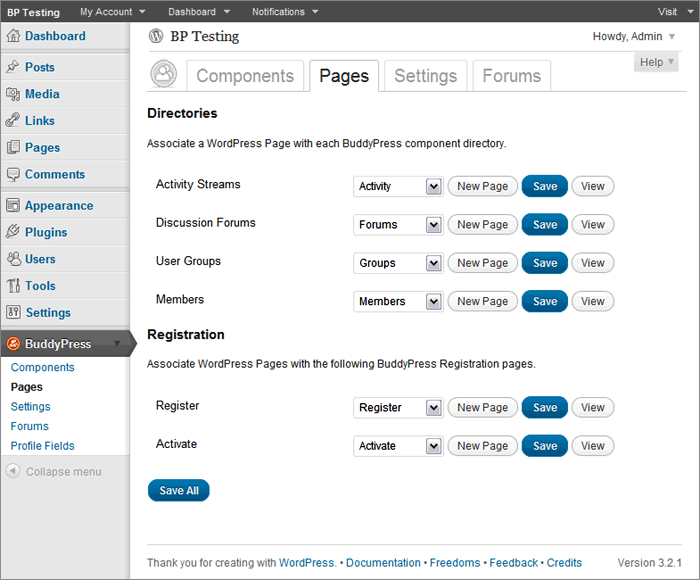
Now if you are using the bp-default theme, go to BuddyPress Pages again and double-check that BP components are indeed associated with respective pages https://mercime.files.wordpress.com/2011/11/bp-installation-wizard-08.gif
If that doesn’t cut it, https://buddypress.org/community/groups/how-to-and-troubleshooting/forum/topic/when-asking-for-support/
May 1, 2012 at 11:55 pm #133822In reply to: [RESOLVED]CSS bp problems – The Global Sport theme
Participant@nsbalgcom I see you’ve installed the BP Template Pack plugin. Now you need to fix the alignment within the BP template files to be compatible with your WP theme WPSN – via 1st method of changing 16 BP template files or via 2nd method of creating only the header-buddypress.php, sidebar-buddypress.php and/or footer-buddypress.php.
Initial scan of online source code shows that you need only to implement the 2nd method and adding some styles to fix the alignment of your theme. https://codex.buddypress.org/theme-development/wordpress-to-buddypress-theme/#fixalignment
May 1, 2012 at 11:14 pm #133820In reply to: do not have associated WordPress Pages
starprintbrokers
MemberJust gettng back to this project.
@mercime, I did confirm that Salutaion will work with the current BuddyPress theme.
Hugo, if this doesn’t work, then I will ask my host provider to wipe out the entire site and I’ll start over. It’s not such a loss, as I am still building the site. I can easily create those missing pages with those names, but would imagine there is code and are layouts that I cannot replicate. I would say my skill level is probably just short of intermediate, so I would rather play it safe than build any more content. I’ve save what I built in Word docs anyway!
May 1, 2012 at 9:18 pm #133819In reply to: Activaty or Forum Directory with slider
Participant@b1gft If that slider by aesthetic can be added via widget area – check out http://justintadlock.com/archives/2010/11/08/sidebars-in-wordpress
May 1, 2012 at 8:36 pm #133818In reply to: Getting Started…
Tilley46
ParticipantI had changed the permalinks before (Day& Name), and saved the settings, but still, whenever I clicked ‘view’ on the ‘Registration’ page, it took me to the ‘Home’ page I created. I deleted that, and then ‘Register’ linked to a page that says ‘Sorry, but you are looking for something that isn’t here’. I deleted ALL pages, uninstalled BuddyPress, re-installed, but then, instead of getting the Installation Wizard, got an error message saying that ‘The following active BuddyPress Components do not have associated WordPress Pages: Activity Streams, Discussion Forums, User Groups, Members, Activate, Register. (REPAIR)’. Was hoping that starting over from the beginning would solve the issue, but no luck. Even now, despite creating all new pages and associating them w/ the BuddyPress components, I still get ‘Sorry, but you are looking for something that isn’t here.’ on both the ‘Register’ and ‘Forums’ page and the ‘Forums’ page says that ‘The forums component has not been set up yet.’ I’m assuming that’s due to my re-installing BP, but not yet having gone through the installation wizard…? I don’t know what the hang-up is… Shouldn’t there be a unique ‘Register’ page created/linked to through the BP component ‘Register’? I’m at a bit of a loss…
May 1, 2012 at 8:21 pm #133817In reply to: Tie Blog to Group?
valuser
ParticipantThe plugin BuddyPress Groupblog at https://wordpress.org/extend/plugins/bp-groupblog/ MAY go some of the way in answering your queries.
” The BuddyPress Groupblog plugin extends the group functionality by enabling each group to have a single blog associated with it. Group members are automatically added to the blog and will have blog roles as set by the groupblog admin settings.”May 1, 2012 at 7:32 pm #133815Participant== every single table in my database says pressfix ==
BuddyPress did not add any pressfix in front of your table names. Check your wp-config.php file to see what prefix you added to your tables. BP creates _bp_ tables in your database. It also adds BP options in wp_options table https://codex.buddypress.org/buddypress-site-administration/deleting-buddypress/
May 1, 2012 at 6:46 pm #133814Hugo Ashmore
ParticipantI’ve installed – re-installed, manually modified DB’s, a hundred times and never had anything remotely like this happen especially not caused by BP. BP doesn’t cock up in this manner, table prefix sounds like something your theme has done.
As for fix? try renaming your tables back to the wp default ‘wp_’
May 1, 2012 at 5:00 pm #133811roclimb
ParticipantI don’t think thats the case here because every single table in my database says pressfix in front of the name.
Buddypress crashed my site so I had to delete the folders from my wordpress folder manually. I am only on a localhost MAMP environment not live with it. I installed budypress it crashed my admin and site so I went into the folder where buddy press folder was located and deleted it. No the site works and admin panel dashboard works great but my database tables appear to be buddy press tables.Any suggestions to change them back?
May 1, 2012 at 1:11 pm #133802Paul Wong-Gibbs
KeymasterThis question is best suited for the wordpress.org support forums as it doesn’t seem to involve BuddyPress.
May 1, 2012 at 8:04 am #133798In reply to: do not have associated WordPress Pages
ParticipantJust for clarity- you do know understand that in the event that bp hasn’t created pages or you get that message that associations are broken it’s a manual process to create those pages before navigating back to BP pages to now find them available in the selection dropdown.
With Saluation – if memory serves – you may need to go into each of those pages created for BP use and ensure that you have selected ‘buddypress’ in the layout options sidebar custom field.
May 1, 2012 at 7:12 am #133797Participant@babray add to the equation that Group Forums will be migrated over to Sitewide Forums (bbPress plugin)
May 1, 2012 at 5:34 am #133791In reply to: do not have associated WordPress Pages
MemberThank you. I am checking with the Salutation author and then I will follow your instructions.
May 1, 2012 at 5:30 am #133790In reply to: Gaming Ladder and Tournament
ParticipantThere are no plugins that does what you need at this time. You can post the job offer at
https://buddypress.org/community/groups/bp-jobs-board/ or at http://jobs.wordpress.net/May 1, 2012 at 5:23 am #133789In reply to: do not have associated WordPress Pages
Participant@starprintbrokers Salutation is supposed to be a BuddyPress-ready theme, therefore you do not need to install and activate the BP Template Pack plugin nor go through Appearance > BP Compatibility process. If you did, deactivate Salutation and delete the theme, then re-upload a clean copy of the Salutation theme but do not activate it yet.
Change to bp-default theme, then go to BuddyPress > Pages. For each component that does not have a Page yet, e.g. Activity Streams does not have “Activity” page across, click on “New Page” button and the Page will be created. Do the same for the remaining components in the section. You associate each page to each component and click “Save All” button at the bottom of the section.
Check that each BP component page is working. Then and only then do you change to Salutation theme. Btw, do confirm with theme author if Salutation has been upgraded to work with current BuddyPress version.
May 1, 2012 at 4:58 am #133788In reply to: do not have associated WordPress Pages
MemberActually, I already had BuddyPress Template pack installed. I just activated it again, and tired again. I clicked repair on that message, and still, there are no pages by those names in teh pull down menus.
May 1, 2012 at 4:49 am #133787In reply to: do not have associated WordPress Pages
yadigit
Participantgo to your /wp-admin -> plugins -> add new.
search Buddypress Template Pack.
Install it, and run it.
Follow the simple steps…
All should work well.April 30, 2012 at 11:51 pm #133781Participant== Buddypress seems to have written over my wordpress database ==
@roclimb BuddyPress creates tables in database and does not overwrite WP DB tables..
Just deactivate BuddyPress and BP plugins from wp-admin. If you cannot access your wp-admin, rename buddypress plugin folder via FTP/sFTP or control panel in server. See also https://codex.buddypress.org/troubleshooting/
April 30, 2012 at 11:26 pm #133780In reply to: Seeking Buddypress/PHP developer
Participant@stealthology post also at http://jobs.wordpress.net/
April 30, 2012 at 9:04 pm #130273Participant@jakeyboy1989 from your WP forums post as well – If you just want to make your WordPress theme compatible with BuddyPress, you don’t need to create a multisite installation.
Install and activate the BP Template Pack Plugin and go through Appearance > BP Compatibility process. Then post back here if you require further assistance.
April 30, 2012 at 8:14 pm #133774Participant@strek-break you’re welcome. Marking this as resolved.
April 30, 2012 at 8:04 pm #133773jakeyboy1989
MemberThanks for the tips @Paul Gibbs
The reason I want the two sites to be connected is so that my authors can network and get points, rankings, etc, for the posts they make (this was a feature requested by my users).
The key thing for me is that my users want the social features that I can provide through buddypress, but it is difficult to integrate with more extensive framework based wordpress templates (at least it seems that way for me) so I would love to be able to have buddypress on the same site, or a connected site, that has its own template and is hidden from users.
Also when I say authors it might sound misleading because this could be potentially 500-1000 different users so they need group and discussion forum features..
-
AuthorSearch Results