Search Results for 'wordpress'
-
Search Results
-
WordPress Multisite 3.5.1
BuddyPress 1.7.1
Tetris ThemeWho’s Online and Recently Active Users widgets display in a long single vertical line of avatars and what I’d like is a grid/block of avatars.
How to do that?
Which file to do that in?Thanks!
If someone makes a long update in the activity stream of a group then the read more link appears at on the update but when it is clicked there is a page not found error. To work around this my people are posting in the group forum but that is not really what I want I would rather have everything on the group activity page. The forum posts cannot be edited even by admin, when I try to edit them I get “Oh bother! No topics were found here!” I have tried maxing out the time that edits are allowed in the forum settings but that did not work either.
What would be ideal would be if I could just get the ability for the long posts to be accessable from the group activity stream. I hate forums anyway and would rather get rid of them.
I am desperate for some help with this as I have just got some serious traffic going to this site and I would like these guys to hang around.
here is my site http://
I have buddypress 1.7.1 running on wordpress 3.5.1 I am using buddycolumns theme but I have tried the default theme which does not rectify the problem.
Plugins that are currently installed (not all active)
bbPress
BP-Registration-Options
BpDev Recently Updated Blogs Widget
BP Export Users
BP Gallery
BP Group Management
BuddyPress
BuddyPress Activity Comment Notifier
BuddyPress Activity Plus
BuddyPress Activity Stream Bump to Top
BuddyPress Edit Activity Stream
BuddyPress Facebook Connect Plus
BuddyPress Gifts
BuddyPress Like
BuddyPress Links
BuddyPress Privacy Component (BP Privacy, BP_Authz, or BPAz)
Buddypress Sitewide activity widget
BuddyPress Template Pack
Codepress Admin Columns
CONTENT BLENDER
CubePoints
CubePoints Buddypress Integration
Easy Google Analytics for WordPress
Email Login
Facebook Like User Activity Stream For BuddyPress
jQuery Vertical Accordion Menu
Ping Kaching
PrettyGallery
SI CAPTCHA Anti-Spam
WangGuardTIA
Alice.I try to keep all my plugins updated and today saw that BP 1.7.1 was available. I upgraded and didn’t think twice. I check a few hours later and my Register page, Activity page and Members List pages (only BP pages I have on my site) are not working. The pages all appear, but the content section is completely blank. The login form, forums, news pages, everything else is fine.
I used vaultpress to restore to last nights backup and it works fine again so it’s definitely the update (I didn’t do anything else today)
Using latest version of WP installed in a directory on a Godaddy server. Using BP 1.7.1 but now back to 1.7. I have a few plugins but they never effected anything with 1.7. All are updated to latest versions: Akismet, bbpress, buddypress, bulletproof security, gD press attachments, jetpack, postloop, vaultpress, wangGuard, wordpress seo.
Using a custom theme too. I should have tried to switch back to the default theme sorry!
I just updated my Buddypress website to 1.7.1 and now I can’t comment or post an update. Other people are having this problem.
I am using WordPress 3.5.1, and Buddypress 1.7.1.
Is there a fix for this?
Thanks.
Topic: Name field on registration
I have extended profiles enabled. I am using the Name field in the registration profile. During registration if a user completes the Name field it is not save to the wordpress user profile. However signing in as the user and saving their profile WILL write their Name to the wordpress user profile. Is this a bug or a feature? How can I fix it?
WordPress Multisite 3.5.1
BuddyPress 1.7.1
Tetris ThemeI’m trying to create a login widget and have copied and pasted the following code into a widget text box:
<div id="sidebar">
<?php do_action( 'bp_inside_before_sidebar' ) ?>
<?php if ( is_user_logged_in() ) : ?>
<?php do_action( 'bp_before_sidebar_me' ) ?>
<div id="sidebar-me">
<h3>You are logged in as:</h3>
<ul id="members-list" class="item-list">
<li><div  class="item-avatar">
<a href="<?php echo bp_loggedin_user_domain() ?>"><?php bp_loggedin_user_avatar( 'type=thumb&width=60&height=60' ) ?></a></div>
<div class="item"><h4><?php echo bp_core_get_userlink( bp_loggedin_user_id() ); ?></h4>
</h4><a class="button logout" href="<?php echo wp_logout_url( bp_get_root_domain() ) ?>"><?php _e( 'Log Out', 'buddypress' ) ?></a></div>
<?php do_action( 'bp_sidebar_me' ) ?>
</div></li>
</ul>
<?php do_action( 'bp_after_sidebar_me' ) ?>
<?php if ( function_exists( 'bp_message_get_notices' ) ) : ?>
<?php bp_message_get_notices(); /* Site wide notices to all users */ ?>
<?php endif; ?>
<?php else : ?>
<?php do_action( 'bp_before_sidebar_login_form' ) ?>

<p id="login-text">
<?php _e( 'Please log in to start connecting.', 'buddypress' ) ?>
<?php if ( bp_get_signup_allowed() ) : ?><br />
<?php printf( __( ' You can also <a href="%s" title="Create an account">create an account</a>.', 'buddypress' ), site_url( BP_REGISTER_SLUG . '/' ) ) ?>
<?php endif; ?>
</p>
<form name="login-form" id="sidebar-login-form" class="standard-form" action="<?php echo site_url( 'wp-login.php', 'login_post' ) ?>" method="post">
<label><?php _e( 'Username', 'buddypress' ) ?><br />
<input type="text" name="log" id="sidebar-user-login" class="input" value="<?php echo esc_attr(stripslashes($user_login)); ?>" tabindex="97" /></label>
<label><?php _e( 'Password', 'buddypress' ) ?><br />
<input type="password" name="pwd" id="sidebar-user-pass" class="input" value="" tabindex="98" /></label>
<p class="forgetmenot"><label><input name="rememberme" type="checkbox" id="sidebar-rememberme" value="forever" tabindex="99" /> <?php _e( 'Remember Me', 'buddypress' ) ?></label></p>
<?php do_action( 'bp_sidebar_login_form' ) ?>
<input type="submit" name="wp-submit" id="sidebar-wp-submit" value="<?php _e('Log In'); ?>" tabindex="100" />
<input type="hidden" name="testcookie" value="1" />
</form>

<?php do_action( 'bp_after_sidebar_login_form' ) ?>
<?php endif; ?>

<?php get_sidebar() ?>
</div>
</div>
I have played around with it (it originally was encased in tables), added and subtracted the last few div tags, encased it in a p tag …
I end up with this whether I am logged in or not:
You are logged in as:

create an account.', 'buddypress' ), site_url( BP_REGISTER_SLUG . '/' ) ) ?>
Any pointers? Code corrections?
OK, I finally upgraded my site to the latest of everything.
WordPress Multisite 3.5.1 (with subdomains)
BuddyPress 1.7.1
Tetris ThemeEverything looks ok so far, haven’t really tested functionality yet.
Realized that I really do like the old admin bar (that was in BuddyPress 1.5).
Currently I’m seeing the basic WordPress admin bar.
I’d like to get my old admin bar back. I hacked it and it worked beautifully to maneuver through the entire site.
What is/are the name/s of the specific files I would need to edit to recreate my old admin bar?
(I’m very confused as to what is an “admin bar” and what is a “buddy bar” so I don’t know if I am referencing them correctly)
Thanks!
I am using child theme of bp-default theme. Its sidebar login form is not working, its getting timed out. But wp-login is working fine. The sidebar login was working properly few days back. I tried deactivating every plugin and also updated buddypress but still the problem persists. Also I didnt make any changes to the sidebar.php file.Cant understand the reason.
Please help.
bp-default theme
BuddyPress 1.7.1
WordPress 3.5.1Topic: Upgrade or new installation
Hi can you advise if I am better to upgrade to 1.7.1 or delete the current installation and re-install?
My forum/site has yet to be launched and only has a couple of test users. I’m using the latest versions of wordpress and bbpress. Also if I upgrade am I better to switch to a theme like TwentyTwelve as I am using a child theme based on a premium theme.
many thanks in advance!
Hi, all
My site should be in Bulgarian (Cyrillic scripted), so the slugs of my group generates in Cyrillic.
I have for instance group called “Леопардови гекони” and its slug is ‘леопардови-гекони’ by default, but I want it to be ‘leopard-geckos’ for exampmle. The problem is that when these slugs are typed in Cyrillic if I post a link somewhere it looks sth like this:This is simply disgusting! 🙁 So, from where to change slugs in Latin and more imortant how my users who will create groups to make pretty slugs for pretty links?
And it’s not only in the groups slugs but everywere… 🙁
Hi Team,
I have followed the instructions at this URL: http://buddypress.org/2009/05/customizable-slugs-in-buddypress/ to alter the slugs and labels in my BuddyPress install.
However, when I refresh the Premalinks in the WordPress admin, my changes do not take. I do not have a caching plugin on my WordPress install, and I have cleared my browsers history, cache etc. multiple times.
Please advise. Is this because of the update? I’m really running out of options here.
Thank you for your time.
currently using WordPress 3.5.1 + BP Courseware Version 0.9.7 + BuddyPress Version 1.7 + bb Press Version 2.3.1
firstly, i am not able to see ‘Create New Group’ button anywhere in groups. All the three plugins activated.
Secondly, what sort/ types of questions does BP Courseware caters to?Topic: Fixing The Profile CSS
Hello,
I am not exactly a “noob” to code editing but nowhere near “experienced” either. I have installed BuddyPress 1.7 on my WordPress 3.5.1 but the pages look dull with my theme colors. I was hoping someone could help me do the followng:
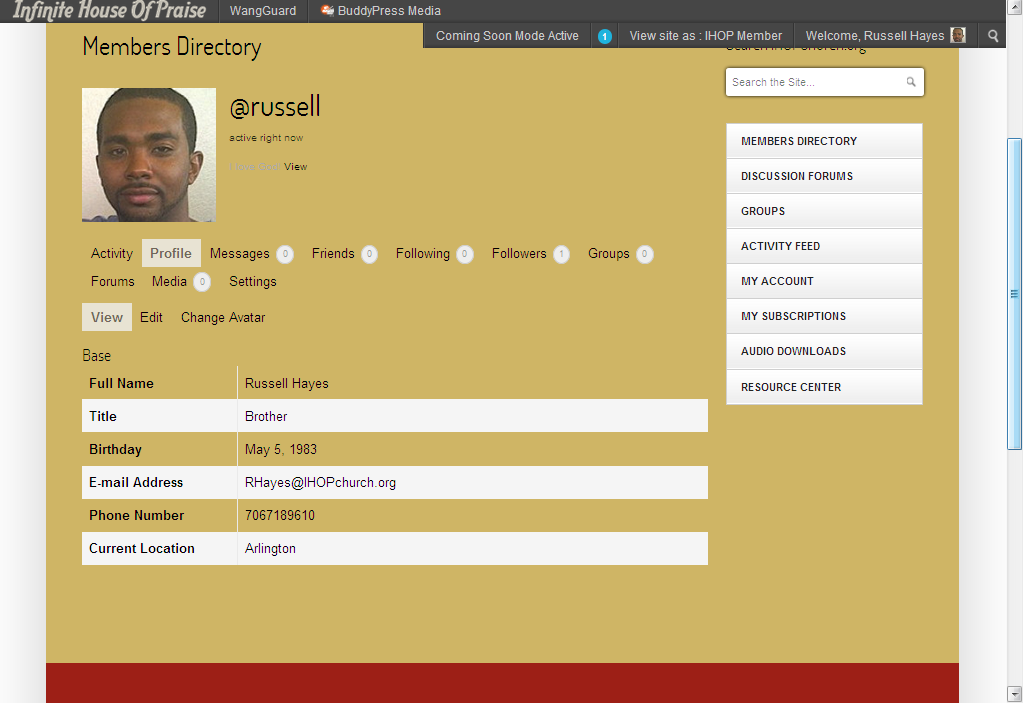
1. Add a white box behind all of the profile info. It looks bad on the tan background. (See Sample 1)
2. Make the Tabs at the top actually look like tabs. I will be earasing a few so they’ll fit on one line. (See Sample 1)
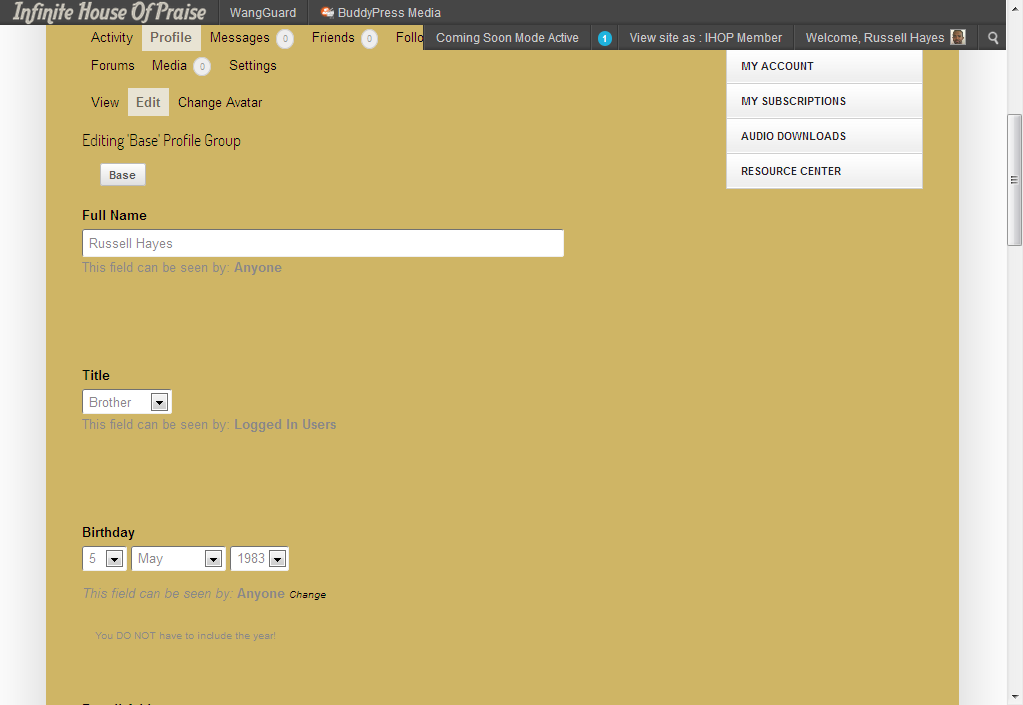
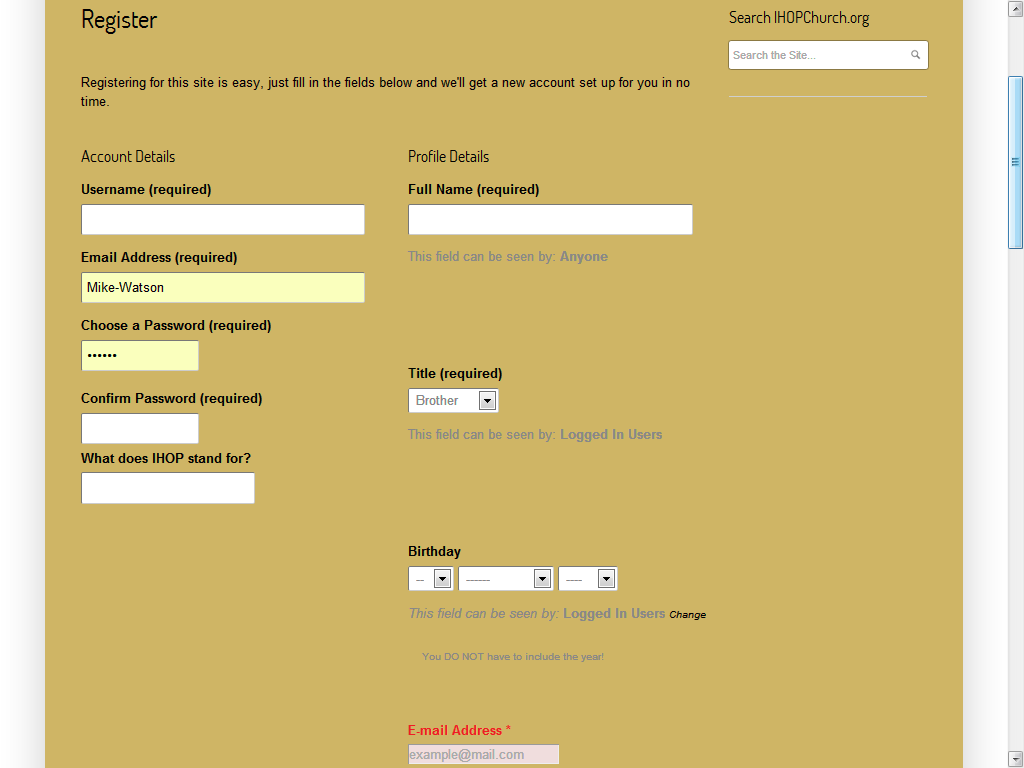
3. Close the gaps in my profile fields. As you can see they are too spaced out and I don’t understand it. It look terrible on the registration page as well. (See Sample 2 & 3)
4. Change the grey font color to black as I cannot find where the CSS for this font color is located! (See Sample 2)If you can help with ANY of these 4 issues, I’d GREATLY appreciate it! I believe they are issues that would be simple to fix. Thanks!
Sample 1: http://i1201.photobucket.com/albums/bb354/FlashyTees/Sample1_zpscc6c4f4a.png
Sample 2: http://i1201.photobucket.com/albums/bb354/FlashyTees/Sample2_zps9010516f.png
Sample 3: http://i1201.photobucket.com/albums/bb354/FlashyTees/Sample3_zpsc0b69739.png