Search Results for 'wordpress'
-
Search Results
-
Hi there,
I have started building wp community using BP.
I created a test account using the BP register function. When I try and login it redirects me to:
https://wordpress.com/log-in?redirect_to=https%3A%2F%2Fwordpress.com%2Fwp-login.php%3Faction%3Djetpack-sso%26site_id%3D174275720%26sso_nonce%3Dtzrqdu6inkxwmhwn0upeIs there some code I need to configure to get to redirect to home page or activity page? I downloaded and installed the redirect plugin for roles but doesn’t seem to work either.
I assume there is a line of code overriding this but not sure where to find.
Thanks in advance
Ben
Wordpress 5.4
Buddypress 5.2
Theme: Twenty NineteenVersion: 1.5Hi guys
I’m looking to create a custom theme built around BP Nouveau and have dequeued the css, but doing so makes the member and group cover images disappear.
In BP legacy it was possible to follow this tutorial (https://codex.buddypress.org/themes/buddypress-cover-images/), but in Nouveau it doesn’t seem work.
Here’s the old code for it
function mytheme_cover_image_callback( $params = array() ) {
    if ( empty( $params ) ) {
        return;
    }

    return '
        #buddypress #header-cover-image {
            height: ' . $params["height"] . 'px;
            background-image: url(' . $params['cover_image'] . ');
        }
    ';
}


function mytheme_cover_image_css( $settings = array() ) {
    $settings['callback'] = 'mytheme_cover_image_callback';

    return $settings;
}
add_filter( 'bp_before_xprofile_cover_image_settings_parse_args', 'mytheme_cover_image_css', 10, 1 );
add_filter( 'bp_before_groups_cover_image_settings_parse_args', 'mytheme_cover_image_css', 10, 1 );

function your_theme_cover_image_css( $settings = array() ) {

    $theme_handle = 'bp-parent-css';

    $settings['theme_handle'] = $theme_handle;

     $settings['callback'] = 'mytheme_cover_image_callback';


    return $settings;
}
add_filter( 'bp_before_xprofile_cover_image_settings_parse_args', 'your_theme_cover_image_css', 10, 1 );
add_filter( 'bp_before_groups_cover_image_settings_parse_args', 'your_theme_cover_image_css', 10, 1 );
Anyone got an idea?
Thanks for your time!
Hi there,
I don’t understand why this is so complicated.
When people register they are required to enter a username and a name. Their username is not changeable after that, I understand that this is WordPress default functionality.
Though:
- what is entered at “Username” is shown on someones profile page like: @name
- what is entered at “Name” at the register form is filled in the field “First name” and “Nickname”
- Display name is set as “Nickname / First name” – since they are the same
– Why isn’t just the display name used for BuddyPress on someones profile?
– Or why is the username shown on the members profile since that cannot be changed by anyone?
– Why is there a field “Username” AND “Name” (which is also required) on the register form? I think having a Username field would be enough which is also automatically the “Nickname”.I hope I’m thinking too difficult here and there is some easy explanation.
Looking forward to someones reply.
Thanks in advance.Justin
Hi there,
Got a weird error. In my custom theme header I try to call this function:
bbp_is_single_user_profile()And I got the error:
Uncaught Error: Call to undefined function bbp_is_single_user_profile()After some research this function is correct right? I want to check if you are on a member page, since every page has it’s own source of an header image. This case from the cover image of the member.
I use the latest version of WordPress and BuddyPress. Also there are no other plugins installed since it’s in development.
Thanks in advance.
JustinHello, I have been breaking my head with this little thing for a while, all I want is for the activity page to refresh automatically without having to click the “Latest Updates” button, something like Twitter, Facebook, etc. Is that possible or has not been implemented yet ??? I use WordPress 5.4 and BuddyPress 5.2.0
Hi,
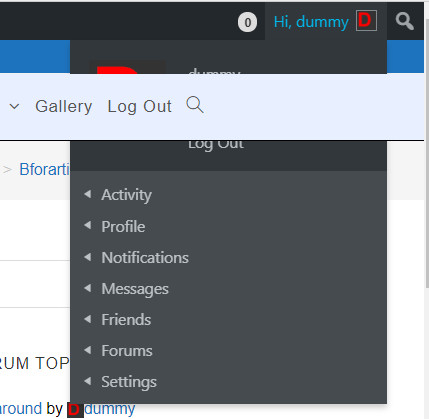
I have a problem with the Buddypress menu. The menu of the theme is covering the buddypress profile part. Ctrl + F5 then fixes this for a short moment. Switching to another page leads to the same situation then again though. The theme is OceanWP in actual version.
To have the Buddypress menu half covered by the page menu is a bit unsatisfying. Is this a known issue? Does somebody have an idea how to fix it? Any help is highly appreciated.
Kind regards
ArunderanHere a shot of the problem
Hi all,
Apologies for the post. I’m a wordpress/website creation/Buddypress novice and am struggling a bit to get all my plugins to work together. As such this post may not make complete sense as it’coming from a slightly confused place.
Basically what I’m trying to do is create a person to person marketplace.
I have a registration form (User Registration plugin) that I like and it also integrates with woocommerce which is a big plus. It also makes a User Registration MyAccount page which I was thinking of using as a profile page (as I can edit this). However, I like the messaging and friend capabilities of buddypress and want to incorporate that if possible (has lead me into some plugin conflicts).So I had a few questions:
1) Could I assign the BP registration page as a page with User Registration shortcode?
2) Do you need to assign all the BP pages for BP to work?
3) Could another registration form be used to create a BP profile
4) Any suggestions as how I could achieve my goals by managing my plugins differently?Topic: Activity Page
I’m using BuddyPress with Olympus child theme and Youzer. I don’t have an Activity Page under pages list. I have to go to the user profile and literally change the url to get to the activity page that is connected with the profile and the one that I can modify with Youzer. I downloaded BuddyPress from the WordPress plugin screen so I’m not sure on how to get the correct activity page back listed under my pages tab. I’m quite confident I messed this up. I just need help fixing it. Thank you!


