Search Results for 'wordpress'
-
Search Results
-
So, after installing Buddypress (specifically), I receive a redirect loop. You know, that thing that makes it so you can’t access your page, ever.
My thoughts are that this is caused because I did, at one time, have Buddypress installed, then uninstalled it, screwed around with the http:// and http://www. settings of my site on not only the WordPress page, but through my Hosting provider as well, and now I can’t “reinstall” it due to it maintaining the settings of my old install.
(^ Impressive run-on sentence.)That said, I don’t know how to completely wipe all traces of Buddypress from my WordPress so I can ‘redo’ it all again.
Keep in mind that I’m not talking Activate/Deactivate. Buddypress won’t let me run through the Installer again, because it had been installed in the past. Or.. something.
Aside from wiping my entire site, I have no idea how to fix this issue.
Hi, I’m am interested in installing BuddyPress on my WordPress site but want to ask a couple quick questions before doing so, since there is somewhat significant traffic to the site and I don’t want to cause any large-scale problems that cause me to mess around with the site for the rest of the day.
1). I’m currently using the default Twenty Eleven theme. I presume I’ll have to change to the BuddyPress theme unless I do something special?
2). I currently have a plugin for Twenty Eleven which makes my widgets show up on all of my pages. Will this be possible with the Buddypress theme? Or will I have to play around with the source code?
Thanks!
I’ve just installed BuddPress a few days ago onto wordpress 3.2.1 . When I create a forum, it dosn’t appear in the Forum page. Can anyone help?
I’m not sure if this is where to ask this (let me know if there is a more appropriate group) but I have some questions about the status of plugins. Where can I see:
– the most recent version of bp the plugin is known to work with. I see WordPress versions and I can tell it’s a bp version if I see 1.5.1, but eitherr som plugins don’t show the bp version or it’s not labeled clearly enough for me
– the most recent date a plugin was updated, to have an idea how actively the plugin is maintained
– Status updates on when a developer expects their plugin to be ready for the current version
I think it would also be helpful to filter a list of plugins known to work with a given version. Is using 1.5.1 in the search box going to be effective for that?
As someone new to bp and trying to figure out which modules to use, this would all be helpful. I assume it would also help when deciding when to upgrade a bp site.
Greetings,
I am extremely new. Started checking out what BuddyPress was yesterday. I’ve been looking at the listing of “official” BuddyPress themes shown on this site, though I realize they are hosted offsite. When I attempt to preview many of them at the hosted site, some of them come up as blank screens, while others appear almost as pre-css html websites. Almost none of them resemble their preview image. I have even tried to download a couple — BP Colors for example, but when I installed it, I simply got the same BuddyPress theme without change.
I have a fresh, clean install. The only pluggin I have installed is BuddyPress 1.5.1. My WordPress version is WP is 3.2.1.
I’ve also noted that more than 1/2 of the over 107 plugins mentioned to be available appear to be incompatible with the current version of WP.
What is the ETA to resolve these sorts of issues?
Thanks!
J.Topic: Where do I go from here?
So I installed the BuddyPress plugin into my current WordPress site. Options show up on the left sidebar of my admin page. Under BuddyPress/Forums I installed the Site Wide Forums (and increased my WordPress memory to avoid the fatal error). I have also gone through the process of making my current theme BuddyPress friendly. But now what?
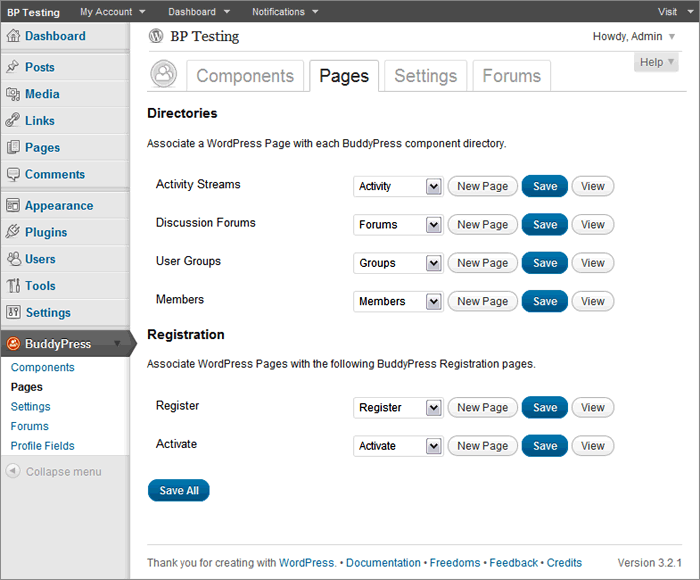
I get the dark admin bar at the top of my site, but no links to a forum in my nav bar. When I go to BuddyPress/Pages on my admin site, I click Save but the page does not exist when I click on View.
There is another set of menus called Forums/Topics/Replies, and I tried adding a Forum and Topic, but nothing on my site has changed.
Is there a tutorial for how to actually set up the plugin?
Thanks!
Hi translated this plugin:
http://wordpress.org/extend/plugins/buddypress-activity-plus/
Where, which folder, do i put the translated .mo .po files in?
Do i have to change something in the plugins .php files, what where?grtz & thnx
Topic: Using this website aargh!
Hi, I’m new to Buddypress and WordPress. But having used this site I wanted to ask.
1) How can I get to my posts and follow. I’ve had no response in over 24 hours, so I thought I would post it somewhere else, but can’t find my original post. When I click on my alias “junglejinge” it displays that I have created a post, but it doesn’t allow me to quickly navigate to it.2) The search facility doesn’t seem to be working either.
I have a production site and it’s “Beta” test site that are doing the same thing and I’m not sure how to stop it. When an admin, author, or contributor logs into WordPress (not BuddyPress), they are redirected to the home page instead of Dashboard. When I deactivate BuddyPress, this stops and they go to Dashboard (as expected). I tried deactivating plugins and changing themes, but nothing changes until I deactivate BuddyPress.
I’ve just tried setting up a third test site and only have the default WordPress and BuddyPress installs (with the BP Template Pack plugin to provide compatibility for the Twenty Eleven theme). It’s doing the same thing. What is going on and how do I make it stop?
Hi. I”’m trying to apply the BP theme compatibility to the Adventure Journal theme (http://www.contextureintl.com/wordpress/adventure-journal-wordpress-theme/)
I’m stuck on step three. Can someone give me a clue please? Thanks.
My page.php:
My index.php:
Topic: lost in buddy press
I had buddy press 1.0 running half decent and then upgraded to 1.1 or attempted to. Now I have a bunch of buddy press pages missing associated wordpress pages. There is a repair tab. Clicked it and up comes a page with directories and registration that have drop down menus to create new pages to associate or pick an existing one. I’m not sure what to do here or if I made a new one what to call it? Any help appreciated.




 I am very much a newbie and do understand the frustration but that energy could be more productively spent. Anyway, Boone did a couple great Buddypress presentations which can be found on WordPress TV. Also, there’s a Buddypress for Dummies book. Both provide good foundational material even though neither are up-to-date. But I think that’s awesome because it means we’ve got some very committed people in this community who are intent on continuous improvement.


