Search Results for 'wordpress'
-
Search Results
-
Topic: Call to arms – Own your task
Do you really like the activity stream and have ideas on how to improve it? Are you working on a site where you’re beefing up Private Messages and want to contribute some code back to the project? Maybe you’re just really good at blogging and want to share some BuddyPress experiences?
Now’s your chance to help the BuddyPress core team get things done.
If there’s a task you want to *own* in BuddyPress, let’s start by talking about it here first. Later we’ll move onto development chats, etc… but for now I want to get a feel for who wants to commit to doing what.

Example – Things I am working on:
Step 0 – Better dedicated support forums via bbPress plugin – June
Step 1 – Redesigning buddypress.org – June
Step 2 – Releasing 1.3 – June’ish
Step 3 – Mirroring the WordPress development methods (UI/UX/Trac/etc…) – July
Step 4 – Improved collaboration with contributors – JulyExamples of things that could use ownership:
bp-default theme audit (make sure actions are in the right places, CSS is tidy, small visual tweaks to bp-default CSS)
phpDoc audit (verbose documentation on functions, classes, variables, etc…)
deprecated code clean-up (get rid of our old MU specific code)
Moderation tools (integrate them into the WP menu)
Admin interface UI (thinking far, far head here)
Wireframes, mock-ups, ideas, visual stuff
*anything that you think needs doing, and can commit to doing*Judging by the lack of information when I perform a search, I may be one of the few people that has tried to get these plugins playing nicely together. When all is sorted and the site is live, I’ll post up a link to hopefully inspire a few other sites to try them out together.
Basically what I have is a standard WP multisite/BP configuration, to which I’ve installed the WooTumblog plugin at the network level and then added ‘function woo_tumblog_type’ and ‘function woo_tumblog_short_title’ to the functions.php file in the child theme used by my sub-sites. Both my main theme and child themes are heavily adapted from the BP Default theme.
Somewhat frustrated by the lack of front-end publishing tools for WordPress and keen to use the WooTumblog dashboard (which uses javascript enabled panel changes depending on whether a user wishes to publish a video, image, quote, link or article), I decided to customise the admin area for users to look identical to the site’s front-end, then I removed all other dashboard widget boxes (using unset($wp_meta_boxes…) and all the admin sidebars and menus (using remove_submenu_page()) and also customised the admin bar.
The result is a a user admin dashboard that looks as if it is a part of the main site. The configurations are triggered by user level – using <?php if ( current_user_can('manage_options') ) – so at a network level I can still see the full admin menu, but users only see the wootumblog dashboard widget and can toggle through to view a list of comments on their site or posts.
I came slightly unstuck when I implemented the WPMU sitewide tags plugin which copies everything on the network into a single site which can them be used to produce cross-site tags, searches and display all the latest network posts. On the front end of my main site (where all the latest posts are displayed) I display a tumblog icon against each post based on its taxonomy (i.e. video, image, quote…) . I have built a ‘catch image’ function which displays the first image from a post and where there is no image (such as for a quote or video) it displays a default thumbnail.
Everything works fine except I cannot get the custom taxonomy to reach the main site (or tag blog) so that I can then customise the presentation of these sub-site posts.
I’ve been in contact with Ron Rennick (who maintains WPMU SWT) and Jeff Pearce (who is the woo themes developer behind wootumblog). They’ve both shared their advice, but I’ve not worked with classes, actions and filters so I’m finding it difficult translating their advice into tangible changes in my code.
If anyone has a spare moment and would like to give it a go, here’s a link to Ron’s advice; http://wordpress.org/support/topic/getting-buddypress-and-sitewide-tags-to-play-nicely?replies=10
And he refers to a post that he wrote which describes how to add a filter to solve the issue: http://wpmututorials.com/plugins/sitewide-tags-update/
Also in conversation with Jeff (woothemes) this morning, he advised that I use the following snippet:
`// Custom Taxonomy Tumblog Filter
add_action(‘pre_get_posts’, ‘woo_taxonomy_tumblog_filter’ ); function woo_taxonomy_tumblog_filter( $query ) {global $wp_query;
if ($query->is_home || $query->is_front_page) {
$query->set(‘tax_query’, array( ‘taxonomy’ => ‘tumblog’ ));
$query->parse_query();
}return $query;
}`
I feel a little out of my depth trying to make this work. I can see that both plugins are working fine with BP, however sitewide tags is filtering out the custom taxonomy created by wootumblog and I need to add that filter back in.
Anyone with any thoughts? I’ve been badgering Ron and Jeff all day, but been unable to confirm (a) which piece of code to add? and (b) which file to add it in?
Topic: Sidebar Hell! :-(
Hi, guys! I’m by no means a php or buddy/wordpress expert (obviously).
I created my own theme for my fishing blog from scratch, and all seems to validate outside of this plugin. My sidebar works fine on all pages, but on the buddypress pages, and I can’t seem to get past step 3 of the configuration. I’ve modified all 13 pages, played with the CSS, and I’m still stuck. The sidebar just lays below the content.
I’d love to use this plugin for when I go live this summer, and think this is one of (if not the) coolest plugins available.
But my sidebar works with the theme I created from scratch on all pages that aren’t buddypress pages.
My blog: http://www.fromthesurf.com/bp/
The members page: http://www.fromthesurf.com/bp/members/Webmaster/
Any help is greatly appriciated
A while back I thought about ways to make BuddyPress integrate with the regular posts and pages within WordPress better. I had no idea to properly display BuddyPress information in posts, sidebar or templates. So I came up with the idea to use WordPress Shortcodes to display BuddyPress related content anywhere.
Imath created the plugin, and for more information and examples check out BP-Tricks:
http://bp-tricks.com/featured/buddypress-shortcodes-plugin/Leave your suggestions in the comments
Topic: Subnav menu customization
Hi there,
First of all thanks for taking your time in reading my question and thanks in advance for providing any clues and suggestions. I’m new to WordPress and Buddypress but have worked a couple of years before using other frameworks/blog solutions like Serendipity (S9y).
Now, I’ve installed WordPress with Buddypress in my own server (I’m setting up a webpage for an off-road enthusiasts club) using the default theme (BuddyPress Default 1.2.7 by BuddyPress.org).I’ve been searching for some days now for a way to customize (rearrange and remove) some of the Subnav elements (the tabs on the bottom-line of the header image that reads ” Home – Activity – Members – Groups – Forums – Photo – Video”) but haven’t found something specific yet. There are lot of posts everywhere (with lots of comments) but they all end up with no specific answer or solution.
Does anybody knows the way to customize or rearrange the subnav?
Thanks!I really need a project management tool like CollabPress but I need it to have the ability for each member to have their own private project within BB and I need to create a project template that will automatically populate in the users profile when they join.
This functionality is in the roadmap for CollabPress but there is no date set and I really need it asap.
Does anyone know of a project management tool (with a budget tracker would also be cool) that has the ability to be integrated with wordpress and BB. Even if it’s a separate app with an API (like basecamp or something, it doesn’t need to be too fancy as it’s just tracking an event for the member) that I can pay a developer to customise?
I really appreciate any advice, getting pretty stressed trying to find something I can use.
Thanks in advance,
EliseSo as a relative newbie to the wordpress/buddypress community I subscribe to a number of sites for news, tips, etc. One of those sites, Bowe’s bp-tricks.com, appears to be undergoing a bit of maintenance. As of the writing of this post, the splash page displays an image of a re-designed interface and what appears to be an article entitled “The Current State of BuddyPress: A Critical Analysis”.
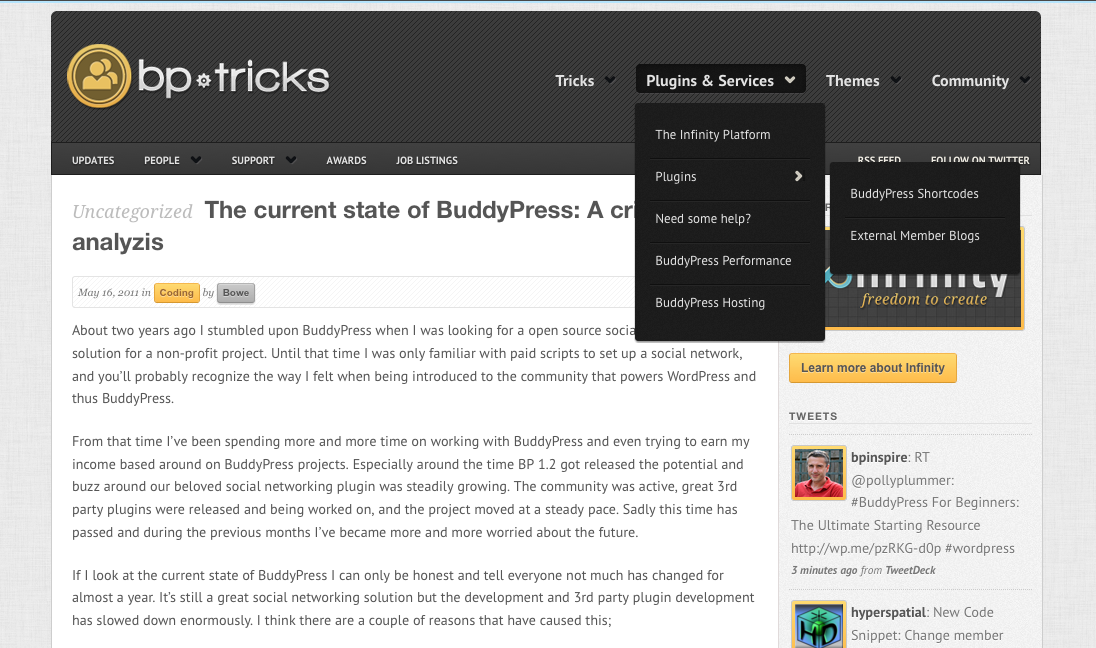
Now, I’m a ‘noob’ and am not at all qualified to debate the health or potential future of BuddyPress. I wonder if @boonebgorges @djpaul @r-a-y @hnla or some of the other pros have anything thoughts? It’ll be interesting to see the actual article once he finishes his work on the site.
Hello, I have installed :CubePoints + WordPress 3.1.2. + BuddyPress 1.2.8 + CubePoints Buddypress Integration 1.9.1
For some reason “points” is not appearing on the members profiles, and no CubePoints items are appearing on the menu bar. Had anyone else seen this issue? I am pretty stuck.
Thanks
I installed the buddy press plugin for WordPress and it told me my theme wasn’t compatible so I installed the BP compatibility that can come with the plugin when it detects your theme isn’t bp ready. Upon doing that it was like “these are your links to activities, members and forums along with registration which must be enabled. well mines not….How do I enable it?
I don’t see a “enable registration” any where. and the link they gave me is obviously broken because of that.
Ideas?
I was extremely excited about BP as an extension of the free, public site I’ve created for local and family historians with research interests in a specific geographic location. BP provides precisely the community functions I want to have available for researchers to share.
I really like the WP theme (Panorama) that I’ve set up.
Unfortunately, I don’t like the display of BP content within the theme.
I’m not great at creating CSS, but I can tweak existing code — if I know what to do.
What I want is the forum portion to display much like it is here on the buddypress.org site. However, what I’m getting is a display that looks like the CSS file is missing or broken. I can’t figure out how to attach a file to a post, so here is a link to a screen shot — https://docs.google.com/leaf?id=0B0bN3UCRBvwDNzhmZGNkYmQtYTVkNC00YTQwLWI1ZDQtNmExMzQ2Yjc5YjY0&hl=en&authkey=CNeT6rQI
Is it possible in WordPress to run a secondary theme for a system like the bbforum portion of BuddyPress, leaving the main theme in place for everything else?
Any assistance would be tremendously appreciated!


