Try removing that code from your functions.php as a start, that’s nav related. This is pretty much the ideal use case for one of my more obscure plugins – https://wordpress.org/plugins/bp-template-overloader
Notice	bp_nav was called incorrectly. These globals should not be used directly and are deprecated. Please use the BuddyPress nav functions instead. Please see Debugging in WordPress for more information. (This message was added in version 2.6.0.)	6
+
wp-includes/functions.php:4667
Plugin: buddypress
Notice	bp_nav was called incorrectly. These globals should not be used directly and are deprecated. Please use the BuddyPress nav functions instead. Please see Debugging in WordPress for more information. (This message was added in version 2.6.0.)	5
+
wp-includes/functions.php:4667
Plugin: buddypress
Notice	bp_nav was called incorrectly. The bp_nav and bp_options_nav globals should not be used directly and are deprecated. Please use the BuddyPress nav functions instead. Please see Debugging in WordPress for more information. (This message was added in version 2.6.0.)	1
+
wp-includes/functions.php:4667
Plugin: buddypress
I get those error with my 4.2.0 version of BP. I’ve got custom bp templates in my child-theme, but none using bp_nav. All of these issues are related to the core files of the buddypress plugin. How can I resolve this issue? Is it normal?
To add my two cents, There is another plugin that allows file as well as image
BuddyPress Xprofile Custom Field Types
Regards
B
What are you looking to upload? The only plugin that includes an upload feature that I’ aware of is https://wordpress.org/plugins/buddypress-xprofile-image-field/
Hi,
I would like to add some users to groups according to their profile fields selection. For example, in the users profile there’s a “city” field and the user select “london”, so that user should be added to the group called “london”. How can I do that?
I checked a couple of plugins but are old or they don’t do what I need:
BuddyPress Group-O-Matic
https://wordpress.org/plugins/buddypress-auto-group-join/
Thanks!
Ok wow what a ride. so I went to do that and was met with white screens trying to login to WordPress. So I went through each plugin in my wp-content/plugin directory and renamed them to find the culprit. It was the buddy press plugin once renamed, the white screen went away.
Once I try to reinstall buddy press, it gives me a white screen again, even when I had 2017 theme activated.
Luckily some how by reactivating my theme Aardvark and then reinstalling buddy press I am not getting the white screen. but alas.. still no activation email.
One thing I notice is why when I go to Emails then Customize, it goes to bring up the Buddypress options and then quickly disappears to be replaced by other list of Customizing elements to which that isn’t one of them?
I caught a quick screenshot before it switched .. I suspect I need these options yes? Any idea why it disappears on me?
I don’t have a url for the screenshot..only image.
you could email support@idreamer.ca
Thanks
Lucinda
In wordpress Users /Profile Fields
Date selector will not change date format. 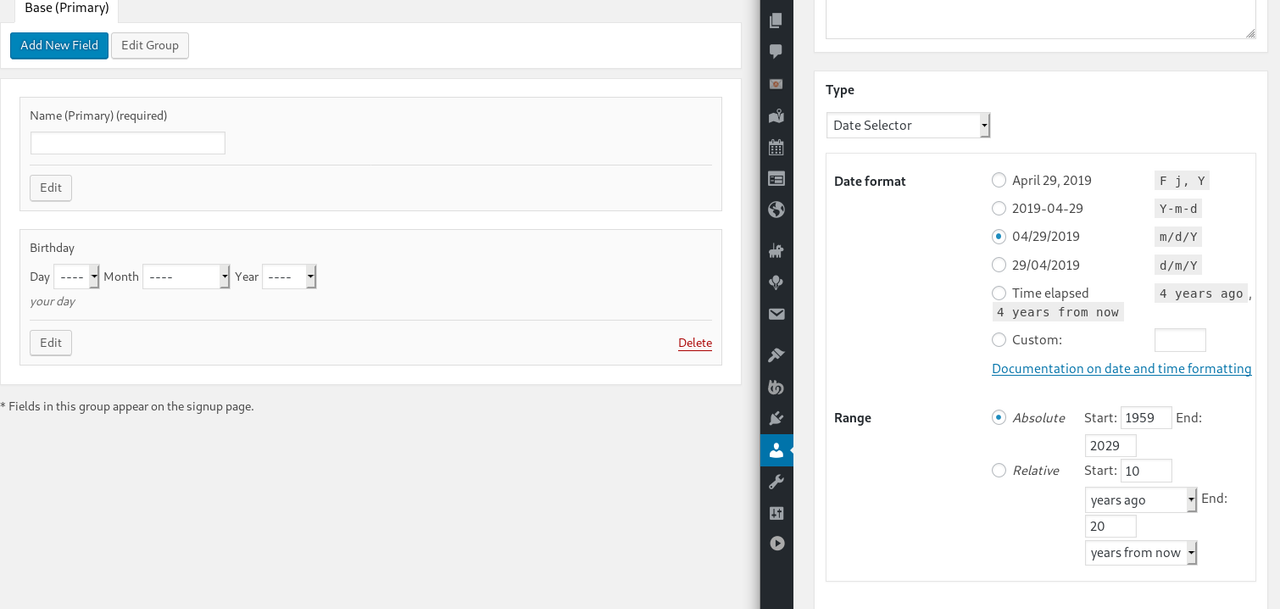
WordPress 5.1.1; BuddyPress 4.3.0
I migrated an existing site to multisite. Now the following Dashboard entries are not shown: Activity, Groups. I can live without Activity, but I need Groups in order to add users to the correct groups. How do I get the Dashboard item back? Alternatively, how do I add people to a Group without the Dashboard item?
Buddypress version 4.3.0, wordpress version 5.1.1
site: https://meroaawaz.com/community/members/bhattarai1995/groups/
the Create group funtcion given by buddypress is not available in my site, i have tried uninstalling and re installing buddypress as well as all the other plugins, also the admin settings are set such that users can be allowed to create groups.. please help me..
What does profile filters mean?
Profile fields ?
If so, perhaps a profile fields search plugin is what you want.
I was able to find this plugin which made life easy. Once again, thank you for your help.
Search & Replace
Search Replace for database.
Most. maybe all, of the do_action hooks you need are in this file: buddypress\bp-friends\bp-friends-functions.php
I’ve just added that restriction into my plugin https://wordpress.org/plugins/bp-messaging-control/, I’d welcome your feedback, but make it on the plugin forum, this ones only for BuddyPress.
It’s in the Public Message Character Restrictions in Settings>>Messaging Control
You should ask on the bbPress forums regarding limiting the topic size.
For private messages and also Activity update size restrictions I’ve just added those restriction capabilities into my plugin https://wordpress.org/plugins/bp-messaging-control/, I’d welcome your feedback, but make it on the plugin forum, this ones only for BuddyPress.
Yes that’s correct, BuddyPress just uses the WordPress Login, there’s quite a few alternatives.
If it still does not work with BuddyPress deactivated then something’s blocking WordPress itself. One thing to check is if you have ever installed a cache, some of them leave files behind, it can be quite a job truly uninstalling them.
if I deactivate Buddypress, issue persists. I am totally lost here.
the strange thing alse is that the log-in page is has the wordpress logo, is this correct?
Hi, new in WordPress and Buddypress, Following some youtube tutorials, I have installed buddypress and configured it. Everything fine but I have few issues:
1. The Member page is shown whe users are logged in (which is fine) but also when users is logged out (this is the issue that I have. anyone (logged in or logged off) can see and access to the Member page.
2. When a user is registered, receive the e-mail and activate the account (in the WordPress dashboard the users shows as ACTIVE), then the user tries to access to the site using the user and password but get an error that the information is incorrect and is unable to access the site. Me as administrator I am the only one that can access the site.
3. if that user clic the “Forgot password” option, a message indicates that an e-mail was sent to the e-mail but is never received.
4. In the Member page, only my user is listed as active, even when the site has several active users.
I know there are several topics, but any help you can provide, will be very much appreciated.
Thanks
Yep I’ve tested it and hidden groups are not displayed in the users group lists, neither with BP Legacy nor BP Nouveau.
Could you raise a bug report of Trac?
https://buddypress.trac.wordpress.org/
hi
WordPress 5.1.1
with the BuddyBoss theme
and BuddyPress 4.2.0
I’m sorry if this is not the place for this kind of question but how many times I had a problem I could always count on help.
The question refers to BuddyPress Greeting Message.
The last update was 3 years ago and the support is rather not active. Therefore, please help.
How to make the message visible only in the profile of the logged-in user?
I tried to do something about it, unfortunately, without success.
Can I count on help in this matter?
or maybe an alternative to this plugin?
please help
ok I understand though it could be clearer also on BP side, because for the login… they send to a WordPress login!
And all internet says that both bbPress and BuddyPress come from the same company!
I started by googling “free online forum platforms” and then saw there was a platform by wordpress… etc, and I finished here.
We have no relationship with wordpress.com, BuddyPress is a free plugin, available to anyone using a wordpress.org self hosted site. it’s the wordpress.com info that would need to tell you this, not BP.
But also in BuddyPress, they should say that intalling BuddyPress in wordpress is only for paid plans. I did not see it mentionned, so it seems possible to do for the free plans as well….
We don’t really support wordpress.com here, they have their own support but my understanding is that you don’t get to install other plugins on the free plan.
https://balancefeeling.wordpress.com
this is also why I found strange I had to register a second time to be able to post here! They would not admit my address to log in!


