Forum Replies Created
-
In reply to: Core Pages not Populating
What didn’t work ? And don’t use Ultimate Member while trying to debug your install…
Where is BP installed ? Where do you try to register a new user ? What is the registration URL ? And give more details about your install please.
In reply to: BP Restrict Signup By Email Domain – not workingHi,
BuddyPress doesn’t restrict signup by email domain. If you have issues with a third party plugin, please ask for help on their support. This is specially the case for premium plugins, as we have no access to the code.
In reply to: PHP error messagea php notice is generally harmless and doesn’t compromise the way your site works.
If you deactivate wp_debug, this message won’t show publicly. On a production site, you shouldn’t activate wp_debug anyway.If you’re sure you isolated the culprit, open a ticket on the plugin support and give any details who can help the author to reproduce the issue and to publish a fix.
If you aren’t a php freak, you cannot do more than wait for a new version, but you can continue to use the bugged version.
In reply to: Core Pages not Populatingdeactivate all plugins but BP and restart BP’s setup
BP pages should be empty, without any shortcode or template assigned. Once created again, clear eventually the trash, your pages must be unique !
Once ok, go to permalinks, and choose any option but “default”.
In BP pages settings, you should have a page for:
members
activities
groups (if you use groups)
register &
activation (if you allow user registration)Reading the codex will help you to clarify how to proceed.
Your snippet use some deprecated code. (
bp_is_page( BP_MEMBERS_SLUG )since 1.8)Here a similar one who let you make BP almost private…
function bpfr_guest_redirect() {
global $bp;
// enter conditional here
   if ( bp_is_activity_component() || bp_is_groups_component() || bp_is_blogs_component() ||  bp_is_members_component() || is_bbpress() ) {

// not logged in user - user will be redirect to any link to want
   if( !is_user_logged_in() ) {
      //wp_redirect( get_option('siteurl') ); //back to homepage
      //wp_redirect( get_option('siteurl') . '/intranet' ); // back to whatever page
      wp_redirect( get_option('siteurl') . '/register' ); // back to register page
      }
   }
}
add_filter( 'get_header', 'bpfr_guest_redirect', 1 );
In reply to: Blog subscriber vs. BP userHi @vukhachminh, @doulos12,
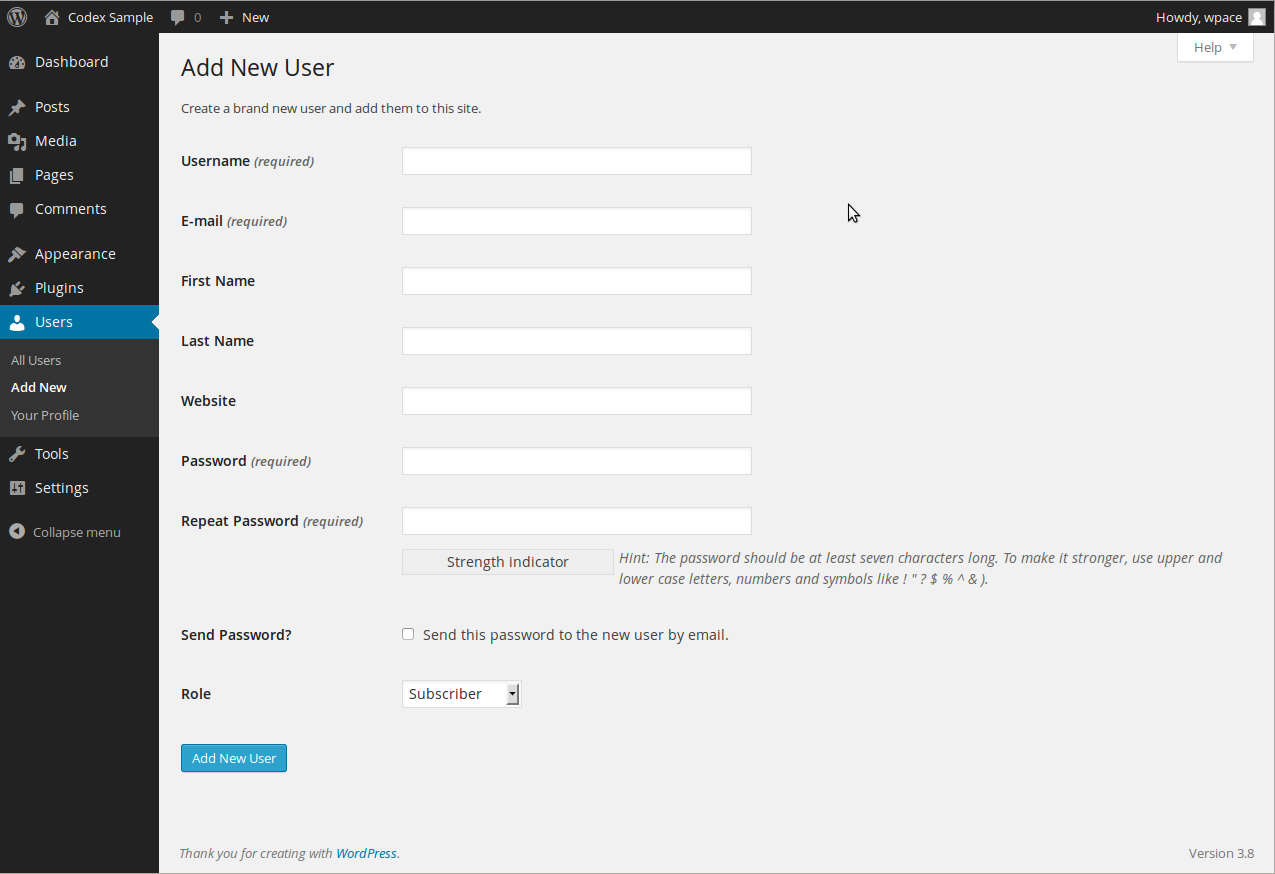
– “subscriber” is wp’s default role. This is site admin territory and is handled on this screen.
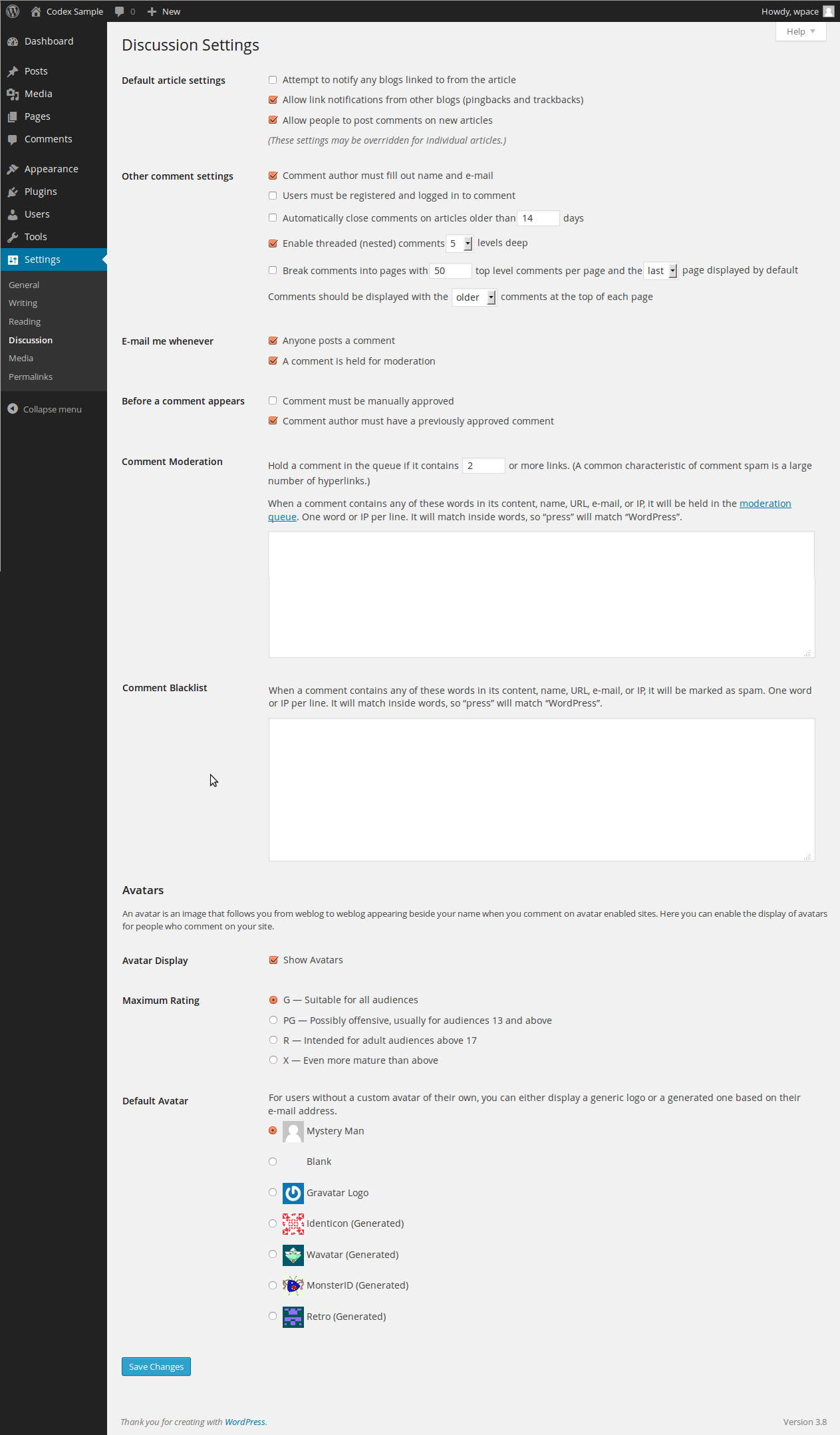
– who can comment can be defined in wp settings.
Hi,
sounds like an issue with customisation. Which one is difficult to say, specially if what you tell on this topic is related to this one !
Socialize was updated today (6 dec. 2016). Do you use this new version ?
As you use a child you need to check around it too, as BP 2.7 introduced some template improvement. Those may be in the parent now, but what with your custom child files or functions ?Is “xprofile component” the feature exposed in “Settings > BuddyPress” named “Extended Profiles” (at the very top of the config page)? (It probably is, but I just want to be sure, thanks.)
Yes it is !
it is possible […] to effect the change of either the email or password fields?
Yes it is ! from here: your-site.abc/members/USERNAME/settings/ – the link can be found under the top right usermenu on wp’s toolbar: username > settings > general OR/AND on the buddymenu, when you’re on your profile: Settings ! And that’s it !

For all other BP related questions, please read through the codex, i really have no time to (re)write all explanations. Sorry, hope you uderstand.
In reply to: What WP theme should I use for BuddyPress?i’ll try to explain. You’re using WordPress and a plugin called BuddyPRess which add a community dimension to WP.
Members are the heart of BP. Anything done by the plugin will return something related to members: activities, friendships, dicussion and much more.
How is this possible ?
Because WP let you register members separately. To do this, WP ask for a username(pseudonym), a password and a valid email.You cannot avoid this, whatever plugin you use. It is how it works.
Now, we have 2 different question in this topic.
1) how to restrict access to profile settings ?
2) do we need a plugin for that ?About point 1
WordPress was designed to be a blog builder. A CMS with one blog author who was mainly also the site
owner/builder… This changed with the years and today, you can handle a multiauthor blog.When you install BP, you can still handle a multiauthor blog (or even blogs) and also a big community of different users, whith different (wp) roles.
What hasn’t changed is the way WP handles authors(or members): from within the dashboard, whatever the role.
When BP is activated, and if you use the xprofile component, you can build a registration form who is added to the original wp registration form. This form is then available on each user profile and can be modified from there.
To restrict user access to wp-admin, you can use different technique. This depends of your coding knowledge or working philosophy, with custom code or applying some plugin solution.
This is independant of BuddyPress and out of the scope of this forum. Just remember that BP let you access to your credentials from front-end.
About point 2
– in theory, you don’t need a plugin
– you always need to read about a plugin before using it.
For example, the workaround mentionned in this topic about the usage of Profile Builder.
– here a recent tutorial – for beginners – you may found more advanced advice by googling about “wordpress restrict dashbord access”.When you read the teaser on that plugin page, you already should have understand that you don’t need it !
Simple to use profile plugin allowing front-end login, user registration and edit profile by using shortcodes.Astonishment ! BuddyPress offers exactly the same options (among others).
What ever plugin you use, the regiter process of WordPress won’t change, and the user list or the user data will always be at the same place. What plugins do (most of them), is to modify the appearance of that process.
What you can also do is to remove all WP related items from the toolbar, if you use it. This is widely documented and discussed on WP’s support and codex. It’s WP territory and has nothing to do with the fact you use BuddyPress.
Admitting you found a solution for the backend, you need to use BP’s login widget. From there, users can enter the site. And if they loosed their password, they can ask for a new one from there (usually the sidebar, on front-end).
In reply to: How can I get a registration shortcode?Hi,
BuddyPress use templates to show his stuff.
The registration is part of WP and BP’s xprofile component add only some additionnal fields to the original register form.If you open a template file you will see a lot of code and many lines starting by do_action( ‘something’ );
These files are all stored in bp-templates/bp-legacy/buddypress/
Now you have already the where and the what. here’s the how.
To show some text on the register page you have two options:
1) altering the whole template file bp-templates/bp-legacy/buddypress/members/register.php
2) add what you want by using an action hookThe second method is the fasted and the easiest. You just need to write a function and you’re done.
function valeriemanne() {
   echo 'Here i am !';
}
add_action( 'bp_before_register_page', 'valeriemanne' );
Add this to your child theme functions.php file or into bp-custom.php
WordPress codex references
add_action
Child themeHi,
Is there any easier way
this question may be answered if you provide first the complicated way !
if you want to use BuddyPress, you need a page for each active component. These page are there essentially for internal purpose and are working as placeholder or if you prefer, as permalink targets. Even if you use custom registration or pwd handling, you need them. What hapen in the template (ie. register.php) is to you, but you need to use a page slug.
Members is mandatory and is the only page you shouldn’t never delete.
In reply to: Forum IssuesMa qué pasa hombre ?
No saves !
Oy… 🙂In reply to: Profile & Cover Image NOT WORKINGhi @rodgerrmi,
“not working” is not an issue, but an observation. Please describe what happen so we’re able to reproduce the issue!
As the Enlighten theme support needs to be logged in, and i don’t want do that, provide the question and answer(s) you already received from support.
Apparently, once this theme is activated, no file can be uploaded.
In reply to: Use default WP registration page in BuddypressHi @kaosone1975,
add those snippets to bp-custom.php and give a try:
function bpfr_redirect() {

	if ( bp_is_current_component( 'register' ) ) {
		wp_redirect( get_option('siteurl') . '/wp-login.php?action=register' );
	}

}
add_filter('get_header','bpfr_redirect', 1 );

function my_disable_bp_registration() {
	remove_action( 'bp_init',    'bp_core_wpsignup_redirect' );
	remove_action( 'bp_screens', 'bp_core_screen_signup' );
}
add_action( 'bp_loaded', 'my_disable_bp_registration' );
In reply to: Get all users that posted in bbpress forum… and that questions related to bbPress can be asked on the bbPress support forum 🙂
In reply to: Registration form => 404 not foundHi,
You have to install BP correctly on WordPress as very first.
This means particulary that you use WordPress with one of default’s Twenty theme.
– install BuddyPress
– activate the component you want to use
– ensure that each component has his own page
– pretty permalinks must be activated too.To get a proper register page, allow user registration in WP settings and add manually, if not created automatically, a “register” page to BP.
NOTE: BP pages are not usual WP pages. They are only placeholder (a unique ID in the wp ecosystem) where BP will show dynamic content. These page must be unique and shouldn’t be asigned to any template or model. Give them a title and you’re done.
once WP+BP work correctly together and you can access to the register page without trouble, you can be sure that this couple is definetly OK.
No it’s time to activate a custom theme if you use one. An if something gooes wrong at this stage you’re sure it’s the new theme who is the culprit.
And if the new theme is working correctly with WP+BP, you can install plugins.
And again, WP+BP+Theme = OK, but what about the plugin ?
Easy to understand, easy to build, very annoying to write this for the 589 000 time, but still the only way to install BP.
On your side, you need to follow these steps, but also to read the documentation from codex and of course, from any additionnal plugin you want to use !
That said, be warned that we can’t assist you on this forum with third party premium theme or plugins as we have no free access to their code.
Hem… you’re free to use BuddyPress to your needs, but i guess there is a moment where you reach the software limit.
If you publish private activities in the public activity stream, what do you expect ? To compromise privacy or the way the software works ?
As with 99,9% of software, you have to answer by Yes or No to each option you find. For groups, you have 3 options: 1 OR 2 OR 3 and not a bit of each, depending the current wind speed ! It’s private or it’s public, but not Y and N.So far i know, hidden group members see the hidden group activities when they are on their group activity page. A group is hidden means that “public” can’t see/access to it, so you can’t see those activities on the site activity page.
In reply to: show random profilebp_the_site_member_random_profile_datadoesn’t exist.Current version use only
bp_member_random_profile_data: Output a random piece of profile data for the current member in the loop.
– or
xprofile_get_random_profile_data: Fetches a random piece of profile data for the user.Find more here.
In reply to: [Resolved] get profile group namePerhaps you can spare time and use https://wordpress.org/plugins/buddy-progress-bar/ ?
In reply to: Allow user to take screenshotIn reply to: Buddypress not showing avatarsThe theme maybe ? Have you tested with a twenty theme ? What goes on when WP Social is deactivate, with twenty and your actual theme ?
halo @verenar,
you already have that behave, in the “all members” activity stream.
Problem is not the behave, but your 761 members which activities are all related on the same tab : all members ! OK, it’s not easy to see who, what and where and most informations are also available elsewhere.Because of this, BP brings by default allactivities sorted by “all”, and for each member, the possibility to get quick access to his group or friend activities.
If you don’t want multiple access, simply remove the tab ! Ganz einfach.
See here how to do that.In reply to: Allow HTML Attributes in Profile Description FieldHi,
try by adding
remove_filter( 'bp_get_the_profile_field_description', 'stripslashes' );


