Skip to:
Content
Pages
Categories
Search
Top
Bottom

Search Results for 'buddypress'

Viewing 25 results - 32,701 through 32,725 (of 94,540 total)
  • Author
    Search Results
  • #163021
    JamesonBlake
    Participant

    I created pages for activity stream, registration, members, etc. In the buddypres setting I set all these pages up for their jobs. Now whenever I try to go to one of those pages it just brings me to the home page. What going wrong? Thanks for your help.

    #163020
    PleaseHelpMePlease
    Participant

    Hello,

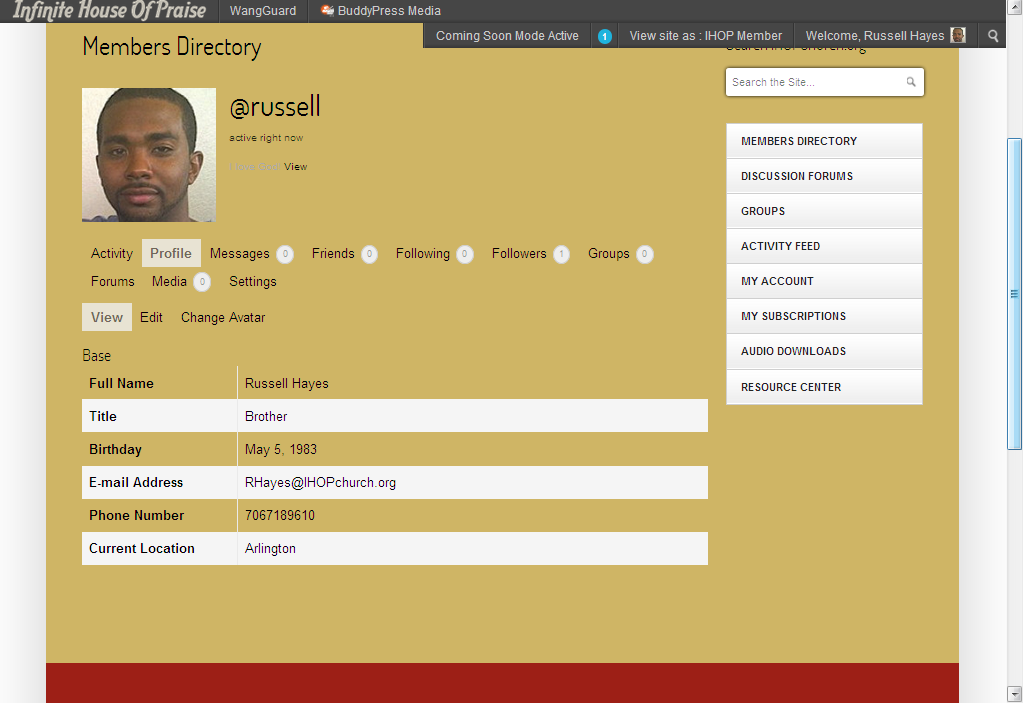
    I am not exactly a “noob” to code editing but nowhere near “experienced” either. I have installed BuddyPress 1.7 on my WordPress 3.5.1 but the pages look dull with my theme colors. I was hoping someone could help me do the followng:

    1. Add a white box behind all of the profile info. It looks bad on the tan background. (See Sample 1)
    2. Make the Tabs at the top actually look like tabs. I will be earasing a few so they’ll fit on one line. (See Sample 1)
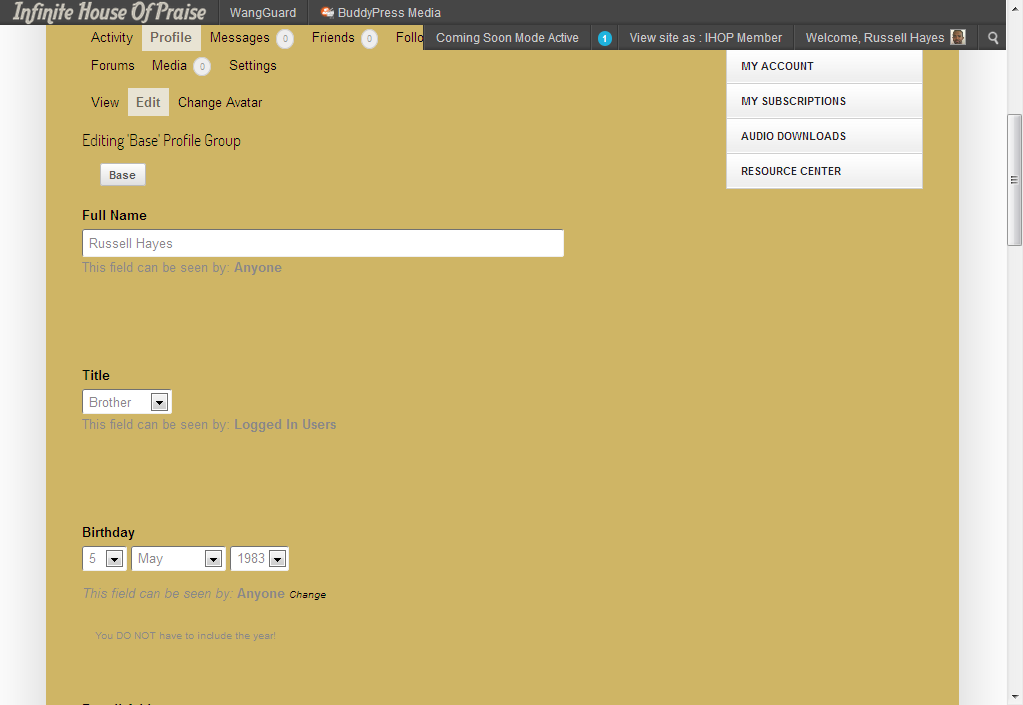
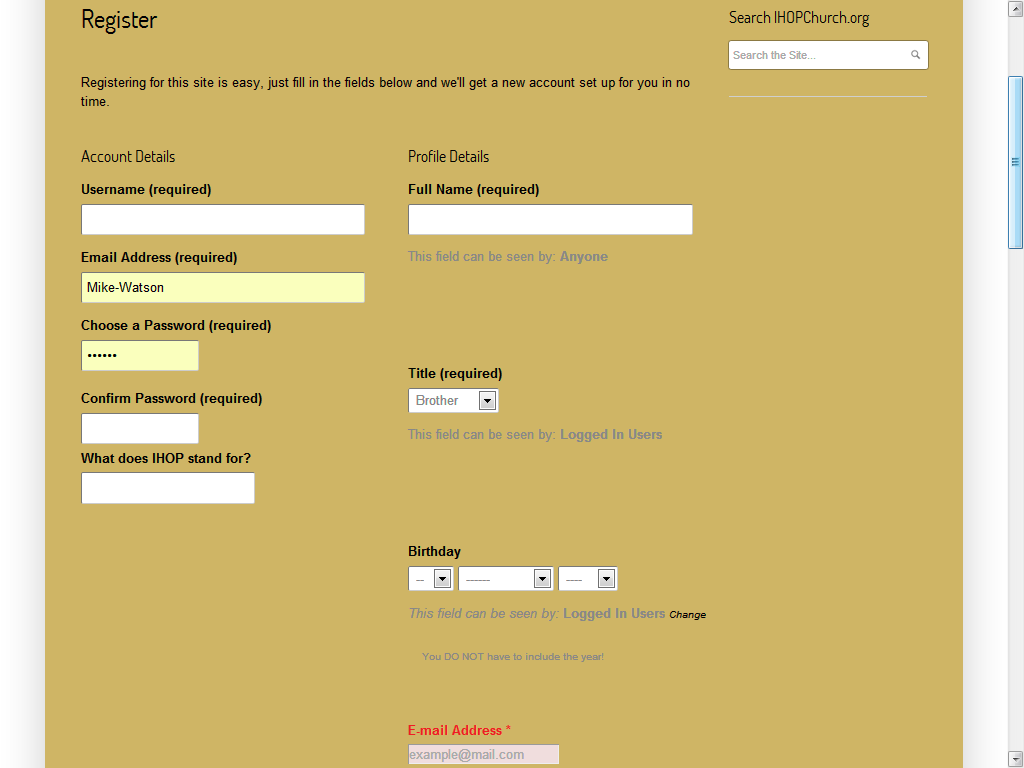
    3. Close the gaps in my profile fields. As you can see they are too spaced out and I don’t understand it. It look terrible on the registration page as well. (See Sample 2 & 3)
    4. Change the grey font color to black as I cannot find where the CSS for this font color is located! (See Sample 2)

    If you can help with ANY of these 4 issues, I’d GREATLY appreciate it! I believe they are issues that would be simple to fix. Thanks!

    Sample 1: http://i1201.photobucket.com/albums/bb354/FlashyTees/Sample1_zpscc6c4f4a.png
    Sample 2: http://i1201.photobucket.com/albums/bb354/FlashyTees/Sample2_zps9010516f.png
    Sample 3: http://i1201.photobucket.com/albums/bb354/FlashyTees/Sample3_zpsc0b69739.png

    #163018
    Scott
    Participant

    Finally found the fix for this so in case anyone else needs it. Add the below to bp-custom.php

    
    /* This fixes the Multisite avatar problem */
    function nfm_bp_avtar_upload_path_correct($path){
        if ( bp_core_is_multisite() ){
         //   $path = ABSPATH . get_blog_option( BP_ROOT_BLOG, 'upload_path' );
    		$path = ABSPATH . 'wp-content/uploads/';
        }
        return $path;
    }
    add_filter('bp_core_avatar_upload_path', 'nfm_bp_avtar_upload_path_correct', 1);
    
    function nfm_bp_avatar_upload_url_correct($url){
        if ( bp_core_is_multisite() ){
            $url = get_blog_option( BP_ROOT_BLOG, 'siteurl' ) . "/wp-content/uploads";
        }
        return $url;
    }
    add_filter('bp_core_avatar_url', 'nfm_bp_avatar_upload_url_correct', 1);
    
    #163019
    careythegreen
    Participant

    OK @bphelp – I’ve discovered some of my own answers. I see that the @name is the user name they chose and cannot be changed. And… I just noticed the grey area of options below the standard WP options, which of course are the options for buddypress. So… poking around long enough I’ve answered my own questions.

    #163016
    ProfC
    Participant

    Hi, I have the same problem, even if I didn’t move the site. Many users of my social network have lost their Avatar and Gravatar. Instead of the original image I can see a broken link icon. If I try to upload a new image I cannot do it, It gives me back a black frame. The Avatar directory is the default one, wp-content/uploads/avatars. Should I change this directory and where?

    Buddypress 1.7
    WP 3.5.1

    #163014
    aces
    Participant

    @fagiano1973
    What did you try exactly?

    There is a problem with buddypress.org and older ‘code’ settings in posts. The ` at the begginning and end should not have been included – so there should not be a character on the same line before add_action or after the final }

    ( I would repeat the function here but the last time I did that buddypress.org changed again and the original looked better – EDIT: see http://pastebin.com/sSBGjPNi )

    It is difficult to diagnose what is probably a css problem with the information you’ve given. To help find or define the problem more precisely try using the developer tools in Chrome, Safari or Internet Explorer, or use Firebug with Firefox, or Opera’s Dragonfly …

    #163011
    bp-help
    Participant

    @careythegreen
    Unless you have introduced some custom code then there is a link in the toolbar just like the one that appears on buddypress.org. Hover over howdy USERNAME, profile/edit. This is pretty standard so it should be there. If you want to add a a direct link to save confusion then use this code in your header.php:
    http://pastebin.com/Eg2HCKrM
    wrap it in a div and style as you wish!

    #163008

    In reply to: Can't create a group

    luccame
    Participant
    #163004
    akukskuks
    Participant

    Having the same problem here, James. Can’t create any groups! Does anyone have some advice for us??

    partytrotter
    Participant

    @bphelp, thanks a lot for the help, but I tried adding that line and it didn’t do much :S Here is what my code looks like without the line, where should I add it? Also, just to be sure I am modifying the right file, i took the members-loop.php in the folder of the current theme I am using, is that correct?

    <?php

    /**
    * BuddyPress – Members Loop
    *
    * Querystring is set via AJAX in _inc/ajax.php – bp_dtheme_object_filter()
    *
    * @package BuddyPress
    * @subpackage bp-default
    */

    ?>

    <?php do_action( ‘bp_before_members_loop’ ); ?>

    <?php if ( bp_has_members( bp_ajax_querystring( ‘members’ ) ) ) : ?>

    <div id=”pag-top” class=”pagination”>

    <div class=”pag-count” id=”member-dir-count-top”>

    <?php bp_members_pagination_count(); ?>

    </div>

    <div class=”pagination-links” id=”member-dir-pag-top”>

    <?php bp_members_pagination_links(); ?>

    </div>

    </div>

    <?php do_action( ‘bp_before_directory_members_list’ ); ?>

    <?php cc_get_displaymode(‘members’)?>

    <?php do_action( ‘bp_after_directory_members_list’ ); ?>

    <?php bp_member_hidden_fields(); ?>

    <div id=”pag-bottom” class=”pagination”>

    <div class=”pag-count” id=”member-dir-count-bottom”>

    <?php bp_members_pagination_count(); ?>

    </div>

    <div class=”pagination-links” id=”member-dir-pag-bottom”>

    <?php bp_members_pagination_links(); ?>

    </div>

    </div>

    <?php else: ?>

    <div id=”message” class=”info”>
    <p><?php _e( “Sorry, no members were found.”, ‘cc’ ); ?></p>
    </div>

    <?php endif; ?>

    <?php do_action( ‘bp_after_members_loop’ ); ?>

    #162998
    careythegreen
    Participant

    S2member integration… I’m curious if any of you have integrated BuddyPress with S2Member. I’m still testing out the combination and have a few questions.

    Can I create “fictional” members so that I can see how the interaction works? I know I can in BP but S2Member requires them to go through Payment first… unless there’s another way to create a user within S2M that doesn’t require that. Anyone?

    #162997
    fagiano1973
    Participant

    @aces : Thank you for your help but it don’t work. I recevied fatal error message

    @hnla : i am sorry, buddypress 1.7 wordpress 3.5.1 bbpress 2.3.1 Browser : Chrome last version.

    thank you

    #162994
    aces
    Participant

    It’s not clear what your problem is, so if the following isn’t any help then can you state what theme you are using and a URL where the problem can be seen?

    https://buddypress.org/support/topic/buddybar-background-color-overlap/#post-161001 ?

    #162991
    fagiano1973
    Participant

    After update buddypress to 1.7 version, when user do login a white line appears under the head menu. If user logout this line disappears.
    Where is the problem? thank you

    We are using the buddypress and buddypress multilingual plugins on this site –

    WordPress – 3.5.1
    Buddypress – 1.6.2
    Buddypress ML – 1.4.0

    http://www.kilovekk.no/klubb/grupper/

    Creating and deleting groups all work fine. However when i click to join/leave/request memberships on groups the page reloads and does nothing? I’ve tried a few things including changing permissions each group etc but nothing seems to be working. I get no errors when using the wp_debug either.

    Any help would be great!

    Thank You!

    #162987
    feeldesign
    Participant

    HI
    Trying to set up a Buddypress site, have installed various plugins and a them, along with Buddypress itself.
    However, when you view http://retiredandkicking.com/ the Groups, Members, Register etc pages are blank, despite being specified in the admin, I’ve installed bb press which seems to have got forums showing but I’m at a loss as to why it’s blank on those pages, where would that content be drawn from?
    Buddypress Version 1.7
    Wordpress 3.5.1
    Theme Buddyboss v 2.1.7
    I’m getting a lot of page not found errors too on create an account pages

    I’ve obviously had some issue with install, but not sure what – tried re-installing but no luck!
    Help!
    James

    #162984
    briffel
    Participant

    Hi @mercime, the groups are currently hidden, but the problem is that everything appears twice.

    So it says All groups twice etc. and it’s like this one every page.

    Is there a way to stop this happening?

    #162983
    kukac7
    Participant

    I have a similar problem.
    Last vanilla WP / BuddyPress / bbPress.
    Hostgator is a repository of the problem.
    Specifically it:
    http://cyberdurer.com/sotephd/groups/csoport/forum/topic/teszt/

    Thanks for your help.

    #162982
    kukac7
    Participant

    I have a similar problem.
    Last vanilla WP / BuddyPress / bbPress.
    Hostgator is a repository of the problem.
    Specifically it:
    http://cyberdurer.com/sotephd/groups/csoport/forum/topic/teszt/

    Thanks for your help.

    #162981
    kukac7
    Participant

    I have a similar problem.
    Last vanilla WP / BuddyPress / bbPress.
    Hostgator is a repository of the problem.
    Specifically it:
    http://cyberdurer.com/sotephd/groups/csoport/forum/topic/teszt/

    Thanks for your help.

    #162977

    In reply to: Basic Page Template

    Hugo Ashmore
    Participant

    You can create a template to override BP theme compat use of page.php i.e buddypress.php located in your themes ‘buddypress’ or ‘community’ folder, in that if you wanted to further manage things you could use conditional functions for various BP views.

    Please check the BP codex as the above is explained in a guide or two, look under ‘user’ or ‘1.7’ in the codex.

    #162976
    Matzze
    Participant

    Hi everybody 😉

    Is there a way to make a custom page template for activites, members etc. pages? Something like “page-activitites.php” in my theme folder?. Working with the buddypress directory in my theme works, but content is always embedded in standard page template content.

    THX.

    Hugo Ashmore
    Participant

    How have you got members following posts or pages, that isn’t a normal default BP action. If you have a plugin providing extended functionality that allows this then you need to provide that information as without it it’s not possible to provide suggestions. Either way this sounds like a job for a developer I doubt a simple answer can be given to tell you how to achieve this.

    thatmtnman
    Participant

    Dear Mercine and Paul,

    I got the issue resolved by deleting the plugin and redownloading and reinstalling it. Its not crashing the page any longer, but I haven’t done anything with it yet.

    Thank you so much for your help. Its a wonderful community.

    regards…

    #162971
    aces
    Participant
Viewing 25 results - 32,701 through 32,725 (of 94,540 total)
Skip to toolbar