Search Results for 'buddypress'
-
AuthorSearch Results
-
November 12, 2011 at 4:08 pm #124252
justbishop
MemberYes, it’s built into BP. Just type the person’s @loginname into your wall post and it will link to their profile.
November 12, 2011 at 1:34 pm #124248In reply to: “Official” BuddyPress Child Themes Broken?
Paul Wong-Gibbs
KeymasterWordpress.org theme previews don’t work for BuddyPress themes, because wordpress.org doesn’t have BuddyPress installed. I think there’s very little chance of this situation changing. I’ll contact the company who runs WordPress.org (Automattic) and pass the feedback on.
Regarding plugins appearing out of date; the BuddyPress core team has no involvement or responsibility for the vast majority of those plugins. If someone decides to stop contributing to a plugin, then it will eventually break and stop working, unless someone contacts the original author and they agree to take ownership of it.
It’s also worth noting some plugins may work fine with the current version of BuddyPress, and the author just hasn’t bothered with a release to update the “tested up to” version number.November 12, 2011 at 12:38 pm #124244In reply to: MoviePress and Buddypress
gvworker
MemberYes, I totally removed the BuddyPress. I already followed given instructions to remove BuddyPress. Is there some other tables or database entries expect wp_bp_ tables?
November 12, 2011 at 12:27 pm #124243In reply to: MoviePress and Buddypress
@mercime
ParticipantMake sure you totally deleted BuddyPress https://codex.buddypress.org/buddypress-site-administration/deleting-buddypress/
November 12, 2011 at 9:56 am #124219In reply to: Creating links to profile pages
dildosti
MemberUse BP Redirect to Profile for Buddypress plugin to redirect users to their profile page after login.
November 12, 2011 at 6:29 am #124240In reply to: Where to put my translations, or how to activate it?
ParticipantI would place mo and po in wp-content/plugins/buddypress-activity-plus/languages folder
November 12, 2011 at 6:27 am #124239In reply to: Paid membership and subscription plugins
peeld
ParticipantI’ve been trying to send a message to @Travel-Junkie but the BP site won’t let me, so here goes – @Travel-Junkie mentioned he was going to make a custom mod/hack to S2Member to get it to protect groups – did you ever get that to work? I had S2Member working with a bit of code in my functions.php file and it was AWESOME, till the BP 1.5 upgrade, and now it doesn’t work. I think they’re tired of me too, because although the customer support has heretofore been very VERY good, they finally just told me it was a custom hack and S2Member wasn’t designed for groups or group protection. Bleh. I must say that also there are some other functions that aren’t working as of late and the help has been a bit overtaxed, probably because of the overall generally good quality of the plugin. But I wouldn’t really recommend it at this time for specifically protecting BP groups, just since I haven’t been able to get a solution to what WAS working from either the folks at S2Member *or* the Buddypress.org forums. I finally resorted to posting a request for a custom PAID job to fix this, it’s maddening. S2Member doesn’t currently protect my groups, doesn’t populate the correct end date in subscriptions, so really, all it’s doing is redirecting users to a different URL if they’re not logged in.
The help forum has been pretty overwhelmed the last couple of days, I’ve been checking daily trying to solve my own issues
 November 12, 2011 at 6:06 am #124237
In reply to: People Registering ~ Having Issues
ParticipantIf you’re using a WP theme, you need to make it compatible with BuddyPress by installing, activating and going through the compatibility process via the BuddyPress Template Pack plugin. If this is the route you took, double-check in server that the register folder with 2 files within was transferred into your WP theme folder wp-content/themes/yourWPtheme/register
If you’re using the bp-default theme or a child theme of the bp-default theme, then double-check that the register folder with two files within is present in wp-content/plugins/buddypress/bp-themes/bp-default/register
November 12, 2011 at 6:01 am #124236ParticipantSomething like this http://buddydev.com/buddypress/blog-categories-for-groups-plugin/
November 12, 2011 at 5:58 am #124235Participantduplicate post of https://buddypress.org/community/groups/third-party-components-plugins/forum/topic/looking-for-a-group-category-plugin-with-specific-needs-1/.
Closing this — mercime.November 12, 2011 at 5:56 am #124234In reply to: [Resolved] Theme Compatibility Details – Memo Theme
Participant== However, in the step 3 of the compatibility process it only listed 11 files to change. ==
True, but the BP Template Pack plugin will be updated to list 16 files which need to be changed per link above https://codex.buddypress.org/theme-development/wordpress-to-buddypress-theme/#tplfiles== There are still some outstanding formatting issues. ==
True. I have updated code above in two areas above which I have placed [Updated …] info.
1. hentry-content should be entry-content
2. whole block of what to be replaced in bottom of registration/register.phpI have to ask whether you changed style in bp.css of the BP Template Pack plugin because the `div#item-header-content` is missing the `margin-left: 170px; ` and you need to bring that back.
In addition, you need to tweak some styles in your WP theme’s style.css file. Check out the additional tweaks on the BP components divs as a guide https://codex.buddypress.org/theme-development/theme-dev-bp-template-pack-walkthrough-twenty-ten-bp-1-5/3/
November 12, 2011 at 4:26 am #124232In reply to: buddypress google analytics plugin
codegene
ParticipantI tried a plugin in the wordpress directory called buddypress ananlytics but it is broken i.e not supportable with buddypress 1.5.1 . Does anyone know any another plugin which is supportable with buddypress 1.5.1
November 12, 2011 at 2:37 am #124229In reply to: Using this website aargh!
aces
ParticipantTry putting an @ sign in front of their user name ie @junglejinge
November 12, 2011 at 2:05 am #124226In reply to: Using this website aargh!
junglejinge
MemberAlso, when trying to include the code in my post, it didn’t allow it.
https://buddypress.org/community/groups/installing-buddypress/forum/topic/where-are-my-sub-menus/?#post-114995November 12, 2011 at 1:45 am #124215In reply to: Where are my sub-menus? – Graphene Theme
MemberHere is my more in depth post, as you will see I have tried many themes. Nearly all in the template pack. https://wordpress.org/support/topic/buddypress-theme-knocks-out-my-navigation-structure?replies=1
I have now decided to go back to graphene and install the compatibility pack but am having problems with that. I am following the instructions as per this post
BUT… after the index.php page I am supposed to do the blog page code, but the code is very different to the one in the example, hence I don’t know what to replace.e.g.
DELETED -content posted was from https://buddypress.trac.wordpress.org/browser/tags/1.5.1/bp-themes/bp-default/blogs/index.php
November 12, 2011 at 1:26 am #124213In reply to: [Resolved] Adventure Journal theme
ParticipantYou’re welcome.
== Which file do I edit to get the BP Album profile page to display my style? ==
Not sure. Please post at https://buddypress.org/community/groups/bp-album/forum/ You can refer them to this post if needed.November 12, 2011 at 1:20 am #124212Participanthttp://www.moe.co.uk/2009/08/17/php-running-under-mod_fcgid-read-data-timeout-in-40-seconds-on-plesk/
Btw, where are you hosted?November 12, 2011 at 12:33 am #124208In reply to: lost in buddy press
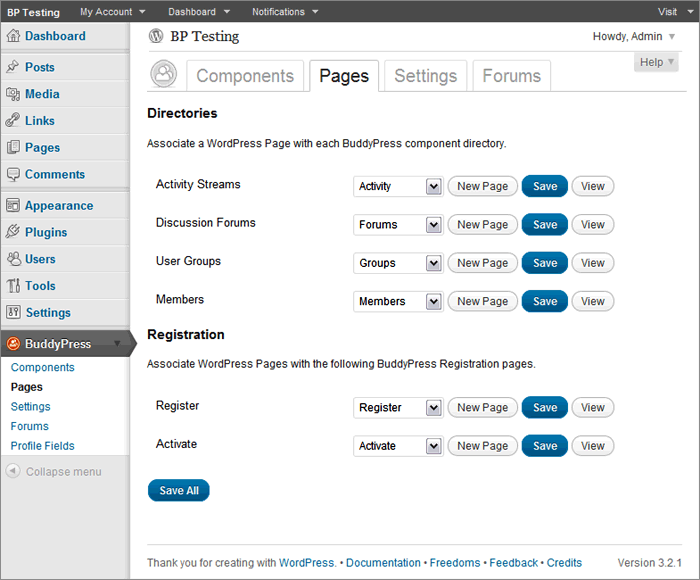
Participant== … a page with directories and registration that have drop down menus to create new pages to associate or pick an existing one. I’m not sure what to do here or if I made a new one what to call it? ==
If you had a default installation in BP 1.5 before upgrading to BP 1.5 and did not create Pages which have slugs like that of the BuddyPress components, then choose the corresponding Page in dropdown per BuddyPress component if it’s there.
 November 12, 2011 at 12:24 am #124207
In reply to: How to fix this?
Participant@welvincudas you need to complete Step 3 of the BP Template Pack compatibility process. If you need assistance, open up your theme’s page.php file, select all and copy, and paste onto pastebin.com. Click submit and post the generated URL here.
November 11, 2011 at 11:13 pm #124205ParticipantIllustrated guide to setting up BUddyPress group forums and/or sitewide forums coming soon.
November 11, 2011 at 11:06 pm #124204In reply to: buddypress google analytics plugin
Participantclosing duplicate of https://buddypress.org/community/groups/third-party-components-plugins/forum/topic/buddypress-google-analytics-plugin-1/ — mercime
November 11, 2011 at 11:04 pm #124203In reply to: [Resolved] Adventure Journal theme
ParticipantYou’d have to use the first method of fixing alignment in the BP Compatibility process to make your WP theme compatible with BuddyPress. The first method involves changing HTML structure in the 16 files as listed here https://codex.buddypress.org/theme-development/wordpress-to-buddypress-theme/#tplfiles
A. Download the six BP template folders which were transferred to your adventure-journal theme in server down to your computer hard drive.
** We’ll explore if the adventure-specific template tags will work within BP. It will spout errors if it’s not working, so we’ll have to delete such template tags. But if no errors show up, it’s good to go.
B. Starting with activity/index.php, open it up and at the top of the file, replace:
``with
`
<div class="content" >
<div id="col-main" role="main" style="”>
<div id="main-content" >`C, At the very bottom of the same file, replace:
``
with
`
`D. Save file and do the same to the remaining 15 files per list linked above except for registration/register.php where at the bottom of the file,
replace:
`
jQuery(document).ready( function() {
if ( jQuery(‘div#blog-details’).length && !jQuery(‘div#blog-details’).hasClass(‘show’) )
jQuery(‘div#blog-details’).toggle();
jQuery( ‘input#signup_with_blog’ ).click( function() {
jQuery(‘div#blog-details’).fadeOut().toggle();
});
});`
with
`
jQuery(document).ready( function() {
if ( jQuery(‘div#blog-details’).length && !jQuery(‘div#blog-details’).hasClass(‘show’) )
jQuery(‘div#blog-details’).toggle();
jQuery( ‘input#signup_with_blog’ ).click( function() {
jQuery(‘div#blog-details’).fadeOut().toggle();
});
});`
E, Upload the six folders to your server wp-content/themes/adventure-journal folder
November 11, 2011 at 10:11 pm #124201In reply to: BuddyPress 1.5 compatibility for plugins and themes
nicoleta.juglan
MemberDoes anybody know if U BuddyPress Forum Attachments and Editor is compatible with BuddyPress 1.5.1? Thank you!
November 11, 2011 at 5:26 pm #124196In reply to: Adding a template to the profile menu
KeymasterIt is a bit tricky, unfortunately. I want to make it easier in a future version. Could I ask what version of BuddyPress you are using? The latest version is 1.5.1
November 11, 2011 at 5:23 pm #124195In reply to: lost in buddy press
KeymasterI think you got your version numbers messed up; you must be on 1.5 or 1.5.1 as it’s the first versions where the repair button comes in. Do you know which version of BuddyPress you were on previously? Really 1.0?
-
AuthorSearch Results


