Search Results for 'buddypress'
-
AuthorSearch Results
-
November 12, 2011 at 2:05 am #124226
In reply to: Using this website aargh!
junglejinge
MemberAlso, when trying to include the code in my post, it didn’t allow it.
https://buddypress.org/community/groups/installing-buddypress/forum/topic/where-are-my-sub-menus/?#post-114995November 12, 2011 at 1:45 am #124215In reply to: Where are my sub-menus? – Graphene Theme
MemberHere is my more in depth post, as you will see I have tried many themes. Nearly all in the template pack. https://wordpress.org/support/topic/buddypress-theme-knocks-out-my-navigation-structure?replies=1
I have now decided to go back to graphene and install the compatibility pack but am having problems with that. I am following the instructions as per this post
BUT… after the index.php page I am supposed to do the blog page code, but the code is very different to the one in the example, hence I don’t know what to replace.e.g.
DELETED -content posted was from https://buddypress.trac.wordpress.org/browser/tags/1.5.1/bp-themes/bp-default/blogs/index.php
November 12, 2011 at 1:26 am #124213In reply to: [Resolved] Adventure Journal theme
@mercime
ParticipantYou’re welcome.
== Which file do I edit to get the BP Album profile page to display my style? ==
Not sure. Please post at https://buddypress.org/community/groups/bp-album/forum/ You can refer them to this post if needed.November 12, 2011 at 1:20 am #124212Participanthttp://www.moe.co.uk/2009/08/17/php-running-under-mod_fcgid-read-data-timeout-in-40-seconds-on-plesk/
Btw, where are you hosted?November 12, 2011 at 12:33 am #124208In reply to: lost in buddy press
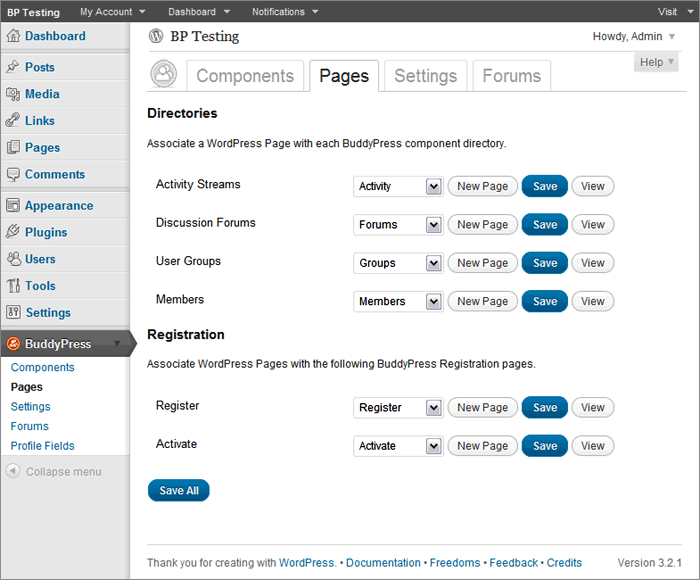
Participant== … a page with directories and registration that have drop down menus to create new pages to associate or pick an existing one. I’m not sure what to do here or if I made a new one what to call it? ==
If you had a default installation in BP 1.5 before upgrading to BP 1.5 and did not create Pages which have slugs like that of the BuddyPress components, then choose the corresponding Page in dropdown per BuddyPress component if it’s there.
 November 12, 2011 at 12:24 am #124207
In reply to: How to fix this?
Participant@welvincudas you need to complete Step 3 of the BP Template Pack compatibility process. If you need assistance, open up your theme’s page.php file, select all and copy, and paste onto pastebin.com. Click submit and post the generated URL here.
November 11, 2011 at 11:13 pm #124205ParticipantIllustrated guide to setting up BUddyPress group forums and/or sitewide forums coming soon.
November 11, 2011 at 11:06 pm #124204In reply to: buddypress google analytics plugin
Participantclosing duplicate of https://buddypress.org/community/groups/third-party-components-plugins/forum/topic/buddypress-google-analytics-plugin-1/ — mercime
November 11, 2011 at 11:04 pm #124203In reply to: [Resolved] Adventure Journal theme
ParticipantYou’d have to use the first method of fixing alignment in the BP Compatibility process to make your WP theme compatible with BuddyPress. The first method involves changing HTML structure in the 16 files as listed here https://codex.buddypress.org/theme-development/wordpress-to-buddypress-theme/#tplfiles
A. Download the six BP template folders which were transferred to your adventure-journal theme in server down to your computer hard drive.
** We’ll explore if the adventure-specific template tags will work within BP. It will spout errors if it’s not working, so we’ll have to delete such template tags. But if no errors show up, it’s good to go.
B. Starting with activity/index.php, open it up and at the top of the file, replace:
``with
`
<div class="content" >
<div id="col-main" role="main" style="”>
<div id="main-content" >`C, At the very bottom of the same file, replace:
``
with
`
`D. Save file and do the same to the remaining 15 files per list linked above except for registration/register.php where at the bottom of the file,
replace:
`
jQuery(document).ready( function() {
if ( jQuery(‘div#blog-details’).length && !jQuery(‘div#blog-details’).hasClass(‘show’) )
jQuery(‘div#blog-details’).toggle();
jQuery( ‘input#signup_with_blog’ ).click( function() {
jQuery(‘div#blog-details’).fadeOut().toggle();
});
});`
with
`
jQuery(document).ready( function() {
if ( jQuery(‘div#blog-details’).length && !jQuery(‘div#blog-details’).hasClass(‘show’) )
jQuery(‘div#blog-details’).toggle();
jQuery( ‘input#signup_with_blog’ ).click( function() {
jQuery(‘div#blog-details’).fadeOut().toggle();
});
});`
E, Upload the six folders to your server wp-content/themes/adventure-journal folder
November 11, 2011 at 10:11 pm #124201In reply to: BuddyPress 1.5 compatibility for plugins and themes
nicoleta.juglan
MemberDoes anybody know if U BuddyPress Forum Attachments and Editor is compatible with BuddyPress 1.5.1? Thank you!
November 11, 2011 at 5:26 pm #124196In reply to: Adding a template to the profile menu
Paul Wong-Gibbs
KeymasterIt is a bit tricky, unfortunately. I want to make it easier in a future version. Could I ask what version of BuddyPress you are using? The latest version is 1.5.1
November 11, 2011 at 5:23 pm #124195In reply to: lost in buddy press
KeymasterI think you got your version numbers messed up; you must be on 1.5 or 1.5.1 as it’s the first versions where the repair button comes in. Do you know which version of BuddyPress you were on previously? Really 1.0?
November 11, 2011 at 5:06 pm #124193modemlooper
Moderator99.999% of support topics are not even BuddyPress related, that being said, give the people, like myself, who come here daily and try to help some respect.
November 11, 2011 at 4:40 pm #124191Quint
ParticipantThanks Paul, I was in the process of putting on my boots to go find me some ah ‘dem har tires to kick!
 I am very much a newbie and do understand the frustration but that energy could be more productively spent. Anyway, Boone did a couple great Buddypress presentations which can be found on WordPress TV. Also, there’s a Buddypress for Dummies book. Both provide good foundational material even though neither are up-to-date. But I think that’s awesome because it means we’ve got some very committed people in this community who are intent on continuous improvement.November 11, 2011 at 4:20 pm #124187Keymaster
TireKicker, consider this your first warning: If you haven’t got anything nice to say, go somewhere else. Stop spamming this forum.
November 11, 2011 at 4:16 pm #124185troymer
MemberAnd this here: https://buddypress.trac.wordpress.org/ticket/2354 doesnt really explain how it works in bp 1.5 with bbp 2.0
November 11, 2011 at 4:03 pm #124180TireKicker
MemberAFAIK, as a prospective user like you evaluating all WP options, BP sounds ideal…but getting it to actually work seems like the bad ol’ days before Windows 3.1!!
November 11, 2011 at 3:47 pm #124175In reply to: Do Not Understand BuddyPress
justbishop
MemberI think there’s an option for that now (group forums vs. sitewide forums) in the BuddyPress admin menu now. I run BP on a Multisite install of WP, so mine is in the Network admin side of things, but you should be able to find the option to install/uninstall one or the other under BuddyPress -> Forums
November 11, 2011 at 3:36 pm #124173In reply to: Do Not Understand BuddyPress
MemberThe problem is that there is no introduction to this kind of ethos, this BuddyPress ethos.
I suspect that many here are either geeky types who are used to this Web 2.0 mindset or people born during the ’90s who never knew any other way of doing things.
Some of us may be older and thus used to a very “orderly” — that is, tightly hierarchical — way of presenting information…it would help to explain BuddyPress in the FAQ section with such folks in mind.
BuddyPress sounds promising…but there is simply no documentation explaining the philosophical assumptions behind it, never mind individual toggles for specific components….
Me, I’d like for my site’s registered users to be able to create their own particular interest groups and user profiles but limit forums to a traditional site-wide kind of affair…seems like it should be possible to do all this, but I can’t see how in the available documentation I’ve been able to piece together!
November 11, 2011 at 3:29 pm #124172MemberOMG, finally a support site that’s worse than what you get at Drupal.org…yes, I too can’t find my way around here. No wonder everyone uses the ’90s-looking phpBulletin software for a forum! Can’t believe this BuddyPress is from the same folks behind WordPress — but then again, maybe the WordPress site was a mess at first, too….
Part of the problem is that everyone’s (that is, everyone “normal” and not on Facebook all the time) expecting a standard forum with an orderly hierarchy whereas this BuddyPress way of doing things is…chaotic.
November 11, 2011 at 3:29 pm #124171rich
Memberlooks like a bug
https://buddypress.trac.wordpress.org/browser/tags/1.5/bp-blogs/bp-blogs-activity.php#L57Suppose to check for an existing activity keying off the blog id, post id, user id, etc and then it updates instead of inserting.
November 11, 2011 at 2:19 pm #124169MemberNevermind, did it, and your 2nd query worked like a charm, @boonebgorges! Thanks

P.S. I did make a db backup, and will hang onto it just in case some wonkiness that I’m just not seeing yet crops up
November 11, 2011 at 11:08 am #124165In reply to: A new activities stream
candy2012
MemberThank you @modemlooper but that’s not enough and makes no change; we need a function to check if friend or not to apply to all streams.
And I think I can say …. yes yes yes yes yes! I found the combination that seems to finally turn buddypress into a modern social network
So here the wonder-code (it must have smth to do with 11/11/11 > wish came true
):Code:function my_is_friend_check( $friend_id = false) {
global $bp;if ( !is_user_logged_in() )
return false;if ( is_site_admin() )
return true;if ( !$friend_id ) {
$potential_friend_id = $bp->displayed_user->id;
} else {
$potential_friend_id = $friend_id;
}if ( $bp->loggedin_user->id == $potential_friend_id )
return false;if ( friends_check_friendship_status($bp->loggedin_user->id, $potential_friend_id) == ‘is_friend’ )
return true;return false;
}function my_denied_activity_nonfriends( $a, $activities ) {
global $bp;//if admin we want to know
if ( is_site_admin() )
return $activities;foreach ( $activities->activities as $key => $activity ) {
if ( $activity->user_id != $bp->loggedin_user->id && $activity->user_id != 0 && !my_is_friend_check($activity->user_id) ) {
unset( $activities->activities[$key] );
$activities->activity_count = $activities->activity_count-1;
$activities->total_activity_count = $activities->total_activity_count-1;
$activities->pag_num = $activities->pag_num -1;}
}$activities_new = array_values( $activities->activities );
$activities->activities = $activities_new;return $activities;
}
add_action( ‘bp_has_activities’, ‘my_denied_activity_nonfriends’, 10, 2 );For all buddymuppets to enjoy
November 11, 2011 at 9:26 am #124163Gautam Thapar
MemberThanks, the problem is now solved.
November 11, 2011 at 9:23 am #124162MemberJust to add to the information I have php 5.2
Using the default wordpress .htaccess file.
-
AuthorSearch Results


