Search Results for 'buddypress'
-
Search Results
-
Topic: Erros, blocking wp-admin
#6 /srv/htdocs/wp-content/plugins/buddypress/bp-core/bp-core-functions.php(538): apply_filters(‘bp_core_get_dir…’, Array, ‘all’)
#7 /srv/htdocs/wp-content/plugins/buddypress/bp-core/bp-core-cache.php(88): bp_core_get_directory_page_ids(‘all’)What can i do????
Hi!
Here’s your last chance to test BuddyPress 7.0.0 before it’s officially released! Thanks in advance for you help 😉
Hello. I’am using this theme https://themeforest.net/item/vikinger-buddypress-and-gamipress-social-community/28612259 and this plugin https://codecanyon.net/item/snax-viral-frontend-uploader/16540363.
I’m also, of course, using buddypress on my website- But for some reason, the notifications are showing blank. See example: https://imgur.com/a/CXL2yFF
Can I get a help, please ?
i would like this code
<form method=”post” action=”/chat/login.php” name=”user_trans”>
<input type=”hidden” name=”username” value=”<?php echo $current_user->user_login; ?>” />
</form>
ingeriren in the navigation buddypress
How can I allow mediapress to post without adding text to post form? Some members just want to add a quick photo without adding text, but there is an error message if they don’t include text. I tried this, but it didn’t work:
https://buddypress.org/support/topic/allow-empty-whats-new-activity-update/
Topic: Header color issues
Hello, I have problems with the header colors, I am using divi and I have some colors set for the header, the problem comes with the pages that come from buddypress, I don’t know why it does not save the same color design, it changes to the color By default it came to me in divi, for example my header is I change the color to blue and if I enter home it is blue, if I enter the blog it is blue, if I contact it it is blue, now if I enter members or in the profile of buddypress and other pages that are with buddypress leaves them in white as it came by default, any solution?
I have a client BuddyPress site I have been developing but running into trouble finding a solution for her request.
1) She’d like to only allow admins to post main posts to the Activity Stream BUT allowing commenting from anyone on these posts (for a conversation).
2) AND/OR She’d like all activity posts / comments not made by an admin to be held for moderation and not posted until an admin approves the post.
On number 2, I have looked into the BuddyPress Moderation but it doesn’t appear this is accomplished with the plug in.
On the 1st question I can’t see anything related except perhaps integrating buddy forums and using that as the group discussions manager.
HELP! Thanks in advance!
Hi,
In the group me nu the “Documents” links are displayed twice :
N°1 – Link to: https://mydomain/group/group-name/documents/
N°2 – Link to: https://mydomain/group/group-name/docs/
An idea where come from this issue?
Regards
MichelTopic: Ask question before login?
Topic: Users can’t register
I created a fresh install of WordPress, removed all themes except TwentyTwenty and all default plugins. Installed Buddypress from the WP repository. Activated. This is a fresh install set up to troubleshoot this Buddypress problem in another install.
I can add users in the backend. If BP is disabled, users can register using the default registration.
No WP errors are created or logged. A single proxy error is thrown. Noted below with real domain masked.
Any suggestions?
********************
1. Which version of WordPress are you running?
Wordpress 5.5.32. Did you install WordPress as a directory or subdomain install?
Subdirectory3. If a directory install, is it in root or in a subdirectory?
subdirectory4. Did you upgrade from a previous version of WordPress? If so, from which version?
Fresh installation5. Was WordPress functioning properly before installing/upgrading BuddyPress (BP)? e.g. permalinks, creating a new post, commenting.
yes6. Which version of BP are you running?
Version 6.4.07. Did you upgraded from a previous version of BP? If so, from which version?
No. Fresh install8. Do you have any plugins other than BuddyPress installed and activated? If so, which ones?
None9. Are you using a standard WordPress theme or customized theme?
No10. Which theme do you use ?
Twenty-twenty11. Have you modified the core files in any way?
No12. Do you have any custom functions in bp-custom.php?
No13. If running bbPress, which version? Or did your BuddyPress install come with a copy of bbPress built-in?
None14. Please provide a list of any errors in your server’s log files. https://codex.wordpress.org/Debugging_in_WordPress
One error noted in proxy_error_log
2020/12/01 13:37:19 [error] 31520#0: *5156884 “/var/www/vhosts/DOMAIN.com/httpdocs/testing2/register/index.html” is not found (2: No such file or directory), client: 143.244.45.55, server: DOMAIN.com, request: “POST /testing2/register/ HTTP/2.0”, host: “DOMAIN.com”, referrer: “https://DOMAIN.com/testing2/register/”All debug options enabled in wpconfig but WP throws no errors or creates a log file.
15. Which company provides your hosting?
1and1 dedicated server16. Is your server running Windows, or if Linux; Apache, nginx or something else?
Apache & nginx17. Which BP Theme are you using?
None additional18. Have you overloaded any BuddyPress template files.
Touched none19. Any other site customisations that might have a bearing on the issue?
Fresh install20. What BP Template Pack is activated in your installation? You will see that under Dashboard > Settings > BuddyPress – Options page.
Buddypress Nouveau (but also tried with Buddypress Legacy)Hi, I need help about language mo file.
How to update the language file.
I checked documentation and it was written.You can use your own translation version to fit your needs. Add it to /wp-content/languages/buddypress/. This new directory will not be automatically updated, so it is a safe place to store your custom work. BuddyPress will check for this directory as first. If nothing is found, it will use the translation stored wp-content/languages/plugins/. You can use both directories, so you will never miss an official translation and continue to use your own one. Simply remind to control your work after each BuddyPress update, with help of the buddypress.pot file.
But, I guess BuddyPress will not check for this directory as first. I tried some ways. Maybe wp-content/languages/plugins/ path as first.
WordPress Version : 5.5.1
BuddyPress Version : 6.3.0
Moment Js Version : 2.15.1
I need to upgrade moment.js Date Library to newer version Which is present Inside the BuddyPress plugin. Please help me to upgrade these kind of nested libraries.Thanks..
hello,
i am currently working on a website that is using buddypress plugin and i am getting thousands of email on daily basis of spam user registration.
link: https://www.fbia.org.au/register/
wordpress version: Version 5.5.3
buddypress Version 6.4.0
parent theme: omega
child theme DeliciousVersion: 0.1.2 (currently install)i have applied the following methods
i) install wp zero spam (it has to blocked the spam user)
ii) install the (Advanced noCaptcha & invisible captcha) captcha is working but spams are bypassing it.
iii) install the (BuddyPress reCAPTCHA), its not updated on latest 3 versions of wordpress not working.
iv) install a third party plugin(Pixel Jar BuddyPress Honeypot) not working.
v) install (Spam Destroyer) not working, it also just blocking, not a permeant solution
vi) install (Wordfence Security) to scan the website, not found any serious error.
vii) got a plugin (wangguard) from forums answers, but not working on latest wordpress versions.
viii) install (BuddyPress Security Check), not working just because of latest updates of wordpress.so can you at-least tell me the permeant solution for this.
Hi,
I installed ProjectNami WordPress edition Version 2.5.5 which incorporates WordPress 5.5.3 from projectnami.org. I chose this edition since it is the only available version I could find which can run using a Microsoft SQL database which I currently use for my project. I want to use WP with my current project so I want to use a single MSSQL database and share data…
I am using a Windows 2008 Server R2 Enterprise, with MS SQL 2012 database server…
I installed some other plugins and can see that the related MSSQL DB tables are being created by these plugins but when I try to install and activate BuddyPress, it looks like everything is okay on the WP pages (says installed and activated) but actually in the background no BP tables are being created in the MSSQL database… As a result no BP related tasks runs on WP and each one fails returning an error… for example creating a BP Profile Field fails returning “There was an error saving the group. Please try again.”
Is there a solution for this problem? Is there a different BP version compatible with MSSQL?
Is there any way I can use BuddyPress with MSSQL? I found out some people online who were using old versions of BP with MSSQL but I could not find any recent information…I would appreciate any comments on this, since I am really stuck…
Thank you
Hello,
I installed BP on my site and it was working well. But now, the “standard member front page” is gone. The page where you have your menu items: activity, messages, notifications, friends, groups, etc. What I mean by “standard member front page” is this: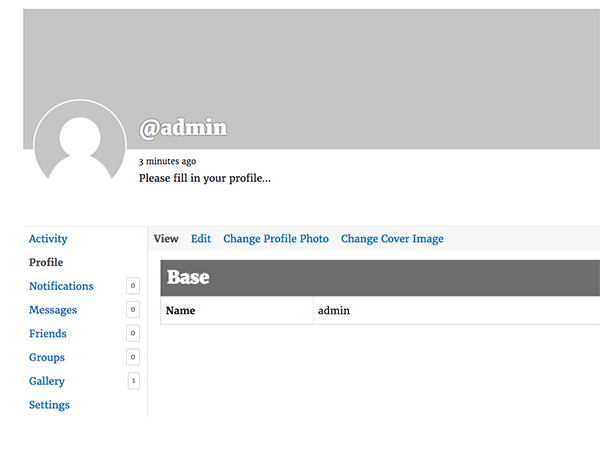
I don’t understand how this page can disappear. Now when you login the website defaults to a “you’re now logged in as X” page. And if you navigate to the member directory and click on your profile, there is just a list of your friends and groups. No activity, no messages, no notifications tabs.
In addition to BP, I’m using the Profile Builder plugin, and Profile Builder Customization Toolbox. In the Appearance> customization > BuddyPress nouveau settings, I have selected the enable default front page for member profiles. I also have selected the display the biographical info from the member’s WordPress profile.
WP version:5.5.3
BP version: 6.4.0
Theme: Werkstatt
website: queerarmenianlibrary.comH there,
I have been using BuddyPress for many years, but no longer need it.
When I deactivated BuddyPress, non of my user avatars displayed in comments, forums, etc.
I noticed the image files remain on the server, but realised that these must be somehow associated with BuddyPress and not WP.Is there any way to migrate the avatar association back to WP, so that when I deactivate BuddyPress, my users still retain their avatars?
I would rather not keep BuddyPress active just to display user avatars.
Thanks.
Topic: Registration emails not sent
Hi,
I have a buddy press registration page on my site. Upon registration I can see the user info in wp_users table but no email goes out. For email I have configured WP Mail SMTP Pro and AWS Simple Mail Service (SES). The test email from WP Mail SMTP Pro works fine.
After researching the issue, I found that other people had similar issues and this post helped resolve it https://ast.io/html-emails-buddypress-bbpress/. But in my case it did not help. After applying the suggestions in the post I am getting the following errors. Note that I am using WordPress: 5.4.4 and BuddyPress: 6.2.0.
What am I missing?
Thanks!Fatal error: Uncaught Error: Class ‘Composer\Autoload\ComposerStaticInite3e5c35c972290b9df87aba53682fd14’ not found
in /var/www/html/wp-content/plugins/wp-mail-smtp-pro/vendor/composer/autoload_real.php on line 33Call stack:
ComposerAutoloaderInite3e5c35c972290b9df87aba53682fd14::getLoader()
wp-content/plugins/wp-mail-smtp-pro/vendor/autoload.php:7
require_once()
wp-content/plugins/wp-mail-smtp-pro/src/Providers/AuthAbstract.php:55
WPMailSMTP\P\AuthAbstract::include_vendor_lib()
wp-content/plugins/wp-mail-smtp-pro/src/Pro/Providers/AmazonSES/Auth.php:74
WPMailSMTP\P\P\A\Auth::__construct()
wp-content/plugins/wp-mail-smtp-pro/src/Pro/Providers/AmazonSES/Mailer.php:61
WPMailSMTP\P\P\A\Mailer::send()
wp-content/plugins/wp-mail-smtp-pro/src/MailCatcher.php:134
WPMailSMTP\MailCatcher::send()
wp-includes/pluggable.php:488
wp_mail()
wp-content/plugins/buddypress/bp-core/bp-core-functions.php:3202
bp_send_email()
wp-content/plugins/buddypress/bp-members/bp-members-functions.php:2309
bp_core_signup_send_validation_email()
wp-content/plugins/buddypress/bp-members/bp-members-functions.php:1873
bp_core_signup_user()
wp-content/plugins/buddypress/bp-members/screens/register.php:204
bp_core_screen_signup()
wp-includes/class-wp-hook.php:287
WP_Hook::apply_filters()
wp-includes/class-wp-hook.php:311
WP_Hook::do_action()
wp-includes/plugin.php:478
do_action()
wp-content/plugins/buddypress/bp-core/bp-core-dependency.php:373
bp_screens()
wp-includes/class-wp-hook.php:287
WP_Hook::apply_filters()
wp-includes/class-wp-hook.php:311
WP_Hook::do_action()
wp-includes/plugin.php:478
do_action()
wp-content/plugins/buddypress/bp-core/bp-core-dependency.php:430
bp_template_redirect()
wp-includes/class-wp-hook.php:287
WP_Hook::apply_filters()
wp-includes/class-wp-hook.php:311
WP_Hook::do_action()
wp-includes/plugin.php:478
do_action()
wp-includes/template-loader.php:13
require_once()
wp-blog-header.php:19
require()
index.php:17Hello all,
I am aiming to add a set of custom fields to Buddypress groups. After an extensive search I realized that the current solutions
do not work with the latest WordPress 5.5.3.
Can anyone point me to an alternative or a workaround ?
Thanks a lot in advance,
bestAlex
I have looked for any documentation but I cannot find anything that explains this hook system. For example, in bp-nouveau/buddypress/members/register.php the hook bp_nouveau_signup_hook() shows up several times. The hook has two arguments which change depending where they are in the code.
How to hook into these from my child theme to add content?


