Search Results for 'buddypress'
-
Search Results
-
We’re running WordPress 3.3.2. After upgrading BuddyPress to 1.5.5, some of the functions in our WordPress plugins have stopped running if they hook WordPress’s “init” action. For example, in this code:
`error_log(“one”);
function foo() {
error_log(“two”);
}
add_action(“init”, “foo”);
error_log(“three”);`the strings “one” and “three” get written to the error log (proving that the PHP file is being loaded), but “two” never happens. This problem is also mentioned on StackOverflow:
http://stackoverflow.com/questions/9895881/buddypress-wiki-component-action-on-init-not-called
Any ideas how to debug this? Or is it a known bug? Thanks.
Hi,
Greetings.
I’m using WP 3.3.2, BuddyPress 1.55. New installation on http://www.mydomain.com (via softaculous) . Permalink Settings: Post name http://www.mydomain.com/sample-post/
I encountered a problem while installing ‘Site Wide Forums’ (bbPress plugin). I followed exactly all the steps at:-
http://codex.buddypress.org/getting-started/installing-group-and-sitewide-forums/2/
But I got a blank page. I did setup the ‘Forums’ page during the initial installation, but when I tried to open the page http://www.mydomain.com/forums/ it says ‘The forums component has not been set up yet.’
I tried on my other hosting provider (Quickinstall), I encountered the ‘404 Not Found’ error message
Anyone has the similar problem?
Please help.
I’m working with the Custom Community Pro theme on a site with Buddypress installed. I wanted to change the colors on different group pages and discovered the Group CSS plugin. The plugin works fine but on my three column theme (a left and right sidebar) it chooses to push the right sidebar down to the footer.
The site I am working on is usually in Maintenance Mode so if you would like me to post any code I can. I’m used to looking into and fixing .php files but I’m not necessarily familiar with the language. Any help or tips would be so appreciated!I would be able to specify expires access for the BuddyPress contents. It’s OK for WordPress posts, as you can see :
http://www.paul-emploi.biz/actu/anonymous-attaque-emploi-en-france/15945/HTTP/1.1 200 OK
Date: Tue, 08 May 2012 10:51:22 GMT
Server: Apache
X-Pingback: http://www.paul-emploi.biz/xmlrpc.php
Set-Cookie: bp-message=deleted; expires=Mon, 09-May-2011 10:51:22 GMT; path=/
Set-Cookie: bp-message-type=deleted; expires=Mon, 09-May-2011 10:51:22 GMT; path=/
Link: ; rel=shortlink
Cache-Control: max-age=604800, public
Expires: Tue, 15 May 2012 10:51:22 GMT
Vary: Accept-Encoding
Content-Encoding: gzip
Content-Length: 15175
Keep-Alive: timeout=2, max=150
Connection: Keep-Alive
Content-Type: text/html; charset=UTF-8But it doesn’t work for forum topics and activities :
http://www.paul-emploi.biz/groups/techniques-de-recherche-demploi/forum/topic/le-cv-video-ca-marche/HTTP/1.1 200 OK
Date: Tue, 08 May 2012 11:53:31 GMT
Server: Apache
X-Pingback: http://www.paul-emploi.biz/xmlrpc.php
Expires: Wed, 11 Jan 1984 05:00:00 GMT
Last-Modified: Tue, 08 May 2012 11:53:32 GMT
Cache-Control: no-cache, must-revalidate, max-age=0, public
Pragma: no-cache
Set-Cookie: bp-message=deleted; expires=Mon, 09-May-2011 11:53:31 GMT; path=/
Set-Cookie: bp-message-type=deleted; expires=Mon, 09-May-2011 11:53:31 GMT; path=/
Vary: Accept-Encoding
Content-Encoding: gzip
Content-Length: 11062
Keep-Alive: timeout=2, max=150
Connection: Keep-Alive
Content-Type: text/html; charset=UTF-8http://www.paul-emploi.biz/members/phgras/activity/604/HTTP/1.1 200 OK
Date: Tue, 08 May 2012 10:49:16 GMT
Server: Apache
X-Pingback: http://www.paul-emploi.biz/xmlrpc.php
Expires: Wed, 11 Jan 1984 05:00:00 GMT
Last-Modified: Tue, 08 May 2012 10:49:17 GMT
Cache-Control: no-cache, must-revalidate, max-age=0, public
Pragma: no-cache
Set-Cookie: bp-message=deleted; expires=Mon, 09-May-2011 10:49:16 GMT; path=/
Set-Cookie: bp-message-type=deleted; expires=Mon, 09-May-2011 10:49:16 GMT; path=/
Vary: Accept-Encoding
Content-Encoding: gzip
Content-Length: 10598
Keep-Alive: timeout=2, max=150
Connection: Keep-Alive
Content-Type: text/html; charset=UTF-8Is it a difference between WordPress posts and BuddyPress contents for ExpiresByType text/xml access ?
Topic: 404s – NOT mod-rewrite
Before we go any further, I have modrewrite enabled and my permalinks are fine. They work fine.
So I install Buddpress on my local WP installation running on WAMP.Ran through the setup, but it won’t work.
The activity, discussion, user, members, register, activate pages are blank. They don’t 404, but they are blank.
Every other Buddypress page returns a 404, it returns the 404 in my theme folder.
I am using a custom theme but I get the same problems with the default theme, so I don’t think it’s theme related.
Any ideas? It’s just broken for me right now.
Hi everybody,
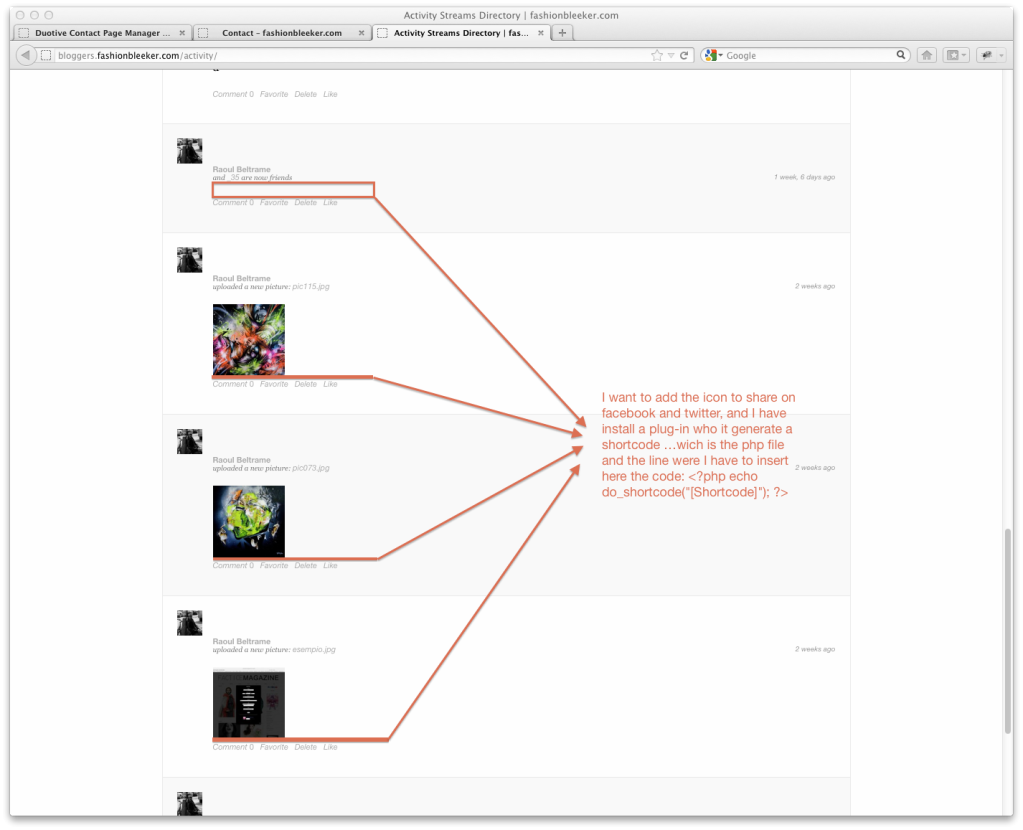
I want to add sharing button (Facebook,twitter, mail etc..) under all activity of members, group and forum to add the possibility to our member to share every content… I’ve install plugin “BuddyPress Share It” but is not working well and the support doesn’t reply to help me…. so I think that maybe I can install a plug-in for social sharing (there’s a million of plugins) and I can insert the short-code in file php where activities works …so I can have sharing button under any activity … but the problem is that I don’t find wich is the php file to insert the shorcode… anyone can help me ?
Look also this image:
http://i1271.photobucket.com/albums/jj634/raoulbeltra/shortcode.png
the website is : http://bloggers.fashionbleeker.com/
thank you


 – .
– .



If there is now ay to add threaded comments in Buddypress, is it possible to give each comment its own page? Can someone point me to a tutorial where I can learn how to create this?