BP Template Pack plugin does not work if BuddyPress is not installed and activated first. I had assumed you had done so before.
Thanks Hugo… I tried that as well, and I am happy to go that route.
However, I am having the same problem… when previewing the child theme, looks fine. Activating it kills all styles and settings EXCEPT for those made in the child theme.
I am perhaps fundamentally misunderstanding about how child themes work… I thought they would use everything of the parent UNLESS, something new (template, style) was provided?
A child theme uses as it’s core the parent theme, it references any template pages you copy over from parent theme to child theme. The child theme files are used in preference to the same named file in parent theme likewise any functions files are read in order of child theme first then parent theme. All you need for a child theme to work is the style.css file with appropriate header block.
I would follow mercims advise to copy over header.php and simply remove the physical markup or enclose it in php comments, display: none simply hides the visual display but doesn’t remove markup so technically it’s still there.
Well, I spoke to soon. This is my first experience with Child Themes, but I referenced this: https://codex.buddypress.org/theme-development/building-a-buddypress-child-theme/
Seems like it couldn’t be simpler… I created a new director in wp-content/themes, added the required comments to the style.css file, plus the new css mod to hide the search form.
When I “preview” the child theme in WP, it looks good as it should, search form gone, all other styles and settings in tact.
But when I activate it, the entire theme goes back to the default BP Default, with the exception of the CSS change I made.
When using a child theme, do I need to essentially “re-configure” all of my theme settings, or is something simply not working here? Hmm… maybe this needs a new post.
Edit: New post for this topic: https://buddypress.org/community/groups/how-to-and-troubleshooting/forum/topic/child-theme-not-working/
Thank’s Paul!
Yeah, we have 2.0.2 installed already and don’t want to loose what has already been posted.
The way I see it, I have about 3 options:
– I’m not sure what group forums is.. and if site wide is available, we may just be able to get away with that for now.
– If we use bbPress 1.x that is included with BP.. When the 1.6 and 2.1 come out, can we upgrade and merge it with our current 2.x version we have now? (maybe the question is how complicated would that be).
– Or is there a way to downgrade 2.x?
Those are constants, the whole point of them is that you can set them yourself and override the BP ones as the bp ones check to see if they are defined first somewhere. Try it ou, either in bp-custom.php or functions.php
Thank you for your replay
I have install the BP Template Pack plugin and I have also activate it ….but I go to Appearance ….but I don’t see any BP Caompatibility ????
Thank you for your reply
Thanks Mercime! Very helpful!
I’m getting an index of page instead of the members page
Not sure why, all other buddypress components are working just fine
Thats how I’ve worked it in the example, but I have to go into plugins/buddypress/ directory to edit that, I want to know if I can copy those parameters over to my functions.php and overwrite the core buddypress ones.
Know what I mean? I have other functions/declarations that I would like to overwrite, this is just one example
Why don’t these work or am I missing the point .
`define ( ‘BP_AVATAR_FULL_WIDTH’, 350 );
define ( ‘BP_AVATAR_FULL_HEIGHT’, 350 );`
same for thumbs, also of course one can pass size params back on avatar calls.
Hi – we’ve installed BuddyPress with multisite functionality so users can create their own blogs. If a user signs up, and chooses to create a blog during the sign up process, then all is well. But if a user doesn’t initially choose to create a blog, it seems there’s no way for them to later create a blog. These latter types of users don’t get access to the admin – after they login they are redirected to the front end of the site. Is it possible for already registered users who did not choose to create blogs to later create blogs?
It defines the sizes of the avatars, large and medium, I’ve set medium to be slightly larger than the original. But I don’t like modifying the core.
There are a whole series of constants in bp-core-avatar.php that may be overridden, not sure what the constant you mention ‘CORE_MAX_FILE_SIZE’ is
look in the file bp-example-activity.php in the buddypress-skeleton-component plugin it’s pretty well commented with all the info and params you need to pass
Hi
I’ve changed the CORE_MAX_FILE_SIZE function so the avatar can be larger but I really don’t like thought of editing the plugin files, is there a way I can override this item in my theme functions?
Hi, I have installed BuddyPress a a few other modules and am almost ready to build my live site (working on a test site atm). Just two problems I can see.
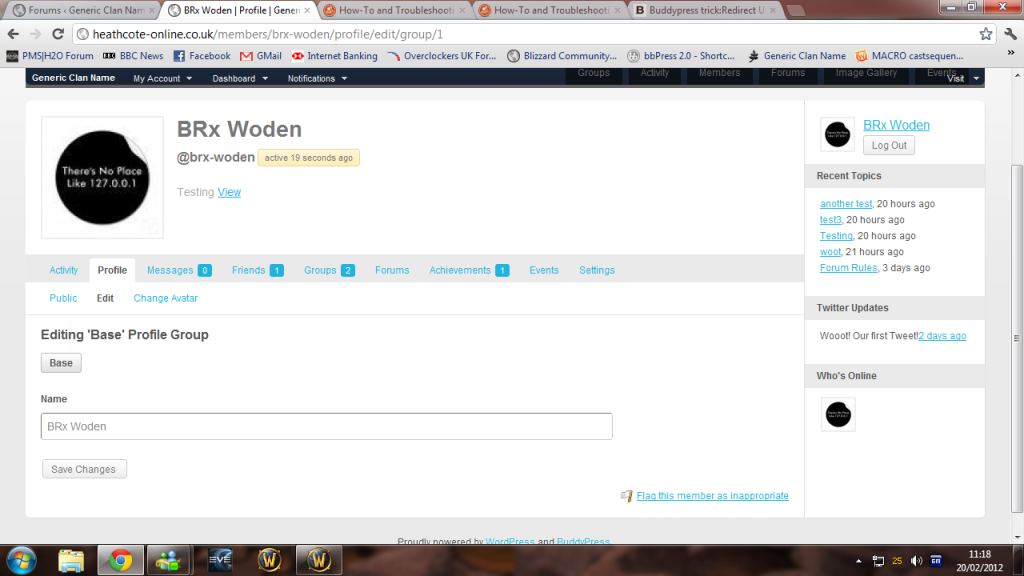
A users profile page doesn’t actually show their profile.
A user can only edit their profile using the dashboard. Which isn’t (and never will be by me )themed.
You can see a screenshot of what I mean here http://i1176.photobucket.com/albums/x334/Woden83/bpprofile.png I have entered information for that user, interests a website etc but they ar’nt showing. And the edit profile page linked to in the menu only allowes a user to change their password.
Ideally general users (subscribers) would never see the dashboard.
I am running WordPress 3.3.1, BuddyPress 1.5.4, bbPress 2.0.2
Hi all, here is my dilema. I have a CPT set up in buddypress. I have this working through the front end, so that people can add/edit their entries.
How would I go about adding said additions and edits to the main activity stream, so that you would see:
“John smith added a new item…”
Any help is greatly appreciated.
Cheers
Before mercime kindly shows you how can we just check that you have made a start in attempting to enable your theme for BP? Have you moved any BP template pages across to your theme? Have you read through any of the excellent guides/ walk throughs mercime provided in the BP codex, starting with this initial guide:
https://codex.buddypress.org/theme-development/wordpress-to-buddypress-theme/
To fix alignment of BP template files to fit your theme’s HTML structure, open up your theme’s header.php, copy code, paste code in pastebin.com, click submit and post the generated pastebin irl here. Do the same for your index.php, page.php, sidebar.php and footer.php
Hello all,
I’ve been trying to get buddypress integrated with my theme and I’m not having much luck. I have it on my website now at http://www.critterhub.com, but a lot of the styling is off… Places overlap, sidebars are messed up, etc.
I read the tutorial about how to change each buddypress file to the structure of my main theme (Boulevard), but still can’t figure it out.
Any help?
Thanks,
Neodoxa
It is the regular WordPress version 3.3.1 using a new install of Buddypress 1.5.4. This issue occurs even with the default theme activated and with all other plugins deactivated.
WordPress and BuddyPress versions? Internet Explorer version?
Is this a new installation? Single WP or Multisite?
Did you change theme and/or plugins recently?
Have you tried basic troubleshooting – changing to bp-default theme and deactivating all plugins except BuddyPress then clearing cache to see if issue is corrected?
@igid26 Please post the code for sidebar.php and page.php as well.
You need to make your theme duotive compatible with BuddyPress by installing and activating the BP Template Pack plugin. Then proceed to dashboard menu Appearance > BP Compatibility and go through the compatibility process. https://codex.buddypress.org/theme-development/wordpress-to-buddypress-theme/