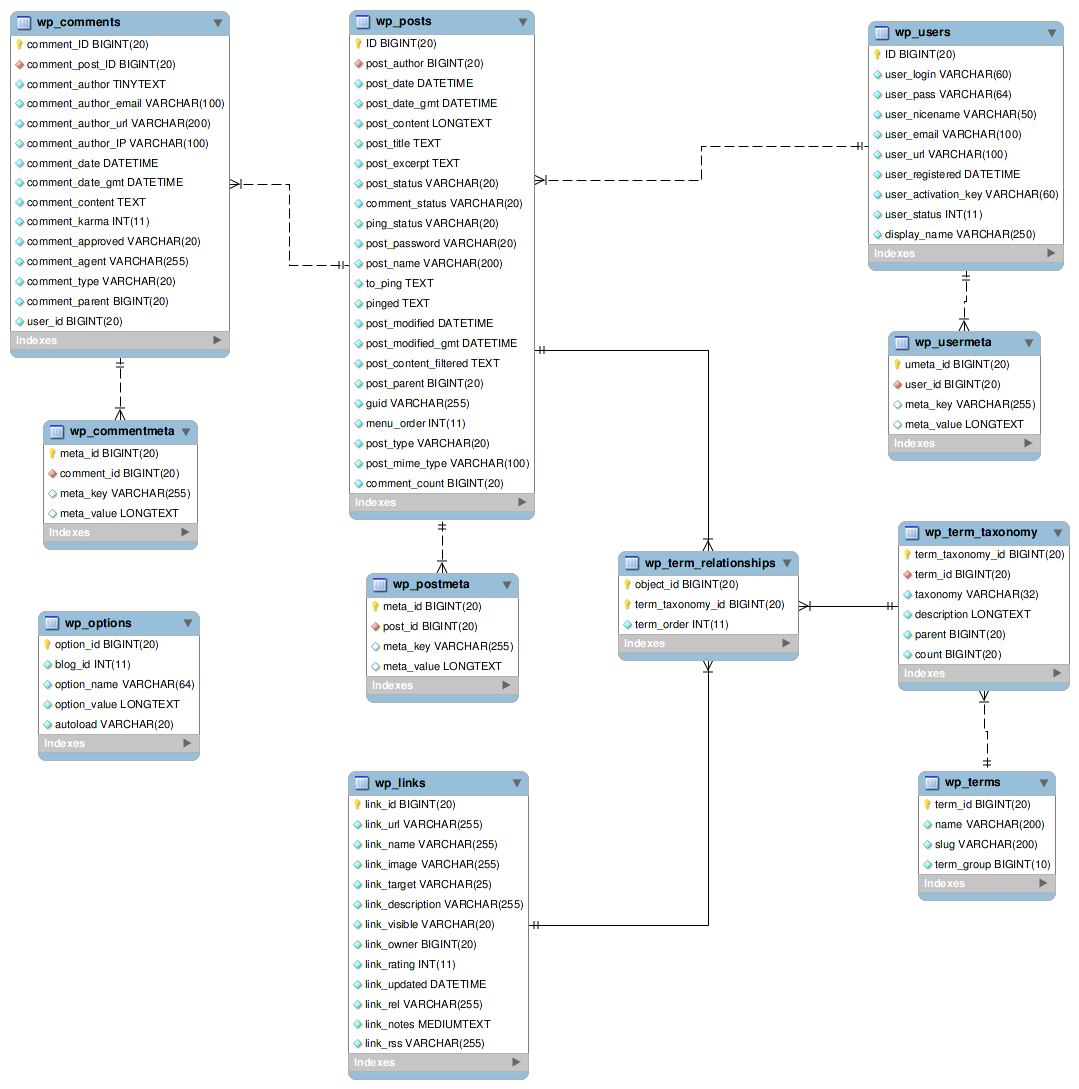
I can’t find a Database Schema for Buddypress. I’m looking for something similar to the one posted on WordPress found here: http://codex.wordpress.org/images/9/9e/WP3.0-ERD.png
Has anyone mapped this and posted it somewhere?
The BP bar at the top of the screen is messing up the layout of my website.
I have tried the BuddyPress Template Pack plugin but had no success. Please can you help me fix this. The theme I am using is called “redbel”. I like this theme and I do not want to change it.
my site is: http://www.funwithaccounts.co.cc
Seriously – it looks crap, gives a bad impression of buddypress and makes it impossible to get anything useful via searches on the site.
@brentcee234
hi,
this solution works for child theme.
you add code of r-a-y to your style.css and all works like a charm.
(check topics on how to create child theme).
@xevo: sure its not bp devs responsability and im far away of thinking that. but it apears strange to me, that the ame plugins work perfect on a system which had been updated to the current version (1.2.6) after having the plugins already installed… so that could be a hint to the devs 
hi…
I’m very new to buddypress….
I have tried to install buddypress… but it is’nt working properly.
First I’m downloaded wordpress latest from wordpress.org.
then installed it.
after that in admin i tried to install buddypress… that is also fine
but after that while activating buddypress following error occurred.
Unhandled exception at 0x023cdc22 in apache.exe: 0xC0000005: Access violation reading location 0xe87f4f0c.
after the error i couldn’t access the site, sometimes my Apache server will stopped.
is there any way to solve this?
Please help me….
I’m using php5, windows xp servicepack2
Thanks in advance
I have tried several time …
Thankz…
Hi all,
Am wracking my brain to try and get inline images working in this plugin. All I want, it for the image to show within the post, rather than as a download link. Can anyone point me in the right direction?
Such a crucial thing for a forum!
Many thanks.
I just instal the buddy press and the following message came up.
Fatal error: Call to undefined function get_user_meta() in /home/blazon/public_html/redesocial/wp-content/plugins/buddypress/bp-forums.php on line 530
Please orient me how to solve this.
Thanks
Clerio
delete the plugins.. to get rid of the error messages for now. (we will get them back eventually)
After you do that, does your buddypress function correctly?
@hnla, I use a 1.2.5 of BP. only because the newest causes more problems with my situation. I have tested the latest version, and I see no major differences that I just must keep the newer version. Once they come out with 1.2.7, or so, I will check it out.
But for now, 1.2.6 is not on my list.
It’s not buddypress devs responsibility too update plugins.
Thanks mercime. Do you guys know if gigpress will work with wp and bp as well? Can site visitors add content to archived gigs? Sorry for these questions. I’m just not envisioning the whole thing yet. I guess that’s why I would need a buddypress developer to help me!
I’m having the same issue with the Jooc theme. Admin bar is loading fine in the default theme, but as soon as Jooc is activated it disappears.
I’m a coding noob and tried deleting this code from functions.php in the jooc theme folder to no avail.
`function arit_remove_buddypress_admin_bar_install() {}
function arit_remove_buddypress_admin_bar_init() {
if ( function_exists(‘bp_core_admin_bar’) ) remove_action( ‘wp_footer’, ‘bp_core_admin_bar’, 8 );
if ( function_exists(‘bp_core_admin_bar_css’) ) {
remove_action( ‘wp_head’, ‘bp_core_admin_bar_css’, 1 ); }
if ( function_exists(‘bp_core_add_admin_css’) ) remove_action( ‘admin_menu’, ‘bp_core_add_admin_css’ ); }
function arit_remove_buddypress_admin_bar_uninstall() {}
register_activation_hook( __FILE__, ‘arit_remove_buddypress_admin_bar_install’ );
add_action( ‘init’, ‘arit_remove_buddypress_admin_bar_init’ );
register_deactivation_hook( __FILE__, ‘arit_remove_buddypress_admin_bar_uninstall’ );`
Also tried deleting this from style.css:
`padding-top: 0 !important; /* Remove the top padding space for the admin bar in this theme */`
That also did not work. I would like to move the admin bar to the bottom instead of eliminating this. Any word from the designer or any thoughts? Thanks…
Our nonprofit organization is using Buddypress for our Student Program’s online community. We are also using it to gather all of the student members’ vital information—contact info, university, major, etc.—using many extended profile fields, some required, some not. We’ve put many hours/weeks/months into creating and promoting this online community, but have come to realize that there is apparently no way to export the data we collected into a usable format.
The users’ data is stored in three different tables in the SQL database: wp_users (with the basic login info), wp_bp_xprofile_fields (with the labels of the extended profile fields), and wp_bp_xprofile_data (with the actual extended profile field data). We need the data in either a single Excel spreadsheet or Access database (ultimately the data goes into our Raiser’s Edge and Convio databases). Currently we can export the three tables as individual spreadsheets, but have not been able to then combine the data into one usable document, with the Profile/Extended Profile Field labels across the top row, and all the data (from the wp and bp data tables) for each user across one line in the spreadsheet.
In the absence of any built-in functionality or plugin, I assume we need to write a SQL query of some kind that does the following:
1 – copies wp_users into a new table.
2 – adds new columns to this table for every field from wp_bp_xprofile_fields where wp_bp_xprofile_fields/type value is other than “option” (“textbox”, “selectbox”, etc.).
3 – takes value from wp_bp_xprofile_data/value and adds it to the correct user in the correct column:
3a – wp_bp_xprofile_data/user_id corresponds to wp_users/ID
3b – wp_bp_xprofile_data/field_id corresponds to wp_bp_xprofile_fields/id
3c – Whenever wp_bp_xprofile_fields/type value is “option”, wp_bp_xprofile_data/field_id will instead correspond to wp_bp_xprofile_fields/parent_id
However, I don’t know much at all about SQL queries. Has anyone had any luck exporting the user data in this (or any other) way? Does anyone have any ideas that could point me in the right direction?
We’re aware of the is_page() issue with WP 3.1
@avinanrey keep your language polite.
@modemlooper Sounds great. (:
Two more questions…
When updating the theme, how can we maintain custom css changes without editing custom.css after updating?
Is it possible to show the ad code (sidebar.php) only on certain wordpress pages. Because I would like to hide this ad code on most buddypress related sites.
One more suggestion, how about adding ajax pagination for latest blog posts and or maybe ^^ make ’em sortable by date, most hits and most comments. (:
See screenshot: http://i56.tinypic.com/9bazye.png
Thanks for helping me with my decision on using Buddypress. I’m exploring it further.
Likely if the plugin is called ‘single random post’ then you would place some form of template tag in one of the post loop pages i.e index.php or single.php however you are asking a question about a plugin on another plugins support site, I assume this isn’t a BuddyPress specific plugin but a WP one? If the plugin instructions are not clear then it might be best to see if the authors can answer specific questions.
wp-content/plugins/buddypress/bp-themes/bp-default/activity/
deactivate the buddypress and then network activate it, make sure you followed all those steps given in readme came with buddypress @Chris O’Brien you have disabled the registration and there seems to be no way to contact you try ND’s solution if you are using si captcha “”Found the cullprit; the ‘SI Captcha’ plugin was preventing it because of a wrong set file permission.
Check the plugin settings page and it will say what is wrong””
there was this problem with the last version of buddypress i don’t think this still exists someone if you still face it do tell wp ver buddypress ver and if possible your site address
@avinanrey just log onto your server via FTP, and rename the BuddyPress plugin directory, or delete it. This works for any malfunctioning plugin. It will be immediately disabled.
I have come across the same error with WP 3.1 beta 1. Apparently WordPress normally ignores this error.
Fatal error: Call to a member function is_page() on a non-object in /public_html/wp-includes/query.php on line 419
But the issue lies with the plugin.
https://wordpress.org/news/2010/11/wordpress-3-1-beta-1/
So BuddyPress needs to fixed.