Skip to:
Content
Pages
Categories
Search
Top
Bottom

Search Results for 'buddypress'

Viewing 25 results - 1,051 through 1,075 (of 69,119 total)
  • Author
    Search Results
  • #331049

    In reply to: Email Placeholders

    akoitoparin
    Participant

    sorry, i’m non-programmer, i think they refer this to as EMAIL TOKENS.
    EMAIL TOKENS doesn’t seem to be working when editing buddypress emails

    #331028
    kolalee
    Participant

    Public messaging in BuddyPress refers to messages that can be seen by all users, regardless of whether they belong to a specific group or not. These messages are visible to the entire BuddyPress community and do not require the existence of a group for users to access them. This open accessibility fosters broader communication among users within the BuddyPress platform.

    #331026
    akoitoparin
    Participant

    WordPress 6.3 Multi-Site Network with BuddyPress Version 11.3.1
    Site: https://kamito.org/
    Theme: Twenty Twenty-Three (generic)

    Placeholders are not working in > Emails > All Emails
    To replicate, register a new user

    (1) check the “Recipient has registered for an account” email >
    the subject line is showing: “[] Activate your account” instead of displaying the site.name instead of the brackets.

    (2) check the “Recipient has successfully activated an account.” email >
    the subject is showing: “[] Welcome!” instead of displaying the site.name instead of the brackets.
    (2a) click on the ‘profile’ link inside the email and the ‘this page’ link you’ll see what I mean with this error. Links in system generated emails seems like adding “%7B%7B%7B” to the URL or “http://” infront of the URL

    (3) check the new user email again, WordPress continue to send their own “Welcome Email”

    halogen1
    Participant

    Hello. I just wanted to share a fix to a problem that I had for days. I saw detailed replies to folks wanting to generate a dynamic User Profile URL, but in my case, I wanted it to appear in the navigation menu. (I saw what code snippets–on this site–to add and that it should go in the functions.php file, but I wasn’t seeing where you invoke that code.)

    This YouTube Video was so helpful and simple. It shows how you access additional website links for navigation in WordPress Menus, including from plugins like BuddyPress. These classes got added to the Profile menu, after I dragged it over to my main Navigation menu on my site: bp-menu bp-profile-nav

    BuddyPress: Adding BuddyPress Profile Link inside WP Menus

    #331023
    Symphony Velenciano
    Participant

    Hi, yeah I installed WordPress without using the server side software, Softaculus, then I installed Buddypress, and ‘walla’, I’m good. No more 404 errors or anything. I’ll never use server side software for my WordPress managing again, at least not using that one! I hope other users are not using it with their hosting either, now that we know that it does cause problems. This issue is solved. Thank you for your promptness and hard work in trying to get me taken care of.
    Thank you.

    #331022
    Symphony Velenciano
    Participant

    Now, my hosting company Host Gator, uses a software to install WordPress on their servers called, Softaculus. A sort of WordPress manager as well. It even has it’s own plugin ( I deactivate it when it installs.) Other plugins are automatically installed with other options to install other plugins (Buddypress wasn’t one of them) before the install……hmmmmm, that could be a key for you guys….. My problem could be related to that software management install. I will check it out, but if other users might be experiencing what I’m experiencing, though I doubt it, it could be related as to how that software, used by most hosting companies, could be installing Worpress. I don’t but it’s the only thing I can think of. I will research promptly. A lot of these hosting companies are sourced out to third world countries, and I have found that they really don’t know much, and it’s always me teaching them, while we’re on the phone.

    #331021
    Varun Dubey
    Participant

    Hi @martenw I can confirm that I have identified the issue and have submitted it through trac https://buddypress.trac.wordpress.org/ticket/8985#ticket

    #331020
    Symphony Velenciano
    Participant

    Hi, thank you, yeah reverted from the multisite and did a complete new install for just a regular site. I immediately install Buddypress for my first plugin to install, I do still get the 404 errors for just Buddypress pages. Regular WordPress pages are fine. I will say, that I have 3 other sites and Buddypress is performing fine. So, that also indicates that there may be no problem server side. But only for that ONE website where I completely take down the entire directory, do a complete install, and still, the same problem. I’ve been developing for 25 years and this by far is the greatest ministry I’ve ever seen or encounter, which I’m now convinced is of no fault to you developers. I can’t think of anything that could possibly cause that. Again, changing permamalink structure makes it worse. I don’t know. Mysterious.

    #331018
    Varun Dubey
    Participant

    @ph59 It’s a built-in option.
    Setting >> BuddyPress >> Options
    https://prnt.sc/DQl4MC9xouRq

    #331002
    thinlizzie
    Participant

    Hi, it’s all buddypress.

    On my site , I found the Public Message function to be pretty pointless for most users and disabled the profile page button. No one misses it.

    #330996
    Philippe Roussel
    Participant

    Hi,

    Does public messaging imply that only people in the same group will see the message or that all BuddyPress users will (which would seem to be the case anyway if no group has been created)?

    Thanks for your help.

    阿卡林刘
    Participant

    My WordPress is running on Docker’s Debian operating system, I enabled the multi-site network mode, hoping to create a separate forum, but when I installed the BuddyPress plugin and created the group, there were some problems: although the group function can be created, the group cannot be accessed normally.
    At first, I thought it was a conflict problem with a certain plugin, and I disabled all plugins, but the bug still exists, and I hope that the official can fix this bug.

    Details:
    – Runtime Environment: Docker
    – Docker Version: 24.0.5
    – Docker Image: wordpress:latest
    – PHP Version: 8.0.30

    jubalince
    Participant

    When I click the timestamp of a post, I am taken to the correct page:

    Example: https://myurl.com/members/username/activity/72/

    However, the page shows ALL of that users updates, not just the single post. This happens for group posts as well.

    Any ideas what may be causing this? I have tested everything I can think of (disabled all plugins, reactivated only buddypress, removed all custom CSS, etc.) and the problem persists.

    #330978
    denisjhonson
    Participant

    Hello,

    It looks like you’re facing a PHP warning related to the BuddyPress plugin on your WordPress site. The error message indicates that there’s an issue with an undefined array key “media” in the mentioned file class-bp-core-bp-nav-backcompat.php at line 111.

    Here’s how you might approach fixing this issue:

    Check Plugin Compatibility: Make sure that your current version of BuddyPress (11.2.0) is fully compatible with the version of WordPress you’re using. Plugin updates or WordPress updates can sometimes introduce compatibility issues.

    Review the Code at Line 111: Open the file class-bp-core-bp-nav-backcompat.php and navigate to line 111. Examine the code around this line to understand the context of the error. It seems that there’s an attempt to access an array key “media” that might not be defined.

    Check Plugin Settings: If the “media” key is supposed to exist in that context, review the plugin’s settings to ensure you’ve configured it properly. There might be a setting related to media that needs to be configured or enabled.

    Update or Reinstall BuddyPress: If the issue persists, consider updating BuddyPress to the latest version if available. If that doesn’t resolve the issue, you could try temporarily deactivating and then reactivating the BuddyPress plugin. This can sometimes help refresh settings and resolve minor glitches.

    Theme and Plugin Conflicts: It’s possible that the issue is caused by a conflict between BuddyPress and another plugin or your theme. Try deactivating other plugins one by one to see if the issue goes away. If it does, you can identify the conflicting plugin and investigate further. Similarly, try switching to a default WordPress theme temporarily to see if the issue persists.

    Debugging: If you’re comfortable with debugging, you can add some debugging statements to the code around line 111 to print out relevant values and see what might be causing the issue. This can help you narrow down the problem.

    Remember to create a backup of your site and database before making any significant changes. Also, keep an eye out for updates to both BuddyPress and WordPress, as they might release patches or updates that address issues like this.

    As for “FOLLOWTWITCHGURUS,” it seems like you’ve included this term, but it’s not directly related to the error you’re facing. If “FOLLOWTWITCHGURUS” is relevant to your query, please provide more context so I can assist you better.

    #330970
    Mathieu Viet
    Moderator

    Update:


    @earl_d
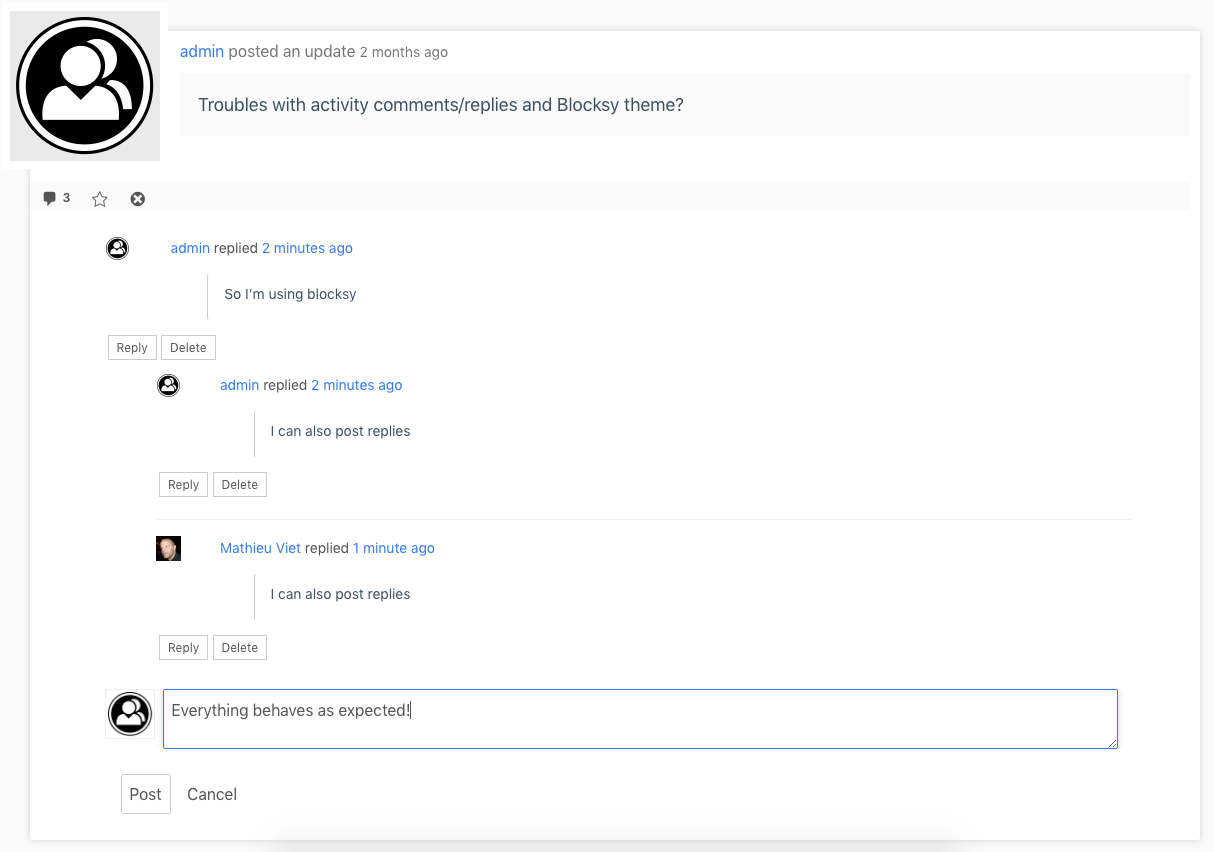
    I just tested with WordPress 6.3 & BuddyPress 11.3.1, no other plugins or custom code, having Twenty Nineteen theme active and using a regular WP config (as opposed to multisite) : everything behaves as expected.

    #330965
    Varun Dubey
    Participant

    Hello @symphonyvelenciano, kindly review your permalink settings and ensure they are configured as follows: https://docs.wbcomdesigns.com/docs/buddypress/getting-started-buddypress/permalink-settings/.

    And if it’s the same, please get in touch with your hosting support to verify whether mod_rewrite is enabled in PHP.

    #330964
    Symphony Velenciano
    Participant

    Has the 404 errors been fixed yet? I just created a new install, installed a new version of buddypress, and add the pages to a new menu. The Activity and Member page is now working, but the Setting is still not. Now if I go into Pages, and open the pages directly, they work fine. But not from the menu or the backend from the top right hand corner. Changing permalinks doesn’t help as it points them to other pages. I tried on another computer, same thing. Hosting company is on it’s third day still trying to figure the issue. It’s not any of the default themes, although with SocialV, their buddypress plugin doent’s even recognize that buddypress is already installed! I’m using the latest PHP version, no clue. All other pages work except buddypress pages. I saw this same issue in the forums, but no one knew the answer or the fix for this, and many of them are just left unanswered.

    #330954
    bretlee010186
    Participant

    It seems that you’re encountering issues with your website, https://buriedladies.com, specifically related to the registration page and the functionality of BuddyPress. After deleting and re-uploading BuddyPress, the register page appears blank despite setting up everything correctly according to the instructional videos you’ve watched. Additionally, you’ve noticed that when you log out of the site, the register option disappears from the top menu, which is puzzling.

    Regarding your second concern, it appears that individuals have successfully registered for your site due to your invitation to join groups. You’re wondering if there’s a way to manually assign them to specific groups.

    Considering the situation, here are a few steps you could take:

    Check Theme Compatibility: Since you’re using a Genesis theme, it’s important to ensure that it’s fully compatible with the latest versions of WordPress and BuddyPress. Sometimes, theme conflicts can lead to unexpected issues. Make sure your theme is up to date and well-suited for BuddyPress integration.

    Plugin and Theme Conflict: Conflicts between plugins or themes can lead to unusual behavior. Deactivate all other plugins except BuddyPress and switch to a default WordPress theme temporarily. See if the registration page works in this scenario. If it does, then the issue likely stems from a conflict. You can reactivate plugins and your theme one by one to identify the culprit.

    Permalinks: Check your site’s permalink settings. Sometimes, incorrect settings can lead to pages not displaying as intended. Go to Settings > Permalinks and make sure you have a valid permalink structure selected.

    BuddyPress Settings: Double-check your BuddyPress settings, especially those related to registration and user roles. Ensure that the registration page is properly assigned in the settings and that user roles are set up correctly.

    Cache and Cookies: Clear your browser cache and cookies to ensure you’re viewing the most recent version of your site.

    As for your second concern about moving users into specific groups, BuddyPress doesn’t natively offer a feature to manually assign users to groups. However, you can encourage users to join specific groups after registration by providing clear instructions on your site.

    Regarding “TWITCHFUSION,” it’s still unclear how this term relates to the context you’ve provided. If “TWITCHFUSION” has specific relevance to your website or the issues you’re facing, please provide more information so that I can address it accurately.

    #330952

    In reply to: AVATAR AND ATTACHMENTS

    Mathieu Viet
    Moderator

    Hi,

    In this support topic of the BP Attachments Add-on, there’s a code snippet to disable the beta feature about managing Avatar using the Add-on instead of BuddyPress Legacy Avatar UI:
    https://wordpress.org/support/topic/bp-users-are-not-able-to-delete-their-avatar-image/#post-16897553
    It should help you carry on being able to share media in activity updates & being able to upload avatars in a more stable way.

    #330951
    Dan Wein
    Participant

    Hi there, PLEASE HELP!
    I have been struggling for weeks trying to get the Avatar to work. User can not upload Avatar if BP Attachments in installed, however, if BP Attachments is removed, then user can not post images in BuddyPress feeds.
    This is very frustrating, I am using BuddyPress with Paid Memberships Pro and I would really like a solution.
    Thanks

    Mattia Grispo
    Participant

    Hi I’m developing an app in flutter where I managed to send the friend request from user A to user B, but I don’t understand the logic to apply to accept the request. At the moment I was thinking of using the /buddypress/v1/friends/$requestId endpoint to return the request id and change is_confirmed from 0 to 1. but it doesn’t work

    #330917
    Mathieu Viet
    Moderator

    Hi @awol

    Absolutely 10.0.0-beta2 will include the BP Menu items fix and you’ll be able to add BP Menu Items to WP Navigations from the Menus Administration screen or the Customizer.

    I just added this user docs resource for more informations

    #330916
    hausman1229
    Participant

    My site is https://buriedladies.com. My register page is blank. I deleted buddypress today and uploaded a new copy. The software creates the page but it’s blank. I’ve enabled anyone to register and they become subscribers. I’ve watched 3-4 videos and I have everything set up correctly. When I log out of the site, the register disappears from the top menu. I’m totally flummoxed.

    Meanwhile, folks registered for my SITE because I’ve asked them to join my groups. Is there any way to move them into a group?

    I have the most recent version of WordPress and buddypress. I’m using a Genesis theme.

    #330910

    In reply to: Edit button

    scott65
    Participant

    It seems like you’re facing an issue with the BuddyPress Edit Activity plugin not functioning as expected. The plugin should add an edit button to activity posts in BuddyPress, allowing users to edit their own activity posts. If you’re not seeing the edit button even after activating the plugin.

    #330904

    In reply to: How to hide comments

    VibeThemes
    Participant

    Unfortunately, this is BuddyPress support. BuddyBoss support is not provided here.
    The comments can be disabled in WP admin – settinggs – buddypress – options – disable activity comments.

Viewing 25 results - 1,051 through 1,075 (of 69,119 total)
Skip to toolbar