Search Results for 'buddypress'
-
AuthorSearch Results
-
May 1, 2014 at 6:19 am #182276
In reply to: Different profile types and different user roles
LeBear
ParticipantMy bad, I’ve just realised that wasn’t the solution…
I had to add the code in this function
xprofile_sync_wp_profilein
wp-content/plugins/buddypress/bp-xprofile/bp-xprofile-screens.php
I’m not sure why it doesn’t work in the bp-custom.php file…
May 1, 2014 at 4:23 am #182270In reply to: Different profile types and different user roles
Participant@noizeburger Thank you for sharing this – it’s helped me out greatly.
I might just add to anyone else who’s going to implement this as I’d spent about four hours trying to figure out why it wouldn’t work for me initially.
add_action( 'bp_core_signup_user', 'custom_bp_core_signup_user', 10, 1);The number 10 states at what point the function should be called. This should work in most instances but I am using a theme with additional buddypress functions built in.
I had to set this to a higher level, meaning it gets executed later on in the process. At least I think that’s right. Anyhow, once I’d changed mine to
add_action( 'bp_core_signup_user', 'custom_bp_core_signup_user', 13, 1);It worked fine!
It’s worth reading this.
https://codex.wordpress.org/Function_Reference/add_action
Thanks again
May 1, 2014 at 2:54 am #182267In reply to: General cohesiveness
bitpath
ParticipantI think it mostly comes down to a few well placed links where you get all those “nothing matches that filter” message so people can find what would go there and fill those empty filter results. This site is so much more user friendly than the default buddypress install it seems, so it must be able to do this somehow. Maybe it just take a lot more work after installing to make it similar to this. Mostly it’s the dead end links I’m worried about. Most people don’t understand getting a lot of “nothing matches that filter” error messages with no direction on how to add groups, forums, friends, topics, etc.
May 1, 2014 at 1:44 am #182262In reply to: Make Amen plugin BuddyPress compatible
Henry Wright
ModeratorI’m guessing I’ll have to use a hook of some kind to accomplish this
You’re right. But the hook would be supplied by the Amen plugin. You could start by asking the plugin’s support if one is available. I’m guessing here but it will probably be called something like
after_submit_prayer_request.Then you’d build your own function which you can ‘hook’ on to the ‘after_submit_prayer_request’ hook (don’t forget I’m guessing at the hook name).
Your function would simply add an item to the BP activity stream and will look something like this:
function add_prayer_request_to_stream() {
    bp_activity_add( $args )
}
add_action( 'add_prayer_request_to_stream', 'actual_hook_name' );
Note: This won’t work until you have the actual hook name and have supplied the
$argsas an array that describes the activity item you’re creating.See here for more info on the
bp_activity_add()functionMay 1, 2014 at 1:05 am #182260In reply to: Group-avatar upload error
cagintx
ParticipantDid you ever resolve this? I’ve just activated BP in wordpress site using the weaver II them and am having a similar issue. Everything seems to work but I never see an avatar and continually get this error message: Notice: Undefined property: BP_Groups_Group::$avatar_thumb in /homepages/24/d463872728/htdocs/APP/wp-content/plugins/buddypress/bp-groups/bp-groups-template.php on line 526. I’ve looked at the code and it’s not obvious to me what this means.
April 30, 2014 at 11:09 pm #182256shanebp
Moderatorolder downloads:
https://wordpress.org/plugins/buddypress/developers/open a ticket:
https://buddypress.trac.wordpress.org/April 30, 2014 at 6:28 pm #182248In reply to: fatal error in posting comments
r-a-y
Keymaster@krazy-kat – Thanks for catching this bug.
A workaround in the meantime is to turn on the “Activity Streams” component.
To do this, login to the WP admin dashboard and navigate to “Settings > BuddyPress”. Check “Activity Streams” and save.
We’ll fix this bug up for v2.0.1.
April 30, 2014 at 5:33 pm #182246In reply to: Changing the layout of the registration page
ModeratorTake a look at this article from the BP Codex on the Template Hierarchy:
To summarise, you’d create a folder called /buddypress/ in your theme’s directory. Then a subfolder called ‘members’. Then a file called ‘index-register.php’. You should end up with:
/buddypress/members/index-register.php
Your register page’s code will go in that file and any customisations you make will take effect.
April 30, 2014 at 4:22 pm #182245In reply to: BP 2.0 | Fatal Error, Profile Updates
ModeratorPlease see the ticket that r-a-y referenced.
You can patch the file using the changeset:
https://buddypress.trac.wordpress.org/changeset/8305Or wait for the release of BP.2.0.1
April 30, 2014 at 11:48 am #182237In reply to: Page Hierarchy Pain
Anonymous User
InactiveHi @localiseorg
Socialise (sitewide activity assigned to this)
– Members (members directory assigned to this)
– Groups (groups directory assigned to this)
– Forums (bbPress forum root assigned to this)Have you tried using a wp_nav_menu instead ?
I think, if i was in your situation, i’d make a wp_nav_menu with your different pages.. It could be “home”, “blog”, “socialise” for instance. And from the wp_nav_menu WordPress UI, i’d attach the Members/Groups and forums as submenus of Socialise.
Then concerning the Socialise title that is “Sitewide Activity”, i’ll begin to edit the activity page changing the title from Activity to Socialise and use a little code like the following:
function change_activity_directory_title() {
	buddypress()->activity->directory_title = buddypress()->pages->activity->title;
}
add_action( 'bp_activity_setup_globals', 'change_activity_directory_title' );
April 30, 2014 at 8:37 am #182234Inactivehi @xyhavoc
Personally, i don’t really like this method “hardcoding the type into the template“. I’ve made a gist using another method, tested it and it’s restricting the activity type the way you want even in case of a new activity post.
By default, this will restrict for all activity loops.
But See the commented parts if you want this behavior to only happen in user’s profile, or in group’s home or in directory..).I don’t know if you use the bp-custom.php file, if not, i recommend you to do so, so that this will happen whatever the activated theme is.
Here’s the link to the gist:
https://gist.github.com/imath/5c7e4db74513ca4b30b8April 30, 2014 at 3:57 am #182230In reply to: Cannot make the plugin work.
modemlooper
Moderatortry upping your server memory
April 30, 2014 at 3:37 am #182228In reply to: Buddypress "bp-core.php" fatal error
critta10
ParticipantI went through all the files and deleted out the “&” sign as the fatal error called for and then when finished this popped up:
Warning: Creating default object from empty value in /home4/unione/public_html/wp-content/plugins/invite-anyone/by-email/by-email.php on line 51
Warning: Creating default object from empty value in /home4/unione/public_html/wp-content/plugins/buddypress/bp-core.php on line 101
Warning: Creating default object from empty value in /home4/unione/public_html/wp-content/plugins/buddypress/bp-core.php on line 114
Warning: Creating default object from empty value in /home4/unione/public_html/wp-content/plugins/buddypress/bp-core.php on line 160
Warning: Creating default object from empty value in /home4/unione/public_html/wp-content/plugins/buddypress/bp-core.php on line 177
Warning: Creating default object from empty value in /home4/unione/public_html/wp-content/plugins/buddypress/bp-activity.php on line 79
Warning: Creating default object from empty value in /home4/unione/public_html/wp-content/plugins/buddypress/bp-blogs.php on line 69
Warning: Creating default object from empty value in /home4/unione/public_html/wp-content/plugins/buddypress/bp-forums.php on line 20
Warning: Creating default object from empty value in /home4/unione/public_html/wp-content/plugins/buddypress/bp-friends.php on line 39
Warning: Creating default object from empty value in /home4/unione/public_html/wp-content/plugins/buddypress/bp-groups.php on line 75
Warning: Creating default object from empty value in /home4/unione/public_html/wp-content/plugins/buddypress/bp-messages.php on line 72
Warning: Creating default object from empty value in /home4/unione/public_html/wp-content/plugins/buddypress/bp-xprofile.php on line 105
Warning: Creating default object from empty value in /home4/unione/public_html/wp-content/plugins/buddypress/bp-core/bp-core-settings.php on line 10
Warning: Creating default object from empty value in /home4/unione/public_html/wp-content/plugins/buddypress/bp-activity.php on line 980
Warning: Creating default object from empty value in /home4/unione/public_html/wp-content/plugins/buddypress/bp-activity.php on line 980
Warning: Creating default object from empty value in /home4/unione/public_html/wp-content/plugins/buddypress/bp-activity.php on line 980
Warning: Creating default object from empty value in /home4/unione/public_html/wp-content/plugins/buddypress/bp-activity.php on line 980
Warning: Creating default object from empty value in /home4/unione/public_html/wp-content/plugins/buddypress/bp-activity.php on line 980
Warning: Cannot modify header information – headers already sent by (output started at /home4/unione/public_html/wp-content/plugins/invite-anyone/by-email/by-email.php:51) in /home4/unione/public_html/wp-includes/pluggable.php on line 876
Recommendations?
April 30, 2014 at 2:29 am #182226In reply to: report user report abuse flag something?
localiseorg
ParticipantAnother, not sure if it’s one already mentioned: http://premium.wpmudev.org/blog/how-to-tackle-spam-with-the-buddypress-spam-link-plugin/
April 30, 2014 at 2:20 am #182225In reply to: report user report abuse flag something?
ParticipantFound some useful stuff here, but some of it is commercial :/ WangGuard in particular implements “report” links, but not sure to what extent (looks like it’s limited to activity stream?)
April 30, 2014 at 12:28 am #182222In reply to: report user report abuse flag something?
djsteveo
Participant@naijaping – thanks for taking the time to look into / test that other abuse plugin and providing some feedback. Sounds like some good ideas working in there! (and good luck with your bp theme, if it’s not based on bootstrap, I’d love to test it out! (the bootstrap based bp themes all fail when used in combination with rtmedia’s bp-media in my experience)
@localiseorg – thank you for mentioning this one! It does look like that plugin was made for the exact kind of thing that we are talking about here! Looks like it is old outdated code though, since it’s in the wp depository, I assume someone could fork it and fix it up to work with current wp / bp.. or at least look at the code to see if there is anything in there that would help a new plugin do more.
Now I am scratching my head as to why I did not stumble across that one in all by google searches, wordpress.org searches, and buddypress.org searches. Hmmm. The name is very similar to another bp plugin I used ages ago that set up moderation for all new members, not allowing them to post certain things until they were manually approved – that one was awesome for a while, but then started to break with newer bp versions.
Anyhow, it looks like this kind of thing has been attempted, but there is nothing that is compatible with current versions (completely it seems).
and yeah “there’s no way an admin can go round reading everything on a busy site” – is driving me crazy now that my buddypress site has started to get busy on a daily basis.
April 29, 2014 at 9:25 pm #182214xyhavoc
Participant@imath
No that template file has been edited. I’ll give you an example of what I mean:
-activity-loop.php I have added the filter “&action=activity_update” so that the stream only shows user’s activity posts, as per the codex (https://codex.buddypress.org/developer/loops-reference/the-activity-stream-loop/).
-I Pull up the activity feed on the web site, everything looks A-OK, the filters are working as they should.
-Then I post a new activity update, when Buddypress adds the new activity via javascript, the filter is removed and the user can now scroll and see activities not listed in the activity-loop.php filter.
Basically the filter isn’t working consistently. I’ve never had this problem with BP 1.8 or 1.9.
I’m also having other problems where deleting an activity, the activity slides up to disappear, and then it comes back again. Upon refresh the activity is now gone.
April 29, 2014 at 8:05 pm #182212In reply to: Start Up Problems
angussharman
ParticipantHi thanks for the reply. Yeah i did try without the compatibility pack, but there were a number of links that didn;t work, i couldn’t get the sidebar to show, and there was more work to do with styling.
I’ve now resolved the problem with the profile settings, following the info in this link https://buddypress.trac.wordpress.org/changeset/8292
so now its just the second issue. I’ve deactivating all plugins and reverting to a standard wordpress theme, but no joy. I see someone had a similar issue, but it was never followed up. https://buddypress.trac.wordpress.org/ticket/5320
Any ideas would be much appreciated
April 29, 2014 at 7:09 pm #182206In reply to: Buddypress "bp-core.php" fatal error
ParticipantThanks did that and now I am getting this fatal error:
Fatal error: Call-time pass-by-reference has been removed in /home4/unione/public_html/wp-content/plugins/buddypress/bp-core/bp-core-classes.php on line 228Line 228 says “$paged_users = BP_Core_User::get_user_extras( &$paged_users, $user_ids, $type );”
And suggests?
Once I am able to log in I will upgrade through the versions like you suggest.
April 29, 2014 at 6:07 pm #182204In reply to: Buddypress "bp-core.php" fatal error
ModeratorThat is an old version of BP.
You could try changing the apply_filters to
return apply_filters( 'bp_core_get_users', BP_Core_User::get_users( $type, $per_page, $page, $user_id, $include, $search_terms, $populate_extras ), $params );That might get you past the fatal error.
You should update BP, but you cannot jump all the way to BP 2.0.
You’ll have to step up thru each version.
You can get older versions here:
https://wordpress.org/plugins/buddypress/developers/April 29, 2014 at 3:02 pm #182195In reply to: Problem Adding divs to Activity Stream templates
Picss3o
ParticipantHi imath thank you for the quick reply.
It is a WordPress theme and I think you have identified my mistake, which was a dumb one I am ashamed to say.
I thought I had used option 2) placing a folder called buddypress inside the child theme
but I copied the instruction to follow the full directory structure so I have
wordpress-theme/buddypress/bptemplates/bplegacy/buddypress/activity/index
I will change to
wordpress-theme/buddypress/activity/index
April 29, 2014 at 3:01 pm #182194InactiveHi,
Make sure to leave the base group profile fields available for all users
Then explore in this direction :
/* Profile display */
function excluding_group_id_depending_on_user_role( $args = array() ) {
	if ( user_can( bp_dispayed_user_id(), 'capability_to_check' ) {
		$args['exclude_groups'] = "2,3,4"; //Comma-separated list of profile field group IDs to exclude
	}
	return $args;
}
add_filter( 'has_profile', 'excluding_group_id_depending_on_user_role', 10, 1 );
/* profile editing */
It will be a bit more complex as you’ll need to filter ‘xprofile_filter_profile_group_tabs’ and use a pattern to exclude the tabs you don’t want the role to edit.Finally to restrict group creation, i’ve shared a code on the BuddyPress fr community :
http://bp-fr.net/agora/sujet/restreindre-la-creation-des-groupes-a-des-roles-wp/April 29, 2014 at 2:38 pm #182193In reply to: turn off comment function in activity stream
InactiveHi,
In the BuddyPress settings, you can deactivate the activity comment feature for blog/forum posts
see https://codex.buddypress.org/getting-started/configure-components/#settings-buddypress-settingsThere’s a setting called “Blog & forum comments”, simply make sure it’s not checked.
April 29, 2014 at 2:33 pm #182191InactiveHow did you force the status to be ‘&action=activity_update’ ?
Because if you’ve edited a template that is within the /plugins/buddypress folder, then upgrading the plugin removed the things you eventually edited..
April 29, 2014 at 2:29 pm #182190In reply to: Registration & Activation Pages reverting to Home
InactiveHi,
I can see your signup page : http://galleryhop.com/sign-up/
When the user is already logged in, he doesn’t need to signup again, so BuddyPress is redirecting the user. It’s the correct behavior. Try to log out and then you’ll be able to access to the signup page.
About the component activation issue, you need to have the submit button “Save Settings” to update your active components
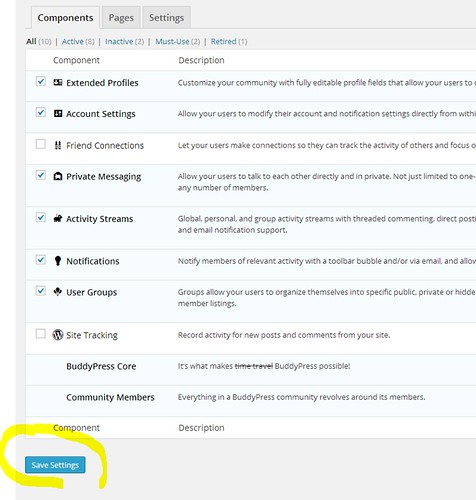
If you don’t see the button, there’s a trouble with your config, are you using an admin theme ?
-
AuthorSearch Results


