Skip to:
Content
Pages
Categories
Search
Top
Bottom

Search Results for 'buddypress'

Viewing 25 results - 18,451 through 18,475 (of 94,539 total)
  • Author
    Search Results
  • #243262
    aleahl213
    Participant

    Hello,

    I have a theme that doesn’t support BuddyPress and the default styling looks horrible in the theme. But I have a different theme I like the styling of buddypress. Would it be possible to just export that part and include that in my current child theme?

    #243253
    danbp
    Participant

    Reference file: buddypress\bp-groups\bp-groups-widgets.php

    To make your own version of the widget: https://codex.wordpress.org/Widgets_API

    HTML definition target="_blank"

    Or maybe this plugin ?
    https://wordpress.org/plugins/bp-extend-widgets/

    #243249
    danbp
    Participant

    @sismis,

    Howdy [username] is part of WordPress Toolbar. When BP is activated, it add a sub-menu to this menu.

    If you want it elswhere, it’s not really possible as the BP part of it was written to go to the admin_bar only.

    To get a similar menu, you simply add buddypress menu to your theme main menu (explained on above codex link). But this menu will be static and you cant get same details.

    Another solution is to recode that menu, so you can add it with a filter function to wp_nav_menu, which handles the main menu or the header menu.

    To do this, you can use a new Walker Class extention or the existing filter. Possibly also some other ways to do this, but i don’t know them.

    To remove the Howdy menu and the attached BuddyPress Profile sub menu from the Toolbar, you can use this snippet (in functions.php or bp-custom.php):

    function bpfr_remove_my_account_menu() {  
        global $wp_admin_bar;  
        $wp_admin_bar->remove_menu('my-account');  
    }  
    add_action( 'wp_before_admin_bar_render', 'bpfr_remove_my_account_menu' );

    Codex References
    https://codex.wordpress.org/Function_Reference/wp_nav_menu
    https://codex.wordpress.org/Navigation_Menus

    Quinn Goldwin
    Participant

    I’m using the code from these 2 forums, can someone tell me how to convert these fields so they are clickable links. Any help would be much appreciated.

    https://buddypress.org/support/topic/how-to-add-fields-to-group-creation-with-group-extension-api-please-read/page/3/

    http://pastebin.com/Bj3aE4Q0

    	<?php $myspace = groups_get_groupmeta( $bp->groups->current_group->id, 'e2e_myspace' ); ?>
    	<label for="group-myspace">MySpace</label>
    	<input type="text" name="group-myspace" id="group-myspace" value="<?php echo $myspace ?>" />
    
    	<?php $twitter = groups_get_groupmeta( $bp->groups->current_group->id, 'e2e_twitter' ); ?>
    	<label for="group-twitter">Twitter</label>
    	<input type="text" name="group-twitter" id="group-twitter" value="<?php echo $twitter ?>" />
    
    	<?php $skype = groups_get_groupmeta( $bp->groups->current_group->id, 'e2e_skype' ); ?>
    	<label for="group-skype">Skype</label>
    	<input type="text" name="group-skype" id="group-skype" value="<?php echo $skype ?>" />
    
    
    djsteveb
    Participant

    I would GUESS that you could edit that plugin to add in the code as mentioned above https://buddypress.org/support/topic/how-users-can-link-to-their-profile/

    Or ask the plugin author for clarification.

    I stopped using that plugin when they added the extra security stuff for strong passwords that broke things for me.. however the plugin’s support page is pretty active, and given that he/she has options for redirecting users after login based on role – there may be an easy way to add such functionality to the plugin by asking the plugin author.

    There is a bit of info with some of the functions here ->https://codex.buddypress.org/themes/members-navigation-menus/

    I see others are asking about bp xprofile fields and such within the them my login support forum,
    ( wordpress.org/support/plugin/theme-my-login )
    so hopefully this plugin author will add more and more BP options – I enjoyed using that plugin some time ago – hope it continues to mature.

    #243238
    djsteveb
    Participant
    #243231
    manicexpression
    Participant

    Forgive me if I’m just making a mistake, I’ve never tried what you’re suggesting, in the link you sent me, it asks me to go to this directory,

    /bp-templates/bp-legacy/buddypress/

    But when I go there, there’s no Template file to copy, just more folders.

    Thoughts?

    #243229
    djsteveb
    Participant
    danbp
    Participant

    @djsteveb +1 !

    @atfpodcast,

    – you go to your menu dashboard and select the menu of your theme (if exist, it should be there)
    – you open screen option (top right) on menu admin and select BuddyPress
    – you select profile in the left column where BuddyPress appeared and give it a title XYZ
    – save and you’re done !

    Now you have a XYZ button near Home, About and whatever is already on your theme menu.
    Doc is here https://codex.buddypress.org/getting-started/buddypress-links-in-wordpress-menus/

    #243227
    shanebp
    Moderator

    You could create a template overload of this file:
    bp-templates\bp-legacy\buddypress\members\single\notifications.php

    Then wrap the current markup with this conditional: bp_is_my_profile()

    Quinn Goldwin
    Participant

    Hello Buddypress community!

    1. I had signed up for a social network and after signing up, the CEO posted something to my wall. I thought it was a great personal touch, letting the users know who he is and if they had questions to reach out to him. Now I know he didn’t personally post that on my wall, it had to be a scheduled or auto post for new users. Is there a plugin out there or some code I can add to have the ability to do something similar?

    2. I also have a another related feature that I would like. Does anyone know if there is a plugin that allows buddypress users to schedule content to the activity feed. I understand it could be abused with spammers but its more for an APP i’m developing. I would like the ability to create an activity post and tell the system to post this weekly or monthly. IE. Every Monday I would like this particular post to be shared on the activity stream. or 1 once a month I would like to share this on my activity feed.

    If anyone can direct me to a plugin or resources on being able to accomplish these 2 things, I’d greatly appreciate it.

    If no one has a solution, does anyone know good places I can hire PHP coders online or overseas to get this accomplished for a somewhat affordable rate? I tried this site called codeable, but they charge $75 an hour for custom coding. If anyone has a site or place to share that is far more affordable I would greatly appreciate it.

    Thanks!

    #243225
    manicexpression
    Participant

    For the moment, as a temporary fix, I have completely removed the Notifications.php file from

    public_html/wp-content/plugins/buddypress/bp-templates/bp-legacy/buddypress/members/single/notifications.php

    ch1n3s3b0y
    Participant

    Hi everyone

    Currently, when a user finishes changing their user avatar, they get redirected to their profile. I want them to be redirected to their edit profile screen.

    The code is in here \wp-content\plugins\buddypress\bp-xprofile\bp-xprofile-screens.php and the code is in the function xprofile_screen_change_avatar().

    The actual bit of code I need to change is:

    do_action( 'xprofile_avatar_uploaded' );
    bp_core_add_message( __( 'Your new profile photo was uploaded successfully.', 'buddypress' ) );
    bp_core_redirect( bp_displayed_user_domain() );

    What I need to do is edit that bp_core_redirect() without editing BuddyPress’ core files. Any one have any idea how I can do this?

    djsteveb
    Participant

    same question asked by someone else hours ago (Also on front page currently)?
    https://buddypress.org/support/topic/how-users-can-link-to-their-profile/

    which is same as 4 days ago as pointed out by others – https://buddypress.org/support/topic/how-users-can-link-to-their-profile/

    I think(?)

    #243209
    djsteveb
    Participant

    @darkhelmet1 – settings -> buddypress -> third tab near top is “settings”
    first checkbox: Show the Toolbar for logged out users

    Is it checked?

    Which theme are you using?

    Any other plugins installed / activated?

    #243208
    DarkHelmet1
    Participant

    Hi, I’m new to WordPress, bbPress and BuddyPress.
    I’ve just installed bbPress and BuddyPress for the first time.
    I was mucking about, looking around to work out how things work.
    I thought I’d log out of Admin and try and see if I could see what it would be like to register as a new user. But there is no “register” link showing up anywhere?
    Below is a screen capture of part of the screen of what I see, no register, just log in.
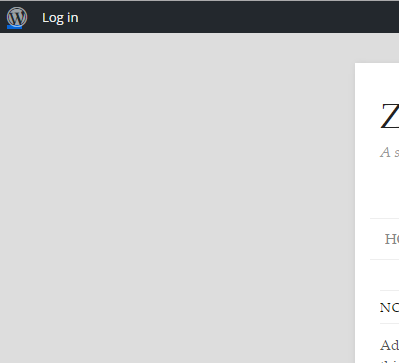
    Any help appreciated.

    #243206
    joergb
    Participant

    Hello,

    I have my buddypress site set up with one activity page only (no groups). Now I’d like the users to be able to subscribe to a weekly email digest that includes all topics and comments from the activity page of the past week. I already tried the “BuddyPress Group Email Subscription” plug-in, but as the name suggests, it only works for groups. I also tried several other plug-ins but haven’t found one that works. Do you know of any plug-in working in this scenario or do you have any suggestion on how to set this up?

    In case it matters: My buddypress site is password protected. I already thought about a solution with MailChimp and an RSS feed or similar, but it seems complicated to set up a password protected RSS feed that works with MailChimp (right now, I have disabled the RSS feeds entirely). My favourite would be something without 3rd party services, anyway.

    Wordpress Version: 4.2.4, Buddypress Version: 2.3.2.1

    Any help highly appreciated!

    Best regards,
    Jörg

    #243204
    danbp
    Participant

    This question was asked 4 days ago here:
    https://buddypress.org/support/topic/how-users-can-link-to-their-profile/

    And some other search result you can read also, here:
    https://buddypress.org/support/search/bp_get_loggedin_user_link/

    Finally, question is: which menu are you talking about ? Give details please.

    #243190
    Henry Wright
    Moderator

    This is simply the way your theme displays things on the page. If you’d like a sidebar on those pages, you can modify the templates. See the Template Hierarchy article for more info.

    #243188
    Markus Echterhoff
    Participant

    Found the culprit and the fix here in case anyone encounters the same issue: https://codex.buddypress.org/themes/buddypress-companion-stylesheets/#existing-styled-themes

    Markus Echterhoff
    Participant

    Hello,

    I have a BP installation. I was making use of the theme compatibility with a “buddypress” folder in my theme directory, where I’m customizing theme files. I also have plenty of custom css. I was happy with the way BP looked. After upgrading to the newest version things were moved around, the inbox is completely messed up and unusable, backgrounds appeared that weren’t there before, the search box looks horrible, I don’t know where to begin fixing this…

    What happened? I don’t really want to rewrite everything from scratch, any ideas on what’s going on?

    #243180
    Halo Diehard
    Participant

    I am using the theme Matheson, but I tested it on Twenty Ten with all plugins deactivated except BuddyPress and it still happens.

    #243179
    djsteveb
    Participant

    first test with default 2014 or 2015 theme – and all other plugins disabled except bp – does it work then? If not…

    previous forum posts maybe helpful –
    (let us know what you find works!)

    With a new bp setup I usually check these things first if email are not seeming to send or go through ->https://buddypress.org/support/topic/activation-e-mail-failing-to-send/#post-241079 (From a recent similar thread)

    Better to check the basics before digging into whether it’s a email header config on the server, php settings limiting functionality – need for wp to send as smtp plugin – something just with gmail blackhole filtering –

    so many different things can affect wp sending, bp sending, your web serving sending email as php, or an email service accepting something that was sent, much less put in the actual inbox instead of junk mail / promotions box or whatever…

    =-=- also from danbp about 8 months ago:
    When encountering a registration problem, first thing to do is to test your install without any plugins and one of WP’s Twenty default theme. Ensure that your site send correctly emails. Before activating any plugin, your base WP install must work.

    Once WP is OK – you can install BuddyPress and check your permalinks. Pretty permalinks must be activated to get the plugin working correctly.

    This point is important, especially if you have redirection issues after BP is activated.

    Second point to check is your theme installation.

    Proceeding like this will help you to isolate easely the culprit. If:
    – WP install: OK
    – BP install: OK
    – theme activation: problem

    So you know here the problem comes from.

    While testing your install, you can activate wp_debug (set to TRUE) in the wp-config file. This can give you a lot of information about conflict and/or errors.

    Just keep in mind that these information have 2 levels of importance: notice and warning.
    While notice are generally harmless, warnings should be taken seriously in account and solved.

    If WP is the problem, see first the wordPress support
    If it’s BuddyPress, see the BP support
    If it’s the theme, see the theme support
    If it’s any other plugin, see first the plugin support.

    #243161
    chicho1969
    Participant

    Thanks @danbp ,
    I´ll try to explain you:

    I have a custom_post_type (celebrities). it real name is “famosos”.
    BuddyPressUsers can mark any celebrity as fasvourite.
    This part is working fine.
    So now, I am trying to send a notification (to users that have marked as favorite certain celebriry) that “today” is that celebrity´s birthday.

    For that purpose, I have a SQL query that works fine and gives me an array with budypress user id and the celebritie post id. (this is also working fine)

    SO I have to setup a custom notificationa that checks every day that SQL QUery to gets users and celebrities ids to notify user about today´s birthday (of their favourite celebrities)

    and this is what I did at first:

    define( 'BP_ACTIVITY_CELBIRTHDAY_SLUG', 'celbirthday_notifier' );
    function celbirthday_notifier_setup_globals () {
    	
    	$bp = buddypress();
    	
    	$bp->celbirthday_notifier = new stdClass();
    	$bp->celbirthday_notifier->id = 'celbirthday_notifier'; //I asume others are not going to use this is
    	$bp->celbirthday_notifier->slug = BP_ACTIVITY_CELBIRTHDAY_SLUG;
    	$bp->celbirthday_notifier->notification_callback = 'celbirthday_notifier_format_notifications'; //show the notification
    	
    	$bp->active_components[$bp->celbirthday_notifier->id] = $bp->celbirthday_notifier->id;
    
    	do_action( 'celbirthday_notifier_setup_globals' );
    }
    
    add_action( 'bp_setup_globals', 'celbirthday_notifier_setup_globals' );

    and then try to format the notification:

    function celbirthday_notifier_format_notifications( $action, $item_id, $secondary_item_id, $total_items, $format = 'string' ) {
     if ( 'new_birthday' === $action ) {
                    $famoso_name =  get_the_title( $secondary_item_id );
    		$subject = 'Celebrity birthday';
    		$message = 'Say happy birthday to $famoso_name';
    		$content = 'Tody is $famoso_name birthday .....somethin else ';
    		if ( (int) $total_items > 1 ) {
              $text = sprintf( __( 'You have %d celebrities birthday', 'bbpress' ), (int) $total_items );
              $filter = 'bp_activity_at_message_notification_message';
          } else {
              if ( !empty( $secondary_item_id ) ) {
                  //nada
              } else {
                  $text = sprintf( __( 'You have %d new birthday of %s', 'bbpress' ), (int) $total_items, $famoso_name );
              }
              $filter = 'bp_activity_at_message_notification_message';
          }
    	 }
          if ( 'string' === $format ) {  //falta definir $famoso_link y mas 
              $return = apply_filters( $filter, '<a href="' . esc_url( $famoso_link ) . '" title="birthday anounce">' . esc_html( $text ) . '</a>', (int) $total_items, $text, $famoso_link );
    		// $message = apply_filters( 'bp_activity_at_message_notification_message', $message, $poster_name, $content, $message_link, $settings_link );
    
    } } do_action( 'celbirthday_notifier_format_notifications', $action, $item_id, $secondary_item_id, $total_items );

    and then add notification this way:

    function buddypress_celebrities_add_notification( $fecha_act,  $famoso_name, $receiver_user_id) 
    {    if ( bp_is_active( 'notifications' ) ) { 
    
    	$fecha_act = date("Y-m-d");
    	$res_birth = $wpdb->get_results( "SELECT wp_best_favs.user_id, wp_postmeta.post_id
    					FROM wp_best_favs
    					LEFT JOIN wp_postmeta ON ( wp_postmeta.post_id = wp_best_favs.celeb_ID ) 
    					WHERE (
    					wp_postmeta.meta_key =  'fecha_na')
    					AND (DAY(  <code>wp_postmeta</code>.<code>meta_value</code> ) = DAY(  '$fecha_act' ))					AND (MONTH(  <code>wp_postmeta</code>.<code>meta_value</code> ) = MONTH(  '$fecha_act' )							)
    									") ;
    			$res_birth = array_filter($res_birth);  
    			$matriz = objectToArray($res_birth);  //convertimos el array de objetos en array normal para manejarlo mas facil
    			$current_time = bp_core_current_time();
    			if(count($matriz)==0) { 
    				// está vacío 
    				}  else { 
    					global $wpdb;
    					$bp = buddypress();
    					$subject = 'Celebrity birthday';
    					$message = '1 Say happy birthday to $famoso_name';
    					$content = '2 Say happy birthday to $famoso_name';
    					foreach ($matriz as $v1) {
    					
    						$famoso_id = $v1[post_id];
    						$famoso_name = get_the_title ($v1[post_id]);
    						$receiver_user_id = $v1[user_id];
    						
    					$args = array(
    							'user_id'           => $receiver_user_id,
    							'item_id'           => $famoso_id,
    							'secondary_item_id' => $famoso_id,
    							'component_name'    => $bp->celbirthday_notifier->id,
    							'component_action'  => 'new_birthday',
    							'date_notified'     => $current_time,
    							'is_new'            => 1,
    	       					 );
    							 
    							 bp_notifications_add_notification( $args );
    						 
    			}	}  }	} add_action( 'new_birthday', 'buddypress_celebrities_add_notification', 10, 1 );

    so far this is what I am trying to do, hope you understand.
    Thanks in advance.

    #243160
    kostasbarkas30
    Participant

    thanks @danpb. buddypress is really great!!! thanks again for your advises.

Viewing 25 results - 18,451 through 18,475 (of 94,539 total)
Skip to toolbar