Hi @hansvdzwet
What happens is that when the TemplatesNext Toolkit plugin is active, all and every BuddyPress related link shows a page containing the content of the main/home page.
Does the problem happen when the plugin is deactivated? If not, then I suggest you contact the plugin author letting them know the details. Hopefully they can issue a fix.
Hi @butterzeugs,
Here are a couple of options:
Hi @backpackersunion,
Companion stylesheets were introduced in 2.3. You can read more about them here.
If they’re not quite to your taste, you can dequeue them. Here’s an example of how to do it:
function dequeue_bp_twentyfifteen() {
    wp_dequeue_style( 'bp-twentyfifteen' );
}
add_action( 'wp_enqueue_scripts', 'dequeue_bp_twentyfifteen' );
Ups, let me answer myself.
I had this on wp-config.php
define( ‘BP_ENABLE_MULTIBLOG’, true );
Just remove it and “my problem” solved. Now Network members dont see BuddyPress configs 😉
My bad 😀
OMG Thanks mrjarbenne 😀 Now it works. Thanks a lot.
One thing I don’t understand/like why each member of the Network has now access to the BuddyPress Configs? I would prefer they not touching that. Plus they can also create Activity/Groups/Members Pages on they sites, I don’t like that, I would like all that to be centered on the root domain only, same for registration page and activation page. (Perhaps I activate too many options and I should uncheck one of them?)
I will add screenshots of the steps I followed so anyone having same issues can see how to get it to work, thanks to mrjarbenne steps 😉
View post on imgur.com
Hello all,
I’m currently running the following wordpress setup/plugins/theme:
– WordPress : Version 4.2.2
– BuddyPress : Version 2.3.0
– i-Excel theme : Version: 1.1.4
Theme requires :
– TemplatesNext Toolkit : Version 1.1.3
I’ve run into a problem that I’m not sure how to solve or where to ask for help, but going by forums and activity I’m guessing I’ll have a better chance at the BuddyPress forum.
So… What happens is that when the TemplatesNext Toolkit plugin is active, all and every BuddyPress related link shows a page containing the content of the main/home page.
Server Log doesn’t show anything out of the ordinary.
I’m a bit lost here.
Any help/advice will be greatly appreciated.
thnx in advance for your time and efforts,
Hans.
What exactly do you mean by the page not being nested? In my situation both the nested and un-nested versions are accessible however only the un-nested version displays the member loop. This holds true for any arbitrary blank page that I choose to point the Buddypress page options to.
The page exists, however there is no content. Thanks Hugo, your work is greatly appreciated!
Edit: I should also mention that other Buddypress pages such as Groups and Activity have no such issue.
I can confirm that the url path is stripped out but the actual members page should still work either directly navigated to or clicking the page link as nested under a parent dropdown which should result in page being found but at it’s root position my-site.com/members/
Can we confirm that the page does still exist and is viewable, in the meantime I’ll open a trac ticket to log the page hierarchical issue.
This issue is ticketed for looking into:
https://buddypress.trac.wordpress.org/ticket/6475#ticket
Well, I just tested it and it didn’t work. Hopeful someone can come in and suggest an alternate fix. One of the issues is that the code I’ve pasted there was pulled from a source that switched to smart quotes rather than regular quotes, but that doesn’t seem to be the only issue as I’ve rectified that on my test and it didn’t help.
Here’s the source:
How to Add, Remove, and Change the Order Of BuddyPress Component Menu
This may be a unique case, but it’s worth asking.
I am running a WPMS installation at ultrapowa.us, and I was wondering if there was a way I could set it up so registration and activation, as well as all the main BuddyPress features were accessible from a subdomain, say profiles.ultrapowa.us. That way my main site would be ultrapowa.us, and all Multisite domains would be subdomains of that, but registration and groups would be on profiles.ultrapowa.us. Is there any way at all to set up a system like that?
I have two questions.
1. I would like to rename the Forum tab in my group.
2. How would I add a extra tab in a group that I can link to a URL? I have multiple groups but I just wanted one of the groups to have a Tab that links elsewhere. Is that possible?
The Theme I am using is KLEO by Seventh Queen
Buddy Press version Version 2.2.1
Website:http://www.cmpg-annex.org/
Other Plugins
Akismet
bbPress
BuddyPress Cover Photo
K Elements
MOJO Marketplace
Paid Memberships Pro
PMPro MailChimp Integration
PMPro Register Helper
PMPro Set Expiration Dates
Register Helper Example
Revolution Slider
rtMedia Pro for WordPress, BuddyPress and bbPress
The Events Calendar
WPBakery Visual Composer
Use, or create, the bp-custom.php file in your plugins folder: https://codex.buddypress.org/themes/bp-custom-php/
Add this to it (make sure you add a <?php tag if you are creating a bp-custom file for the first time.
function bbg_change_profile_tab_order() {
global $bp;

// Change Menu Order
$bp->bp_nav[‘profile’][‘position’] = 10;
$bp->bp_nav[‘friends’][‘position’] = 20;
$bp->bp_nav[‘groups’][‘position’] = 30;
$bp->bp_nav[‘blogs’][‘position’] = 40;
$bp->bp_nav[‘messages’][‘position’] = 50;
$bp->bp_nav[‘settings’][‘position’] = 60;

// Remove a menu item
$bp->bp_nav['activity'] = false;
}
add_action( ‘bp_setup_nav’, ‘bbg_change_profile_tab_order’, 999 );
I haven’t tested this. I hijacked it from here: http://themekraft.com/customize-profile-and-group-menus-in-buddypress/
Ok since you are my godsend I hate the activity page.. How do I edit the buddypress menu to remove the page from the menu? Matter of fact how do I change the order of the items in the menu? You are the man remember that always
MS integrates wonderfully with BuddyPress. When network activated on a Multisite, activity from across the network is recorded on the users Profile. Just be sure to check Site Tracking under Settings/Buddypress once you network activate BuddyPress (https://cloudup.com/i_-p1kJGUwd). Once upon a time, BP was ONLY compatible with Multisite: you couldn’t run it on a single WP install.
Note that this will give your users the ability to have their own blogs. This is separate from the ability to post from the front end. For this you would need to make a theme like P2 your network default. http://premium.wpmudev.org/blog/how-to-set-the-default-theme-for-wordpress-multisite/
Given that you have been able to diagnose that this is a theme issue, particularly on a theme that you paid for, I would suggest going back to the theme author to see if they can help. X Themes seems to be a popular issue tonight. You’re the second one I’ve come across:
https://buddypress.org/support/topic/fatal-error-when-plugin-activated/#post-240153
It’s hard to know what that file is doing without seeing the whole thing. It’s not a standard BP file, it’s something your theme developer has added to provide additional functionality to the theme (something that would probably be better left as a plugin, but that’s another argument entirely). BuddyPress has its own theme compatibility layer, that should make it look nice in any theme. Your theme is clearly trying to do something fancy with BuddyPress in a way that is messing things up.
A quick google search reveals a few different people having issues with the xTheme and BP.
https://theme.co/community/forums/topic/buddypress-error/
https://theme.co/community/forums/topic/buddypress-website-down/
This topic seems to suggest that if the activity stream isn’t activated in Settings/BuddyPress/Activity Streams then there is an error:
https://buddypress.org/support/topic/buddypress-website-dowm/
You could try commenting out the line as suggested in the above link. You could comment out line 427. You could temporarily delete the entire buddypress.php file in your theme (use your FTP program to throw it on your desktop and then delete it).
In the end, the X themes developer should really be the one to fix this.
@mrjarbenne:
Thanks so much i forward my help to Theme X support, I thought it was a BuddyPress issue, that is why i came here. I do have access to my server and a FTP. What should line 427 say? I know silly question but it is a shot in the dark if it is supposed to be something specific
again thanks so much, i am excited to get buddy press working again
Please don’t post the same question multiple times. See this link for a response: https://buddypress.org/support/topic/default-to-display-name-publicly-as-username/
You could use this plugin — https://github.com/r-a-y/buddypress-usernames-only — to override the Display name so that only the username shows. I find this makes a lot of sense in communities where @mentions are a prevalent means of connecting. By default the Display name on the profile will still be the Nice Name, rather than the username, but you can change that by adding this snippet to your wp-config.php file
define( 'BP_SHOW_DISPLAYNAME_ON_PROFILE', false );
If you go into Tools/BuddyPress there is a function called Data to Repair: Count Total Members which might help. Otherwise I have noticed that occasionally user count is updated when the user actually starts participating on the site, not immediately after they register. I can’t test this, but I feel like I noticed something similar previously, and it sorted itself out.
On a multisite, you activate BuddyPress Network wide, and it then exists as a Social Network on the main domain (it doesn’t affect your multisite otherwise, and subdomains or subdirectories — depending on how you have set things up — will not be able to create their own social networks). Once activated, BP will track your users’ activity across the entire network (comments they leave on other blogs, posts they create, etc.)
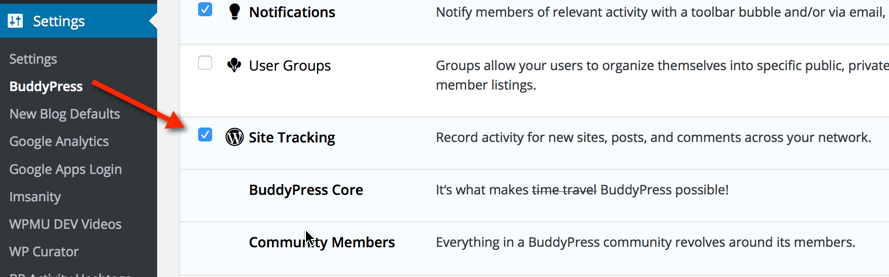
Once activated, go into Network Admin/Settings/BuddyPress, and make sure that Site Tracking is enabled to get the full benefit. Users will need to be subscribers on the main domain in order to contribute: a role they should be assigned automatically when they are registered.


