Search Results for 'buddypress'
-
Search Results
-
Apologies for the repeat. I was told that the first topic was marked as spam, that’s the reason for this one, incase the first one is not seen.
I am running the current versions of WordPress and buddypress. I all of a sudden cannot see my admin tool bar or login to my WordPress backend. Activated the debug feature and found out its an issue with buddypress plugin. Please how Do I resolve this? I had to disable the entire plugins, to be able to login of give access to my backend. The web url is http://www.wokshop.com
https://mywokshop.com/wp-content/uploads/2022/09/Screenshot-2022-09-01-at-00.15.15.png
Topic: advices
hello
i’m wondering if using buddypress on my site https://ustours-rugby.fr/ would be a good idea
Hi,
I’m using BuddyPress with the extendes profiles.
When a visitor tries to register, it may fail from time to time. After the submit, however, there is no error, but he lands directly back on the registration form – without error or anything else. But then the email address is already taken.The question is what can be the reason that he lands again on the form after the submit and where is the email stored in the database if the registration is not completed/successful?
in wp_users I do not see anything about it
Thanks a lot!
Topic: Translation dont work
Hello! i have problem, from official tutorial i create folder and upload translation from your website to: /wp-content/languages/buddypress
Name of file wp-plugins-buddypress-stable-pl.po
But plugin is still in engllish why? where i can change now plugin to use PL?
I downloaded the Buddypress plugin to use with my Buddyboss plugin but ended up not needing it. After trying to delete I kept getting a deletion failure message. I’m not sure what to do. I should also note that my site isn’t broken from this but I got an email that there was a critical error so I wanted to fix it. I’m on wordpress 5.2 and my site link is: https://your-introverted-space.com
ThanksAccording to https://codex.buddypress.org/translations/ we should store the
bbpress-de_DE.moandbbpress-de_DE.pounder/wp-content/languages/buddypress/, which we did. But these language files are being ignored.We are using buddypress in de_DE and made some tweaks to the wording (we replaced the string “group” with “cluster” in German).
Buddypress uses the files stored under
/wp-content/languages/plugins/and ignores the aforementioned folder.What we already tried:
- deleting the
buddypress-de_DEfiles in/wp-content/languages/plugins/: this partially works. Buddypress then uses our files stored in/wp-content/languages/buddypress/. But somehow wordpress (or buddypress?) regenerates the files in/wp-content/languages/plugins/after some hours. And then these “new” translations are used again of course. (Our own translations in/wp-content/languages/buddypress/stay untouched by wordpress/buddypress) - Created a folder
/wp-content/languages/plugins/buddypressand copied our files over to this folder. But to no avail – these files are being ignored completely (even if we delete the buddypress files in/wp-content/languages/plugins/). - Copied our files directly to
/wp-content/languages/plugins/: this works until these files get overwritten after a couple of hours
Specs:
- WordPress 6.0.1
- Buddypress 10.4.0
- Custom template, which we’ve written on our own
Multisite
Questions:
- What are we missing?
- Is there a way to stop wordpress/buddypress regenerating the files living directly in
/wp-content/languages/plugins/? - What is the right place to store our translations?
Hello , i started creating my website using buddypress , when my users login they are redirected to the my profile page. The problem is that they still can access wp dashboard by typing /wp-admin after my page url.
Is there any way to block access to /wp-admin for non administrators ?
Thank you for reading , hope someone can help me :/
There is an Ugly style by buddypress nouveau when text loger than about 30 words. There is a <breake> needed after cut of text. Btw it would be better to first have a picture and than cutted text.
But also now picture should come after cutted text not in 1 line…
https://e1.pcloud.link/publink/show?code=XZwqR4ZtwgWl2UhoFpVmXTV4jj2kpLwy9QV
I like the security features of UM and considered using bbPress as UM has an extenion for it. But I don’t want to pay $45 a year just for a logon front end.
I want to use UM for front end Recatcha, etc., but want to be able to use BuddyPress.
BP version 10.4.0 WordPress 6.0.1 PHP 7.4.28
If I can’t use the twp together, how can I migrate users from UM? And can I add recatcha?
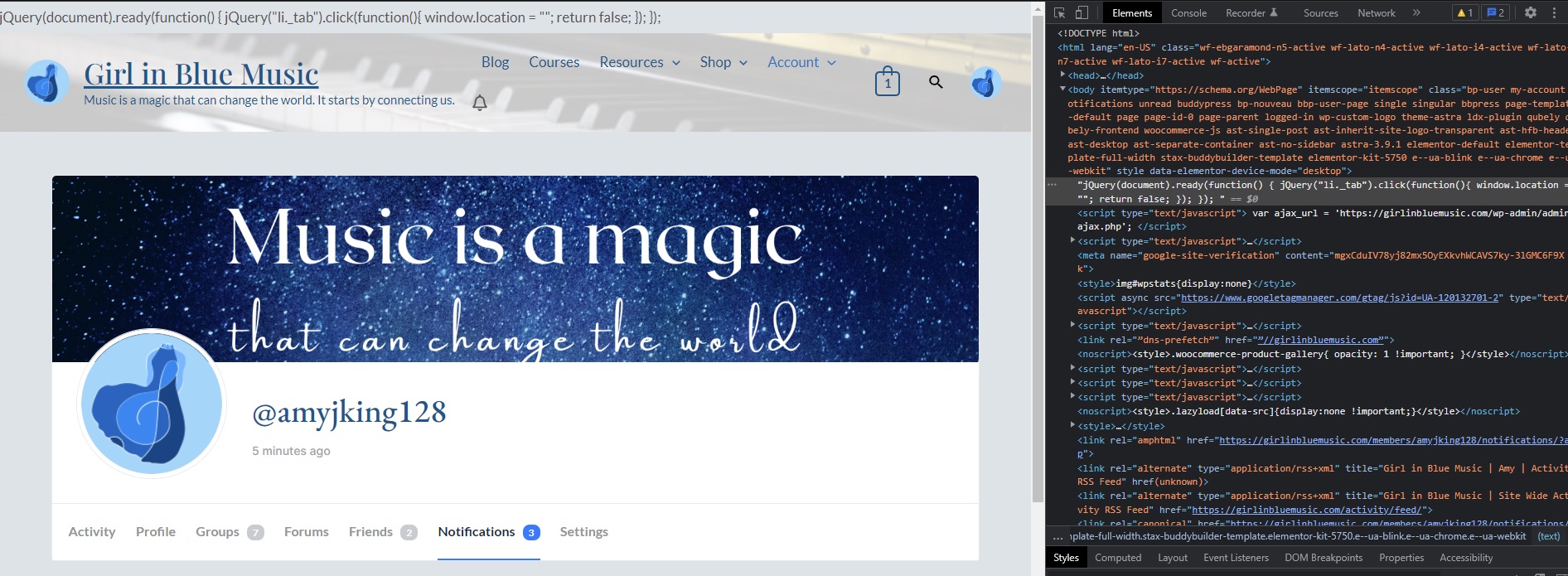
I’m not sure which version this started happening with, but in the last I want to say month or so, there’s a random string of jquery at the top of all of the Buddypress pages on my website:
https://girlinbluemusic.com/wp-content/uploads/2022/08/jquery.jpg
I have confirmed that this still happens with the 2021, 2020, and 2017 themes, and it only seems to happen with the Buddypress plugin alone.
Anyone have any idea how to get rid of this issue? I’ve also had some other recaptcha issues with my site, and I’m not sure if it’s related to this or to another plugin, but one thing at a time.
Hi,
I am facing really strange issue, as I updated buddypress to latest version and now all the member/user pages show 404 error except for administrator it works fine and good. but all other users it shows 404 error.
I need quick help with it.
Thank you.Hi,
I have a Rehub theme and Buddypress there. The problem is that the customer can write with the customer, but I want the customer to be able to write only with the seller. Can it be reduced like that?
Also, in the messages tab, the customer can see all the people registered on the site, is there any way to limit this?
Well thank you.Lukas
Topic: Elementor
BuddyPress plugin has stopped working with Elementor I get this message How to Fix the ‘Preview Could Not Be Loaded’ Error on my home page https://ballardpointcondominium.com/activate/ and https://ballardpointcondominium.com/ can you guys push an update to fix this error?
Hello there,
A while ago I installed BuddyBuilder and attempted to create my own profile page. Something broke and since then I am unable to access any profile page. I have tried creating a brand new page and selecting it in the Buddypress settings. I have tried uninstalling buddybuilder. I’ve tried removing all of the xprofile fields and even uninstalling it. Absolutely nothing will work and I geta critical error every time. Hoping someone can help me. Here is the stack trace:
WordPress version 6.0.1 Active theme: Twenty Twenty-One (version 1.5) Current plugin: BuddyBuilder Pro (version 1.6.7) PHP version 7.4.26 Error Details ============= An error of type E_ERROR was caused in line 81 of the file /mnt/customers-man/customers-el-2731002-14723-clubhx-wordpress-pvc-61003d1e6074e8003173bf8a/wp-content/wp-content/plugins/stax-buddy-builder-pro/core/dynamic-tags/MemberXProfileTag.php. Error message: Uncaught Error: Call to undefined function Buddy_Builder_Pro\bp_get_profile_field_data() in /mnt/customers-man/customers-el-2731002-14723-clubhx-wordpress-pvc-61003d1e6074e8003173bf8a/wp-content/wp-content/plugins/stax-buddy-builder-pro/core/dynamic-tags/MemberXProfileTag.php:81 Stack trace: #0 /mnt/customers-man/customers-el-2731002-14723-clubhx-wordpress-pvc-61003d1e6074e8003173bf8a/wp-content/wp-content/plugins/elementor/core/dynamic-tags/tag.php(35): Buddy_Builder_Pro\MemberXProfileTag->render() #1 /mnt/customers-man/customers-el-2731002-14723-clubhx-wordpress-pvc-61003d1e6074e8003173bf8a/wp-content/wp-content/plugins/elementor/core/dynamic-tags/manager.php(216): Elementor\Core\DynamicTags\Tag->get_content() #2 [internal function]: Elementor\Core\DynamicTags\Manager->get_tag_data_content() #3 /mnt/customers-man/customers-el-2731002-14723-clubhx-wordpress-pvc-61003d1e6074e8003173bf8a/wp-content/wp-content/plugins/elementor/core/dynamic-tags/manager.php(109): call_user_func_array() #4 /mnt/customers-man/cus - deleting the