Skip to:
Content
Pages
Categories
Search
Top
Bottom

Search Results for 'buddypress'

Viewing 25 results - 23,701 through 23,725 (of 94,544 total)
  • Author
    Search Results
  • danbp
    Participant
    danbp
    Participant

    @julia_b,

    you can allow your users to be notified by email when they are mentionned (and some other little things).

    See Notification Manager plugin.

    #192079
    danbp
    Participant

    I just tested Duena and the BP translation is fine.

    Recheck your po/mo files. Here what you must have:

    duena – leave as is.
    buddypress/bp-languages/buddypress.pot
    wp-config – if you use english, as it’s default language you have nothing to do
    // define(‘WP_LANG’, ” );
    wp-content/languages/plugins/buddypress-en_US.mo

    Now if you want to modify only some strings, make a copy of the pot file and put it in a folder outside of buddypress.

    From this copy you remove anything you don’t want and keep only the 2 lines or 4 lines (if plural form) who belong to the string you want to change. You keep only the string you want to change.
    Once done, save and rename it buddypress-en_US.po and open it with a text editor (not poEdit), as we’re going to modify the header.

    msgid ""
    msgstr ""
    "PO-Revision-Date: 2014-09-12 00:05+0100\n"
    "MIME-Version: 1.0\n"
    "Content-Type: text/plain; charset=UTF-8\n"
    "Content-Transfer-Encoding: 8bit\n"
    "Plural-Forms: nplurals=2; plural=n > 1;\n"
    "X-Generator: Poedit 1.5.7\n"
    "Project-Id-Version: BuddyPress 2.0.2\n"
    "POT-Creation-Date: \n"
    "Last-Translator: \n"
    "Language-Team: \n"
    "Language: en\n"
    "X-Poedit-SourceCharset: UTF-8\n"
    "X-Poedit-Basepath: .\n"
    "X-Poedit-KeywordsList: __;_e;__ngettext:1,2;_n:1,2;__ngettext_noop:1,2;"
    "_n_noop:1,2;_x:1,2c;_nx:4c,1,2;_nx_noop:4c,1,2;_ex:1,2c;esc_attr__;"
    "esc_attr_e;esc_attr_x:1,2c;esc_html__;esc_html_e;esc_html_x:1,2c\n"
    "X-Poedit-SearchPath-0: ..\n"

    The rest of the file looks like this:

    msgid "Friendships"
    msgstr ""  <strong><- replacement goes here</strong>
    
    #: bp-friends/bp-friends-template.php:588
    msgid "%s friend"
    msgid_plural "%s friends"
    msgstr[0] ""
    msgstr[1] ""

    Save in text format utf8 without BOM. (important)

    Now you can open this po file with poEdit, do your translation and save so that poEdit generate a mo file (see poEdit settings first to get this automatically each time you save a file).

    Copy the mo file in the appropriate folder and, normally, you’re done.

    References
    https://codex.wordpress.org/Translating_WordPress
    https://make.wordpress.org/polyglots/handbook/translating/basics/
    http://www.wpbeginner.com/wp-tutorials/how-to-disable-automatic-updates-in-wordpress/

    The definitive guide to disabling auto updates in WordPress 3.7

    #192077
    Anonymous User
    Inactive
    #192076
    durkk
    Participant

    @danbp

    Let’s be honest here. Bbpress is designed to be ok with most themes.

    So yeah you are right, in absolute terms. A forum is just a grit. But if we go that route all of this is just 0 and 1’s. It’s not that productive to think like that imo πŸ˜‰ Most people like to have something that looks better than ok for most themes.

    https://devpress.com/?attachment_id=6504 is a theme that is just a regular forum but completely fine tuned to the theme. This is a rarity. Sadly. Some perspective on why this is I guess… https://devpress.com/tickets/social-buddypress-theme/

    Standalone forums most of the time have themes, although indeed phpbb always looks very much like…phpbb πŸ˜€ BUT, it’s a standalone forum and therefore coherently themed throughout.

    #192075
    geistschatten
    Participant

    I called it a tutorial, I just meant this page: https://codex.buddypress.org/getting-started/customizing/customizing-labels-messages-and-urls/

    I’ve removed the bp-custom.php file entirely.

    Thank you for the list of where to put the translation files and the tip about poEdit! I installed poEdit, opened my edited .pot file, exported the .po and .mo files, uploaded them to the appropriate directories and changed to the language in wp-config to “en_US” while naming the files buddypress-en_US.po and buddypress-en_US.mo

    Still no translations showing up (even after several refreshes and Ctrl+F5), but I did discover a couple errors with my file while editing it. Something about duplicate definitions, which I fixed.

    Again, all I’m trying to do is change friends, friendships, friend requests, etc. to something else. A simple translation for only BuddyPress seemed to be the easiest way to do that.

    #192067
    danbp
    Participant

    @durkk

    you seem to be affraid by the term “legacy”… ?
    Read here some explanation about legacy

    Like BuddyPress, bbPress is only a plugin.
    Generally when you need a theme, you search a theme for wordpress, not for a plugin.

    Of course some a better than other, or better tailored to do something than other, but in anyway, no theme can be perfect for anything.

    And in some case, ready to use is not synonym of adaptable ready.
    If you search forum themes, see first what other forum software have to propose. One of the most popular, phpbb, is desperatly identical from one site to another in 90% of case.

    When you have 1 000 of WP theme and you add a bbpress or a buddypress group forum, you have potentially 1 000 different forum look.

    Basically it’s a grid, so it’s a bit difficult to present a forum in a very original maner. And finally too much work for many users or considered as out of rentability (100 hours to get a nice forum and 3 topics after 2 mounth….search the error ! )

    #192065

    @mercime actually I want to design the buttons and the tabs in buddypress user profiles?
    Is there any other plugin or any other way to do this all ? ? ? ?

    #192060
    #191956

    Hi!
    I am using the7 theme for my wordpress site.
    I just installed the Status child theme for buddypress.
    I copied all of the files to `wp-content/themes/
    and then checked the `wp-admin/themes
    but there is nothing is the installed themes?
    How to activate the theme?
    I need help!

    Its showing the error, that bp-default theme is missing.
    Can I override this error?
    I am using the7 theme.

    #191900
    danbp
    Participant

    FYI here some related topics
    https://buddypress.org/support/topic/how-to-remove-xprofile-names-and-replace-with-username/
    https://buddypress.org/support/topic/sort-user-list-by-last-name/

    About your first post, why don’t you show the site activity by using the topic filter instead of the default “all activities” ?
    https://buddypress.org/support/topic/changing-the-default-activity-filter/

    Or you can try buddypress-wall plugin
    https://wordpress.org/plugins/buddypress-wall/

    #191897
    danbp
    Participant

    11. Do you have any custom functions in bp-custom.php? Yes, the function from every tutorial talking about the language, but changed for my custom language file.

    Which tutorial are you telling about ?

    Remove that function, it’s not necessary i guess.

    By default, you set your site language in wp-config define ( ‘WP_LANG’, ‘de_DE’ ); and in wp settings > general (depending if single or MS install)

    Where to put the translation ?
    wp-content/languages/de_DE.mo (this is the WP translation)
    wp-content/languages/plugins/buddypress-de_DE.mo (this is the BP translation)
    wp-content/languages/themes/theme_name-de_DE.mo (this is the theme translation)

    You say you used gedit to generate your translation. It’s a text-editor, not a mo compiler. (mo means machine only, you can’t read it !)

    I suggest that you use poEdit to make a translation and generate a correct mo file.
    On Ubuntu, you can (not sure) use the msgmt command from the gettext package. Something like this

    $> msgfmt -o your_file.mo -v your_file.po

    #191895
    Henry Wright
    Moderator

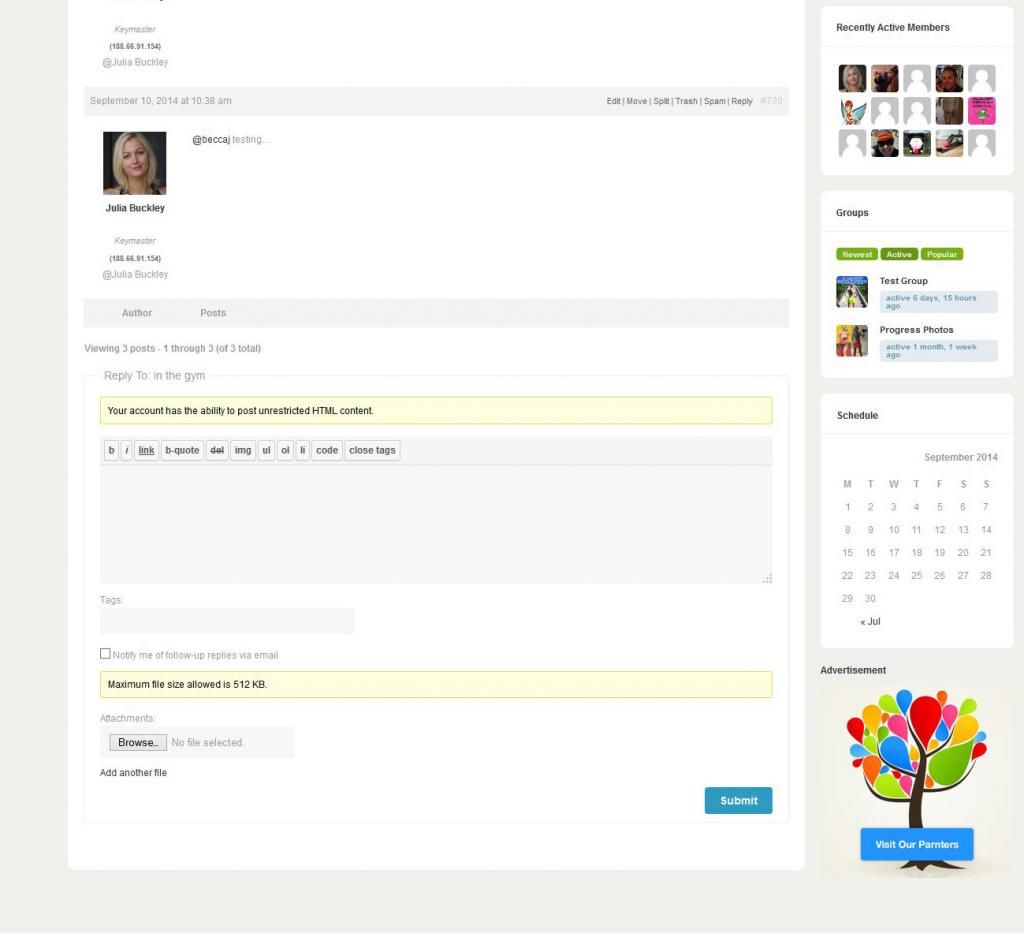
    In the last screenshot, if you take a look under the IP address it reads: @ Julia Buckley

    Regarding the roadmap, 2.1 is due any time soon. See https://buddypress.trac.wordpress.org/roadmap

    #191892
    danbp
    Participant

    @julia_b

    be patient ! The upcoming BP 2.1 version brings huge improvement to mentions handling, with auto suggestion.

    BP 2.1 About page excerpt:

    With BuddyPress 2.1, type a @ when leaving a status update or commenting on an activity item or blog post, and the new suggestions panel will open.

    https://buddypress.trac.wordpress.org/ticket/3278

    #191891
    Julia_B
    Participant

    Hi durkk, thanks very much for the reply. I’m already using a theme meant bbpress and buddypress from Themeforest, it’s called Buddy. I’m generally happy with it and like how it looks (apart from what I mentioned above), I spent a lot of time getting it how I wanted so I’d be very reluctant to change themes. I’m hoping I can find plugins or some css I can drop in to help.

    Good news about the ip names, didn’t think to check if it was just in admin view. πŸ™‚

    #191887
    geistschatten
    Participant

    Alright, so I’m almost ripping out my hair over this. I’ve checked other threads on here, I’ve put the .po and .mo files in multiple directories (wp-content/languages, theme/languages, bp-languages), I’ve added the bp-custom file, tried to change the language with wp-config, and even selected the language from Settings->General.

    All I’m trying to do is change some of the words talking about friends to something else. I’m not using a BuddyPress theme, it’s the Duena theme (https://wordpress.org/themes/duena).

    I took the .pot file and edited it with a text editor for Ubuntu called gedit, then I saved it as .mo & .po files and named them accordingly. I’ve triple checked every other fix to the issue for the past few days and have had zero success.

    Since this is supposed to help, here is my info below. Any help is greatly appreciated! I just need a simple step-by-step of what to do for my versions of WP and BP, I can follow them to the letter, and then report what happens.

    1. Which version of WordPress are you running? 4.0

    2. Did you install WordPress as a directory or subdomain install? Directory.

    3. If a directory install, is it in root or in a subdirectory? Root.

    4. Did you upgrade from a previous version of WordPress? If so, from which version? The previous version, but was having the issue prior to the upgrade.

    5. Was WordPress functioning properly before installing/upgrading BuddyPress (BP)? e.g. permalinks, creating a new post, commenting. Yes, everything works perfect, I just need certain words like “Friends” changed to something else.

    6. Which version of BP are you running? 2.0.2

    7. Did you upgraded from a previous version of BP? If so, from which version? The previous one, had this issue prior to the upgrade.

    8. Do you have any plugins other than BuddyPress installed and activated? If so, which ones? (BuddyDev)BP Poke, All In One SEO Pack, BP Profile Search, BP Xtra Signup, Buddypress – Who clicked at my Profile?, BuddyPress Edit Activity Stream, BuddyPress Friends Only Activity Stream, BuddyPress Live Notification, BuddyPress Username Changer, BuddyPress Usernames Only, Gatekeeper, Limit Login Attempts, Maintenance, Membership Premium, Registration Honeypot, RS Buddypress Activity Refresh, rtMedia for WordPress BuddyPress and bbPress, Simple Login Log, Useful Banner Manager, and Welcome Pack.

    9. Are you using the standard BuddyPress themes or customized themes? Duena, so a regular theme? Not designed particularly for BuddyPress though.

    10. Have you modified the core files in any way? Other than uploading the .mo & .po files and the bp-custom.php, no.

    11. Do you have any custom functions in bp-custom.php? Yes, the function from every tutorial talking about the language, but changed for my custom language file.

    12. If running bbPress, which version? Or did your BuddyPress install come with a copy of bbPress built-in? Nope, no bbPress.

    13. Please provide a list of any errors in your server’s log files. None.

    14. Which company provides your hosting? My own, HostArmor.

    15. Is your server running Windows, or if Linux; Apache, nginx or something else? Linux + Apache.

    #191886
    durkk
    Participant

    First and foremost, I am not a buddypress expert, rather someone that went through the same process you are going through now.

    The forum is not easy to customize without coding. There used to be themes for the standalone I believe but that’s all legacy stuff now. If you want to start ‘theming’ bbpress you’ll need to adjust the css to taste. Shortcodes won;t help you with this.

    The easiest solution is buying a theme that has extensive bbpress tweaks. Do a search on Themeforest for ‘bbpress’ and or ‘buddypress’. There’s only a view that did extensive tweaks to the forums tho.

    The IP address is only visible to Admins. As far as I am aware the @ mentions are based on the username, not the display name.

    rzelnik
    Participant

    I am trying to create a widget that would show the list of groups that a particular user is a member of. I have created this:

    <?php
    $user_id = get_current_user_id();
    $user_groups = (groups_get_user_groups($user_id));
    $user_groups = $user_groups["groups"];
    ?>
    <ul class="my-groups-list" class="item-list">
    <?php foreach ($user_groups as $group): ?>
    	<li><?php echo $group ?></li>
    <?php endforeach; ?>
    </ul>

    This code displays a list of the user’s group ID’s. Now I would like to create a loop from this query, so that I could display the group permalinks and names instead of the ID, like this:

    <ul class="my-groups-list" class="item-list">
    	<?php while ( ... something() ) : bp_the_group(); ?>
    		<li><a href="<?php bp_group_permalink() ?>"><?php bp_group_name() ?></a></li>
    	<?php endwhile; ?>
    </ul>

    How can I do that?

    I use WordPress 4.0 and BuddyPress 2.0.2.

    Thanks for your help.

    #191883
    Julia_B
    Participant

    I hope it’s OK to post something like this…

    I’m brand new to Buddypress and not a professional developer. I’m moving a community from a Facebook group to my new Buddpress site. A lot of my members are not very net-savvy and are unfamiliar with how other community sites/forums work. So, I’m trying to offer familiar functions that they’ve seen on Facebook. The forum is going to be the main hub of the site, so I need to get it look good and easy to use.

    Set up has gone well do far, but the forum is just looking a bit dull.
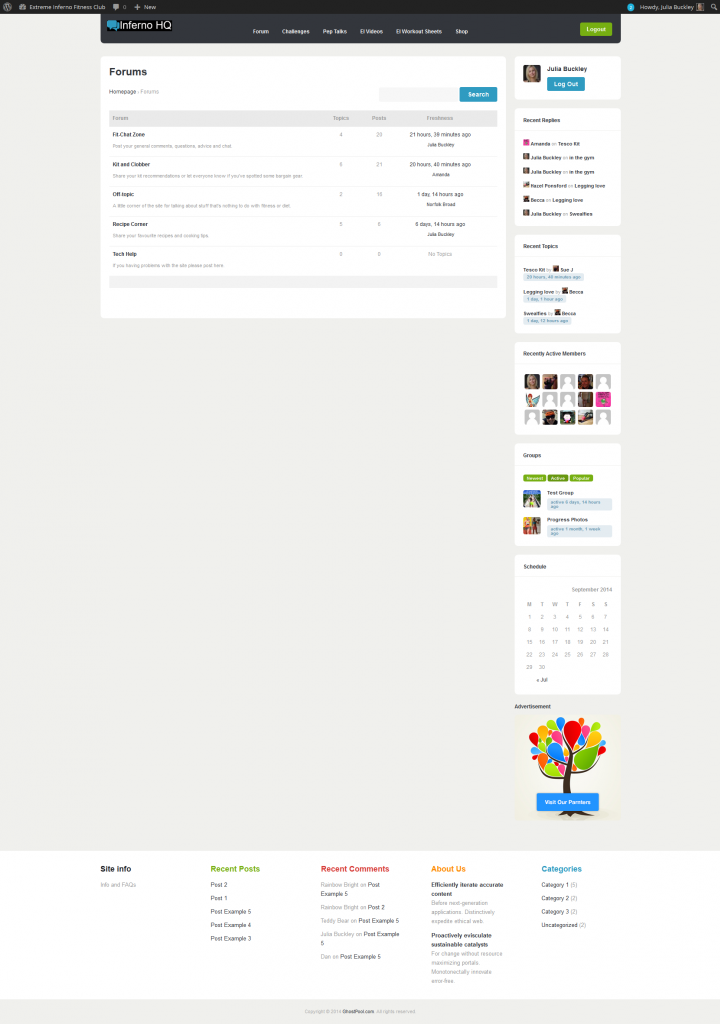
    Is there a better way I can display the forum to show the activity?

    Are there any other plugins or shortcodes people would recommend to make the forums as similar as possible to what my members have been used to in the Facebook group? (I’m only just getting to grips with shortcodes, so I’m afraid I’d need pretty basic instructions)

    I have a Latest Activity feed on the site homepage which shows all activity:
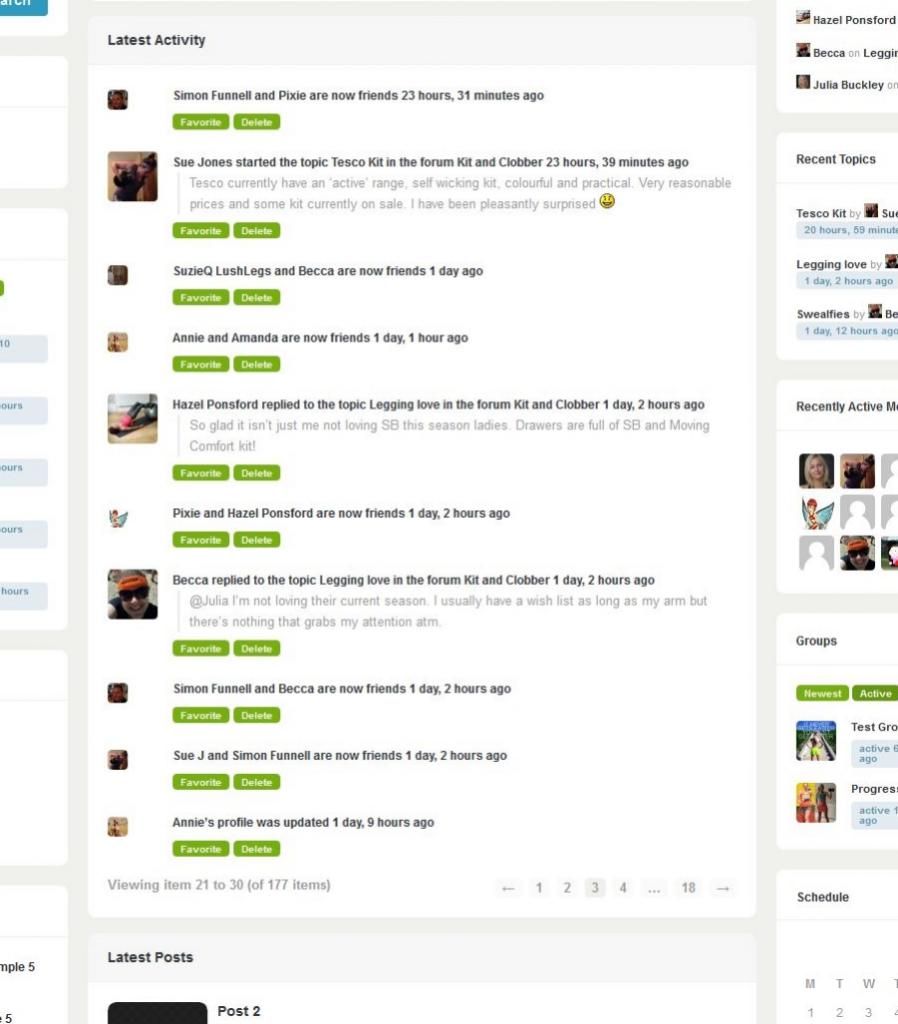
    This looks a bit more compelling than the forum page, but it would be nice if it could have things like reply buttons or ‘Go to forum’ to make it more obvious how people can get in the conversations.

    I’m also having trouble getting the Private Message function set up. I do have it selected in Buddypress settings, but it’s not working (error page comes up). Any ideas?

    Just one more thing, people are getting confused about how to @mention each other due to @names being different from the usernames which appear under member’s profile photos. Because my members are used to a Facebook group they expect to be able to @ message using user names. At the moment, as a temporary work around, I’ve installed some shortcode which displays the @name below the user name, but it’s not ideal (and also seems to display the ip address which I don’t like):
    Suggestions on all of the above would be great and anything else I can do to make my site’s community elements more similar to Facebook really. Thanks. πŸ™‚

    #191882
    danbp
    Participant

    @wainwatkins

    if you’re comfortable with coding (php, js and html), you can add such a scenario to the profile-loop template from within the child-theme.
    Original file:
    wp-content/plugins/buddypress/bp-templates/bp-legacy/buddypress/members/single/profile/profile-loop.php

    child:
    your_child_theme/buddypress/members/single/profile/profile-loop.php

    #191879

    In reply to: Member/User Guide…

    danbp
    Participant

    Read the buddyPress Codex and be inspired to write something of your own.
    End user documentation is not a general matter that can be applied to every site. It is more your point of view, the way you want your members go through your site and respect your community rules who primes.
    This is a software support first, not a how to use it for your best. Each site has his own specifics.

    BuddyPress Components and Features

    Asynaptic
    Participant

    @ hnla Thanks Hugo. The “legacy” term is misleading but I don’t want to get bogged down in that.

    I realize that there are older components, features, etc. that are being accommodated because the development team (rightly, I might add) wants to maintain backward compatibility with existing or older versions of buddypress that have been deployed and on which people depend on.

    I’m wondering if there is a safe way to excise these to have a leaner version of BuddyPress when running a fresh install which doesn’t need to accommodate any older ‘baggage’.

    Hope I’m being clear πŸ™‚

    #191872
    bitpath
    Participant

    You can “hide” this from the obvious displays by

    #buddypress span.activity { display: none; }
    

    Just put it at the end of whatever CSS. My preference is just before any mobile specific sections that may be towards the bottom.

    but really that just hides it and still leaks it everywhere. Until it’s really fixed it may be better to let members know it is so public.
    I am also looking how to programmatically secure this as well and let users choose what is displayed.

    CSS is applied so that in general, the most specific gets priority and the last line gets the last word too, so if you have control of the flow put the things you want to override at the end or the last stylesheet applied.

    #191871
    Mikki Barker
    Participant

    Is there documentation available for the end user?

    I’m creating a buddypress site for a kennel club. The majority of their members are not necessarily computer savvy. Is there documentation available that I can provide the members to make learning how to use buddypress that doesn’t include the backside stuff, i.e. installation etc.

    Many Thanks!

    wainwatkins
    Participant

    On the BuddyPress profile page, how can I expand and collapse each group of profile fields?

    I would like the default state of each group of profile fields to be collapsed and look like:

    GENERAL INFORMATION ABOUT ME

    SUBJECTS I HAVE STUDIED

    MY EDUCATION AND WORK

    To see the profile fields in each group, a user would click on the group name. Let’s say someone clicked on the group SUBJECTS I HAVE STUDIED

    The profile page would then look like:

    GENERAL INFORMATION ABOUT ME

    SUBJECTS I HAVE STUDIED
    Math: Yes
    Science: Yes
    Ancient Languages: No

    MY EDUCATION AND WORK

    So, the group that is clicked on expands, while the other groups remain collapsed. When the group is clicked again, it would return to a collapsed position.

    Hope you are able to help.

    Wain

Viewing 25 results - 23,701 through 23,725 (of 94,544 total)
Skip to toolbar