Skip to:
Content
Pages
Categories
Search
Top
Bottom

Search Results for 'theme'

Viewing 25 results - 401 through 425 (of 31,071 total)
  • Author
    Search Results
  • paginaswebea
    Participant

    Hello BuddyPress,

    First of all thank you for your work on creating the plugin.

    Second, I have a problem with a client’s website I’m currently building. We have run into an issue that when, uploading avatars by mobile, it compresses down the picture so much that it becomes blurry. It is not because of the image used. I have made sure I’ve uploaded a huge resolution photo to discard that.

    Where I see the problem is, BuddyPress somehow compresses the image to make it fit the phone screen, (it maybe makes it 150×150 for what I’ve read so far in the documentation), and then gives you the option to crop the image.

    The expect behaviour should be that the image retains the original “full” size, but shrinks down so it fits the mobile screen and you can crop/select whatever you desire.

    I hope I am explaining myself.

    I see that this bug is not new and has been around for several years, and so far, I haven’t been able to find any fix other than what is explained here, but then it stops the image from being responsive. (Anything further than 600 breaks the image hence you can’t see what you’re cropping).

    Changing default avatar size cropped/used by BuddyPress

    Is there a way to fix this, so the image retains the full quality when uploaded? I’ve set in place filters to retain 100% of quality image so wordpress doesn’t reescale them either (But you can give me more tips regarding this as well). An alternative solution would be to just disable the cropping part when uploading avatar.

    Currently I’m using the theme called Gwangi, but it doesn’t matter, because it also happens with Twenty-Twenty-One, and the forked version of buddypress Buddyboss. I’m guessing all the webpages built with buddypress have the same issue, as the ones I’ve checked so far run into the same problem. I’ve disabled CDN and everything else that could cause caching and rendering of images.

    Thank you for your time.

    #331654

    In reply to: Instant Messages

    ritz11
    Participant

    you can use ‘Customify’ for customizable themes.

    #331646
    keyfox
    Participant

    Thanks. I checked it. However, other themes had the same issue. I used the user role editor to try to fix it. But it just not working.

    #331634
    Varun Dubey
    Participant

    @keyfox You can try testing by using either the default 2022 or BuddyX theme. After switching to a different theme, performing the same action will help you determine whether the issue is related to the theme or BuddyPress.

    #331631
    keyfox
    Participant

    Hi,
    I have met a problem my Buddypress cannot allow my user to post activities. I am using a theme called Vikinger. I have tried numerous solutions like creating a new role or try to config the Buddypress setting (There is no activity setting). However, the problem cannot be solved. Can anyone help me? I would really appreciate that!

    WordPress version: 6.3.2
    BuddyPress Version: 11.3.1
    BBPress Version: 2.6.9
    Site Url: https://furryisland.net/

    #331596
    davidgrace
    Participant

    Hello,
    The issue is most likely caused by the Hotsteel theme. To confirm this, temporarily switch to a default WordPress theme such as 2020. If the problem doesn’t persist with the default theme, you should reach out to Hotsteel for assistance with resolving the ajax errors.
    Best Regard,
    Custom Serum Boxes

    #331579
    Mathieu Viet
    Moderator

    @punkaun Thanks a lot for your feedback and for confirming BP Classic is a possible plan B 😍.


    @awol
    I’ve just tested there are no issues for me with BP 12 + BP Classic and Menu Administration Screen or front-end generated menus. When BP 12.0 performs its upgrade task, it transforms regular pages into custom post types. So I feel if you create a menu with these post types, you probably need to remove first the menu item and add it again once BP Classic is active, have you tried this ?

    PS: I’d like to have time to contact every possible Theme authors, unfortunately I cannot take this road, sorry.

    #331505
    AWOL
    Participant

    Hi @imath,
    Even though I have already done this, I have done it again. With all plugins deactivated apart from Buddypress, the reply button still does not display. I have also wiped the style.css of my child theme, removed all functions from the child theme functions.php, renamed bp-custom so it is not in play, and removed any buddypress files I had in my child theme – still no reply button. I have removed everything extraneous. I have switched to the parent Blocksy theme and it still isn’t there. When I examine the html in the inspector, the code just isn’t there to generate the reply button. Attached are two images showing this while in my child theme and everything else turned off apart from Buddypress. But it is the same with just Blocksy parent theme
    No reply button on activity comment
    HTML in Inspector

    I have also tried with the 2023 theme, attachments below.
    2023 theme
    Inspector 2023 theme

    This is all with the beta 3 that I upgraded yesterday, on the latest Firefox on a Mac running the latest OS. Just to make sure it was neither browser or device, I also looked on my Android phone using the Opera browser, and that screenshot is attached below.
    Android using Opera

    So, please, what do I do now?

    #331567
    AWOL
    Participant

    Hi @imath,
    Thanks for your response – I’m sure you are very busy. The problem I have is that the BP Classic plugin causes a problem with the menu, as noted earlier in this thread – https://buddypress.org/support/topic/lets-prepare-the-buddypress-12-0-0-next-major-release/#post-331198 – and acknowledged by you – https://buddypress.org/support/topic/lets-prepare-the-buddypress-12-0-0-next-major-release/#post-331239 – but I haven’t seen any more mention of it. It isn’t really an issue until those deprecated functions stop working, but it is an extremely tedious task to trace where they are being used if it is a plugin as the debug log gives no clues at all except when the function was used. I will have a look at the list (thank you) to see if that is any help. If the issue with the BP Classic plugin can be looked at and fixed in the meantime I would be grateful – this could be another Blocksy issue so again, if you can speak to them it would be most appreciated, as they don’t want me to tell them until the non-beta version of BP is released, whereas you will have a clear idea what is and isn’t going to be in the final version and can raise it with them to look at – they may highlight something you are not aware of that needs doing before final release that might be something that affects many other themes. Can you also let me know what has happened to my post regarding the comment reply link? It still hasn’t appeared.

    #331559
    punkaun
    Participant

    Some additional info. I changed my theme to both Astra and GeneratePress in staging to try to confirm if this is a bug with the Kadence theme. The same behavior (the addition of the BR tags) appears in those themes as well–but, again, not with Twenty Twenty-Three.

    Also FYI: I had this working as desired (no BR tags) in Kadence within the last week or two.

    #331554
    punkaun
    Participant

    Hello,

    I recently noticed that there are extra <br> tags in BP navigation menus, which is causing extra space to display. See the following screen shot.

    https://drive.google.com/file/d/1klFhmAHE0Oa7XXDUSzrr2hXMF8pAQVY4/view?usp=sharing

    I’m running WP 6.3.1 and BP 11.3.1. My website (https://gaelquest.com) uses the theme, Kadence, v 1.1.47. That said, I’ve applied fairly extensive CSS changes to customize the layout.

    When I change to Twenty Twenty-Three, the extra <br> tags disappear. Any thoughts as to what could be causing them to get inserted? Is this a theme issue or is there some other possible explanation?

    #331542
    freelanceme
    Participant

    The error message you’ve encountered is related to the Elementor plugin in WordPress. It seems like there’s an issue with the plugin’s code, specifically in the Controls_Stack class when trying to sanitize settings. Here’s a breakdown of the error:

    Argument 1 passed to Elementor\Controls_Stack::sanitize_settings() indicates that the sanitize_settings method of the Controls_Stack class is expecting an array as its first argument.
    must be of the type array, null given means that the function received null instead of an array as the argument.
    The error occurred when the code called this method in the file /wp-content/plugins/elementor/includes/base/controls-stack.php on line 1084.
    To resolve this issue, you can try the following steps:

    Check for Plugin Conflicts: Sometimes, conflicts with other plugins can cause such errors. Deactivate other plugins one by one to see if the issue persists when Elementor is the only active plugin.

    Update Elementor: Make sure you’re using the latest version of the Elementor plugin. Outdated versions may contain bugs that have been fixed in newer releases.

    Check for Theme Compatibility: Your WordPress theme might not be fully compatible with the version of Elementor you’re using. Try switching to a default WordPress theme (e.g., Twenty Twenty-One) temporarily to see if the error still occurs.

    Debugging: If the issue persists, you may need to debug the specific code in the Elementor plugin. This usually requires some knowledge of PHP and WordPress development. You can use debugging tools like Xdebug or enable WordPress debugging to get more information about the error.

    Contact Elementor Support: If you can’t resolve the issue on your own, consider reaching out to Elementor’s support or community forums. They may have encountered similar issues and can provide guidance on how to fix it.

    Backup and Restore: As a last resort, if none of the above solutions work, you can try restoring a backup of your WordPress site to a point before the error occurred. This should revert your site to a stable state, but you’ll lose any changes made after the backup date.

    Remember to take proper precautions, such as backing up your site and data, before making any significant changes to your WordPress installation.

    #331496
    Mathieu Viet
    Moderator

    Hi @awol

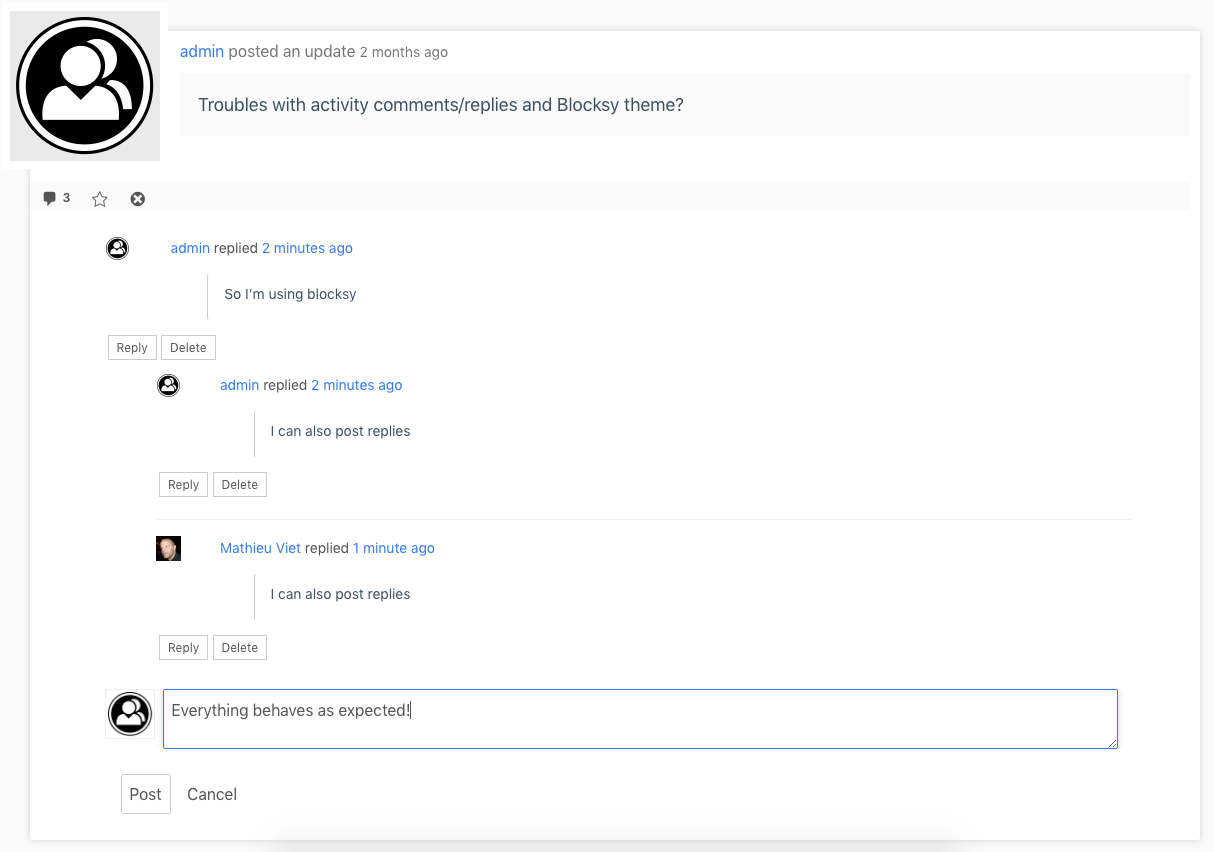
    I just tested Blocksy and BP 12.0.0-beta3. About activity comments/replies, it behaves as expected:

    BP 12 & Blocksy Theme

    I’ve also checked WP Nav Menus (Member links & directory links). It also behaves as expected.

    If you still have issues, you’ll need to deactivate all plugins but BuddyPress, then reactivate plugins one by one to identify the one causing the issue.

    #331337
    valuser
    Participant

    Some feedback on BP 12.0.0-beta2 though please treat with caution!

    Local Install – Local, php 8.2.10 – MySQL 8.0.16 – WP 6.3.1 – BP Version 12.0.0-beta2

    a lot of plugins!!

    Buddyx theme NouveaU template only or Thaim theme i use Legacy template.

    Not a coder or developer.

    Just a general interest in BuddyPress
    Not in any way dependent. a hobby!

    1) Bottom line – With BP Classic all appears good.

    2) When BP Classic is not active plugins like buddydrive, buddypress-group-calendar, buddypress-group-email-subscription and bp-idea-stream no longer appear in Group Navigation.

    However Q&A from Anspress still appears in Group Nav & works when BP Classic is not active

    https://imgur.com/P6gKRWq no-bp classic not active

    https://imgur.com/b8yu3fi yes-bp classic active

    3) The plugins (with exception of BuddyPress Group Calendar) do appear in the Group Nav —> Manage. (see https://imgur.com/DCYvcOT)

    4) Also another (non-buddypress plugin) that interests me a reasonably popular (codecanyon) directory plugin ‘Sabai’ – well, essentially all its data vanishes when bp-attachments is active in BP 12.0.0-beta2 without BP Classic. The message is “it seems we can’t find what you’re looking for. Perhaps searching can help.”

    5) If bp-attachments is not active (say replaced with mediapress or with mediatheque) in BP 12.0.0-beta2 the Sabai data is unaffected but the non updated plugins (mentioned in 2 above) are ineffective

    6) In wp-admin/admin.php?page=bp-settings options–attachments the last two choices (see pic https://imgur.com/00yZYna) if clicked to include the choice is NOT saved. Also buddydrive appears in p-admin/admin.php?page=bp-settings options

    However everything INCLUDING bp-attachments appears to work safely & pristine with BP Classic active

    bp-attachments not used with legacy template

    Many Thanks for all the work on BuddyPress.

    #331450
    AWOL
    Participant

    Hi @imath,
    Further to my post on this thread (https://buddypress.org/support/topic/lets-prepare-the-buddypress-12-0-0-next-major-release/#post-331256) regarding the Reply button, I have tested and done all the troubleshooting I can, and there is nothing that brings the Reply link/button on comments back. From everything I have done I have eliminated all plugins, custom functions and css as being the cause, so this is a fairly major problem for me, that does not occur on the non-beta Buddypress. Unfortunately if I try to even preview another theme I get a critical error, so I can’t eliminate Blocksy as the cause; however on my live site the Reply link is there whether it is the Legacy or Nouveau theme, so something appears to be conflicting between Blocksy and the beta version of BP, given that your test with Twenty Twenty Two did not have this issue. Can you or someone talk to Blocksy and try to work out the various issues that exist between that theme and BP please? I have done what I can and really need some assistance now.

    #331447
    pwlqc
    Participant

    Hi,

    I have installed buddypress but actually I always get a “Loading the group updates. Please wait.” message.

    This is preventing me and users in creating activity under the group.

    How can I fix this?

    I use OceanWP as theme.

    website is liquoriconsulting.com

    Thanks,
    Federico

    #331442
    david00116
    Participant

    Secondly, I found that it wasn’t possible to add a main menu link for the currently logged-in user that remains visible at all times. Although I created a custom link, it only appeared in the menu when viewing specific sections (such as Profile, Activity, etc).

    Thirdly, I encountered difficulties in adding a sidebar to any of the Buddypress pages, despite my default Blocksy setting for each page to have one. Upon investigation, I discovered that in the Customizer, Buddypress pages were being counted as Blog Posts. Intuitively, I would have expected this setting to be configured in the Buddypress-specific sections. As it stands, without extensive CSS modifications, this means Blog Pages and Buddypress pages will always have to share the same layout.

    I’m curious if you’re considering incorporating enhancements or additional features in the Customizer at some point. In my experience, I’ve needed to make a significant number of CSS adjustments to align Buddypress with my desired color scheme and preferences in previous versions. It would be immensely helpful if at least some of this could be achieved through Customizer settings or a dedicated settings page within the plugin. Historically, Buddypress hasn’t adhered to my theme defaults, but I’m uncertain if this is specific to the theme I use or if it’s a widespread experience.

    #331381
    richardrcook2
    Participant

    Hello. I’m using WP version 6.3.1 and BuddyPress version 11.3.1. My site is https://romancingrarehearts.com And I’m using the Twenty Fifteen theme.

    Is it normal that when my members edit their profile page, such as changing the text in their TELL US ABOUT YOURSELF box, they must sign out and back in in order for the update to be successful? I’ve had my website for years and I don’t remember that being the case.

    Thanks for your help.

    Krishnakumar K A
    Participant

    Hi,

    I have a website (website 1) and I want to migrate the users to another site (website 2).

    Reason behind this migration are two. 1. I am going to change the domain name 2. Theme developer changed few plugins and old theme in website 1 is breaking while updating the plugins. So I have installed the updated theme in website 2.

    Can I do this by migrating php data from website 1 to website 2?

    angieb2023
    Participant

    I am missing the buttons seen on this article https://codex.buddypress.org/administrator-guide/messages/

    When I was working on it and trying it out, they popped up once, but I can’t get them to come up again.

    I am using generatepress theme not sure why I would see them once but not again. How do I get those buttons back?

    my website is inspireherpossibilities.com

    I am using Buddypress Legacy.

    #331289
    AWOL
    Participant

    @mike80222, Thanks, I will probably do that once I have adapted anything I need to for the new BP. Changing from the default theme to Nouveau is probably presenting more challenges than BP 12 is though, but it is difficult to know what might be causing issues as I test it though – my main theme, my own php functions, Nouveau or new BP!! Or another plugin of course.

    #331268
    fsam
    Participant

    WordPress : 6.3.1
    BuddyPress : 11.3.1
    Youzify : 3.3.9

    Dear users,

    Since +/- 1 month the ‘Load More’ option on the activity page doesn’t work. On mobile (iOS and Android) nothing happens, and on Google Chrome first nothing happens and then a browser error occurs “The page doesn’t reply, would you like to wait or close”.

    The “Load More” on other pages (user activity, etc.) works.

    Using a lots of plugin which makes it hard for me with my knowledge to understand where it comes from. A new wordpress + buddypress + standard wp theme works fine.

    My questions are:
    – Is it possible to have pagination on the activity wall stream page but keep the other pages as they are for the timebeing?
    – How can I debug where the error comes from?

    Regards

    #331260
    Mathieu Viet
    Moderator

    Hi @awol

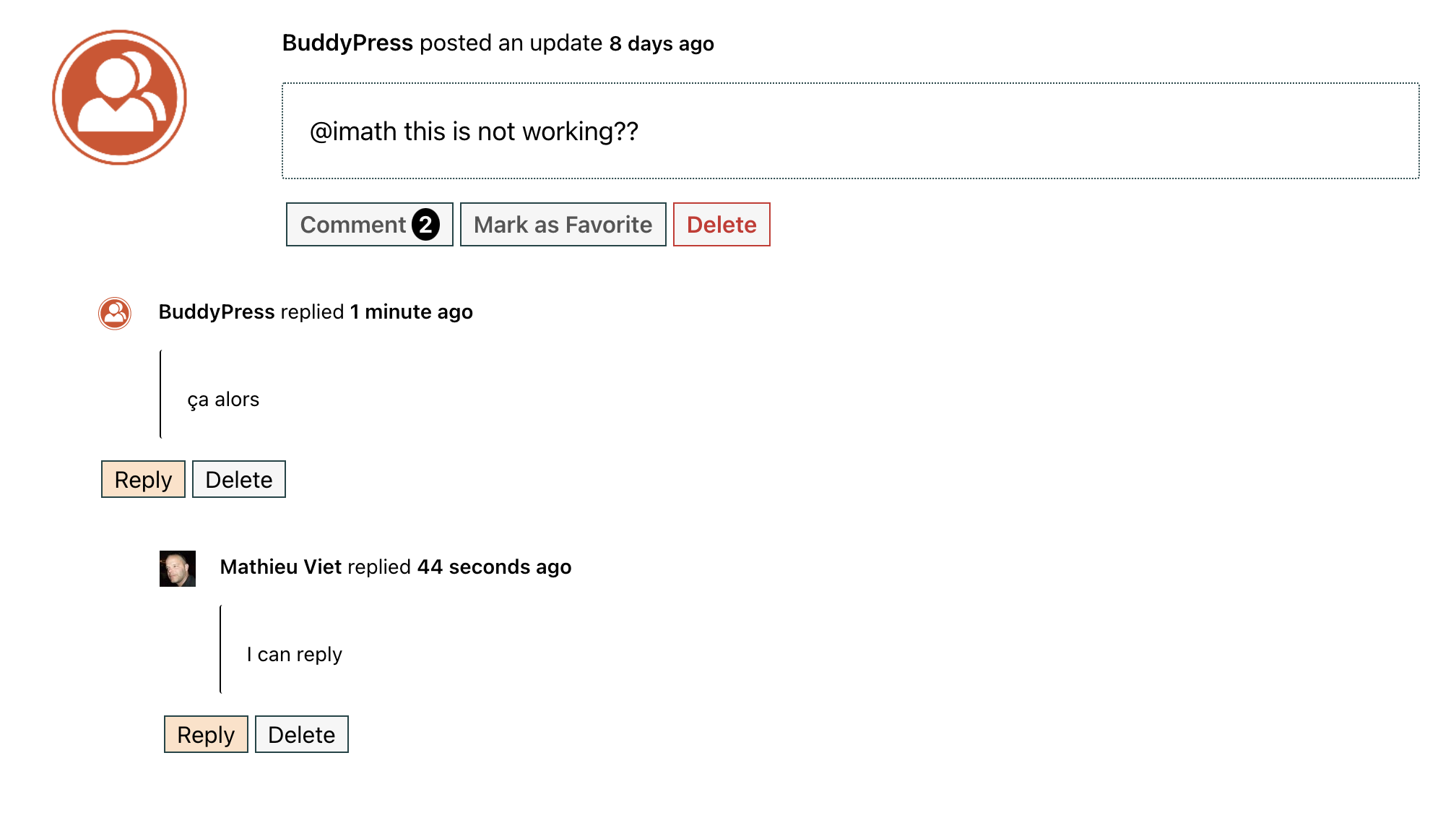
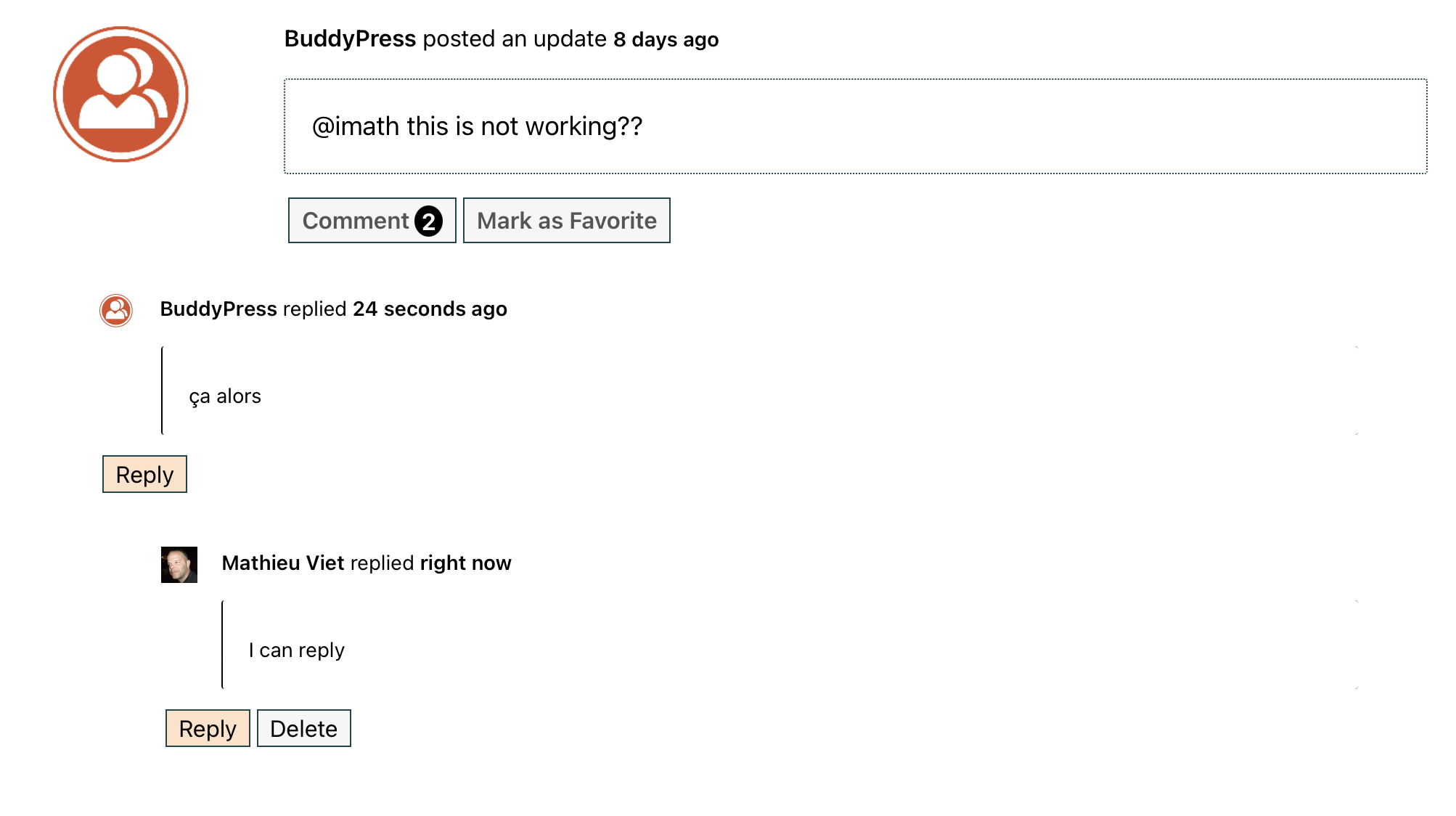
    I’ve just tested with BP 12.0.0-beta2 (no other plugins), having the Twenty Twenty-Two theme active, it works as expected see screenshots below:

    Being and admin:
    Admin

    Being a regular user:
    Regular user

    Otherwise, please let’s stick to the topic! Topic is: making sure BP 12.0 behaves the best way with no regression comparing to 11.3.1.

    Thanks again for your help.

    #331259
    Mike Witt
    Participant

    @awol, regarding your bbPress tangent — my experience is that neither the BP forum (this one) nor the bbP support forum work the way BP and bbP do “out of the box.” Perhaps it has something to do with the theme, or perhaps they’re customized. But if you want to see how they’re going to work together your you, I’d suggest setting up a test site and installing them with your theme. Also robin-w on the bbpress forum has a plug-in that allows for a lot of customization and is pretty good about answering these kind of questions.

    #331256
    AWOL
    Participant

    Hi @imath,
    Thanks for that, and sorry to be a pain (although hopefully I am bringing up things that do need addressing and are not unique to my setup), but I have discovered something else that is not working as I expect, as follows:
    If someone comments on an Activity post, on my existing (not test) setup, that comment has the options below it to either Reply, Edit or Delete; but the reply and edit options are missing in my test setup for non-admin users, and the reply one is missing for admin. I am still using the default theme on my existing site, whereas I am using Nouveau on the test site, so is this a Nouveau issue? I downgraded to the current non beta BP on my test site but no difference. I am going to also investigate if a plugin is causing it, but as I have the same plugins on both sites it seems unlikely. I deactivated one plugin that seemed the most likely culprit (Buddypress Edit Activity from Buddyboss – https://en-gb.wordpress.org/plugins/buddypress-edit-activity/) but it was still the same (except of course this plugin is what adds the edit button in the first place, but the reply one is still missing).

    On a bit of a tangent, can I assume that this forum is running on bbpress? It’s just that I am thinking about adding a forum but am not finding this one very user friendly – for example the reply button is not visible until you hover over the post you want to reply to, and then it doesn’t automatically add the “@name” at the beginning, plus everything is written in a code box rather than normal input, just for starters. Font size could do with being larger too. Or is it just me?

Viewing 25 results - 401 through 425 (of 31,071 total)
Skip to toolbar