Search Results for 'theme'
-
Search Results
-
I’ve had problems with my Elementor Pro and Essential Addons Pro for Elementor built login/registration page for some time now. After troubleshooting, I’ve found a conflict with Rank Math, but after Rank Math, Elementor and Essential Addons for Elementor all troubleshooted the problems, I was told the problem is caused by BuddyPress and that I needed to contact BP to get assistance.
The user (not admin) login page on the site is extremechickens.com/login-registration-x/
WP: 6.0.2
BP: 10.4.0
Astra Pro theme. (Problem happens even when switched to theme twenty twenty.)
Cloudways hosting provider – Vultr server
Cloudflare
BuddyPress NouveauI’m not sure what else you need from me, but feel free to let me know.
Thanks!
Problem Statement: I am not getting a preview/thumbnail/featured image of YouTube videos, Blogs links, when I post the link in the activity stream. Actually, When the link is copied in the activity stream it displays the preview (before pressing post button) but when it is posted, only the link remains and thumbnails disappear.
Following are the details of Configuration:
1. Premium Version of CIRKLE Theme
2. Latest Version of WordPress
3. Installed “Activity Link preview for Buddy press”WebAddress is http://www.Engineersland.com
Request you to help me resolve the issue at the earliest as without a preview of the links whole fun of developing a social media web will go.
Regards
Atul SinglaIf Buddypress is active on any of my sites with Disable Gutenberg or Classic Editor plugins — then it will not allow a featured image upload/attach to a post or page. The image can upload to the site, but it will not attach and display for the post or page.
I have run a lot of test over the last week to figure out the issue or a workaround — but this happens on every single site I’ve tried it on.
It’s not theme dependent. Or caused by a different plugin. It’s BuddyPress in conjunction with either of those two.
Topic: Post format issue
Good day beautiful people. Please I need assistance with organising the format in which the posts on my buddy press theme is presented as can be seen in the red box here https://mywokshop.com/wp-content/uploads/2022/09/Screenshot-2022-09-07-at-08.09.26.png
The image is supposed to be centred and the text directly under the image, words spilling into the next line is supposed to automatically have a hyphen showing that it is a continuation of the same word, but things are a bit scattered here.
When I have Buddypress activated, then I cannot publish featured images to my blog posts. They upload to my site, but it will not save with the post. It’s done this for months – so I had just deactivated. But I need Buddypress back again.
Also, this isn’t unique to one theme. I’ve tried it on two separate sites with different themes. I’ve deactivated all other plugins, etc…
Buddypress is the issue.
Hi,
I’m using the default BP registration page and have to use the legacy themes for various reasons. But I’m having a horrible time customizing the form!
One thing I’d like to do is apply a page background. I’ve tried using .page-id-####. I’ve tried using my Generate Press theme to apply a page layout. But it seems as though I can’t apply anything to this page other than some changes via css to the form itself (and that’s been difficult).
Thanks.
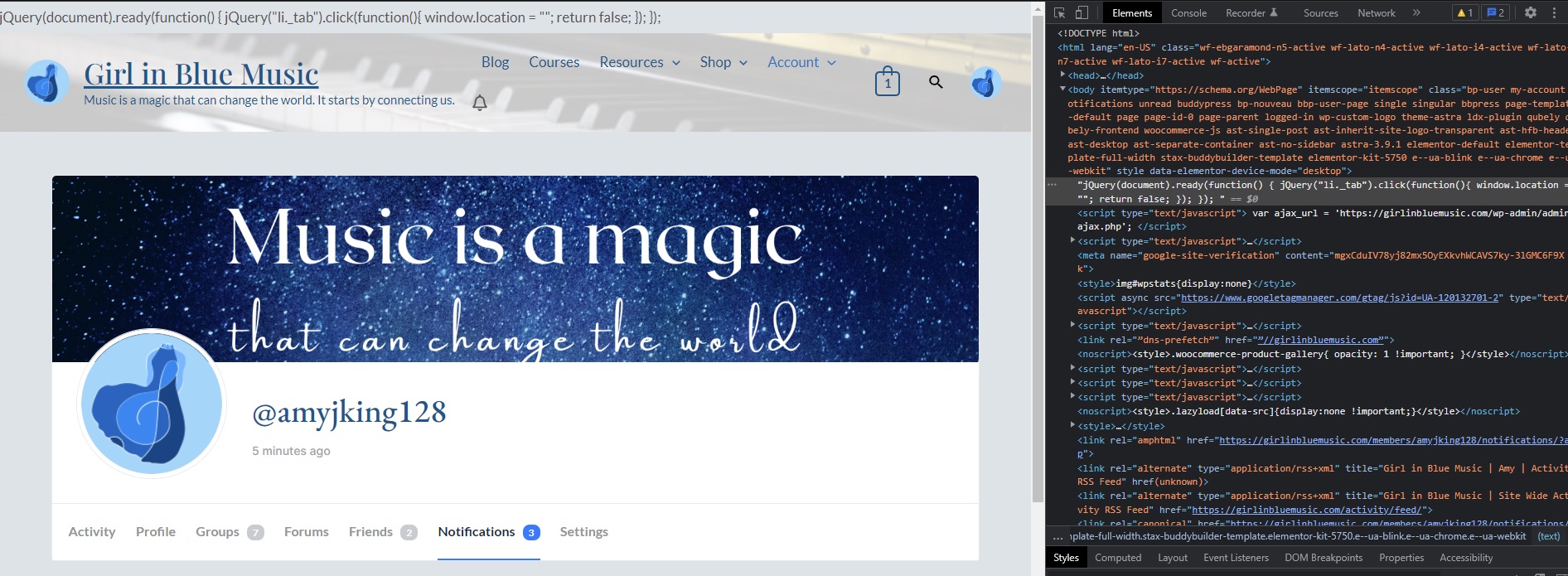
I’m not sure which version this started happening with, but in the last I want to say month or so, there’s a random string of jquery at the top of all of the Buddypress pages on my website:
https://girlinbluemusic.com/wp-content/uploads/2022/08/jquery.jpg
I have confirmed that this still happens with the 2021, 2020, and 2017 themes, and it only seems to happen with the Buddypress plugin alone.
Anyone have any idea how to get rid of this issue? I’ve also had some other recaptcha issues with my site, and I’m not sure if it’s related to this or to another plugin, but one thing at a time.
Hi,
I have a Rehub theme and Buddypress there. The problem is that the customer can write with the customer, but I want the customer to be able to write only with the seller. Can it be reduced like that?
Also, in the messages tab, the customer can see all the people registered on the site, is there any way to limit this?
Well thank you.Lukas
Hello there,
A while ago I installed BuddyBuilder and attempted to create my own profile page. Something broke and since then I am unable to access any profile page. I have tried creating a brand new page and selecting it in the Buddypress settings. I have tried uninstalling buddybuilder. I’ve tried removing all of the xprofile fields and even uninstalling it. Absolutely nothing will work and I geta critical error every time. Hoping someone can help me. Here is the stack trace:
WordPress version 6.0.1 Active theme: Twenty Twenty-One (version 1.5) Current plugin: BuddyBuilder Pro (version 1.6.7) PHP version 7.4.26 Error Details ============= An error of type E_ERROR was caused in line 81 of the file /mnt/customers-man/customers-el-2731002-14723-clubhx-wordpress-pvc-61003d1e6074e8003173bf8a/wp-content/wp-content/plugins/stax-buddy-builder-pro/core/dynamic-tags/MemberXProfileTag.php. Error message: Uncaught Error: Call to undefined function Buddy_Builder_Pro\bp_get_profile_field_data() in /mnt/customers-man/customers-el-2731002-14723-clubhx-wordpress-pvc-61003d1e6074e8003173bf8a/wp-content/wp-content/plugins/stax-buddy-builder-pro/core/dynamic-tags/MemberXProfileTag.php:81 Stack trace: #0 /mnt/customers-man/customers-el-2731002-14723-clubhx-wordpress-pvc-61003d1e6074e8003173bf8a/wp-content/wp-content/plugins/elementor/core/dynamic-tags/tag.php(35): Buddy_Builder_Pro\MemberXProfileTag->render() #1 /mnt/customers-man/customers-el-2731002-14723-clubhx-wordpress-pvc-61003d1e6074e8003173bf8a/wp-content/wp-content/plugins/elementor/core/dynamic-tags/manager.php(216): Elementor\Core\DynamicTags\Tag->get_content() #2 [internal function]: Elementor\Core\DynamicTags\Manager->get_tag_data_content() #3 /mnt/customers-man/customers-el-2731002-14723-clubhx-wordpress-pvc-61003d1e6074e8003173bf8a/wp-content/wp-content/plugins/elementor/core/dynamic-tags/manager.php(109): call_user_func_array() #4 /mnt/customers-man/cusTopic: Change/Upload Profile Photo
When using the Kadence child theme and BuddyPress, I’m getting a small viewport to see the uploaded image and crop area. Is there a way to fix this issue? Once I crop it, it’s not showing the whole image either. It just shows a section of what I’ve cropped.
Any additional assistance would be wonderful.
Hello,
I want to create multiple members pages based on field value.
For example let’s say I have a field called “Team” and values are 1,2 and 3.
I want to create a members page for each teams showing team members.
I found this code to create a function that will filter based on the field value :
function my_custom_ids( $field_name, $field_value = '' )I fount it HERE
I understood I need to add this code in my-theme/functions.php or in bp-custom.php but after that how can I call this function on the 3 different pages with the 3 different fields values ??
The code on the three pages will be like that if I understood well :
<?php if ( bp_has_members( my_custom_ids( 'Team', '1' ) ) ) : ?>
<?php if ( bp_has_members( my_custom_ids( 'Team', '2' ) ) ) : ?>
<?php if ( bp_has_members( my_custom_ids( 'Team', '3' ) ) ) : ?>I missed something, I really don’t know where to put the code that call the created function on the new page I created :/
Thank you for your help