Skip to:
Content
Pages
Categories
Search
Top
Bottom

Search Results for 'theme'

Viewing 25 results - 1,126 through 1,150 (of 31,073 total)
  • Author
    Search Results
  • #316502
    baligias71
    Participant

    Hello!

    On mobile devices does not appears the option “take a photo”, only the option “upload an image” while both options appear on computers.

    aτ : profile-> change-> change profile image

    WP 5.6
    BuddyX theme 3.5.0

    thanks

    #316494
    unity4625
    Participant

    I have scoured Google, YouTube, and even this very forum for an answer but no one has been able to help me. I’ve even tried talking to Elegant Themes and they were of no help – blaming it on the plugin developers, even though they created the feature. Also, time is running out for me to incorporated this into the website, so I’m desperate. Plus, I KNOW I’m not the ONLY one in the world who has encountered this problem. I can’t be…

    I’m using WordPress version 5.5.3 and BuddyPress version 7.1.0. I’m building a website for an online college using Divi (version 4.7.7, developed by Elegant Themes). Out of the box, Divi is compatible with BuddyPress, except when it comes to the Theme Builder.

    I have a template I created using the Theme Builder that I associate for the pages generated by BuddyPress (User Groups, Members, Activity). On the theme, there’s a module called the Post Content Module which renders whatever content is entered in the page/post body field through the admin dashboard.

    For whatever reason, it will not render the content from the BuddyPress generated pages, or allow the children of those pages (such as profiles) from rendering within the Post Content Module. If I turn the theme template off on those BuddyPress generated pages, the content shows up. But, it’s out of theming with the rest of the website.

    I have recorded a video that shows exactly what I’m talking about that can be looked at by clicking here.

    Please, please, please can someone give me an answer and a fix for this issue. I’ve tried reaching out to Elegant Themes, the creator of Divi, and they were of absolutely no help at all.

    #316488
    jameslarkin
    Participant

    I have tried changing the theme, but then the button disappears so i can’t test, I’m not aware of any custom code, the clients isn’t tech savy and won’t be able to tell us. I’ve been in contact with WP bakery’s support which is the page builder and they are saying that the issue is something to do with buddy press, how do i go about getting support from Buddy press ?

    #316427
    clickallco
    Participant

    Use the following code in your bp-custom.php file to change it. You can read more on it here

    Utilice lo siguiente en su archivo bp-custom.php para cambiarlo. Puedes leer más aquí:

    bp-custom.php

    define( 'BP_DEFAULT_COMPONENT', 'profile' );

    #316384

    In reply to: Password issue

    Claudio
    Participant

    It was just the problem.
    The 2021 theme.
    I had uninstall all plugins, even the “Hello World” and “Akismet” plugins.
    What means that the conflict was only with the theme.
    Thank You very much for your help.

    #316379
    iamthewebb
    Participant

    Hi,
    What happens if you try with the Twenty Twenty theme, have you also tested with other plugins disabled?

    #316373

    In reply to: Password issue

    iamthewebb
    Participant

    https://buddypress.org/support/topic/when-asking-for-support-2/

    Have you tried with twenty twenty theme or other plugins disabled? I can see error messages in the console from plugins conflicting.

    #316371
    lishantha
    Participant

    Hi,

    Please see the below answers.

    1. Which version of WordPress are you running? 5.6

    2. Did you install WordPress as a directory or subdomain install? Directory

    3. If a directory install, is it in root or in a subdirectory? Root

    4. Did you upgrade from a previous version of WordPress? If so, from which version? No

    5. Was WordPress functioning properly before installing/upgrading BuddyPress (BP)? e.g. permalinks, creating a new post, commenting. Yes

    6. Which version of BP are you running? 7.0.0

    7. Did you upgraded from a previous version of BP? If so, from which version? No

    8. Do you have any plugins other than BuddyPress installed and activated? If so, which ones? Yes. But I deactivated all for testing purposes but the problem persists.

    9. Are you using a standard WordPress theme or customized theme? Customized

    10. Which theme do you use? My Listing

    11. Have you modified the core files in any way? No

    12. Do you have any custom functions in bp-custom.php? No

    13. If running bbPress, which version? Or did your BuddyPress install come with a copy of bbPress built-in? 2.6.6

    14. Please provide a list of any errors in your server’s log files. Non

    15. Which company provides your hosting? Bluehost

    16. Is your server running Windows, or if Linux; Apache, nginx or something else? Apache

    17. Which BP Theme are you using? Non

    18. Have you overloaded any BuddyPress template files. No

    19. Any other site customisations that might have a bearing on the issue? Non

    20. What BP Template Pack is activated in your installation? You will see that under Dashboard > Settings > BuddyPress – Options page. Non

    #316363
    muranomidwest
    Participant

    Using WP 5.6. BP 7.1.0 and a variety of themes, including Avada, Olympus and WP 2019 and both the BP Legacy and Nouveau templates. I am unable to add a BP post. I can enter replies and create new bbPress topics and blog posts, but any type of post that generates new BP activity hangs when you press Submit and generates errors similar to the below in the JS console.

    I did not note this behavior before the most recent update.

    Uncaught ReferenceError: bp_get_cookies is not defined
    at HTMLButtonElement.<anonymous> (yz-wall-form.min.js?ver=2.6.2:1)
    at HTMLDocument.dispatch (jquery.min.js?ver=3.5.1:2)
    at HTMLDocument.v.handle (jquery.min.js?ver=3.5.1:2)
    [Violation] Forced reflow while executing JavaScript took 51ms
    youzer.min.js?ver=2.6.2:1 [Violation] ‘setTimeout’ handler took 155ms
    [Violation] Forced reflow while executing JavaScript took 155ms
    DevTools failed to load SourceMap: Could not load content for https://wsprdev.wpengine.com/sm/cb6b213d90716bcb7ffe56a94cb1b64fa93d67067b6591fa90b124c2d0fef101.map: HTTP error: status code 404, net::ERR_HTTP_RESPONSE_CODE_FAILURE

    Please advise.

    mbaysf
    Participant

    For everybody’s information: found out the file to modify

    mytheme/buddypress/members/single/profile.php

    mbaysf
    Participant

    @vapvarun, correct, if I was to use the theme’s post tab to be default, I would go after theme customization.

    I have to rephrase my original question:

    “I will not use my theme’s posts tab. I am trying to find out which BP source file to add a view that shows member’s own posts.”

    Varun Dubey
    Participant

    @mbaysf it’s your theme-specific customization, display post tab is not BuddyPress default feature.

    mbaysf
    Participant

    Hi @imath,

    I am using commercial bimber theme, available from themeforest site.
    Apparently the theme created this post tab under bp user profile, not using any plugin.

    Adding the “authors posts view” to member-header.php did not work. Any other source file to try ?

    Mathieu Viet
    Moderator

    Hi @mbaysf

    I’m curious, as BuddyPress doesn’t display WordPress posts written by a member into their individual page, what Theme, Plugin or custom code are you using to create this posts tab?

    Mathieu Viet
    Moderator

    Hi,

    It’s probably due to an outdated template override in your theme. In 7.0+ we’ve fixed a duplicated ID issue that required some template pack files to be updated. We published a developer note about it on September 25: https://bpdevel.wordpress.com/2020/09/25/bp-template-packs-changes-in-version-7-0-0/

    #316308
    Mathieu Viet
    Moderator

    Hi @alersn,

    bp_groups_get_group_types() is used into the group’s individual page header to list the group types it is assigned to. This function gets all registered group types : the ones that are created using the WP Admin screen and the ones that are registered using code. code argument of the array parameters is used to only get group types registered by code to make sure they can’t be deleted from the WP Admin Screen. BTW It’s not used into the Groups directory.

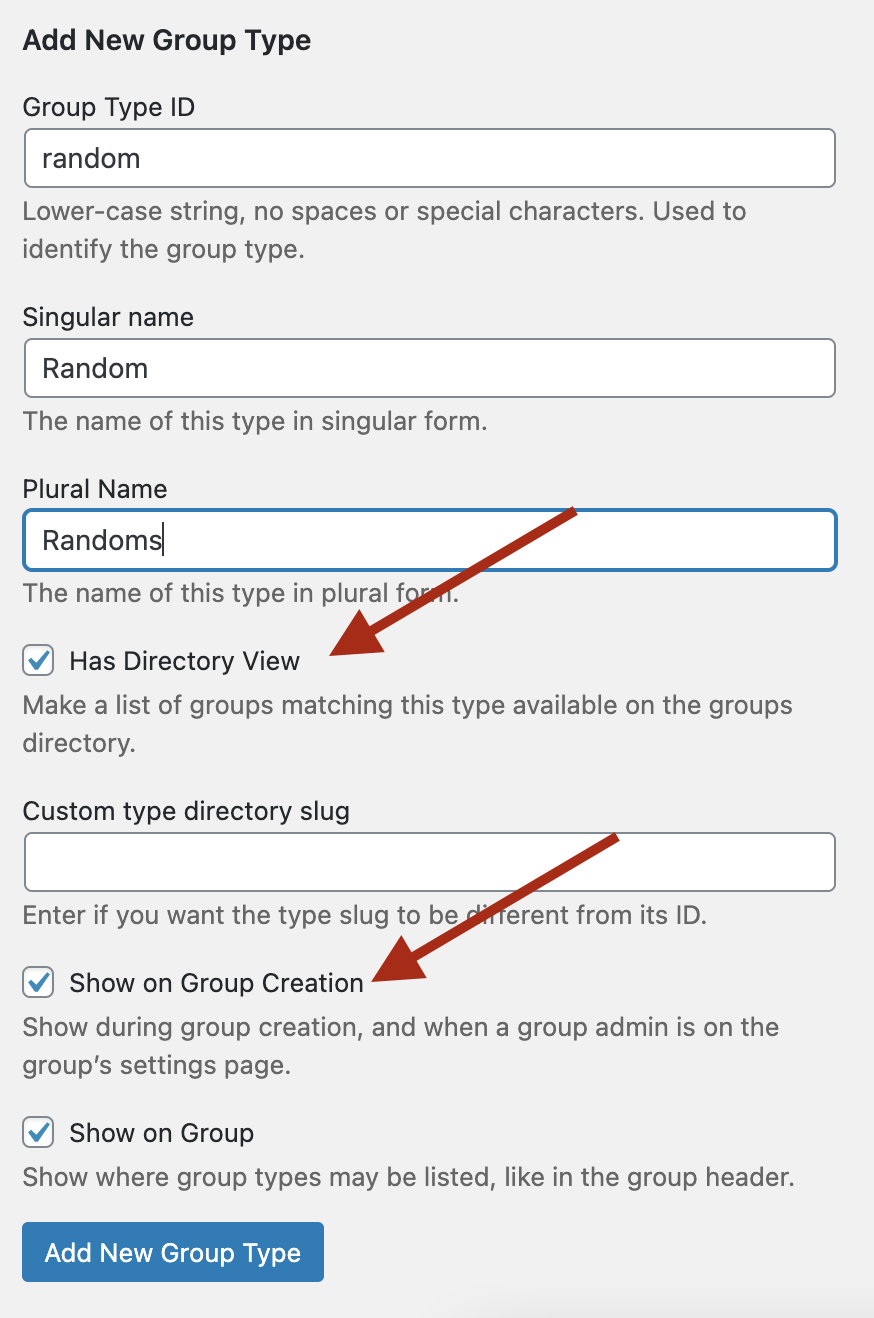
    I’ve tested the “BuddyPress Create Group Type” plugin in BuddyPress 7.0.0. I confirm I’m able to set the Group Types of a Group during its creation process. It’s important to make it possible when adding a Group Type from the WP Admin Screen BuddyPress introduced in 7.0.0 activating the “Show on Group creation” checkbox. See the below screen capture.

    Group Type new form

    Of course, you won’t get the tabs the “BuddyPress Create Group Type” as it uses another way to store the Group Type properties.

    That being said without using this plugin Admin UI, you can still enjoy these tabs with some custom code. Here’s a Gist containing the one I’ve used from a bp-custom.php file.

    #316296

    In reply to: Description Groups

    cloe193
    Participant

    Hello I’m using BuddyX theme and I have the same issue with no group description displayed. I have check files as you’ve suggested.

    Can you help me please ?

    Thank you very much for your help

    Cloé

    #316294
    cloe193
    Participant

    Hello

    i’m using BuddyX Theme and Buddypress. Without this theme, group description are displayed on the group page. But with this theme it’s not.

    Here screens ( group page ) :https://prnt.sc/w7fwo2
    ( group page with a group type filter ) : https://prnt.sc/w7g7u1

    How can i display group description again ? Also how can I show more letters ?

    Thank you for your help

    Cloé

    katparker12
    Participant

    WordPress version 5.6
    BuddyPress version 7.0.0
    Gravity Forms version 2.4.21 with Advanced Post Creation add-on
    Avada Theme
    http://www.mgroupcorp.com

    This site is using gravity forms to feed into an intranet posting feature, and they want to be able to tag other users. When I create a backend post, the dropdown list of mentions populates. When I try from the frontend (as most users would) there is no dropdown. If you know the entire username, the tag still works – it’s just the dropdown that won’t appear. Activity streams are turned on, and I have the following code in my functions.php

    add_filter( ‘bp_activity_maybe_load_mentions_scripts’, ‘buddydev_enable_mention_autosuggestions’, 10, 2 );

    function buddydev_enable_mention_autosuggestions( $load, $mentions_enabled ) {

    if( ! $mentions_enabled ) {
    return $load;//activity mention is not enabled, so no need to bother
    }
    //modify this condition to suit yours
    if( is_user_logged_in() && bp_is_current_component( ‘gravity_forms’ ) ) {
    $load = true;
    }

    return $load;
    }

    Am I missing something else? Thanks!

    Varun Dubey
    Participant

    @socialdigita theme support can help on it better.

    #316274
    chocolateteapot
    Participant

    WordPress 5.6, BuddyPress 7.0.0, all plugins up to date. StarKid theme by Thimpress.

    I’m getting page not found with these types of URLs:
    https://oncloudk9.co.uk/members/On%20Cloud%20K9/profile/edit/
    https://oncloudk9.co.uk/members/On%20Cloud%20K9/courses/all/

    I understand that it’ how the user name is formed, the link is being created as on cloud k9, rather than on-cloud-k9, but I don’t know how to correct it.

    On Cloud K9 is an admin account, so it’s not feasible to delete the account and recreate it.

    Thanks.

    #316263
    wbcomdesigns
    Participant
    #316261
    lishantha
    Participant

    Hi,

    I have a directory website that runs on the MyListing theme.

    I created a staging site and installed BuddyPress to test the possibility of increasing the features. Everything was working fine except for the Group page. It returns an empty page.

    Please could you help me.

    WordPress version – 5.6
    BuddyPress version – 7.0.0

    electroinvention
    Participant

    How to turn a sticky primary Navigation bar, to Non-sticky.
    Hi guys, I am using the BuddyX theme and its primary navigation menu is sticky while scrolling the page.
    The only problem with it is, I am using BP Better messages and when using in mobile phone, that navbar is hiding some of its content in the top.
    I want that sticky header menu to be nonsticky.
    Any solutions guys?

    #316242
    Varun Dubey
    Participant
    function vap_loading_lazy_attribute_remove_actions() {
    	remove_filter( 'bp_get_activity_content_body', 'bp_core_add_loading_lazy_attribute' );
    	remove_filter( 'bp_activity_comment_content',  'bp_core_add_loading_lazy_attribute' );
    }
    add_action( 'bp_init', 'vap_loading_lazy_attribute_remove_actions' );

    above can help to disable lazy load from activities, you can add inside child theme functions.php or using the code snippet plugin

Viewing 25 results - 1,126 through 1,150 (of 31,073 total)
Skip to toolbar