Search Results for 'wordpress'
-
Search Results
-
Hi,
i enabled the option that show the toolbar to the visitor of my website but it does not work. How i can resolve this problem?
BuddyPress Plugin Version: 3.1.0
WordPress Version 4.9.6-it_ITTopic: Multiple activity streams
WordPress 4.9.6
BuddyPress 3.1.0Hi everyone,
I’m building a site that is divided in four sections and I want each of them to have its own unique activity stream. I’ve searched a lot but haven’t been able to find anything helpful on how to achieve this.
I tried with WP multisite. Created four subdomains and installed BuddyPress separately on the main site and each subdomain. Registration was done only through the main site and users were added automatically to all sites upon registration. By installing the BP Multi Network plugin and BP_ENABLE_MULTIBLOG enabled I had what I wanted. Each site had its own activity stream and posts weren’t shared. But there were problems with profiles. If any user navigated to his profile from the home page, the main site, everything was fine. But from any activity page of a subsite, when clicking the Profile link on the menu it took him to my profile instead, the admin. Also, if I clicked on a user’s icon on in a post, it took me to his profile but it appeared empty, with zero friends, messages and notifications, even though there were some. So I had to abandon it.
Is there some way that I can create multiple activity streams? And if that isn’t possible, any ideas on how I can fix the profiles problem and use the Multisite solution?
Thanks,
DaveHi, i use BuddyPress 3.1.0 and WordPress 4.9.6, and i tested BuddyPress on http://muertosdelaburrimiento.cf creating a user called “Prueba” (test in English) and when i register the account redirects me to the “Confirmation Mail was send” page, but i don’t receive any confirmation mail, i tested with two different mails but it doesn’t works, doesn’t sends confirmation Mail, can anyone help me?
Bonsoir a tous
J’ai un pb sur mon site web et ca me bloque car les utilisateurs n’arrivent pas à créer leur compte
En effet je suis entrain de monter un site dating :
– wordpress 4.9.6,
-thème: sweetdate
lien du site: http://hiv-rencontre.com
Le plugin utilisé pour la confirmation des adresses émail est buddypress 3.1.0
Le pb c’est que lorsqu’un user créé un compte il ne reçoit pas le mail de confirmation, et la son compte ne peut etre actif
J’ai déjà regardé dans bcp de forum et même que le site web de buddypress sans trouver de solution à mon problème.
j’ai déjà utilisé WP Mail SMTP, il envoi bien les messages de test.
Les messages de contact form7 et ceux de réinitialisation du mot de passe partent bien, mais pour les mails de confirmation d’enregistrement çà ne passe pas.
J’ai désinstallé buddypress et j’ai essayé nativement avec wordpress ça passe sans problème donc je ne sais pas si le problème c’est avec buddypress, car j’ai même eu à désinstaller tous les plugins mais jusqu’à la rien.
Merci de m’aider car c’est vraiment urgent,
Sonny MBAHey, I’m looking to create or hook into the user creation event and send the info to wordpress itself, as well as an external site that my team is building. It’s my understanding that hooking into wp_insert_user(); and sending a HTTP POST request to the external site is probably the best way to do that. I’m using buddypress’s registration to create users. Can anyone help?
Hello,
I noticed that the links shown in the plugin messages are not shown correctly. Instead of the clickable link, an HTML code appears. How can I solve?
Version of BuddyPress in use: 3.1.0
Version of WordPress in use: 4.9.6-it_ITTopic: Topic’it Mobile App plugin?
For those with BP/BBpress configurations,
Has anyone looked at connecting to Topic’it (ios/android)? They are an app similar to tapatalk, except without the vendetta against wordpress. They already connect to PHPBB and others through plugins, and are making their API available to anyone who wants to create a plugin for wordpress..
I’m going to give it a shot, but it’s my first time creating a WP plugin.
Hey everyone,
I have a membership site. It’s running Woocommerce, WP 4.9.6 and Buddypress 3.0.0. My BuddyPress status is below.I’m having a problem when someone is choosing a any kind of membership(I only have free and 1 paid at the moment). When they get to the billing screen they can either use Facebook or Google to login and fill in the details.
Once they do that, Buddypress redirects them to their wall. I want them to be able to continue the checkout process. I’ve tried so many things, but can’t override it.
Please help!
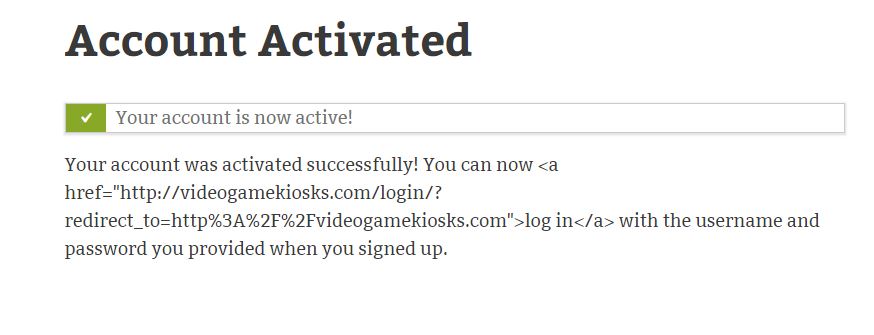
### WordPress Environment ### Home URL: http://www.specialtactics.global Site URL: http://www.specialtactics.global WC Version: 3.4.1 Log Directory Writable: ✔ WP Version: 4.9.6 WP Multisite: – WP Memory Limit: 256 MB WP Debug Mode: – WP Cron: ✔ Language: en_US External object cache: – ### Server Environment ### Server Info: Apache PHP Version: 7.1.16 - We recommend using PHP version 7.2 or above for greater performance and security. How to update your PHP version PHP Post Max Size: 128 MB PHP Time Limit: 3000 PHP Max Input Vars: 1000 cURL Version: 7.54.0 OpenSSL/1.0.2k SUHOSIN Installed: – MySQL Version: 5.6.39-cll-lve Max Upload Size: 128 MB Default Timezone is UTC: ✔ fsockopen/cURL: ✔ SoapClient: ✔ DOMDocument: ✔ GZip: ✔ Multibyte String: ✔ Remote Post: ✔ Remote Get: ✔ ### Database ### WC Database Version: 3.4.1 WC Database Prefix: wp_ MaxMind GeoIP Database: ✔ Total Database Size: 11.24MB Database Data Size: 10.10MB Database Index Size: 1.14MB wp_woocommerce_sessions: Data: 0.04MB + Index: 0.00MB wp_woocommerce_api_keys: Data: 0.00MB + Index: 0.00MB wp_woocommerce_attribute_taxonomies: Data: 0.00MB + Index: 0.00MB wp_woocommerce_downloadable_product_permissions: Data: 0.00MB + Index: 0.00MB wp_woocommerce_order_items: Data: 0.00MB + Index: 0.00MB wp_woocommerce_order_itemmeta: Data: 0.00MB + Index: 0.01MB wp_woocommerce_tax_rates: Data: 0.00MB + Index: 0.00MB wp_woocommerce_tax_rate_locations: Data: 0.00MB + Index: 0.00MB wp_woocommerce_shipping_zones: Data: 0.00MB + Index: 0.00MB wp_woocommerce_shipping_zone_locations: Data: 0.00MB + Index: 0.00MB wp_woocommerce_shipping_zone_methods: Data: 0.00MB + Index: 0.00MB wp_woocommerce_payment_tokens: Data: 0.00MB + Index: 0.00MB wp_woocommerce_payment_tokenmeta: Data: 0.00MB + Index: 0.00MB wp_woocommerce_log: Data: 0.00MB + Index: 0.00MB ts_redirects: Data: 0.00MB + Index: 0.00MB wp_achievements: Data: 0.02MB + Index: 0.01MB wp_bp_activity: Data: 0.01MB + Index: 0.01MB wp_bp_activity_meta: Data: 0.00MB + Index: 0.01MB wp_bp_friends: Data: 0.00MB + Index: 0.00MB wp_bp_groups: Data: 0.00MB + Index: 0.00MB wp_bp_groups_groupmeta: Data: 0.00MB + Index: 0.00MB wp_bp_groups_members: Data: 0.00MB + Index: 0.00MB wp_bp_links: Data: 0.00MB + Index: 0.00MB wp_bp_links_categories: Data: 0.00MB + Index: 0.00MB wp_bp_links_linkmeta: Data: 0.00MB + Index: 0.00MB wp_bp_links_votes: Data: 0.00MB + Index: 0.00MB wp_bp_messages_drafts: Data: 0.00MB + Index: 0.00MB wp_bp_messages_labels: Data: 0.00MB + Index: 0.00MB wp_bp_messages_label_message: Data: 0.00MB + Index: 0.00MB wp_bp_messages_messages: Data: 0.00MB + Index: 0.00MB wp_bp_messages_meta: Data: 0.00MB + Index: 0.00MB wp_bp_messages_notices: Data: 0.00MB + Index: 0.00MB wp_bp_messages_recipients: Data: 0.00MB + Index: 0.00MB wp_bp_notifications: Data: 0.00MB + Index: 0.00MB wp_bp_notifications_meta: Data: 0.00MB + Index: 0.00MB wp_bp_user_blogs: Data: 0.00MB + Index: 0.00MB wp_bp_user_blogs_blogmeta: Data: 0.00MB + Index: 0.01MB wp_bp_xprofile_data: Data: 0.00MB + Index: 0.00MB wp_bp_xprofile_fields: Data: 0.03MB + Index: 0.05MB wp_bp_xprofile_groups: Data: 0.00MB + Index: 0.00MB wp_bp_xprofile_meta: Data: 0.01MB + Index: 0.02MB wp_buddyboss_media: Data: 0.00MB + Index: 0.00MB wp_buddyboss_media_albums: Data: 0.00MB + Index: 0.00MB wp_commentmeta: Data: 0.00MB + Index: 0.01MB wp_comments: Data: 0.01MB + Index: 0.01MB wp_gde_profiles: Data: 0.00MB + Index: 0.00MB wp_gde_secure: Data: 0.00MB + Index: 0.00MB wp_learndash_user_activity: Data: 0.01MB + Index: 0.03MB wp_learndash_user_activity_meta: Data: 0.04MB + Index: 0.03MB wp_links: Data: 0.00MB + Index: 0.00MB wp_options: Data: 2.97MB + Index: 0.09MB wp_pmpro_discount_codes: Data: 0.00MB + Index: 0.00MB wp_pmpro_discount_codes_levels: Data: 0.00MB + Index: 0.00MB wp_pmpro_discount_codes_uses: Data: 0.00MB + Index: 0.00MB wp_pmpro_memberships_categories: Data: 0.00MB + Index: 0.00MB wp_pmpro_memberships_pages: Data: 0.00MB + Index: 0.00MB wp_pmpro_memberships_users: Data: 0.00MB + Index: 0.01MB wp_pmpro_membership_levelmeta: Data: 0.00MB + Index: 0.00MB wp_pmpro_membership_levels: Data: 0.00MB + Index: 0.01MB wp_pmpro_membership_orders: Data: 0.00MB + Index: 0.02MB wp_pmxi_files: Data: 0.00MB + Index: 0.00MB wp_pmxi_history: Data: 0.00MB + Index: 0.00MB wp_pmxi_imports: Data: 0.00MB + Index: 0.00MB wp_pmxi_posts: Data: 0.00MB + Index: 0.00MB wp_pmxi_templates: Data: 0.00MB + Index: 0.00MB wp_postmeta: Data: 0.83MB + Index: 0.21MB wp_posts: Data: 2.47MB + Index: 0.17MB wp_pp_login_builder: Data: 0.01MB + Index: 0.00MB wp_pp_password_reset_builder: Data: 0.01MB + Index: 0.00MB wp_pp_registration_builder: Data: 0.01MB + Index: 0.00MB wp_revslider_css: Data: 0.09MB + Index: 0.00MB wp_revslider_layer_animations: Data: 0.00MB + Index: 0.00MB wp_revslider_navigations: Data: 0.00MB + Index: 0.00MB wp_revslider_sliders: Data: 0.02MB + Index: 0.00MB wp_revslider_slides: Data: 0.18MB + Index: 0.00MB wp_revslider_static_slides: Data: 0.00MB + Index: 0.00MB wp_signups: Data: 0.00MB + Index: 0.00MB wp_social_users: Data: 0.00MB + Index: 0.00MB wp_termmeta: Data: 0.00MB + Index: 0.01MB wp_terms: Data: 0.00MB + Index: 0.01MB wp_term_relationships: Data: 0.00MB + Index: 0.01MB wp_term_taxonomy: Data: 0.00MB + Index: 0.01MB wp_usermeta: Data: 0.05MB + Index: 0.04MB wp_users: Data: 0.00MB + Index: 0.01MB wp_waiting: Data: 0.00MB + Index: 0.00MB wp_wc_download_log: Data: 0.00MB + Index: 0.00MB wp_wc_webhooks: Data: 0.00MB + Index: 0.00MB wp_wfBadLeechers: Data: 0.00MB + Index: 0.00MB wp_wfBlockedCommentLog: Data: 0.00MB + Index: 0.00MB wp_wfBlockedIPLog: Data: 0.00MB + Index: 0.00MB wp_wfBlocks7: Data: 0.00MB + Index: 0.00MB wp_wfConfig: Data: 0.36MB + Index: 0.01MB wp_wfCrawlers: Data: 0.00MB + Index: 0.00MB wp_wfFileChanges: Data: 0.00MB + Index: 0.00MB wp_wfFileMods: Data: 0.48MB + Index: 0.11MB wp_wfHits: Data: 0.14MB + Index: 0.03MB wp_wfHoover: Data: 0.00MB + Index: 0.00MB wp_wfIssues: Data: 0.00MB + Index: 0.00MB wp_wfKnownFileList: Data: 0.97MB + Index: 0.12MB wp_wfLeechers: Data: 0.00MB + Index: 0.01MB wp_wfLiveTrafficHuman: Data: 0.00MB + Index: 0.00MB wp_wfLocs: Data: 0.00MB + Index: 0.00MB wp_wfLogins: Data: 0.01MB + Index: 0.00MB wp_wfNet404s: Data: 0.00MB + Index: 0.00MB wp_wfNotifications: Data: 0.00MB + Index: 0.00MB wp_wfPendingIssues: Data: 0.00MB + Index: 0.00MB wp_wfReverseCache: Data: 0.00MB + Index: 0.00MB wp_wfScanners: Data: 0.00MB + Index: 0.00MB wp_wfSNIPCache: Data: 0.00MB + Index: 0.00MB wp_wfStatus: Data: 0.06MB + Index: 0.03MB wp_wfVulnScanners: Data: 0.00MB + Index: 0.00MB wp_wp_pro_quiz_category: Data: 0.00MB + Index: 0.00MB wp_wp_pro_quiz_form: Data: 0.00MB + Index: 0.00MB wp_wp_pro_quiz_lock: Data: 0.00MB + Index: 0.00MB wp_wp_pro_quiz_master: Data: 0.02MB + Index: 0.00MB wp_wp_pro_quiz_prerequisite: Data: 0.00MB + Index: 0.00MB wp_wp_pro_quiz_question: Data: 1.24MB + Index: 0.03MB wp_wp_pro_quiz_statistic: Data: 0.01MB + Index: 0.00MB wp_wp_pro_quiz_statistic_ref: Data: 0.00MB + Index: 0.00MB wp_wp_pro_quiz_template: Data: 0.00MB + Index: 0.00MB wp_wp_pro_quiz_toplist: Data: 0.00MB + Index: 0.00MB wp_wsluserscontacts: Data: 0.00MB + Index: 0.00MB wp_wslusersprofiles: Data: 0.00MB + Index: 0.00MB ### Post Type Counts ### attachment: 121 bmt-member-type: 4 bp-email: 32 cdfc: 1 condition_group: 1 custom_css: 1 customize_changeset: 9 forum: 1 jetpack_migration: 2 mc4wp-form: 1 nav_menu_item: 33 page: 39 post: 24 product: 12 revision: 1003 scheduled-action: 16 sfwd-certificates: 1 sfwd-courses: 7 sfwd-lessons: 36 sfwd-quiz: 38 sfwd-topic: 147 shop_order: 7 shop_subscription: 5 sidebar: 1 sp_wps_shortcodes: 1 topic: 4 wc_membership_plan: 6 wcps: 1 woocarousel: 1 wpachievements: 3 wpcf7_contact_form: 1 wpe_product_carousel: 1 yith_wcps_type: 1 ### Security ### Secure connection (HTTPS): ❌ Your store is not using HTTPS. Learn more about HTTPS and SSL Certificates. Hide errors from visitors: ✔ ### Active Plugins (50) ### Addons for WPBakery Page Builder: by Livemesh – 1.9.1 Akismet Anti-Spam: by Automattic – 4.0.7 bbPress: by The bbPress Community – 2.5.14 Better Search Replace: by Delicious Brains – 1.3.2 Boss for LearnDash: by BuddyBoss – 1.3.0 BP Redirect To Profile: by Brajesh Singh – 1.2.2 BuddyBoss Inbox: by BuddyBoss – 1.1.3 BuddyBoss Media: by BuddyBoss – 3.2.4 BuddyBoss One Click Installer: by BuddyBoss – 1.0.6 BuddyBoss Wall: by BuddyBoss – 1.3.3 BuddyPress for LearnDash: by BuddyBoss – 1.2.4 BuddyPress Member Types: by BuddyBoss – 1.1.2 BuddyPress: by The BuddyPress Community – 3.0.0 Contact Form 7: by Takayuki Miyoshi – 5.0.2 Force HTTPS: by LittleBizzy – 1.0.6 Google Doc Embedder: by Kevin Davis Dan Lester – 2.6.4 Insert or Embed Articulate Content into WordPress Trial: by Brian Batt – 4.292 WPBakery Page Builder: by Michael M - WPBakery.com – 5.4.7 LearnDash Content Cloner: by WisdmLabs – 1.2.2 LearnDash & bbPress Integration: by LearnDash – 2.0.2.1 LearnDash Course Grid: by LearnDash – 1.4.1 LearnDash ProPanel: by LearnDash – 2.1.3 LearnDash WooCommerce Integration: by LearnDash – 1.4.0 – Not tested with the active version of WooCommerce Mega Addons For Visual Composer: by Nasir – 2.2 Nextend Social Login: by Nextendweb – 3.0.10 Nextend Social Login Pro Addon: by Nextendweb – 3.0.8 WooCommerce Product Carousel Slider: by ADL Plugins – 3.0.2 – Not tested with the active version of WooCommerce Restrict Content: by Pippin Williamson – 2.2.3 Slider Revolution: by ThemePunch – 5.4.7.3 LearnDash LMS: by LearnDash – 2.5.8.2 Simple Buddypress Profile Privacy: by Justin Hansen – 0.7.7 String Locator: by Clorith – 2.3.0 Theme My Login: by Jeff Farthing – 6.4.16 Uncanny LearnDash Toolkit: by Uncanny Owl – 2.4.2 Uncanny LearnDash Toolkit Pro: by Uncanny Owl – 2.3.1 UpdraftPlus - Backup/Restore: by UpdraftPlus.Com DavidAnderson – 1.14.11 Essential WPBakery Page Builder (formerly Visual Composer) Addons: by themebon – 1.9.1 Waiting: by Plugin Builders – 0.4.5 WC4BP -> WooCommerce BuddyPress Integration (Premium): by ThemeKraft – 3.1.4 – Not tested with the active version of WooCommerce WC4BP -> Subscriptions: by ThemeKraft – 1.1.0 – Not tested with the active version of WooCommerce WC4BP -> BuddyPress xProfile Checkout Manager: by ThemeKraft – 1.3.0 – Not tested with the active version of WooCommerce WooCommerce Colors: by WooThemes – 1.0.7 – Not tested with the active version of WooCommerce WooCommerce PayPal Express Checkout Gateway: by WooCommerce – 1.5.5 WooCommerce Stripe Gateway: by WooCommerce – 4.1.6 WooCommerce Memberships: by SkyVerge – 1.10.4 WooCommerce Social Login: by SkyVerge – 2.5.2 WooCommerce Subscriptions: by Prospress Inc. – 2.2.21 WooCommerce: by Automattic – 3.4.1 – 3.4.2 is available WP File Manager: by mndpsingh287 – 2.7 WP Rollback: by WordImpress – 1.5 ### Settings ### API Enabled: ✔ Force SSL: ✔ Currency: USD ($) Currency Position: left Thousand Separator: , Decimal Separator: . Number of Decimals: 2 Taxonomies: Product Types: course (course) external (external) grouped (grouped) simple (simple) subscription (subscription) variable (variable) variable subscription (variable-subscription) Taxonomies: Product Visibility: exclude-from-catalog (exclude-from-catalog) exclude-from-search (exclude-from-search) featured (featured) outofstock (outofstock) rated-1 (rated-1) rated-2 (rated-2) rated-3 (rated-3) rated-4 (rated-4) rated-5 (rated-5) ### WC Pages ### Shop base: ❌ Page not set Cart: #562 - /cart/ Checkout: #9648 - /woocommerce-checkout/ My account: #9671 - /membership/ Terms and conditions: ❌ Page not set ### Theme ### Name: Boss. Child Theme Version: 2.4.3 Author URL: http://www.buddyboss.com Child Theme: ✔ Parent Theme Name: Boss. Parent Theme Version: 2.4.6 Parent Theme Author URL: https://www.buddyboss.com WooCommerce Support: ✔ ### Templates ### Overrides: – ### subscriptions ### WCS_DEBUG: ✔ No Subscriptions Mode: ✔ Live Subscriptions Template Theme Overrides: – Report Cache Enabled: ✔ Yes Cache Update Failures: ✔ 0 failureAfter a user successfully activates their account this is what they see right after activation.
Everything is working correctly but the link for log-in it displays is broken.. you’ll notice it looks to be a syntax error. How can I correct this? Or what file do I need to edit it to fix the a href link?
Screenshot of what the user sees:
BP Version 3.1.0
WordPress 4.9.6I had recently made the following patch to my
bp-groups\bp-groups-activity.phpfile to fix the bug where members could no longer reply to any top-level post made under a group: https://buddypress.trac.wordpress.org/attachment/ticket/7854/7854.01.patchThat patch restored the comment button but only for members that had joined the group in which the post was assigned to. Unlike in the past, there is no longer a “comment” button below any post assigned to a group for those BP members logged in that are not members of that group.
I posted this issue in this thread & have not seen it reported elsewhere: https://buddypress.org/support/topic/comment-button-in-activity-stream-no-groups/#post-273882 My guess is that might be due to the fact that if you are logged in as an admin (which most of us are), the issue does not exist. Only non-admin BP members experience the issue on my site.


