Search Results for 'wordpress'
-
AuthorSearch Results
-
April 11, 2016 at 9:45 am #252318April 11, 2016 at 9:43 am #252317
Paul Wong-Gibbs
Keymaster@justarandomuser Yes. BuddyPress does not and will not support WordPress’
wp_mail_content_typefilter, so setting this or not does not affect BuddyPress.Postman SMTP plugin re-declares a function called
wp_mail(). BuddyPress will send its emails in plaintext ifwp_mail()has been redeclared.This decision was made because a lot of legacy WordPress plugins that change email content/appearance, or how they are delivered, re-declare
wp_mail()and it is impossible for BuddyPress to know if/how it could support all these custom implementations.If you are using Postman SMTP to only send emails via SMTP, you could find an alternate SMTP plugin. People have mentioned some recently in email support discussions on this forum, though I can’t remember the names. If I find one again, I’ll try to remember to let you know here.
If you are using Postman SMTP for any other purpose, and you don’t want to switch to another plugin that only configures WordPress to send via SMTP, then I’m afraid you’re out of the options at the moment.
You are right that the Customizer does not indicate that the email will only be sent in plaintext in these situations. We’ll get some messaging added to that screen in the next BuddyPress release to clarify that.
April 11, 2016 at 6:17 am #252307Topic: Complete chat system???
in forum How-to & Troubleshootingmichaellanfield
ParticipantSorry if this question has been posted before. I did search and did not find any answer to my question.
My site. http:/thevegansandwich.com (under construction)
At the time posting this (April 11, 2016)
WordPress version: 4.4.2
BuddyPress version: 2.5.2
(I always updated all plugins and WordPress)My question is, I am looking for a complete free or inexpensive chat system/plugin or a way to implement a chat system similar to Facebook, with:
– Ability to send any files (anything from videos, photos, music, etc.)
– Ability to text chat
– Ability to video or voice call to a friend
– (Optional) ability to add other friends or users to the chat
– (Optional) ability to screen share (desktop sharing)Thank you.
April 10, 2016 at 12:36 pm #252294In reply to: Profile is Forcing avatar upload
wiziwiz
ParticipantOk so I have tested with another plugin and it is the same issue,
Nextend Twitter Connect also has the same bug,
https://wordpress.org/plugins/nextend-twitter-connect/everything works fine – it’s just this block that the buddypress will not allow any activity until an avatar is uploaded,
I finally have found a fix and that is turn off this setting
Account Settings
Allow your users to modify their account and notification settings directly from within their profiles.so what is that setting because the user can still change their account – will look into that setting a bit more in another thread…
April 8, 2016 at 4:03 pm #252245In reply to: Post comments not appearing in activity stream?
Mathieu Viet
ModeratorHi there, let’s try to reply to one problem at a time!
Now the posts do appear in activity stream, but not the comments. If i comment on a post, the stream doesn’t show the comments, but if i comment on a post via activity stream, the comment is then seen on a post and on the activity stream.
I guess, this means the BuddyPress “Site Tracking” is active.
1/ WordPress Administration > BuddyPress Settings > Options Tab – Activity Settings section:
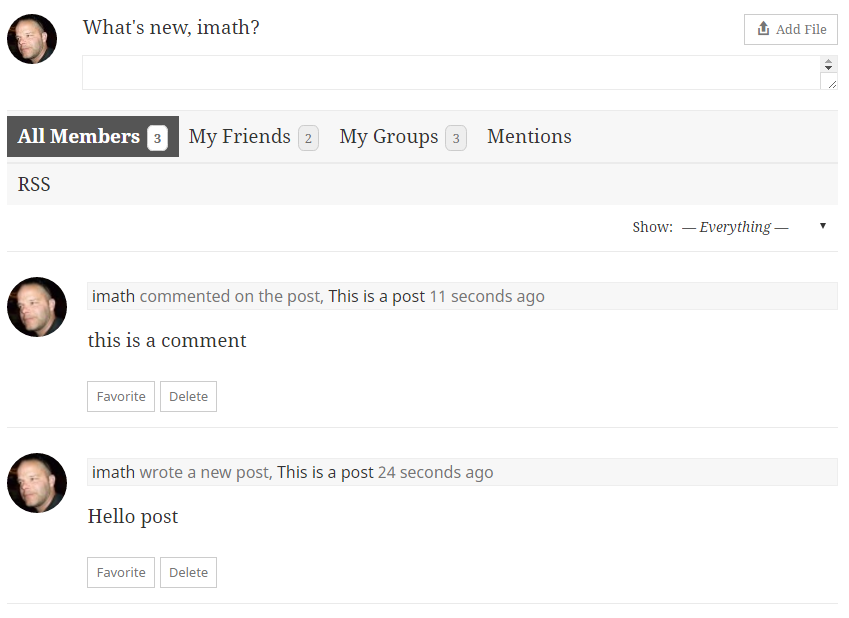
Setting ‘Allow activity stream commenting on blog and forum posts’ is not checked. It means when a post or a comment is posted, then an activity will be generated, but it’s not possible to add an “Activity comment” to the generated activities. Just tested with latest WordPress and BuddyPress 2.5.2 and it works as expected:
2/ WordPress Administration > BuddyPress Settings > Options Tab – Activity Settings section:
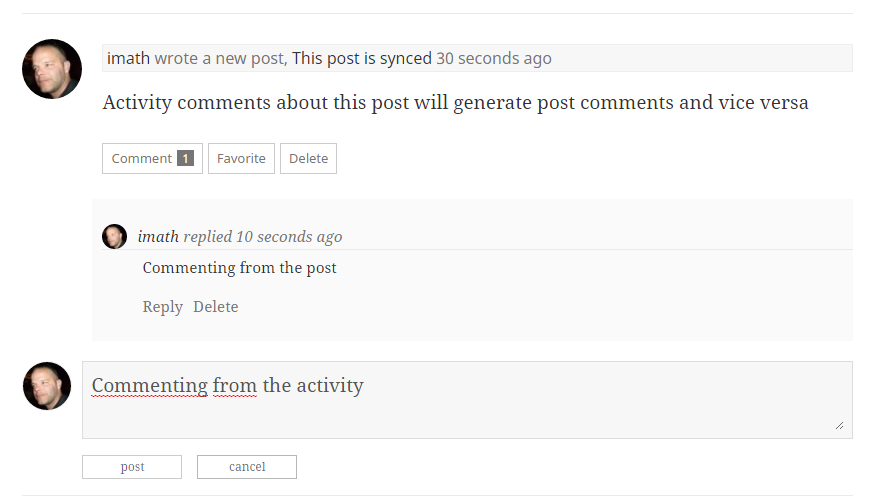
Setting ‘Allow activity stream commenting on blog and forum posts’ is checked. This means you chose to synchronize comments between the Post object and the corresponding activity object. So a comment on the activity about the post will generate a regular post comment and a regular post comment will generate an activity comment on the activity about the Post. Just tested with latest WordPress and BuddyPress 2.5.2 and it works as expected:
Now @cmavrikas is talking about something else i think. He wants the activity comments to also be displayed like regular activities: in stream mode.
I then advise to use another filter to avoid parsing args / checking the current object of the Ajax querystring:function activity_comments_stream_mode( $args = array() ) { return array_merge( $args, array( 'display_comments' => 'stream', ) ); } add_filter( 'bp_before_has_activities_parse_args', 'activity_comments_stream_mode', 20, 1 );I just tested it, and again it’s working fine in latest WordPress / BuddyPress 2.5.2…
I advise you to deactivate plugins/come back to a default WordPress theme and do the opposite work to find the plugins or theme that prevents this regular behaviors.
April 8, 2016 at 12:44 pm #252233In reply to: BP Plugins List Missing????
danbp
ParticipantThat list is/was pretty old and not well maintained. BP’s codex is under permanent reconstruction (made by volonteers), so it’s no tomorrow morning that that list will be back.
Actually, the best place to get available BP plugins is the WordPress Repository. Recommanded search keyword is buddypress. 😉
April 8, 2016 at 11:36 am #252229In reply to: buddypress members search errors
Henry Wright
ModeratorThis might not fix the problem but have you tried BP Profile Search?
April 7, 2016 at 8:33 pm #252205In reply to: Extended Profiles Not on Register Page
concoa
ParticipantUPDATE:
I deleted all BP files and the plugin and did a reinstall.PROBLEM #1)
I am still having trouble with the Register page. I do not know what this error refers to:displays an error message:
“Profile Details
Warning: Creating default object from empty value in /home/content/p3pnexwpnas09_data01/28/2853428/html/wp-content/plugins/buddypress/bp-xprofile/classes/class-bp-xprofile-group.php on line 649”Line 649 is:
$fields[ $key ]->visibility_level = $field_visibility;PROBLEM #2)
Registration submission is now working, but an auto response email is being sent. Is there something in BuddyPress (or WordPress) to disable this? I’m getting an email saying:
Hi test4,
Thanks for registering!To complete the activation of your account, go to the following link: http://blahblahblah.com/activate/ef23a0f24958c3a125917f7e3bac95f8/
I’m using s2Member to allow admin approval of registrations. This email needs to be removed. Thx.
April 7, 2016 at 8:12 pm #252204In reply to: Filtering Title in BuddyPress
BobSD99
ParticipantHi Henry – thanks for response. As confirmed by both the Codex (Code Reference) and my successful use of this method in the same installation outside of BuddyPress, $title is indeed an array.
In fact, I tested my function without the
if ( bp_is_group() ){conditional, and the filter works on the pages NOT created/affected by BuddyPress, which confirms BuddyPress is bypassing this filter.For testing purposes, I modified the function as follows:
// test parameters passed to document_title_parts filter
function test_groups_title( $title ){

	print_r( $title );
	exit;

}
add_filter('document_title_parts', 'test_groups_title', 10);
And BuddyPress pages output the following array:
Array
(
    [title] =>
    [site] => My-Website.com
)
Which suggests that BuddyPress is neither supplying data to this array nor utilizing it for the title output.
I did a grep of BuddyPress and bbPress and I am finding calls to the deprecated
wp_title()function:$ grep -r 'wp_title' ../plugins/b*press/* ../plugins/bbpress/includes/core/filters.php:add_filter( 'wp_title', 'bbp_title', 10, 3 ); ../plugins/bbpress/readme.txt:* Fix custom wp_title compatibility ../plugins/buddypress/bp-core/bp-core-filters.php: * @see wp_title() ../plugins/buddypress/bp-core/bp-core-filters.php: * @see wp_title() ../plugins/buddypress/bp-core/bp-core-filters.php: * Filters the older 'wp_title' page title for BuddyPress pages. ../plugins/buddypress/bp-core/bp-core-filters.php:add_filter( 'wp_title', 'bp_modify_page_title', 20, 3 ); ../plugins/buddypress/bp-core/deprecated/1.5.php: * @deprecated Use wp_title() ../plugins/buddypress/bp-core/deprecated/1.5.php: * Now, just simply use wp_title(). ../plugins/buddypress/bp-core/deprecated/1.5.php: * @deprecated Use wp_title() ../plugins/buddypress/bp-core/deprecated/1.5.php: _deprecated_function( __FUNCTION__, '1.5', 'wp_title()' ); ../plugins/buddypress/bp-core/deprecated/1.5.php: $title = wp_title( '|', false, 'right' ) . get_bloginfo( 'name', 'display' ); ../plugins/buddypress/bp-themes/bp-default/header.php: <title><?php wp_title( '|', true, 'right' ); bloginfo( 'name' ); ?></title> ../plugins/buddypress/bp-themes/bp-default/archive.php: <h3 class="pagetitle"><?php printf( __( 'You are browsing the archive for %1$s.', 'buddypress' ), wp_title( false, false ) ); ?></h3>I guess this means I can and should hook in to the older (deprecated)
wp_title()function? I’m a bit new to BuddyPress and WordPress, so maybe I’m missing something obvious, or barking up the wrong tree here….April 7, 2016 at 11:34 am #252184redokodesign
ParticipantHey all,
A HUGE thank you to @djpaul and everyone else who helped to solve this problem for me.
Paul asked me to install the following plugin:
https://wordpress.org/plugins/bp-email-to-wp-mail-from-bridge/
– This fixed the problem for me instantly. The site now has working notifications for Buddypress, BPpress and WordPress. Amazing! If you too are running WP-mail-SMTP and having problems do try this fix.
The Buddypress community is always so helpful.
Thanks again,
T
April 6, 2016 at 6:07 pm #252175Brandon Allen
ParticipantFor anyone using the
wp_mail_fromandwp_mail_from_namefilters, commonly used in SMTP plugins, I’ve created a plugin that lets those filters work with BP emails.https://wordpress.org/plugins/bp-email-to-wp-mail-from-bridge/
Hope this helps someone!
April 6, 2016 at 1:07 pm #252166Julian M
ParticipantGot the same erorr.
It’s pity. Why this plugin is so hard coded?
Why I cannot see log files with errors or change environment to development/production?Wordpress v4.4.2 (single site)
Buddypress v2.5.2April 6, 2016 at 9:39 am #252162In reply to: Why People Do Not Use RealNames/Images on Forums?
KeymasterI think it comes down to privacy, and what how much a person wants to share to a specific community. I’m much more open in this WordPress community than I am in communities for various video games i’m involved with, for example.
April 6, 2016 at 8:33 am #252159In reply to: Only images in activity stream
nownesx
ParticipantI have a good knowledge of php, but I’m not a super programmer. developing themes for wordpress. BuddyPress documentation for plugins is poor.
Can you give me some guidance about? what are the files involved than post-form.php?April 4, 2016 at 10:05 pm #252123In reply to: Email Notifications not sending
KeymasterI’ll continue to give this thought. If WordPress emails are sent without ANY plugin or customisation, I am not sure why BuddyPress emails aren’t being sent — we put a lot of work into the v2.5.2 release to try to fix this exactly situation/problem.
April 4, 2016 at 8:31 pm #252114Halo Diehard
ParticipantPretty sure your WordPress members have to post after BuddyPress has been installed, or they don’t show up as BuddyPress members 🙁 I’m currently looking into this as well, to see if any updates have remedied this. It’s very confusing to my members when they click the BuddyPress members link and everyone isn’t there. Some of my members keep in contact even if it isn’t through my site. It’s really not a true integration with WordPress set up this way, so I hope it’s been updated.
April 4, 2016 at 8:01 pm #252112In reply to: button does not appear, “Send Update”
ModeratorCan you post some information about your install?
- Active theme
- Plugins activated
- BuddyPress version
- WordPress version
Thanks!
April 4, 2016 at 3:32 pm #252101In reply to: Invited members to hidden group can’t join
ngoegan
ParticipantI deactivated the plugin Another WordPress Classified Plugin and it resolved the issue. I’m going to post over on the AWPCP support forum to see if they are aware of it and know how to fix the conflict.
April 4, 2016 at 12:52 pm #252084In reply to: Email Notifications not sending
manigopal
Participantnormal wordpress user registration working fine only buddypress registration is not working have a look into it.
Thanks
April 2, 2016 at 10:30 pm #252047In reply to: Multiple Groups types
shanebp
ModeratorHave you taken a look at
https://wordpress.org/plugins/bp-group-hierarchy/ ?
It may give you some ideas of how to proceed.April 2, 2016 at 3:45 pm #252037Jojanonone
ParticipantThanks a lot @berkelmudez!!
Accidentally I noticed that activation emails were not being sent. And neither were notification emails, like when receiving a private message. Switched to Postman and all was sweet again.
WordPress 4.4.2
BuddyPress 2.5.2
bbPress 2.5.8April 2, 2016 at 2:28 am #252028davidryal
Participantupdate2: found shane’s answer here:
http://wordpress.stackexchange.com/questions/196929/how-to-get-member-list-based-on-role-by-using-buddypress…and got it to work to only show a single role, which covers about half the users I want to show. I don’t really understand array syntax, but am now neck-deep in the new “role__in” thing in 4.4
…and finally got it to work, after finding https://gist.github.com/sbrajesh/2142009 (the most recent comment is key, bringing in “role__in”
April 1, 2016 at 7:25 pm #252017berkelmudez
ParticipantHi,
I just had a similar problem problem where emails were working perfectly from WordPress and BB press but not from Buddypress for some reason even tho my SMTP plugins were working.
It turned out that the SMTP plugins I were using weren’t applying the configuration on Buddypress emails for some reason. The plugins that did not work for me were:Configure SMTP, Easy WP SMTP, WP-Mail-SMTP.
The plugin for me that did succeed in setting the smtp for buddypress email notifications was ‘Postman SMTP’. I think it might be worth a shot trying this plugin to see if it works with this plugin.
I have no idea why the other SMTP plugins didn’t work but this plugin did and it might work for you as well. Good luckApril 1, 2016 at 4:20 pm #252008In reply to: Update Fail on 2.5.2
ParticipantHi,
you need to network activate, even if you have only one subsite and what ever the sub option (sub-dir or sub-domain) is.Mostly, BP is activated on the main site.
your-site.com/ – here sit WordPress and BuddyPress and depending your options:
your-site.com/my_second_blog/(sub-dir)
or
my_second_blog.your-site.com(sub-domain)April 1, 2016 at 9:48 am #251996Keymaster@redokodesign Do you know how to access raw email headers, in whatever email client you use?
If so, can you copy/paste the email headers of a WordPress email that you’ve received from the site (i.e. one that is working correctly and was sent)? Can you also share with me the “to” “from” “bcc” “cc” parts of the text that the BuddyPress email debug plugin sent you?
You can find my email address on https://profiles.wordpress.org/djpaul/
I have a suspicion this is something to do with the “from” or “reply to” properties being different for each email, but I need the data to prove this, and what SMTP plugin you are using to see how it is configuring WordPress.
-
AuthorSearch Results


