Search Results for 'wordpress'
-
Search Results
-
Topic: Registration page issues
Wordpress 4.6
Buddypress latest version
http://www.ankspon.co.uk/register1. I would like to hide this text that appears on the profile details section of my registration page. “This field can be seen by: Everyone” – It makes the registration form messy. How do I hide it?
2. Where can I edit the text that appears at the top of this page, supplied by the buddy press plugin? “Registering for this site is easy. Just fill in the fields below, and we’ll get a new account set up for you in no time.” – I can’t see it in the plugin or page.
Thanks
FreddyTopic: Cover Image for a Group?
Hi, how do I change the cover image for a group? I have BBPress and BuddyPress installed to work with LearnDash and I can’t seem to figure out how to add a photo, there doesn’t seem to be that option anywhere under Groups or Forums. The page for the group is here: http://worldteam.donate2dogsports.org/groups/world-team-training-course/
Using WordPress Version 4.7, BuddyPress Version 2.74, BBPress version 2.5.12 and the theme I was using was called Basic. I installed Twenty-Seventeen instead and I’m still having the same problem.
Hello, last time changes in my website on January 3 everything has worked. But now I checked my site and no activity stream posts, and also when you post new post it not apear. I tried to dissable all other plugins but it not worked. I using wordpress 4.7 and buddypress 2.7.4.
My website is running the latest version of WordPress (4.7) and the latest version of BuddyPress (2.7.4). When BuddyPress is deactivated everything works well, except for of course its features (Members and Groups). But these are very important to us. Thus I have to activate BP and when I do the sign in button on the top of the screen doesn’t work and you can only view the pages in the menu when logged in. You can however login by going to http://www.example.com/login but the button which should open a vertical bar on top op the screen doesn’t work. Instead it just adds to the hyperlink “/#4lct468lzl6o”. The menu also doesn’t work when BP is activated it just adds a weird String to the hyperlink when clicked on. How can I fix this?
Thanks!Martin W
Topic: UPDATES OF GROUP LOST!
Hello,
suddenly eliminate all updates from groups. Every day many groups lose all their updates.
I wordpress 4.6 and BuddyPress 2.0
Topic: phone number or email
First thanks for your awesome plugin.
Please at the sign up page, I want visitors to be able to use phone instead of email during sign up
In the email field of the sign up form, is it possible to display email or phone number, so that visitors can use either email or phone number, thank you. Am using the latest WordPress.
Topic: New Theme for Free
I’ve been developing a new theme called Centro which supports the core functionality of WordPress & BuddyPress.
It’s currently still in development but has been released and is available on GitHub.
You can view a demo on buddycore or here also and a download is available via GitHub.
Issues will be answered and resolved via GitHub.
Enjoy! Happy New Year!
**********************
Some Features
**********************
Colour customizations in wp-admin.
Support for posts and pages
Archive pages for search and taxonomies
Post thumbnails and post formats
Post commentsActivity streams
Member profiles
– xProfile
– Settings
– Friends
– PMs
– Notifications
– MultisiteRegistration
– Basic member
— With blog creationResponsive
HTML5
Cross Browser (IE10+)*************************
Group support will definitely be added in the next updates
Plan to add support for BBPress and possibly WooCommerceAll of this depends on how many people are using the theme and feature requests from users.
The problem:
I want to display different types of names on the updates in the activity stream like:
– first name + last name for updates which the user posts on their stream
– username/display name when there are updates in groupsi have written the following code:
/**
 * Get the fullname of the current member in the loop.
 *
 * Full name is, by default, pulled from xprofile's Full Name field.
 * When this field is empty, we try to get an alternative name from the
 * WP users table, in the following order of preference: display_name,
 * user_nicename, user_login.
 *
 * @return string The user's fullname for display.
 */
function bp_get_member_name_custom() {
	global $members_template, $bp;
	// print_r($members_template->member->id);
	$firstname= bp_get_profile_field_data('field=vorname&user_id='.$members_template->member->id);
	$lastname= bp_get_profile_field_data('field=nachname&user_id='.$members_template->member->id);
	if(!empty($firstname) || !empty($firstname)){
		$fullname = $firstname.' '.$lastname ;
		return apply_filters( 'bp_get_member_name_custom',$fullname );
	}else{
		$name_stack = array(
			'display_name',
			'user_nicename',
			'user_login'
		);

		foreach ( $name_stack as $source ) {
			if ( !empty( $members_template->member->{$source} ) ) {
				// When a value is found, set it as fullname and be done with it.
				$members_template->member->fullname = $members_template->member->{$source};
				break;
			}
		}
		return apply_filters( 'bp_get_member_name_custom', $members_template->member->fullname );
	}
	/**
	 * Filters the display name of current member in the loop.
	 *
	 * @since 1.2.0
	 *
	 * @param string $fullname Display name for current member.
	 */
}

add_filter( 'bp_get_member_name_custom', 'wp_filter_kses' );
add_filter( 'bp_get_member_name_custom', 'stripslashes'   );
add_filter( 'bp_get_member_name_custom', 'strip_tags'     );
add_filter( 'bp_get_member_name_custom', 'esc_html'       );

// full name to all memebr list
add_filter('bp_get_member_name','bp_get_member_name_custom');


// Fullname in group memeber list
function bp_get_group_member_link_custom() {
	global $members_template, $bp;

	$firstname= bp_get_profile_field_data('field=vorname&user_id='.$members_template->member->id);
	$lastname= bp_get_profile_field_data('field=nachname&user_id='.$members_template->member->id);
	if(!empty($firstname) || !empty($firstname)){
		$fullname = $firstname.' '.$lastname ;
		return apply_filters( 'bp_get_group_member_link_custom', '<a href="' . bp_core_get_user_domain( $members_template->member->user_id, $members_template->member->user_nicename, $members_template->member->user_login ) . '">' . $fullname . '</a>' );
	}else{
		$name_stack = array(
			'display_name',
			'user_nicename',
			'user_login'
		);

		foreach ( $name_stack as $source ) {
			if ( !empty( $members_template->member->{$source} ) ) {
				// When a value is found, set it as fullname and be done with it.
				$members_template->member->fullname = $members_template->member->{$source};
				break;
			}
		}
		return apply_filters( 'bp_get_group_member_link_custom', '<a href="' . bp_core_get_user_domain( $members_template->member->user_id, $members_template->member->user_nicename, $members_template->member->user_login ) . '">' . $members_template->member->display_name . '</a>' );
	}

}
add_filter('bp_get_group_member_link','bp_get_group_member_link_custom');

/**
 * Fetch the display fullname for a user.
 *
 * @param int|string|bool $user_id_or_username User ID or username.
 * @return string|bool The display name for the user in question, or false if
 *                     user not found.
 */
function bp_core_get_user_displayname_custom( $user_id_or_username ) {
	if ( empty( $user_id_or_username ) ) {
		return false;
	}
	// return $user_id_or_username;
	if ( ! is_numeric( $user_id_or_username ) ) {
		$user_id = bp_core_get_userid( $user_id_or_username );
	} else {
		$user_id = $user_id_or_username;
	}

	if ( empty( $user_id ) ) {
		return false;
	}

	global $bp;
	$firstname= bp_get_profile_field_data('field=vorname&user_id='.$user_id);
	$lastname= bp_get_profile_field_data('field=nachname&user_id='.$user_id);
	// return $user_id;
	if(!empty($firstname) || !empty($firstname)){
		$fullname = $firstname.' '.$lastname ;
		return apply_filters( 'bp_core_get_user_displayname_custom', $fullname, $user_id );
	}else{

		$display_names = bp_core_get_user_displaynames( array( $user_id ) );

		if ( ! isset( $display_names[ $user_id ] ) ) {
			$fullname = false;
		} else {
			$fullname = $display_names[ $user_id ];
		}
		return apply_filters( 'bp_core_get_user_displayname_custom', $fullname, $user_id );
	}

}
add_filter( 'bp_core_get_user_displayname_custom', 'strip_tags', 1 );
add_filter('bp_core_get_user_displayname_custom');
add_filter('bp_core_get_user_displayname','bp_core_get_user_displayname_custom');

// Fullname on profile page on other member
add_filter('bp_displayed_user_fullname','bp_core_get_user_displayname_custom');
which is creating the following output on my site:
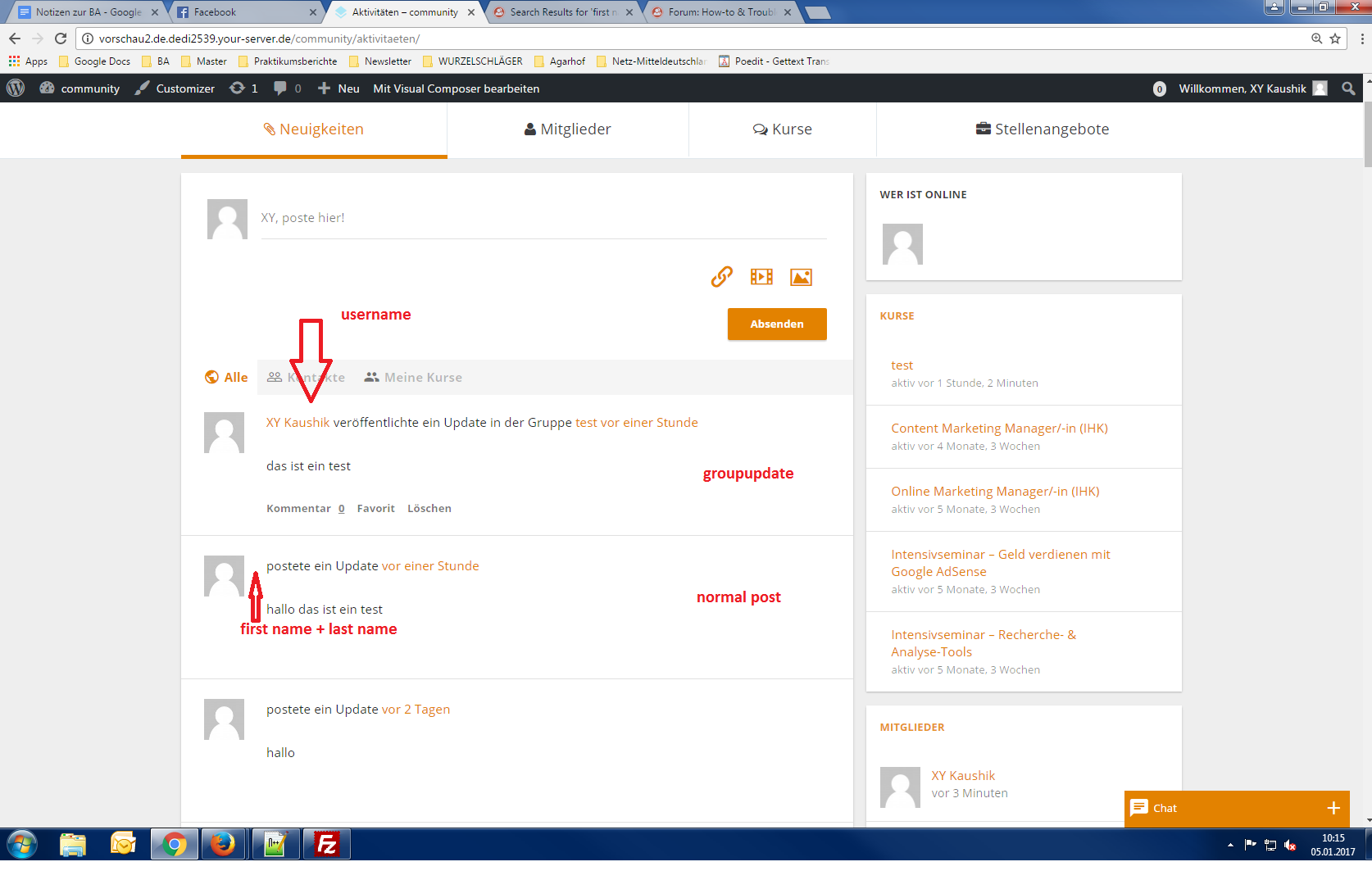
It was working before updating to WordPress 4.7.
Can anyone help since i can’t find a solution or error?
Or am i thinking to complicated?i’m currently working on:
Wordpress Version 4.7.
Buddypress Version 2.7.4
BP Xprofile Member Type Field Version 1.0.2Hello, im using woffice and i want the user to change his password and profile picture only from the front end .
i dont want him to :
– change his name
– edit anything in (Editing ‘Base’ Profile Group)
– change his email .
– change anything in (Send an email notice when: )
i have this link :
https://buddypress.org/support/topic/dont-allow-users-to-change-some-fields-after-sign-up-hide-those-fields/
but i don`t know if it will be like my customization
thanks so much.—————————-
1. Which version of WordPress are you running?
WordPress 4.7 running Woffice Child theme.6. Which version of BP are you running?
2.7.410. Which theme do you use ?
woffice11. Have you modified the core files in any way?
yes12. Do you have any custom functions in bp-custom.php?
i dont think so13. If running bbPress, which version? Or did your BuddyPress install come with a copy of bbPress built-in?
bult in15. Which company provides your hosting?
sitegroundVersion of WordPress: 4.7. Version of BP: 2.7.4.
Link to site: classroomlink.orgI use WPML to create a multilangual site along with BuddyPress.
Here is the problem: when I navigate between pages on Japanese (2nd language)
– the site loads back to English (main language)
– users that are logged in keep getting kicked outCan you please tell me what possibly makes this happen?
Thank you


