Search Results for 'wordpress'
-
AuthorSearch Results
-
March 24, 2015 at 6:58 am #236481
mcpeanut
Participant@buddypresslost hmm, id always rather have my own dedicated ip address, so whats your verdict so far after using the cloud for a day? do you think it will be the correct route for yourself?
I think im definitely sticking to the route i mentioned tbh, i would love for you to keep me updated on your progress with your venture to see if it works out good for you using a media rich site in the cloud, have you already got a strong user base for your site or is it a new venture?
Maybe in a few months time of us both running these very different setups we could compare the pros and cons, When i have finally got this all setup and working as i intend i might even post an how to for reference, showing what steps i took to configure it all, I have done weeks worth of reading and watched hours upon hours of videos now about how to set wordpress up to be scalable via the combining of servers route, that and my knowledge about server administration in general should help me achieve this kind of setup, I feel i have got my head around most of the steps needed to achieve this kind of setup now, No doubt i will run into a few hiccups and problems at first but i’m willing to put the time into it.
March 24, 2015 at 1:31 am #236472In reply to: Bad URL being generated for registration page
blongwp
ParticipantProblem solved… Thank you to everyone that helped.
IHaveToDoThis, your comments pointed me to the problem.
Seems that IIS does not support mod_rewrite.
I solved the problem using this link. http://www.iis.net/learn/extensions/url-rewrite-module/creating-rewrite-rules-for-the-url-rewrite-module.
I just installed the rewrite module and added a rewrite rule to my web.config…
<rewrite>
<rules>
<rule name=”wordpress” patternSyntax=”Wildcard”>
<match url=”*”/>
<conditions>
<add input=”{REQUEST_FILENAME}” matchType=”IsFile” negate=”true”/>
<add input=”{REQUEST_FILENAME}” matchType=”IsDirectory” negate=”true”/>
</conditions>
<action type=”Rewrite” url=”index.php”/>
</rule>
</rules>
</rewrite>March 23, 2015 at 9:21 pm #236454In reply to: Registration page not working (tried EVERYTHING!)
gksgudtjr
ParticipantHey danbp!
I’ve activated to true but I don’t see any conflict or errors anywhere displayed.. Where should I look for?
In regard of MAMP, any specific settings you’re referring? I’ve done what your link said to do already. =)
Yes, I can register users from the back-end if you’re referring this as adding a new user in my dashboard?. I’ve also tried disabling buddy press and tried doing the registering and it works with bp disabled through wordpress (if this helps)
March 23, 2015 at 8:12 pm #236452In reply to: Registration page not working (tried EVERYTHING!)
danbp
ParticipantActivate wp_debug (set to TRUE) in the wp-config file. This can give you a lot of information about conflict and/or errors.
Is MAMP configured correctly ?
https://codex.wordpress.org/Installing_WordPress_Locally_on_Your_Mac_With_MAMPCan you correctly register a user from the back-end ?
March 23, 2015 at 8:53 am #236415In reply to: how to make buddypress private
ParticipantTo get a page ID, simply mouse over the page title on the page list and you can see it in the bottom left corner of your brower.
Someting like this:
../wp-admin/post.php?post=23&action=editwhere “23” is the page ID. This number means post_type ID, so there is no difference between a post ID or a page ID except the post_type itself.Ref: https://codex.wordpress.org/Function_Reference/get_pages
March 22, 2015 at 10:02 pm #236403In reply to: Private message sent to admin e-mail
ParticipantAny user can send a message to the site admin if he use the default sender address: wordpress@yoursite.com
Do you use other plugins as BP ?
March 22, 2015 at 7:43 pm #236396In reply to: Private message sent to admin e-mail
ParticipantAny ideas on what may have caused this ?
That question was answered here.
It’s the user who did it wrong, so guess there is no technical solution.
The “from” wordpress@mysite.com is a default address which redirect to site admin address (the one you indicate when you setup WP).
This can (and should be) changed, as its a common trick used by spammers. Read here how to do this.
March 22, 2015 at 6:26 pm #236392In reply to: No Site Name in Buddypress Pages
gmxperry
ParticipantI just wanted to confirm to anyone who finds this post later with the same issue (before 2.2.2) that this process worked 100%. Just apply the changes in this link and it should fix your problem, if you happen to use Customizr as your theme of choice:
https://buddypress.trac.wordpress.org/attachment/ticket/6107/6107.06.patch
March 22, 2015 at 5:15 pm #236386In reply to: No Site Name in Buddypress Pages
ParticipantVersion 9 and 6 are slightly different and Customizr doesn’t show a complete BP title when you use the latest patch (9). For example, you’ll see just the site name on single activities.
Applying the first one made by imath will probably be the best solution in your situation. I won’t critizise Customizr, but personnally i won’t use it with BuddyPress. Because of this issue, and some others, handled on that theme support. 951,457 downloads maybe say it’s a popular theme, but 245 support pages in one year is something that get me a bit suspicious in term of usage.
There is no miraculous method to apply a patch, and no special tips for that except if you don’t know how to copy/paste code, which i can’t belive is the case 😉
So Codex is your friend to discover some other academic methods like using Tortoise.
March 22, 2015 at 1:38 pm #236381In reply to: No Site Name in Buddypress Pages
ParticipantNot sure that Customizr is now working 100% with BP (1 year back it wasn’t compatible with BP).
Anyway, issue is related to the theme. FYI, 2015 also doesn’t show up page titles…
To solve this temporarely (until next update), you can apply this patch
https://buddypress.trac.wordpress.org/ticket/6107I tested v.6107.06 with Customizr and it works !
March 22, 2015 at 2:18 am #236370In reply to: [Resolved] BP Reinstall Messing with Multisite
@mercime
Participant@lehn6 For clarity, let’s go over some points you made above.
>> I have a multisite network set up and had Buddypress installed on http://www.example.com/subsite1, as in that subsite was where the BP install was placed
So do you have something like this in your wp-config.php:
define ( 'BP_ROOT_BLOG', $blog_id );where$blog_idis a the ID number of your subsite>> UserPro plugin was added and network activated, then subsite1 was improperly deleted
Do you mean subsite1 was deleted by you or developer? How was it deleted? Do you have a database backup of your site before subsite1 was deleted?
>> looking to install BP to the main site and network activate. When I go to do that I find that as soon as I network activate BP the network admin dash and the main site dash are basically the same, where it says I am in the main site dash but none of the pages or posts are displayed.
How are the network admin dashboard and main site dashboard the same? Do you mean you have no access anymore to the Network Admin menus? https://codex.wordpress.org/File:dashboard.png vs https://codex.wordpress.org/File:superadmin-options.png Can you post a screenshot?
March 21, 2015 at 8:42 pm #236354Mickey
ParticipantStatus of groups is all public, in fact i have no private groups at all, public (2) private (0) Hidden (0) when I go to groups menu.
These are my active plugins:
Adminimize
AG Custom Admin
Agreeable
Better Search Replace
BP Login Redirect
BP Profile Search
Buddypress – Who clicked at my Profile?
BuddyPress Cover Photo
BuddyPress Members only
BuddyPress Real Names
Custom Login URL
Email Login
K Elements
MAYO – Login Screen
Revolution Slider
rtMedia for WordPress, BuddyPress and bbPress
TM Replace Howdy
WPBakery Visual Composer
WPi Custom Logout
Go Daddy Quick SetupMarch 21, 2015 at 8:08 pm #236348ParticipantI have the following active at the moment:
Adminimize
AG Custom Admin
Agreeable
Better Search Replace
BP Login Redirect
BP Profile Search
Buddypress – Who clicked at my Profile?
BuddyPress Cover Photo
BuddyPress Members only
BuddyPress Real Names
Custom Login URL
Email Login
K Elements
MAYO – Login Screen
Revolution Slider
rtMedia for WordPress, BuddyPress and bbPress
TM Replace Howdy
WPBakery Visual Composer
WPi Custom Logout
Go Daddy Quick SetupNone of them seem to deal with friend requests.
March 21, 2015 at 8:05 pm #236347In reply to: Find the new field_ name/id in the database?
Participantwhy can’t you display something on the profile page ? Both snippets are working and display some content. Explain what you’re trying to achieve or test the snippet and give details about things which are not going like you want.
Profiles are showed one a page called Member. This page is part of BP and use the page context of WordPress internally, to generate dynamically BP’s content.
This means you cannot publish directly on this page, like an ordinary WP page. And all BP pages are working like this.
This means you can’t publish directly on them, using wp’s editor. For any specific content you want evtl. to show on a BP page, you have to generate it separatly, by coding a function.
That’s why the example above uses an iframe for the video.Normaly, when you add a video to a wp post or page, you have just to copy/paste a link and WP does the whole code automatically for you.
But as it is a BP page, this is not avaible and you must add it manually.
More generally, WordPress doesn’t allow any kind of media and you can only show those which are allowed/recognized by the CMS. This rule is explained here and concern any type of site and any plugin, including BP.
March 21, 2015 at 6:33 pm #236330ParticipantIt’s unclear: do you have public or private groups ?
– Groups set for public viewing not showing up.
– There are groups on the site which are set for private viewing.Privacy settings are different for these types of groups.
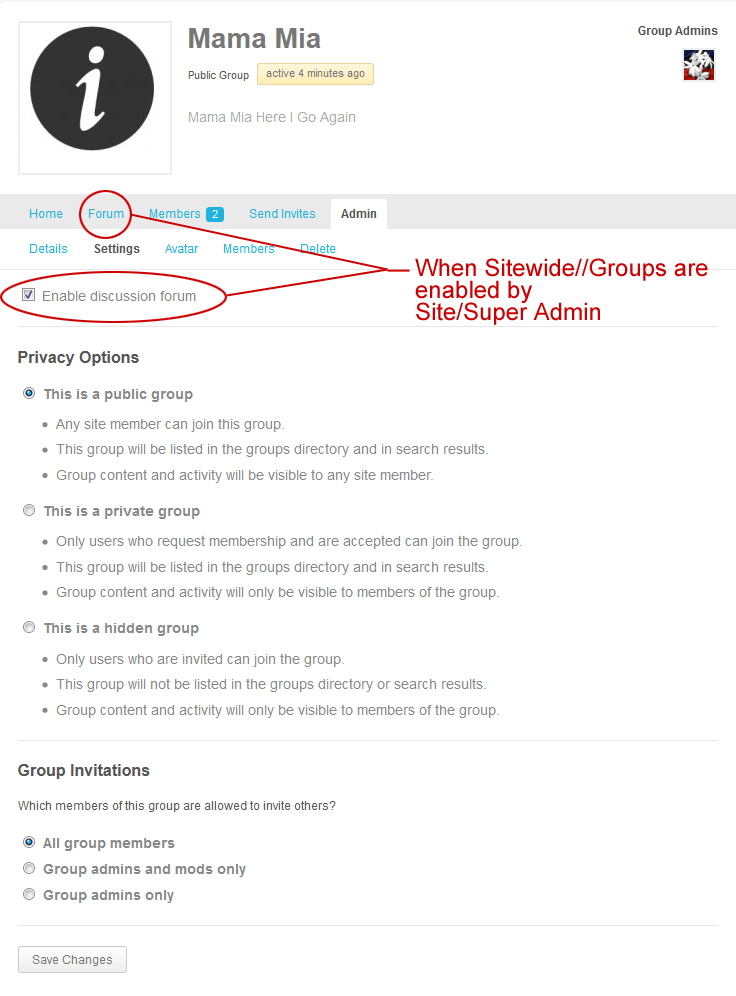 March 21, 2015 at 6:25 pm #236329Participant
https://wordpress.org/plugins/adminimize/ is another solution
https://wordpress.org/plugins/wp-hide-dashboard/, also !March 21, 2015 at 5:43 pm #236326Participanthttps://wordpress.org/plugins/better-wp-security/ you could try this plugin im sure this plugin lets you rename it to a different url and key of your choice if i remember correctly.
Meaning the plugin allows you to change yoursite.com/wp-admin/ and wp-login to a wording of your choice so only you and anyone you have told knows.
March 21, 2015 at 12:41 pm #236314vinay24k
ParticipantI am using Latest version of Buddypress and WordPress. Also Default Buddypress theme.
March 21, 2015 at 2:27 am #236308djsteveb
Participant@morka – I know you can’t enable / disable comments on those pages (at least from my experience with BP and a few themes / installs, of course with WP just about anything is possible) – You failed to mention if you have the same issue with the default wordpress themes.
March 21, 2015 at 1:45 am #236306Participant@morka – do you have the same issue when using the default “wordpress 2014” or “twenty-twelve” themes?
If not, I would ask your theme author to add some kind of check on pages for something like “if is register page, turn off comments” / not load the comment hook thing…sorry not a php or wp/bp expert, can’t point you in the right direction for those codes and what they are really called. I know with some standard WP pages you can go into the editor and select “comments off / disable trackbacks” – and with some themes you can use a theme option to “display comments off” or hide “comments off” on pages where comments are disallowed.
March 20, 2015 at 6:13 am #236269In reply to: Make Groups invisible to non-registered users.
aljo1985
ParticipantHave you tried the WP members only plugin?
https://wordpress.org/plugins/buddypress-members-only/This will restrict your whole website also to members only.
If you want to just restrict one part of the website, I can help you build a simple function to do this.What does the link look like
http://www.example.com/groups/blah blah blah ??
Is that what you are trying to block non mebers access to?March 19, 2015 at 8:23 pm #236256In reply to: Multiple Registration Forms?
ch1n3s3b0y
ParticipantI’m looking for something similar, however I want completely separate forms. I can see how to edit the registration page to only show the fields I need as I customised this to my requirements already. My problem is that I want multiple pages with separate forms on them as this would allow me to code them differently to my needs. When I have put the BP registration form code into a custom wordpress page template, this doesn’t display the form fields as it clearly isn’t recognising the BP specific code within the template.
I’m unsure of where to go with this.
Edit: I can get the form to show up now, but when I submit the form, it just reloads the page without registering the new user.
March 19, 2015 at 2:55 pm #236246shanebp
ModeratorIf you’re using BP 2.2 +, you should use this approach instead:
My cpts appear.
However, comments on them do not appear in the activity stream.Perhaps because I didn’t create a component for those cpts – I hope that is not the case.
Hopefully this ticket will provide an answer.March 19, 2015 at 1:55 pm #236244In reply to: Bussdypress title and SEO Yoast problem
Henry Wright
ModeratorHi @gidantrip
Please see 6107
March 19, 2015 at 11:07 am #236236In reply to: Adding post featured images to activity stream
ModeratorHi @nkeatign
Looking at the code snippet in that thread,
wp_get_attachment_image_src()is used to get the array of info. The 2nd param is size so you can utilise that to get the large version. For example:$theimg = wp_get_attachment_image_src( get_post_thumbnail_id( bp_get_activity_secondary_item_id() ), 'large' );Note: you could also use
mediumorfullif you wanted.Ref: https://codex.wordpress.org/Function_Reference/wp_get_attachment_image_src
-
AuthorSearch Results


