Search Results for 'wordpress'
-
Search Results
-
In my members directory using alpha sort the names are showing up based upon username rather than display name.
Digging into the code to see how to fix that I see in bp-core-classes.php the following as part of function prepare_user_ids_query():
// We prefer to do alphabetical sorts against the display_name field
// of wp_users, because the table is smaller and better indexed. We
// can do so if xprofile sync is enabled, or if xprofile is inactive.
In the settings I have xprofile sync enabled, but I’m not sure what it is supposed to do, or how. What it is NOT doing in my case is making any changes to the WordPress user table such as nickname to match up with the xprofile field for display name.
I have a custom registration page so it may be that I’m not doing something that the default registration page does.
Any idea what the likely omission may be?
For the time being I’ve turned off syncing and so my members directory is correctly displaying in alpha order based on display name, but from the code it is clear that it would be more efficient to have sync enabled.
Hi,
I’m using BuddyPress on my website (gowc.fr) for several month, I was using a “hack” in functions.php to use my WP avatar in BuddyPress and it was working like a charm until the last version of BuddyPress. I have updated the plugin yesterday and now all my members have the default avatar instead of their custom avatar.The code I was using in functions.php :
add_filter('bp_core_fetch_avatar_no_grav', '__return_true');

add_filter( 'bp_core_fetch_avatar', 'revert_to_default_wp_avatar', 80, 3 );//late load
function revert_to_default_wp_avatar( $img, $params, $item_id ){
	//we are concerned only with users
	if( $params['object']!='user' )
		return $img;

	//check if user has uploaded an avatar
	//if not then revert back to wordpress core get_avatar method
	//remove the filter first, or else it will go in infinite loop
	remove_filter( 'bp_core_fetch_avatar', 'revert_to_default_wp_avatar', 80, 3 );

	if( !emi_user_has_avatar( $item_id ) ){
		$width = $params['width'];
		// Set image width
		if ( false !== $width ) {
			$img_width = $width;
		} elseif ( 'thumb' == $width ) {
			$img_width = bp_core_avatar_thumb_width();
		} else {
			$img_width = bp_core_avatar_full_width();
		}
		$img = get_avatar( $item_id, $img_width );
	}

	//add the filter back again
	add_filter( 'bp_core_fetch_avatar', 'revert_to_default_wp_avatar', 80, 3 );
	return $img;
}

/**
* Check if the given user has an uploaded avatar
* @return boolean
*/
function emi_user_has_avatar( $user_id=false ) {
	if( !$user_id ){
		$user_id = bp_loggedin_user_id();
	}

	if ( bp_core_fetch_avatar( array( 'item_id' => $user_id, 'no_grav' => true,'html'=> false ) ) != bp_core_avatar_default() )
		return true;
	return false;
}
Please help me to solve this annoying issue.
Thanks
In short: “The basic reason why this isn;t working is because BuddyPress seems to run only on publicly accessible pages and with the proper urls. Since Draft posts have ?page_id=123 like urls, BuddyPress does not set the global variables. Similarly, when Courses are marked private, BuddyPress again does not initialize the global variables.”
What can be done to resolve this?
Here is the discussion:
Kind regards
PS: Thank you for BuddyPress (and v2)!
Hi,
I’m trying to merge the bbPress profile’s Edit page and the BuddyPress profile’s Settings page.
I don’t understand how HTML forms work with PHP, specifically WordPress and these two plugins, so it would make my day if someone could either explain this to me or point me in the right direction so I can make the forms on these pages work on one page as they do separately.
If you need me to elaborate on what exactly I’m doing and what’s not working, please ask.
Btw, please forgive me if you think this belongs on the bbPress forums; I could be ping-ponging between the two forever, so I just picked the BuddyPress forum since BuddyPress seems like the highest layer in the stack.
Thank you.
Wordpress verion:3.9
Buddypress version:2.0
Hello, my problem is that the Recovery form doesn´t work. The form ask me for entering whether my user name or my email; but, once entered and pressed the button Reset Password, it doesn´t send any email to my email account, which is a big function issue. Thanks for your help!!After updating to the the latest version of wordpress, I had to reactivate plugins. When I activated the buddypress plugin my website kept coming up with 500 internal server error. When I deactivated the plugin buddypress/bp-loader.php my website worked, I was notified that the buddypress issue was due to an error saying the Plugin file does not exist. I love this plug in and vital for my website. Please help me figure out this problem.
Thank you!
Dionne
I created a Register Page in WordPress 3.9. You can see from the first link below that a link to it shows up on the top menu bar.
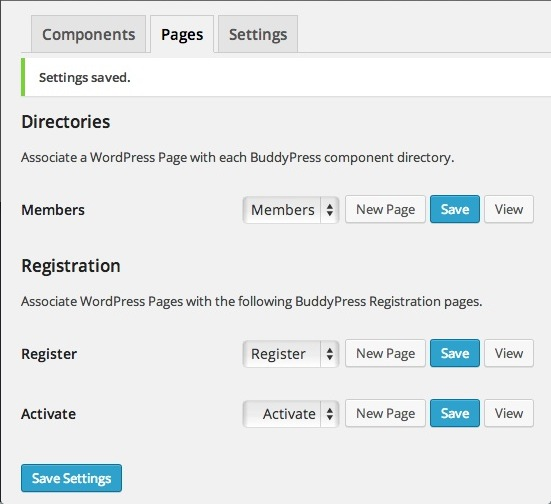
http://snag.gy/Vt6PG.jpgNext I used the BuddyPress 2.0 settings to associate that WordPress Register Page with the BuddyPress Register page. (See link below.)
http://snag.gy/eBQp7.jpgAnd as you can see, the Register link has now vanished from the top menu bar.
http://snag.gy/dA1Ue.jpgThoughts?
(I just updated to WordPress 3.9. Don’t know if the same thing happened with the previous version. Wonder if it has anything to do with that.)
I get the following error when logging into worpdress:
Warning: Creating default object from empty value in /home/xxx/public_html/wp-content/plugins/buddypress/bp-core/bp-core-avatars.php on line 962The code:
if ( $key == 'baseurl' && is_ssl() ) {
					$retval = str_replace( 'http://', 'https://', $retval );
				}
I just started receiving this error when I updated my WP e-commerce plugin which was outdated.
I can turn deactivate the e-commerce plugin and the warnings go away. I am running the latest versions of wordpress and buddypress. I just wanted to check here first before going over to wp e-commerce support.
Thanks.
Topic: Unable to Register Users
Hello there, I’ve recently updated both my WordPress and my Buddypress and have been having trouble with the Buddypress registration page. Everytime I try to create a user it leads me to the “Error: Invalid Username” message with the WordPress login. I haven’t changed anything on my site other than those updates and it worked previously.
Thanks for the help.
– Sarah S.I’ve been hitting quite a wall trying to solve a problem that perhaps someone else has already found a solution for. I have a moderate knowledge of WordPress and a basic working knowledge of BuddyPress/Commons In A Box. Let me share a bit about my installation, and what I’m trying to do:
ENVIRONMENT: WordPress 3.9 with BuddyPress 2.0 using the cbox Infinity theme
GOAL: To create a collaborative work space where members can contribute project ideas that anyone can view, copy and share.
HOW THIS SHOULD WORK:
Each member will have a workbook to which they can add pages. Each page is devoted to a project idea. Pages should be based on a template containing 5 fields:
1) Category (drop-down selection)
2) Project Name (text field)
3) Project Type (radio buttons)
4) Project Description (text area)
5) Field Notes (text area)- When a user adds a new page, they are given this form/template to enter the data into.
- The page (data) is stored in their personal workbook.
- They have the option of making this page (data) visible to and searchable by other members.
QUESTION:
Is there already a BuddyPress-compatible plug-in available that does this?
If not, is it better to approach this by using:
1) BuddyPress Docs?
Already available, allowing each user can create and either make private or share. I don’t seem to be able to find a way of creating a template doc to make available by default in each user’s area.
2) Pages?
Should I be finding a way to create a template that perhaps leverages the “Advanced Custom Fields” plug-in and somehow making this available to users to copy in their own areas? I’ve installed ACF 4.3.7 and have set up a group of fields for a template, but am having a difficult time understanding how to apply it.
http://wordpress.org/plugins/advanced-custom-fields/
Thanks so much for any suggestions that folks can offer to help steer me in the right direction here.
Susan.



Hi
I’m trying to figure out how make my site viewable only to FREE members, their level is set via Paid Memberships Pro, they don’t pay at first, they can check out the site and see it first.
It is a meeting/dating site, and i’m using Sweet Date theme 2.6 on WordPress 3.9, BP 1.9.2, can’t at the moment update to 2.0, cause there’s some issues regarding the Sweet Date theme, they’ll be fixed in a couple of days.
I’m new to Buddypress, so please bear with me 🙂
What i need to do is this:
No public or private messaging.
No be-friending.
No commenting on the activity stream/wall on the profile.
No commenting/creating in forums, not closed/private, they must be able to view them.
No commenting on photo or video (haven’t set those two up yet)
I found this piece of code that restrict private messaging, but it just redirects:
http://buddypress.org/support/topic/hiderestrict-access-to-private-messaging/
How i would like the first two things to work out, is when clicked upon, a message pops up or folds down somewhere on the page telling that this is not possible, they need to upgrade, and a link should be shown.
All the best
Carsten