Then, in each of 16 files, you’d like to change the BP Templates’ page title’s header tag from `
…
` or `
..
` to `
the Respecitve BP page Titles
` and move it above `
Save files.
 bigjosh
The same issue here: I’m a new user of Buddypress the version I installed is:
( buddypress.1.5.5 ) And i installed it on ( wordpress-3.3.1. )
what can i do to adjust the error?
 iosconsultancy
Hi there,
I have also found another issue that seems to be related. When the user doesn’t have a avatar set, there is weird spacing issues when you roll over the “Howdy [username]. in the top right.
Also, I enabled a plugin for easy site switching in the admin bar – https://wordpress.org/extend/plugins/multisite-switcher/ – and this is not fitting either as expected.
A screenshot is below:
http://www.iosconsultancy.co.uk/bpscreenshot2.png
Any help would be greatly appreciated. This site is meant to be going live in 48 hours.
Thanks and Best Regards
Matthew Casey
 Devilish Concept
the latest one i think, its a plugin for my wordpress site, dont think its been updated for a while tho
 @mercime
Do post at https://buddypress.org/community/groups/bp-album/forum/ which is monitored by BP Media plugin devs
The alternative is a premium plugin, BP Gallery
 aces
aces1. /wp-content/plugins/buddypress/bp-themes/bp-default/
You shouldn’t need to touch those files, instead create a child theme: https://codex.buddypress.org/theme-development/building-a-buddypress-child-theme/
2. https://buddypress.org/community/groups/welcome-pack/
https://github.com/sbrajesh/bp-redirect-to-profile/blob/master/bp-redirect-to-profile.php
http://wordpress.stackexchange.com/questions/29545/login-redirect-to-certain-bp-profile-page
?
acesadd new field: 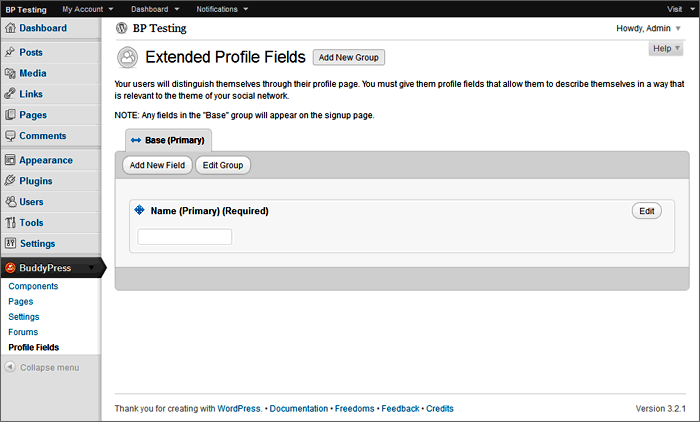
 xcentriq
Thanks Chris. That would help a lot. Do you know if that works with the latest wordpress? 3.3.1?
@mercime== but what if I do want the homepage to display a static page, & my posts to show under “Blog”, how do I do that? ==
I posted how to do it above. This would help you further https://codex.wordpress.org/Creating_a_Static_Front_Page
@mercime== Is there a way to completely UNINSTALL and REINSTALL all components of BuddyPress and BuddyPress Template Pack?! ==
To uninstall template pack, you can delete the BP template folders in your theme’s folder, then deactivate template pack plugin.
To uninstall BuddyPress – https://codex.buddypress.org/buddypress-site-administration/deleting-buddypress/
== I keep getting a 404 Page Not Found Error for EVERY BuddyPress link I click on at the top main menu ==
Mod_rewrite must be enabled in your server for “pretty permalinks” required by BuddyPress. Go to Settings > Permalinks and set it to something other than default.
== The following active BuddyPress Components do not have associated WordPress Pages: Activity Streams, Discussion Forums, User Groups, Members, Activate, Register. Repair ==
Go to dashboard menu BuddyPress > Pages. You need to associate BP components with Pages. https://codex.buddypress.org/getting-started/configure-buddypress-components/#bp-pages
 Scott G.
“””
The following active BuddyPress Components do not have associated WordPress Pages: Activity Streams, Discussion Forums, User Groups, Members, Activate, Register. Repair
“”””
acesIt is probably the https://buddypress.trac.wordpress.org/browser/tags/1.5.5/bp-themes/bp-default/_inc/css/responsive.css stylesheet kicking in.
You should be able to use @media in your child theme stylesheet…..
 @ChrisClayton
fix? It’s like that by design, it allows a user to search for other .users with similar interests..
However, if you want more control – Their’s a plugin for that. (we should seriously steal apples “theirs an app for that” marketing.)
https://wordpress.org/extend/plugins/custom-profile-filters-for-buddypress/
@ChrisClayton“The most important plugin (imho) which is not available is new user moderation…”
In 1.6 the core devs have been doing some work on user capability stuff to make user moderation easier and mentioned that some of the changes will “give us more control over a users status and capabilities for later.” So, something like that ‘could’ end up in core *later* 
See: https://buddypress.trac.wordpress.org/ticket/4038
But, their are wordpress’ plugins that might help keep non-authorised users out – eg. https://wordpress.org/extend/plugins/wordpress-mu-secure-invites/ & https://wordpress.org/extend/plugins/wp-invites/
 shanebp
This is a widget
https://wordpress.org/extend/plugins/bp-show-friends/
I haven’t used this and don’t know if it’s compatible with BP 1.5 as is.
If you don’t want a widget and don’t know how to write your own query, you could do something like this – untested by me:
<?php
$user_id = $bp->loggedin_user->id;
$args = 'user_id='.$user_id.'&per_page=10&populate_extras=0';
if ( bp_has_members( $args ) ){
?>
<div class="item-avatar">
<a href=""></a>
</div>
<?php
}
else echo 'You have no friends!';
?>I believe, that if you pass user_id to bp_has_members loop, it only returns the friends of that user_id.
 DRAGUIAN
Hmm, I highly suggest you make a backup of the file I want you to alter. I’m not sure if your using wordpress or not but in any case what I did was..enter buddypress–>buddypress themes–>bp default—>activity–>index.php. (so yea make a back up of your index.php file) Then edit the index.php file by deleting the following <li class="selected" id="activity-all"><a href="" title=""><?php printf( __( 'All Members <span>%s</span>', 'buddypress' ), bp_get_total_site_member_count() ); ?></a></li>
 wpte
wpteThats great Chris!
I also experienced my first registered spammer today, while I already took some precautions.
I’ve installed https://wordpress.org/extend/plugins/stop-spammer-registrations-plugin/ to stop spammers from getting in. The most important plugin (imho) which is not available is new user moderation…
A lot of small communities also use buddypress, and for those communities I think it would be fantastic to have an option to hold new users for moderation.
This plugin: https://wordpress.org/extend/plugins/bp-registration-options/ was able to do that but hasn’t been updated in ages…
And that option will probably stop bad users from getting in, forever
 Paul Wong-Gibbs
No — BuddyPress is just a WordPress plugin, so if you disable user registration, it’s off, everywhere. User accounts are shared across all plugins.
@ChrisClayton@alanchrishughes – the plugin (Buddypress template pack) is simply a utility tool, it’s not required.
What does it do? From what i gather from your comment above, you tried to copy the template folders from Tpack, but if you look inside your theme, the folders are actually empty, which is why it’s not working The plugin copies the folders from the bp-default theme (inside the buddypress plugin)
So – you either need to turn on (activate) template pack and go through the configure stuff (once done you can deactivate the template pack) or, copy over the files manually from within plugins/buddypress/bp-themes/dp-default
If you choose to not keep the template pack active, you may also need to copy over the functions into your themes functions.php (https://plugins.svn.wordpress.org/bp-template-pack/trunk/bpt-functions.php) as it has some almost required stuff (like registering the “add friends” buttons)
@mercimeBP Multi Network Plugin developer/s usually check https://wordpress.org/tags/bp-multi-network so do post there as well.
shanebp rcain
rcaini am about to try this: https://wordpress.org/extend/plugins/stop-spammer-registrations-plugin/
– it looks very good. anyone tried it with BP yet?
acesThe above error message normally means that wordpress only has 32 mb of memory available and it needs more.
There are various technques for increasing memory available but some hosts don’t allow those methods to be used and require a different hosting plan.
If that isn’t practical it is possible to run wordpress with less memory if you cut back on plugins, use a theme that doesn’t eat up memory, and only upload very small pictures etc…. There are various plugins around that can help you work out what is eating ram
I used to find it hard to run wordpress with 32 meg of memory, let alone buddypress…
1024 bytes in a KB,
1024KB in a MB
Thus: 1024*1024*32 = 33554432 bytes in 32MB
@mercimeBased on the HTML structure of your theme, you’d need to use the first option, i.e., change 16 template files within the 6 BP folders transferred to your Wikiasi theme folder in server during the compatibility process.
If you’ve previously changed any of the BP template files in your theme folder, replace all of them for a clean slate by deleting the 6 BP folders in server – /activity, /blogs, /forums, /groups, /members, and /registration – then re-run Appearance > BP Compatibility.
Download the 6 clean BP folders to your computer hard drive.
A. At the top of each of those 16 template files I linked to above, replace
`
with
`<?php
get_header();
global $woo_options;
?>
<!–
google_ad_client = “ca-pub-0044915326038182”;
/* Leader board 728 x 90 */
google_ad_slot = “6866417018”;
google_ad_width = 728;
google_ad_height = 90;
//–>
<article >
Then, in each of 16 files, you’d like to change the BP Templates’ page title’s header tag from `
` or `
` to `
` and move it above `
Save files.
@mercime@mercime@marciavincent Please post this question in WP forums and tag it elbee-elgee https://wordpress.org/support/forum/themes-and-templates


