Search Results for 'wordpress'
-
AuthorSearch Results
-
November 13, 2011 at 6:42 am #124291
In reply to: BP Conflict with WP Example Content plugin
@mercime
ParticipantYou could post in WP.org forums for that plugin as to why it’s causing that issue with BuddyPress. In the meantime, if you need sample content for your site, you could download test data which the WordPress Theme Review Team use to check out themes submitted to the WP Theme Repository https://codex.wordpress.org/Theme_Unit_Test
November 13, 2011 at 2:39 am #124285In reply to: How to make WP themes compatible with BP?
November 12, 2011 at 10:37 pm #124277In reply to: how can I use BP to build a social bookmarking site?
r-a-y
KeymasterYou might be interested in this WordPress theme instead:
http://sillybean.net/code/themes/twenty-links-a-delicious-inspired-child-theme-for-wordpress/November 12, 2011 at 10:37 pm #124276In reply to: Where are my sub-menus? – Graphene Theme
Participant@junglejinge you need to wrap your code within backticks (`) the symbol between the parentheses for short blocks of code. But for large blocks like the page.php source code, use pastebin.com as aces mentioned above
I gathered additional information from WP.org forums
https://wordpress.org/support/topic/where-have-my-sub-menus-gone?replies=3
https://wordpress.org/support/topic/buddypress-theme-knocks-out-my-navigation-structure?replies=2BP compatibility process for Graphene Theme
A. After you activate the Graphene theme, install and activate BP Template Pack
B. Go to Appearance > BP Compatibility and go through the process till you click Finish. Do not disable the Template Pack’s CSs nor JS. You’ll see this in frontend [before you make the changes, the regular page and the component page]


It’s totally unlike what you have currently at http://www.meetinbradford.org/Note: this theme has many options which may or may not work with the modifications placed below. In case the following exercise does not work, please contact the graphene theme developer and refer him/her to this post.
C. Download the 6 BP folders which were transferred to your graphene theme folder in server down to your computer hard drive. Because of your theme’s HTML structure, you will need to use the first method for fixing alignment on 16 files within the folders you downloaded. Those 16 files listed here https://codex.buddypress.org/theme-development/wordpress-to-buddypress-theme/#tplfiles
Starting with activity/index.php open it up with text editor
At the very top, replace:
``with
``At the bottom of same activity/index.php file, replace:
``
with:
`
`Save file. Then do this for the remaining 15 files listed in link except for registration/register.php where you do the same for the top portion of the file but at the bottom of the file, replace:
`
jQuery(document).ready( function() {
if ( jQuery(‘div#blog-details’).length && !jQuery(‘div#blog-details’).hasClass(‘show’) )
jQuery(‘div#blog-details’).toggle();
jQuery( ‘input#signup_with_blog’ ).click( function() {
jQuery(‘div#blog-details’).fadeOut().toggle();
});
});`
with:
`
jQuery(document).ready( function() {
if ( jQuery(‘div#blog-details’).length && !jQuery(‘div#blog-details’).hasClass(‘show’) )
jQuery(‘div#blog-details’).toggle();jQuery( ‘input#signup_with_blog’ ).click( function() {
jQuery(‘div#blog-details’).fadeOut().toggle();
});
});`
Save files and upload the six folders with modified template files to your theme folder in server.
D. Styling modifications – you’d most probably want to tweak some styles that come with bp.css. Check out style.css mods used in twenty theme as guide https://codex.buddypress.org/theme-development/theme-dev-bp-template-pack-walkthrough-twenty-ten-bp-1-5/3/
November 12, 2011 at 10:22 pm #124270In reply to: buddypress google analytics plugin
KeymasterFor 99% of themes, you can use any WordPress Google Analytics plugin and it will work for BuddyPress!
https://wordpress.org/extend/plugins/tags/google-analyticsNovember 12, 2011 at 10:19 pm #124269KeymasterThanks for testing the trunk version!
Your scenario only occurs if javascript was disabled or if there is a conflict in the javascript. Are you using a custom theme? There’s a chance a plugin could also be intefering with the javascript.
Deleting activity updates when javascript was disabled was recently fixed in trunk:
https://buddypress.trac.wordpress.org/ticket/3706If there are any other links that are broken and not reported, please post them on Trac:
https://buddypress.trac.wordpress.org/newticketNovember 12, 2011 at 10:11 pm #124267In reply to: Questions about finding plugin status on bp site
KeymasterWordPress plugin pages usually show the compatibility version as set by the plugin author.
Recent date can be viewed by clicking on the “Development log” link on the plugin page’s right sidebar.
eg. https://wordpress.org/extend/plugins/buddypress (view the right hand sidebar for the link)For status updates, you’ll have to either:
– post on the plugin’s support forum
– find the author’s website / Twitter account and ping that person.For plugin compatibility, check out this codex page:
https://codex.buddypress.org/releases/1-5-plugin-compatibility/ (this might need to be updated)November 12, 2011 at 10:07 pm #124266In reply to: From Roadmap, basic privacy
KeymasterTo update this thread, basic profile privacy is currently being worked on:
https://buddypress.trac.wordpress.org/ticket/3695It will most likely be a plugin before it is included within the main BuddyPress core code.
Timetable for release (if I were to guess) would be late this year / early next year.November 12, 2011 at 9:46 pm #124262In reply to: Removing Groups
KeymasterYou can delete them manually if you are the site admin by navigating to the group in question. Then click on the “Admin” tab and next, click on the “Delete” button.
Or try a group management plugin like:
https://wordpress.org/extend/plugins/bp-group-management/November 12, 2011 at 6:08 pm #124253In reply to: “Official” BuddyPress Child Themes Broken?
modemlooper
ModeratorA lot of the repo themes are outdated. It’s ridiculous that they screen themes heavily when they are submitted to the repo but are then forgotten and never tested on newer versions of wp or bp. The theme review system at WordPress.org is completely flawed.
November 12, 2011 at 3:53 pm #124251In reply to: Respond to email notifications by email
Paul Wong-Gibbs
KeymasterI’m not aware of any plugins that do this. It’s a bit tricky from a technical perspective – you need to configure special email addresses, get WordPress to monitor them somehow, and so on.
November 12, 2011 at 2:54 pm #124250In reply to: lost in buddy press
tomcat_meow
MemberThere are no wordpress pages available that suit, only pages I created myself.
November 12, 2011 at 1:34 pm #124248In reply to: “Official” BuddyPress Child Themes Broken?
KeymasterWordpress.org theme previews don’t work for BuddyPress themes, because wordpress.org doesn’t have BuddyPress installed. I think there’s very little chance of this situation changing. I’ll contact the company who runs WordPress.org (Automattic) and pass the feedback on.
Regarding plugins appearing out of date; the BuddyPress core team has no involvement or responsibility for the vast majority of those plugins. If someone decides to stop contributing to a plugin, then it will eventually break and stop working, unless someone contacts the original author and they agree to take ownership of it.
It’s also worth noting some plugins may work fine with the current version of BuddyPress, and the author just hasn’t bothered with a release to update the “tested up to” version number.November 12, 2011 at 5:56 am #124234In reply to: [Resolved] Theme Compatibility Details – Memo Theme
Participant== However, in the step 3 of the compatibility process it only listed 11 files to change. ==
True, but the BP Template Pack plugin will be updated to list 16 files which need to be changed per link above https://codex.buddypress.org/theme-development/wordpress-to-buddypress-theme/#tplfiles== There are still some outstanding formatting issues. ==
True. I have updated code above in two areas above which I have placed [Updated …] info.
1. hentry-content should be entry-content
2. whole block of what to be replaced in bottom of registration/register.phpI have to ask whether you changed style in bp.css of the BP Template Pack plugin because the `div#item-header-content` is missing the `margin-left: 170px; ` and you need to bring that back.
In addition, you need to tweak some styles in your WP theme’s style.css file. Check out the additional tweaks on the BP components divs as a guide https://codex.buddypress.org/theme-development/theme-dev-bp-template-pack-walkthrough-twenty-ten-bp-1-5/3/
November 12, 2011 at 4:26 am #124232In reply to: buddypress google analytics plugin
codegene
ParticipantI tried a plugin in the wordpress directory called buddypress ananlytics but it is broken i.e not supportable with buddypress 1.5.1 . Does anyone know any another plugin which is supportable with buddypress 1.5.1
November 12, 2011 at 3:36 am #124230In reply to: Where do I go from here?
ambria
MemberCorrection – the dark bar at the top of the site is from WordPress 3.2 (I just upgraded).
I do have the forum, activate, etc. pages when I look under Pages in Admin, but when I click on View it says Page not Found.
November 12, 2011 at 1:45 am #124215In reply to: Where are my sub-menus? – Graphene Theme
junglejinge
MemberHere is my more in depth post, as you will see I have tried many themes. Nearly all in the template pack. https://wordpress.org/support/topic/buddypress-theme-knocks-out-my-navigation-structure?replies=1
I have now decided to go back to graphene and install the compatibility pack but am having problems with that. I am following the instructions as per this post
BUT… after the index.php page I am supposed to do the blog page code, but the code is very different to the one in the example, hence I don’t know what to replace.e.g.
DELETED -content posted was from https://buddypress.trac.wordpress.org/browser/tags/1.5.1/bp-themes/bp-default/blogs/index.php
November 12, 2011 at 1:20 am #124212Participanthttp://www.moe.co.uk/2009/08/17/php-running-under-mod_fcgid-read-data-timeout-in-40-seconds-on-plesk/
Btw, where are you hosted?November 12, 2011 at 12:33 am #124208In reply to: lost in buddy press
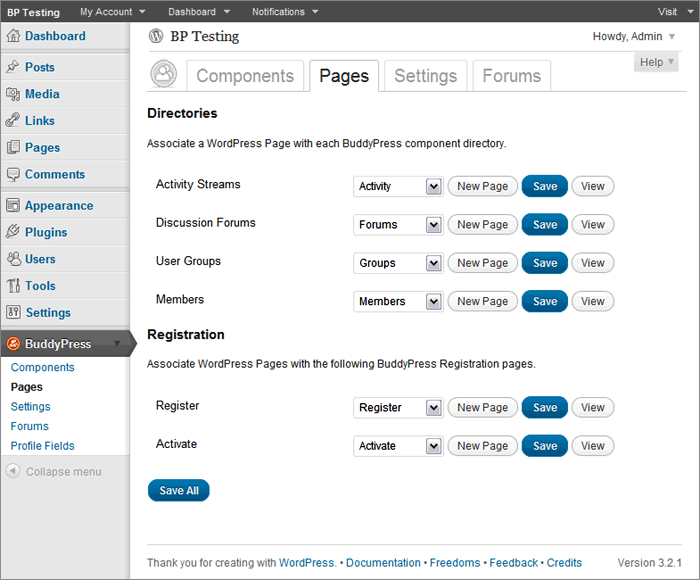
Participant== … a page with directories and registration that have drop down menus to create new pages to associate or pick an existing one. I’m not sure what to do here or if I made a new one what to call it? ==
If you had a default installation in BP 1.5 before upgrading to BP 1.5 and did not create Pages which have slugs like that of the BuddyPress components, then choose the corresponding Page in dropdown per BuddyPress component if it’s there.
 November 11, 2011 at 11:04 pm #124203
In reply to: [Resolved] Adventure Journal theme
ParticipantYou’d have to use the first method of fixing alignment in the BP Compatibility process to make your WP theme compatible with BuddyPress. The first method involves changing HTML structure in the 16 files as listed here https://codex.buddypress.org/theme-development/wordpress-to-buddypress-theme/#tplfiles
A. Download the six BP template folders which were transferred to your adventure-journal theme in server down to your computer hard drive.
** We’ll explore if the adventure-specific template tags will work within BP. It will spout errors if it’s not working, so we’ll have to delete such template tags. But if no errors show up, it’s good to go.
B. Starting with activity/index.php, open it up and at the top of the file, replace:
``with
`
<div class="content" >
<div id="col-main" role="main" style="”>
<div id="main-content" >`C, At the very bottom of the same file, replace:
``
with
`
`D. Save file and do the same to the remaining 15 files per list linked above except for registration/register.php where at the bottom of the file,
replace:
`
jQuery(document).ready( function() {
if ( jQuery(‘div#blog-details’).length && !jQuery(‘div#blog-details’).hasClass(‘show’) )
jQuery(‘div#blog-details’).toggle();
jQuery( ‘input#signup_with_blog’ ).click( function() {
jQuery(‘div#blog-details’).fadeOut().toggle();
});
});`
with
`
jQuery(document).ready( function() {
if ( jQuery(‘div#blog-details’).length && !jQuery(‘div#blog-details’).hasClass(‘show’) )
jQuery(‘div#blog-details’).toggle();
jQuery( ‘input#signup_with_blog’ ).click( function() {
jQuery(‘div#blog-details’).fadeOut().toggle();
});
});`
E, Upload the six folders to your server wp-content/themes/adventure-journal folder
November 11, 2011 at 4:40 pm #124191Quint
ParticipantThanks Paul, I was in the process of putting on my boots to go find me some ah ‘dem har tires to kick!
 I am very much a newbie and do understand the frustration but that energy could be more productively spent. Anyway, Boone did a couple great Buddypress presentations which can be found on WordPress TV. Also, there’s a Buddypress for Dummies book. Both provide good foundational material even though neither are up-to-date. But I think that’s awesome because it means we’ve got some very committed people in this community who are intent on continuous improvement.November 11, 2011 at 4:16 pm #124185
troymer
MemberAnd this here: https://buddypress.trac.wordpress.org/ticket/2354 doesnt really explain how it works in bp 1.5 with bbp 2.0
November 11, 2011 at 3:29 pm #124172TireKicker
MemberOMG, finally a support site that’s worse than what you get at Drupal.org…yes, I too can’t find my way around here. No wonder everyone uses the ’90s-looking phpBulletin software for a forum! Can’t believe this BuddyPress is from the same folks behind WordPress — but then again, maybe the WordPress site was a mess at first, too….
Part of the problem is that everyone’s (that is, everyone “normal” and not on Facebook all the time) expecting a standard forum with an orderly hierarchy whereas this BuddyPress way of doing things is…chaotic.
November 11, 2011 at 3:29 pm #124171rich
Memberlooks like a bug
https://buddypress.trac.wordpress.org/browser/tags/1.5/bp-blogs/bp-blogs-activity.php#L57Suppose to check for an existing activity keying off the blog id, post id, user id, etc and then it updates instead of inserting.
November 11, 2011 at 9:23 am #124162Gautam Thapar
MemberJust to add to the information I have php 5.2
Using the default wordpress .htaccess file.
-
AuthorSearch Results


