Search Results for 'wordpress'
-
AuthorSearch Results
-
August 4, 2010 at 11:40 am #87960
In reply to: What’s the good of a custom user database table?
Paul Wong-Gibbs
KeymasterMainly if you want to rename or customise the user table, or share that table between separate WordPress installs, etc.
August 4, 2010 at 10:16 am #87957Jamie Marsland
Participantok now fixed!
August 4, 2010 at 10:14 am #87956In reply to: how to change Mr. WordPress default first comment
Willy Valdez
ParticipantSame problem also for me. I dont know how to remove hello world
August 4, 2010 at 7:30 am #87953In reply to: How to make a private community?
Tyler
ParticipantHow do I redirect to the wordpress login page and not the buddypress registration page? I want to create all the user accounts myself and prevent random people registering for my site. Thanks!
August 4, 2010 at 6:12 am #87943In reply to: Buddypress and WordPress 3.0 Beta
KeymasterPlease make a new post, @ri-kun. This one is two months old and is on a different topic. We’ll reply in the other post, but what I think you need to do is go in and remove everyone from the root blog (they’ll be assigned as a ‘contributor’ or other user role by default). An alternative would be to edit the template so it always skips that item; I’m not sure what the consequence of removing that default user role would be.
August 4, 2010 at 6:10 am #87942In reply to: Seeking advice for in root or in sub-folder install
KeymasterUnless you want to run multiple sites (the correct terminology, not “blogs”), you don’t need to run multisite. Regular WordPress will be fine.
There’s no technical difference as to how to structure your site. If you just want your site to look the same on the homepage, but for visitors to dive deeper before they get into “BuddyPress land”, then maybe sticking everything under what appears to be a directory would be best (take a look at the URL for this page, for example. We’re under /community but the main blog isn’t).
August 4, 2010 at 6:03 am #87940KeymasterI agree it’s the wrong way around. I’m advertising my own plugin here, but what I have done on some sites is use the Welcome Message part of Welcome Pack to send a private message to the new user and to say hello and remind them to complete their profile / picture, etc.
August 4, 2010 at 5:59 am #87938In reply to: page title in BP
KeymasterIs this on regular WordPress or on multisites?
August 4, 2010 at 4:23 am #87932In reply to: Avatars / profile-pictures
Dudeski
ParticipantHi people, I hope you guys can help me a little bit, even though the topic is old quite old. Mine BP says exactly the same thing as EZD described. I have to go to gravatar.com etc etc. BUT, I have wordpress.com. This is really bugging me out at the moment so please help!
Ralf
August 4, 2010 at 4:06 am #87931Sofian J. Anom
Participant@rhivanz: If your site running on WordPress MS, you can put BuddyPress in the sub-blog, so all BuddyPress features, including user profiles, put there. About how to make it, can be viewed at https://codex.buddypress.org/how-to-guides/changing-internal-configuration-settings
August 4, 2010 at 3:26 am #87930In reply to: Displaying forum topic tags
Pisanojm
ParticipantLooking at this codex page: https://codex.wordpress.org/Template_Tags/wp_tag_cloud Is there an easy way to use the taxonomy parameter with this? Don’t know.
August 4, 2010 at 2:14 am #87926miri
MemberI am having this problem with WordPress 3.0.1 and BuddyPress 1.2.5.2. I’ve disabled every plugin except for BuddyPress and I keep getting this error in Firefox’s error panel:
Error: jQuery(“#avatar-to-crop”).Jcrop is not a function
Source File: http://www.bladdyblah.com/groups/test/admin/group-avatar
Line: 38Viewing the page source, I do see that the following js is being included:
http://www.bladdyblah.com/wp-includes/js/jcrop/jquery.Jcrop.js?ver=0.9.8The uploaded avatars are there an in multiple sizes, but the crop tool doesn’t appear on the page (thus the javascript error). This happens with both user and group avatars.
Any ideas?
August 4, 2010 at 1:59 am #87925modemlooper
ModeratorAre you using a normal WP theme? If so you have to install BuddyPress template pack plugin.
https://wordpress.org/extend/plugins/bp-template-pack/
Then in admin>> reading chose a different front page
August 3, 2010 at 11:48 pm #87918nbfarrand
MemberOk… I am an idiot. I guess that happens when you don’t get enough sleep. Just in case others experience this issue, it is because the permalinks in wordpress 3.0.1 default to http://url/index.php/month/etc. I switched to custom and took out the index.php and all works. DUH.
August 3, 2010 at 10:44 pm #87916In reply to: Buddypress and WordPress 3.0 Beta
ri-kun
ParticipantCan you guys help me with this:
 August 3, 2010 at 8:11 pm #87901
Tammi L Coles
ParticipantFor my PRIVATE groups, I did the following to enable forums.
First, I reinstalled the forums from the dashboard (superadmin )
Then, from the buddypress nav bar, I followed
My Account > Groups > Admin >Under the Admin submenu, I selected Group Settings and did the following:
UNchecked the “Enable discussion forum” checkbox
Clicked save
Checked the “Enable discussion forum” box
Clicked save AGAINThat enabled forums in the private groups.
Still trying to figure out why these posts are not showing up in the main forum tab though…. ((scratches head))
Hope this helps someone else.EDITED: Duh! The forums of private groups do not show up in the general forums page! Related, the site Pressography.com posted the phpMyAdmin version of the fix I outlined above: http://pressography.com/wordpress/daily-tip-fix-for-buddypress-group-forums-error-when-creating-a-new-topic/
August 3, 2010 at 5:54 pm #87882In reply to: Are these BP Plugins compatible with WP3?
r-a-y
KeymasterPMs for Friends Only works; I just haven’t bumped the compatibility tag.
Also do check the oEmbed for BP v0.6 beta.
—
I’d say that most of the BP plugins should work. Only plugins that interact with WordPress in some manner should be flagged for testing.
August 3, 2010 at 5:21 pm #87881rich! @ etiviti
Participantpassing the wrong values
https://codex.wordpress.org/Function_Reference/get_post_metaAugust 3, 2010 at 12:42 pm #87840In reply to: Adding menu items to the admin bar
alanchrishughes
Participant@pcwriter “It does everything you want a dropdown menu to do, and it does it all automatically behind the scenes.”
That’s what my problem is though, it does too much and all behind the scenes. From a design stand point, when I’m trying to figure out programs like wordpress or buddypress I try to break everything down to its most basic state so I can completely control things, so I can make a website function around an attractive user friendly design instead of limiting my design to the functionality I am stuck with because I can’t figure out what is going on hidden behind the scenes. It would be great if there was a buddypress codex with individual lines to generate single links to each page.
August 2, 2010 at 10:48 pm #87788In reply to: Adding menu items to the admin bar
pcwriter
ParticipantYup, I’m there… and here: https://codex.wordpress.org/Writing_a_Plugin
August 2, 2010 at 9:44 pm #87782In reply to: Adding menu items to the admin bar
Participant@Jens Wedin @alanchrishughes
I was looking for a way to include all navigation links in one navbar. Jens’ code snippet is brilliantly simple. Thanks!
The only drawback is you have to add links manually to get them to appear in the adminbar.I’ve modified the code (borrowing inspiration from a snippet previously written by @David Lewis) so that:
1 – all “standard” BP Directory links appear automatically in their own dropdown;
2 – all BP plugin directories (Links, Gallery, etc) are automatically added to that dropdown;
3 – all WP pages are added automatically to the adminbar;
4 – all added WP pages respect whatever page order is set in the WP-Dashboard.The code is here: http://pastebin.com/8FJmcgRF
To ensure that unwanted pages DON’T show up in the adminbar navigation (password-protected, Thank You pages, etc), install the Exclude Pages plugin:
https://wordpress.org/extend/plugins/exclude-pages/August 2, 2010 at 5:43 pm #87766In reply to: Seperate HOMEPAGE for users
JPS Bhullar
ParticipantMy plugin is available on WordPress.org and Buddypress.org. Here is wordpress link — https://wordpress.org/extend/plugins/bp-profile-as-homepage/
August 2, 2010 at 12:04 pm #87751In reply to: Pages not found
Karen Zook
ParticipantHere’s exactly what I have in my wp-config.php file (everything below the unique authentication key code). Actually examining this I think it’s pretty clear I’m missing something, but I don’t know what:
/**
* WordPress Database Table prefix.
*
* You can have multiple installations in one database if you give each a unique
* prefix. Only numbers, letters, and underscores please!
*/
$table_prefix = ‘wp_’;/**
* WordPress Localized Language, defaults to English.
*
* Change this to localize WordPress. A corresponding MO file for the chosen
* language must be installed to wp-content/languages. For example, install
* de.mo to wp-content/languages and set WPLANG to ‘de’ to enable German
* language support.
*/
define (‘WPLANG’, ”);define( ‘MULTISITE’, true );
define( ‘SUBDOMAIN_INSTALL’, true );
$base = ‘/’;
define( ‘DOMAIN_CURRENT_SITE’, ‘classicalfieldwork.com’ );
define( ‘PATH_CURRENT_SITE’, ‘/’ );
define( ‘SITE_ID_CURRENT_SITE’, 1 );
define( ‘BLOG_ID_CURRENT_SITE’, 1 );define( ‘AUTH_SALT’, ‘.~rFFv>Rie|T7C^:Wzl|MdW:1LS{Dr.x+V}U2qrc?Crmhd+Q+sIf7D%#p+$;p<5U' );
define( ‘SECURE_AUTH_SALT’, ‘yFH.Ecyc:_UaMA:8XZc9n7^v#yZHb~(>+D,H<V| rI[AL5Lk<qrv8BfVFzAJT' );
define( ‘LOGGED_IN_SALT’, ‘r*?|QwI=q>#hN-0-[a0$E&Ymv}+Zl39+A^)?(T!Q8%ZB%UiMkK`;(!(@qC-Z]iID’ );
define( ‘NONCE_SALT’, ‘hVh_eHa)*r|MqURj:ciAcu=+.k]D0`R7*0Hu[l<(Iqz}#/A3%#_YmlE/e2tl4al,' );/* That’s all, stop editing! Happy blogging. */
/** WordPress absolute path to the WordPress directory. */
if ( !defined(‘ABSPATH’) )
define(‘ABSPATH’, dirname(__FILE__) . ‘/’);/** Sets up WordPress vars and included files. */
require_once(ABSPATH . ‘wp-settings.php’);define(‘WP_ALLOW_MULTISITE’, true);
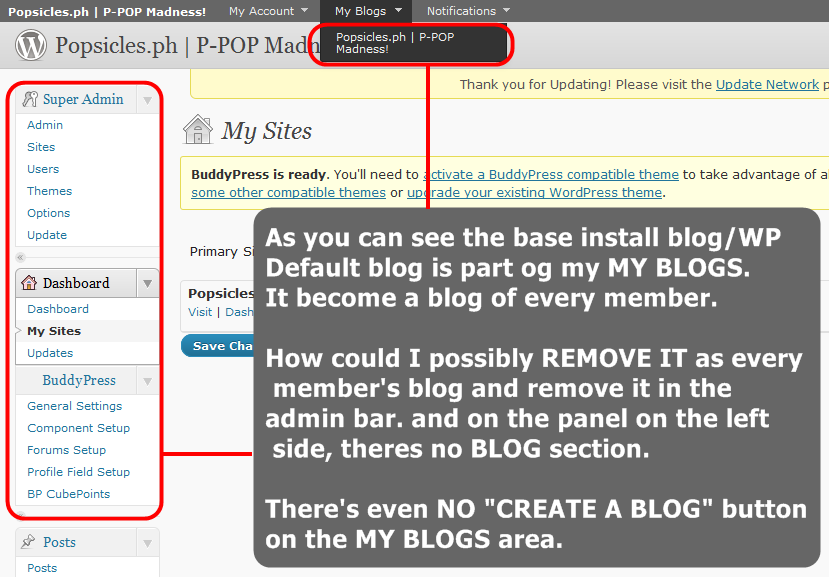
August 2, 2010 at 11:03 am #87736Participantfor everyone reading this topic to properly understand my problem. Here is the actual stuff in my admin area:
DIRECT LINK: http://i630.photobucket.com/albums/uu22/s2ne1/myblogsremove.png
August 2, 2010 at 5:03 am #87719In reply to: Event Calender for visitors
matthewprice1178
Memberas the follow is not entirely inclusive, i have posted it with a password p=events
http://www.countingrows.com/event-calendar-for-wordpress-with-gravity-forms/
-
AuthorSearch Results