Search Results for 'wordpress'
-
AuthorSearch Results
-
June 22, 2009 at 5:57 pm #47907
In reply to: BuddyPress Kills WordPress Themes
Andy Peatling
KeymasterI’ve closed the ticket for this, I’ve not heard of anyone with the same problem. If anyone else can confirm this problem on their setup I will take a look at it.
June 22, 2009 at 2:05 pm #47900In reply to: Forums Not Being Created
notme31
ParticipantHello, I need help, I have installed wordpress mu 2.7.1, buddypress.1.0.1 and bbpress-1.0-rc-3.
I have the “Attention Site Admin: Group forums require the correct setup and configuration of a bbPress installation” stupid famous msg. I have added all the plugins, edited config files of bbpress and wordpress to match auth keys (as explained), etc. added a new user in buddypress, change to “admin” state in bbpress, etc
I dont know what more to try, I read all posts, added small pieces of code to config files, deleted cookies, etc
I am lost, I spent 8 hours trying things and nothing. Same msg. I have one database for wordpress mu and other for bbpress…
Any idea of something I could test? or maybe something fails in my server?
I have done the XML-RPC test that Burt created and server said: “Hello from bbPress!” so it works… I am so tired
 (
June 22, 2009 at 1:30 pm #47897
(
June 22, 2009 at 1:30 pm #47897In reply to: Forum Integration: HELPING HINTS
ParticipantHello, I need help, I have installed wordpress mu 2.7.1, buddypress.1.0.1 and bbpress-1.0-rc-3.
I have the “Attention Site Admin: Group forums require the correct setup and configuration of a bbPress installation” stupid famous msg. I have added all the plugins, edited config files of bbpress and wordpress to match auth keys (as explained), etc. added a new user in buddypress, change to “admin” state in bbpress, etc
I dont know what more to try, I read all posts, added small pieces of code to config files, deleted cookies, etc
I am lost, I spent 8 hours trying things and nothing. Same msg. I have one database for wordpress mu and other for bbpress…
Any idea of something I could test? or maybe something fails in my server?
June 22, 2009 at 1:17 am #47881In reply to: Avatar from Register Page not being created
vito687
Participant1. Which version of WPMU are you running?
2.7 official not svn
2. Did you install WPMU as a directory or subdomain install?
directory
3. If a directory install, is it in root or in a subdirectory?
root
4. Did you upgraded from a previous version of WPMU? If so, from which version?
WordPress MU 2.7.1
5. Was WPMU functioning properly before installing/upgrading BuddyPress?
yes, still is
6. Which version of BuddyPress (BP) are you running?
1.0.1
7. Did you upgraded from a previous version of BP? If so, from which version?
1.0 and prior to that RC2
8. Do you have any plugins other than BuddyPress installed and activated?
Bp-TOS (terms of service) which is the only possible interference
9. Are you using the standard BuddyPress themes or customized themes?
standard Bp-theme only css edited
10. If running bbPress, which version?
latest
11. Please provide a list of any errors in your server’s log files.
none
Problem is as stated in post above
June 21, 2009 at 5:31 pm #47869In reply to: WordPress to WordPress MU
Paul Wong-Gibbs
KeymasterInstall it on domain.com, assuming you’re not currently using the domain for anythign else.
June 21, 2009 at 5:23 pm #47868In reply to: Featured Groups Widget Problem
Jeff Sayre
ParticipantThis thread is about Mike Pratt’s Featured Groups Widget. This allows site admins to select certain BP groups to feature. It has nothing to do with individual members.
It sounds like you are talking about my Featured Member(s) Widget. If you are, you set a featured member by their unique ID, not by their username. When editing the widget’s parameters, it states “Member ID(s)
 ” and “Separate member IDs by commas”.
A member ID is the unique number automatically assigned to each user by WPMU upon registration. You can find each member’s unique member ID (also called userid), by logging into WPMU and clicking on “Site Admin > Users”. Then, hover your cursor of a given member’s username and look at the link text. you’ll see this in the url “user_id=”. You can also obtain a user’s unique ID by looking at the “ID” field in the wp_users table in WPMU’s MySQL DB.
June 21, 2009 at 5:08 pm #47866In reply to: WordPress to WordPress MU
rooseveltrp
ParticipantThanks for the information guys, really appreciate it.
There’s still a little confusion in my head, lol :p.
My blog is at domain.com.
So, should I install WordPress Mu at domain.com or something like mu.domain.com, and then control the blog at domain.com from under mu.domain.com, and install buddypress under mu.domain.com?
Is this how it’s supposed to be setup?
June 21, 2009 at 10:46 am #47858In reply to: How to Make a Achievements thing?
KeymasterThe approach to take in a plugin is to hook into the various WP and BP actions and then reward achievements as and when appropriate. You need to record in the database which achievements have been obtained. And write the administration and user interfaces for BuddyPress as a custom component.
I am myself working on an achievements plugin. I had hoped to release a test version today but I can’t promise that, it’s looking unlikely. But we shall see..
June 21, 2009 at 10:38 am #47857In reply to: WordPress to WordPress MU
KeymasterI believe the WP/WPMU merge isn’t being released until WP 3.0. So yes before Christmas sounds realistic.
June 20, 2009 at 12:56 pm #47836In reply to: WordPress to WordPress MU
Arturo
ParticipantAndy on WordCamp 2009 in Italy (Milan) says “before christmas”
 June 20, 2009 at 3:46 am #47822
In reply to: WordPress to WordPress MU
ParticipantIf you are not in a hurry then I would recommend waiting for awhile. At some point, BuddyPress will be configured to function on single-user WordPress. I do not have a timeline for this as it has to do with merger of the WPMU codebase into WP.
June 20, 2009 at 2:30 am #47821In reply to: A new approach to usernames
3125432
InactiveJust an update. Have played around with this a bit and sometimes the sitadmin dashboard Users section that allows you to select the preferred name to be displayed publicly works and sometimes it doesn’t.
I’m thinking that this may have something to do with the Buddypress General Settings: Disable Buddypress from WordPress syncing? This is a total mystery to me what that means or is supposed to do. Anyone?
Anyway, the fix that seems to work is a MySql query that anchors from the user id # and then you could structure it to replace the current data in the value field of the wp_bp_xprofile_data table with the data from the user_login field of the wp_users table.
I have no idea how to do create that query but I am sure it is pretty easy.
– Brian
June 20, 2009 at 2:17 am #47820In reply to: WordPress to WordPress MU
r-a-y
Keymasterroseeveltrp, you’re correct!
You need WordPress MU.
BuddyPress only works with MU at this moment in time.
Some day down the road BuddyPress will support regular WordPress, but not now.
Here’s a good guide for transitioning from WordPress standard to MU:
http://welcome.totheinter.net/2008/10/04/how-to-migrate-from-wordpress-to-wordpress-mu/
It helped me!
June 20, 2009 at 12:13 am #47819Participantwhat version of jQuery we can expect to see in the next BuddyPress update?
Well, based on the new features of WP 2.8, which WPMU will merge into its codebase, I’m going to guess jQuery 1.3.2. Perhaps Andy has a different idea.
June 19, 2009 at 9:16 pm #47811In reply to: Import User to BP
peterverkooijen
ParticipantI have to do something similar. Not looking forward to it…
I’ve found this plugin:
User Import for BuddyPress (All Fields)
To export member data from another WordPress installation you could use this:
Haven’t gotten to testing this yet, so let me know if it works…
June 19, 2009 at 9:05 pm #47806In reply to: Ning.com Migration Tool (NMT)
Inactive+1
I’ve been running a ning network and wordpress blog in parallel. Slightly integrated by way off rss feeds, but nowhere near enough. Likely to jump onto buddypress at some point.
June 19, 2009 at 6:18 pm #47799In reply to: Help! 2nd Full system crash in two days!
InactiveJeff,
Thank you for taking the time to try and help us! This may seem off topic but every person on this board should take a moment to say “Thank You!” to Burt and Jeff and Andy, and the countless others who work to help solve problems.
This is a shout out to each and all; could you check your db’s using phpadmin or whatever you use to examine your wordpress/buddypress database and tell me what ‘user_status’ setting you see for the admin, typically ID#1?
Thanks,
Brian
June 19, 2009 at 5:52 pm #47794In reply to: Correct way to replace functions in bp-core.php
ParticipantLook at line 1426 of that function:
add_action( 'init', 'bp_core_action_search_site', 5 );In your bp-custom.php, you can stop that action by doing this:
remove_action( 'init', 'bp_core_action_search_site', 5 );You’ll need to place that within a function.
See this for more info: https://codex.wordpress.org/Function_Reference/remove_action
June 19, 2009 at 5:47 pm #47793In reply to: BuddyPress Kills WordPress Themes
gwsa
ParticipantBurt & Mike –
Thanks for the prompt reply. Tried upgrading both manually and with the built-in plugin install function. Also tried clearing out the BP tables from the database (the site has not launched yet) hoping that would kick things into shape.
2.7.1 was the first and only version of WPMU installed, upgraded BP from 1.0 to 1.0.1 and that’s when the themes died. Also, no hyphens in the themes’ directories.
Went through the code and was able to see what you were talking about in terms of setting the theme_root variable to /bp-themes/, but any idea why it would be doing so outside of member pages?
If the plugin is active, if I go to /wpmu-themes.php or /wpmu-blogs.php? in the WPMU backend, to activate themes all I see are the BP themes. Correct me if I’m wrong, but before it would also show me themes in the /themes/ directory as well. Is this an intended function? I’d prefer not to move my non BP themes into the bp-themes/ as disabling BP would then kill the site.
Any help you could provide would be greatly appreciated.
– Ben
(ben at gwstudentassociation dot com)
June 19, 2009 at 5:26 pm #47790In reply to: Add admin bar in all Themes
InactiveHello,
Thank you for your reply, themes are (depo-clean and TerraFirma ), one more question does using WordPress admin bar will cause conflict ?
Thank you
June 18, 2009 at 10:44 pm #47731ParticipantThis is because BuddyPress currently runs only on WPMU, not the single-user version of WordPress
June 18, 2009 at 9:42 am #47689In reply to: How to make bbpress permalinks work in Group forums
Burt Adsit
ParticipantI just don’t think anybody really knows. What version bp, wpmu, bbpress? That’s got to be somewhere around bbpress rc2 though. Not sure when bbpress went with the permalinks options. I can’t help you at the moment. I wiped my dev server’s bbpress, upgraded to bbpress rc2 and can’t get group forums to work at all. I can’t get that to work or wp/bbpress cookie integration. It’s the usual issue with conflicting, incorrect or just plain missing docs on how to make it happen properly.
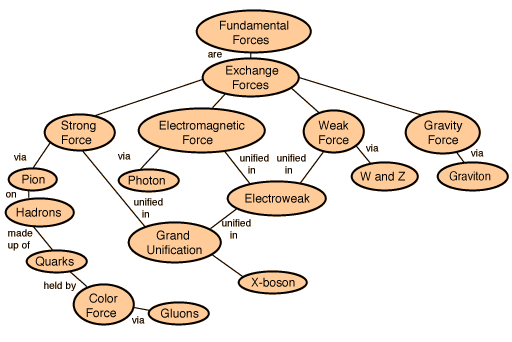
We have wordpress config settings, bbpress config settings, bp config settings. After careful and lengthy research, I’ve determined that it all is somehow related to this:
http://hyperphysics.phy-astr.gsu.edu/hbase/forces/imgfor/fforcon.gif
I guess I get to wait until Automattic decides that integration of their three products is actually important. This is a back burner issue with my dev server. I just don’t have the time to track down the problem at the moment.
June 18, 2009 at 9:33 am #47688In reply to: BuddyPress Kills WordPress Themes
ParticipantWell, that is partially true. bp hijacks the theme root and alters it to point to /bp-themes when it detects an url that belongs to the member theme. Those urls are things that are of the form mysite.org/members, mysite.org/groups …
By default it only does this for the root blog of the installation. Blog id 1.
You upgraded from what ver of bp and what ver of wpmu? wpmu now will not allow theme directory names that have a dash in them. So the non-2.7.1 theme /themes/my-theme doesn’t work anymore. It has to be /themes/mytheme
Same goes for the themes that live in /bp-themes. Did you upgrade your bp member theme and the bp home theme also?
You didn’t leave a link to your site or specify what versions of bp and wpmu you used to be running so I’m just shooting in the dark here.
June 18, 2009 at 3:33 am #47684In reply to: BuddyPress Kills WordPress Themes
Mike
ParticipantThat’s odd. Have you tried upgrading manually?
June 17, 2009 at 4:05 pm #47664Participantis there a back up / restore procedure documented?
Do you mean for bbPress? Since bbPress uses MySQL as the DB backend, as do the other *presses, I would look at the WP codex: https://codex.wordpress.org/Restoring_Your_Database_From_Backup
-
AuthorSearch Results