Forum Replies Created
-
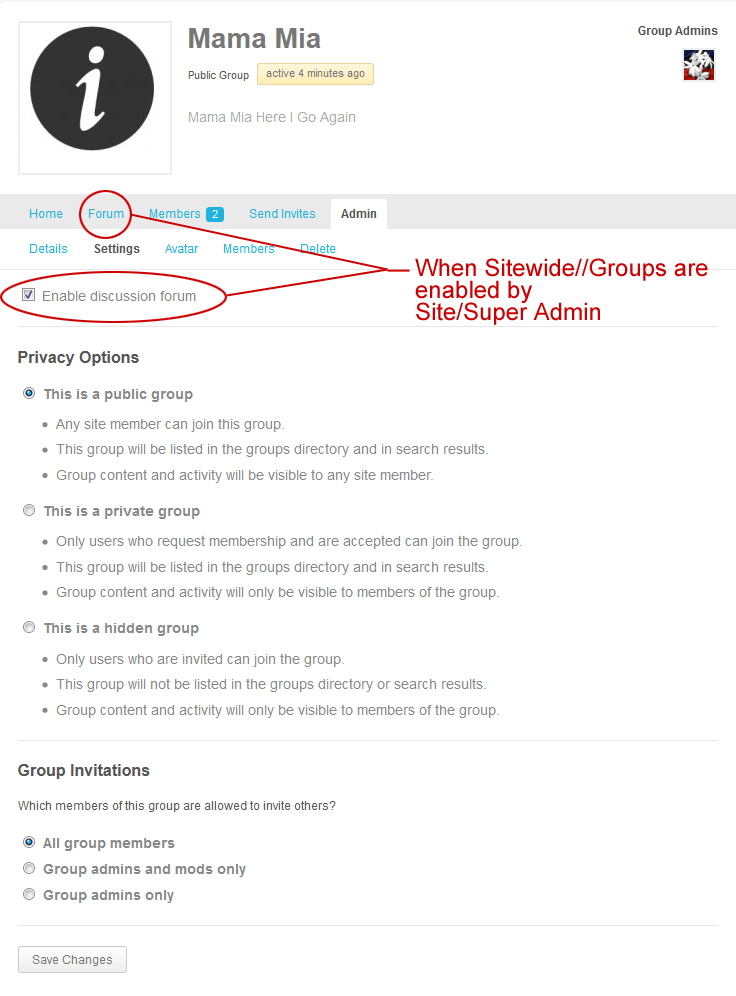
If you have to invite users to join a group, this group i not public, but private or hidden.
So again, which plugins are you using ? And if you could provide an url it would be easier to answer/help you.
Trash is trash and cache is cache. But yes, i forgot to mention the cache. You can clear it too and give a try.
In reply to: Find the new field_ name/id in the database?why can’t you display something on the profile page ? Both snippets are working and display some content. Explain what you’re trying to achieve or test the snippet and give details about things which are not going like you want.
Profiles are showed one a page called Member. This page is part of BP and use the page context of WordPress internally, to generate dynamically BP’s content.
This means you cannot publish directly on this page, like an ordinary WP page. And all BP pages are working like this.
This means you can’t publish directly on them, using wp’s editor. For any specific content you want evtl. to show on a BP page, you have to generate it separatly, by coding a function.
That’s why the example above uses an iframe for the video.Normaly, when you add a video to a wp post or page, you have just to copy/paste a link and WP does the whole code automatically for you.
But as it is a BP page, this is not avaible and you must add it manually.
More generally, WordPress doesn’t allow any kind of media and you can only show those which are allowed/recognized by the CMS. This rule is explained here and concern any type of site and any plugin, including BP.
In reply to: Displaying Shortcode content on Profilehi @rezon8dev
see if this topic can help you:
https://buddypress.org/support/topic/find-the-new-field_-nameid-in-the-database/No, that’s not a BuddyPress standard behave. Frienships are made by request, and not automatically for each new registered user.
If you don’t give the list of used plugins, nobody will help you to resolve the “perhaps”.
Aaaah ! 😀
Have you changed the permalinks to something other than “default” ?
And does a Group page exist ? Also, in case you trashed some previous group pages, clear the trash. BP and WP need only one existing group page.You’re welcome. 😉
FYI, reading the codex and this forum is a good way to learn.
And if you like BP, don’t forget the 2015 Survey. 😉
Currently when someone registers they have automatic friend requests in Friends-Requests space, from everyone already registered.
Never seen this in BuddyPress. Do you use some friendship or social plugins ? What is your theme?
It’s unclear: do you have public or private groups ?
– Groups set for public viewing not showing up.
– There are groups on the site which are set for private viewing.Privacy settings are different for these types of groups.
https://wordpress.org/plugins/adminimize/ is another solution
https://wordpress.org/plugins/wp-hide-dashboard/, also !hi @minglonaire,
Your question is related to bbPress, but the answer is no. CSS is not made for that.
To change the words, you can use the language file or try this code, found on bbPress forum.Read the whole topic first, as they’re some points which are important to take in consideration.
hi @5high,
as @hnla mentionned it, CSS is not the correct way to ‘remove’ something, because it’s not removed from source code, but only hidden to visitors.
Here is a solution to remove what’s new form from the activity page, but let it live for groups.
1) copy bp-templates/bp-legacy/buddypress/activity/index.php
to the child-theme, to get /child-theme/buddypress/activity/index.php2) open the copied file and remove line 7 to 11
<?php if ( is_user_logged_in() ) : ?>

   <?php bp_get_template_part( 'activity/post-form' ); ?>

<?php endif; ?>
To remove the form from members single activities
3) copy bp-templates/bp-legacy/buddypress/members/single/activity.php,
to the child-theme, to get /child-theme/buddypress/members/single/activity.php4) remove only line 35
bp_get_template_part( 'activity/post-form' );Hope this help.
In reply to: How to hide tool bar for logged out users?Hi @ratethetrainers,
see if this plugin may help:
https://wordpress.org/plugins/global-admin-bar-hide-or-remove/In reply to: Project Management BuddyPress Plug-In?Hi,
The pro version of this plugin works with BuddyPress:
https://wordpress.org/plugins/sp-client-document-manager/In reply to: Hidden groups in "All groups" tabHi,
The button is in /bp-legacy/buddypress/groups/index.php:19
Make a copy of that file to your child-theme. (child-theme/buddypress/groups/index.php)
Than you can remove the code or add a condition. For example, only the site admin will see All Groups.
<?php if ( is_site_admin() ): ?> <li class="selected" id="groups-all"><a href="<?php bp_groups_directory_permalink(); ?>"><?php printf( __( 'All Groups <span>%s</span>', 'buddypress' ), bp_get_total_group_count() ); ?></a></li> <?php endif; ?>Every other person who asked the same question has said the exact same thing. It does not work…
Oh ? And you think they are right ? 😉 Because i answer you the same thing: “my” code to remove rss feeds works… Apologize if i misunderstood the topic title (remove feeds from head).
For the page title, i indicate a discussion containing a solution from a trac ticket. Did you applied the patch or checked around that ?
I’m clean precise and a perfectionist
and a bit rude by the way !
tell me where the function is after
It does not work… I can disable access to the feeds easily… your code does nothing…The code is messyhello, please, thank you are not in your vocabulary ?
Sorry but my help stops here. Bye bye.
In reply to: Users are Automatically ActivatedSpam is an endless plague… and there is no radical solution, but only a set of combination for minimizing it, or at least to slow down that phenomenon..
For example, changing the default wp_ table prefix is a good practice which i would recommand to any site owner touched (or not yet) by spammers.
Even if you already use another prefix, but spammers found your site, you have to modify it again. Sounds a bit stupid, but the gain will be effective for a while.
Other tips are avaible on WP Codex.
In some case, you would prefer to use a plugin. See BuddyPress Registration Option.
But in any case, you have to found your own combination.
Hi,
searching the forum before asking is sometimes more efficient. 😉
https://buddypress.org/support/topic/title-of-pages-not-correct/
In reply to: Login menu item shows WordPress loginWhen BP is correctly setup, users don’t see the backend (except if you allowed them as author to use your blog or to create one).
It’s exactly the same as when you login on this forum.In reply to: [Resolved] Buddypress language folder missingAaaargh…
And thank you @rosyteddy ! 😀
In reply to: Login menu item shows WordPress loginAnd what is the problem ? With or without BuddyPress, you login to WordPress. 🙄
Perhaps reading this will helpIn reply to: Add Friend in postAdd this to bp-custom.php
function bpfr_add_friend_button() {
$user_id = get_the_author_meta( 'ID' );
$mybutton = bp_add_friend_button( $user_id );

	if ( ( is_user_logged_in() && is_page( 'blog' ) ) ){
		echo $mybutton;
	}
}
add_action( 'custom_zone', 'bpfr_add_friend_button' );
And this to your child-theme/single.php at the place you want the button to appear.
<?php do_action( 'custom_zone' ); ?>Depending your theme, you have to adjust the output with CSS and additionnal divs.
In reply to: Refresh activity, private message etc.As stated by the plugin decription:
The JavaScript file “refresh.js” will send every 10 seconds an ajax request to wp-load.php to get the new activities.
If you still have trouble after 10 seconds, you preferably ask about this on the plugin support.
Note also that the plugin is compatible up to: 3.8 / 1.8.1 so it may no more work today !SPQR !


