Search Results for 'buddyboss'
-
Search Results
-
I’m having the same issue with Safari on iOS and not being able to upload profile images.
It also fails in the DuckDuckGo mobile browser, but works fine in Chrome and on desktop devices.
I’m using the Hello theme, WP v 7.1, the free version of BuddyBoss and iOS is fully up-to-date.
I’ve had reports from a number of users that they are also unable to update their profile photo.
Is there any update on this issue?
Thanks
Topic: FIFU and activity
You close topic withoung giving me possibility to answer even if there is writteN:
This topic is marked as closed to new replies, however your posting capabilities still allow you to reply.
Error: Topic is closed.My answer:
bbPress and BuddyBoss Platform integration is not needed
It has already worked correctly, tha only issue ist delay between publishing and appearing with picture in activity
After few days they are there. I coluld accept even this but have auto emeil sending alerts about new publication and they are, like tha last entries in activity, without pictures.
BuddyPress activities have a single visibility control:
hide_sitewide(0 or 1). This provides binary visibility — shown everywhere, or hidden from sitewide feeds. There’s no way to express:– **”Only me”** — private activity visible only to the author
– **”Friends only”** — visible only to the author’s friends
– **”Logged-in users”** — hidden from anonymous visitors
– **”Group members only”** — visible only within the group context where it was postedPer-item privacy is a foundational social platform feature. Facebook has had it since 2009. LinkedIn, Twitter/X (with protected tweets), Instagram, and every major social network support some form of per-post audience control. It’s as fundamental to a social platform as
hide_sitewideis — just multi-valued instead of binary.This is not a request for any specific addon’s needs. It’s a request for the same kind of infrastructure that
hide_sitewideprovides — a first-class column that any addon can use to implement privacy-aware features.#### Current State
BuddyPress 14.4.0’s activity query system is well-designed for extensibility:
–
bp_activity_get_where_conditionslets addons inject WHERE clauses
–bp_activity_get_join_sqllets addons add JOINs
– Data hydration usesSELECT *(inpopulate()and the cache-miss path ofget()), so any column added to the table is automatically returned to calling code
–bp_activity_before_save/bp_activity_after_saveprovide save-time hooksAn addon **can** add a
privacycolumn viadbDeltaand filter queries viabp_activity_get_where_conditions. However, thesave()method has a hardcoded column list in its INSERT/UPDATE SQL (inBP_Activity_Activity::save()), meaning an addon must do a separate$wpdb->update()after every save — a double-write on every activity creation. This works but is suboptimal, and the column’s general-purpose nature (used by media addons, document addons, moderation addons, group addons — not just one feature) argues for core inclusion.#### Proposed Change
**Schema:** Add one column + index to
bp_activityinbp_core_install_activity_streams()(inbp-core-admin-schema.php).dbDelta()handles adding the column on upgrade automatically:sql
-- Added after the existing <code>is_spam</code> column in the CREATE TABLE definition:
privacy varchar(75) NOT NULL DEFAULT 'public',
-- Added to the KEY list:
KEY privacy (privacy)
**Model class (
BP_Activity_Activity):**1. Add
public $privacy = 'public';property
2. Insave()— addprivacyto the INSERT/UPDATE column list alongside the existing columns (user_id, component, type, action, content, etc.)
3. Inget()— add'privacy'to the$rdefaults (defaultfalse, meaning no filtering). When set, addAND a.privacy IN (...)to the WHERE conditions.**REST API (
BP_REST_Activity_Endpoint):**4. In
prepare_item_for_response()— exposeprivacyin the response object (paralleling howhide_sitewideis currently exposed ashidden)
5. Inprepare_item_for_database()— acceptprivacyas a writable field on create/update**Migration:**
dbDelta()runs on every upgrade viabp_core_install(), so modifying the CREATE TABLE definition is sufficient for the schema change. A DB version bump inbp-core-update.phptracks the upgrade.#### Scope
– ~40 lines of changes across 4 files (
bp-core-admin-schema.php,class-bp-activity-activity.php,class-bp-rest-activity-endpoint.php,bp-core-update.php)
– Default value'public'— 100% backward compatible
– Existing queries that don’t passprivacyreturn all activities as before
–hide_sitewidecontinues to work as-is (orthogonal —hide_sitewidecontrols directory listing,privacycontrols per-item access)#### What Core Provides vs. What Addons Handle
To be explicit about scope: this proposal adds **storage and query filtering only**. Core would:
– Store the
privacyvalue on each activity row
– Allowget()callers to filter by privacy value(s)
– Expose/accept the field through the REST APICore would **not** need to:
– Define a fixed set of allowed values (addons register the values they need — e.g.,
'onlyme','friends','loggedin')
– Enforce access control based on privacy values (addons hook intobp_activity_get_where_conditionsto inject viewer-aware WHERE clauses, exactly as they would today for any custom filtering)
– Provide UI for selecting privacy (addon/theme territory)This mirrors how
hide_sitewideworks today — core stores the flag and filters on it; the decision of *when* to set it is made by callers (groups component, plugins, etc.).#### Prior Art
BuddyBoss Platform (a BuddyPress-derived platform) implemented this exact column. Their
bp_activityschema includesprivacy varchar(75) NOT NULL DEFAULT 'public', and their media, document, video, and moderation subsystems all depend on it for privacy filtering. The column is referenced in their activity save/query paths, REST API, and template layer — making it one of the most cross-cutting additions they made to the activity table. The fact that an independent platform needed this to build standard social features demonstrates both the demand and the general-purpose nature of the column.I’m happy to submit a PR for this change.
Hi BuddyBoss community,
I’m having trouble activating BuddyBoss components programmatically. I’ve tried several approaches, but the components aren’t being enabled. Here’s what I’ve attempted:
Using bp_update_option()
Direct database updates
Different hooks (init, after_setup_theme)
Current Behavior:No components activate
No error messages in logs
Tried both single site and multisite
What I Need:A reliable way to activate components (Groups, Activity, Messages, etc.)
Best practices for programmatic component management
Any known issues with automatic component activation
<?php
/**
* BuddyBoss Components Activator
* Add this to your theme’s functions.php or as a must-use plugin
*/// Make sure we don’t expose any info if called directly
if (!defined(‘ABSPATH’)) {
exit;
}// Hook into after_setup_theme to ensure BuddyBoss is loaded
add_action(‘after_setup_theme’, ‘activate_buddyboss_components_on_init’, 9999);function activate_buddyboss_components_on_init() {
// Check if BuddyBoss is active
if (!function_exists(‘buddypress’)) {
return;
}// Get current active components
$active_components = get_option(‘bp-active-components’, array());// Components we want to activate
$components = array(
‘groups’ => 1,
‘activity’ => 1,
‘messages’ => 1,
‘notifications’ => 1,
‘friends’ => 1,
‘settings’ => 1,
‘xprofile’ => 1,
‘members’ => 1
);// Merge with existing components
$new_components = array_merge($active_components, $components);// Only update if there are changes
if ($active_components != $new_components) {
update_option(‘bp-active-components’, $new_components);// Clear BuddyBoss component cache
if (function_exists(‘bp_core_reset_incrementor’)) {
bp_core_reset_incrementor(‘bp_active_components’);
}// Flush rewrite rules on next load
set_transient(‘bb_flush_rewrite_rules’, ‘1’, 60);
}
}// Handle rewrite rules flush
add_action(‘init’, ‘bb_maybe_flush_rewrite_rules’, 9999);
function bb_maybe_flush_rewrite_rules() {
if (get_transient(‘bb_flush_rewrite_rules’)) {
delete_transient(‘bb_flush_rewrite_rules’);
flush_rewrite_rules(false);
}
}I was on buddyboss for a couple of years on a fairly popular site. I had issues several times and decided I wanted to move back to buddypress. We lost a lot of things. Photos mostly but also the activity feed is not what it was. Nothing shows when it loads in default setting of “everything” I can selected new members and that shows a member registered a year and a half ago and yet we have had new members everyday. Anyone have any thoughts on this? Your help is greatly appreciated.
Hi
I’m using BuddyX Pro with the BuddyBoss Platform and I have an issue where the colour of the active page name in a dropdown menu won’t change on some pages.
The people at both BuddyX and BB both tell me it’s not theme-/platform-related, but something within BP.On the ‘Settings’ page, when viewing the submenus ‘Notification Preferences’ and ‘Privacy’, the word ‘Settings’ in the dropdown menu is blue, showing the page is active (screenshot 1), but when viewing ‘Blocked Members’ or ‘Export Data’, the active page colour in the dropdown menu isn’t showing (screenshot 2).
I’ve tried all sorts of CSS and even a couple of menu-builder plugins, but I can’t find a fix.
Can anyone give me any advice on where to look for the issue as I’ve reached the limit of my knowledge!
The site is private, so I can’t attach a link, unfortunately.


WP: 6.7.1
BP: 14.3.1
BPGE: 3.7.0
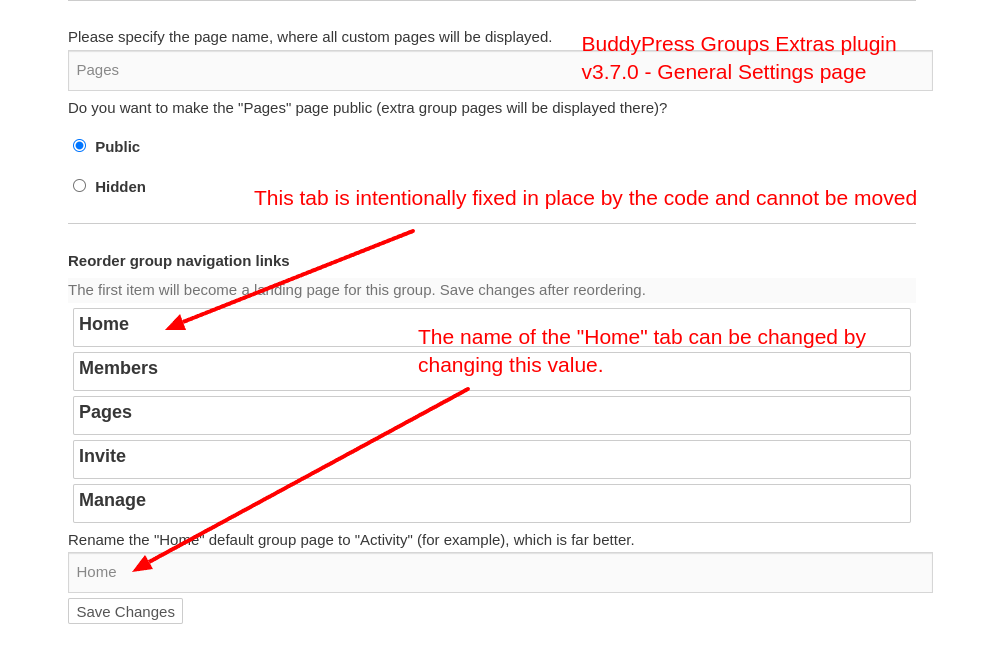
Theme : BuddyBoss with a custom child themeBefore version 3.7.0 of the buddypress-groups-extras plugin, I could reorder the group tabs, even the Home/Activity. I used this to put Pages on top (above Activity) to ensure it was the landing page for the group.
Activity is now hard coded as the first tab in core/templates.php of BPGE as explained in Emaralive’s response to my previous request https://buddypress.org/support/topic/activity-tab-cannot-be-moved-in-manage-page-general-settings-anymore/How could I change the default group landing pages to Pages instead of Activity?
WP: 6.7.1
BP: 14.3.1
Theme : BuddyBoss with a custom child themeSince we update to 14.3 we cannot change the Activity tab order in the manage Page general setting anymore
When we create a group, the default page is Activity.
Previously it was possible to change it to any other tab in Manage Page General Setting, but not anymore.
While I can change the place of the other tabs (Pages; Members, etc.) I cannot move the Activity any more, i.e. I cannot grab the Activity button while I can still grab and move the others.If I edit an old group where I changed the tab default to something else than Activity, I can still change the other tabs but I cannot grab the Activity and therefore I cannot change its order.
Could someone help me on where to look at ? I’m clueless at this point.
I tried on Safari Google Chrome, Firefox and observe the same behaviour.
Thanks for your help
Dominique
Hi,
I am using the “BuddyPress Messaging Control” plugin (available here) and ran into some bugs with it. The creator has not responded so I thought I should ask here.Issue 1:
This plugin is used to restrict who (based on user roles) can send how many messages to whom and within what time period, eg free user roles can send 10 messages a week or only reply to messages sent to them, but paid users can send unlimited messages to anyone).When I tested this plugin with the latest Buddypress and WordPress version and BuddyX theme, when you go to send a message, and your account is restricted, there is a message that says “Your messaging is capped, you can send a further”. and “Your messaging is set to Reply Only, you can only message users who have previously sent you a message, in addition you are only able to send another”. It doesn’t show the quota, and I would like for it to show it, because this just looks silly.
Issue 2 and 3:
In the Buddyboss platform (Buddyboss says anything made for Buddypress is compatible with Buddyboss, but it doesn’t actually seem so) the messages can be sent by simply pressing enter, there is even a message that says “Enter to Send Shift+Enter to add a new line”. But, pressing the “enter” key doesn’t visibly do anything, ie the message that you typed still stays in the text box, it doesn’t move to the sent messages box, so it is not obvious that a message was sent. Then the user will repeatedly press “enter” until they run out of their alloted messages. Then a message appears that says “There was a problem sending your message.”The first of this issue is obviously the message not “sending” upon pressing “enter”.
The second of this issue is that the message itself is vague and not specific: It should say “You have used up your message quota for this period.”I am wondering if anyone can help with fixing these things.
Thank you in advance.