Skip to:
Content
Pages
Categories
Search
Top
Bottom

Search Results for 'buddypress'

Viewing 25 results - 251 through 275 (of 94,540 total)
  • Author
    Search Results
  • #337042
    jerryrcole
    Participant

    How do I remove the sidebar for all BuddyPress pages (directory, member profile, etc)?

    I’d like the pages to display full-width without the sidebar.

    I’m running:
    – WordPress 6.8
    – BuddyPress 14.3.4
    – Elementor 3.28.3

    alysa06
    Participant

    Hi BuddyPress Community,

    I’m currently working on improving the overall user experience on my WordPress-based site, which is centered around the Chipotle menu and pricing. My goal is to make the site more interactive and community-driven, allowing visitors to not only browse menu items but also share customizations, reviews, and ordering tips.

    Here’s what I’m planning:

    Improving User Engagement: I’m exploring ways to add community features like user profiles, comment threads, and maybe even local pricing insights submitted by users.

    Considering BuddyPress: I’ve been looking into BuddyPress as a possible solution to build out these social features and create a more connected experience for returning users.

    Site Link for Context: [edit: link removed] — feel free to check it out to see the current layout and content style.

    I’d love advice on:

    How to use BuddyPress to enhance content-focused websites (vs. forums or traditional social platforms).

    Lightweight setup ideas to avoid performance issues.

    Suggestions for plugins or tools that work well alongside BuddyPress for food or menu-based communities.

    Appreciate any feedback or tips! Thanks so much in advance.

    emaralive
    Moderator

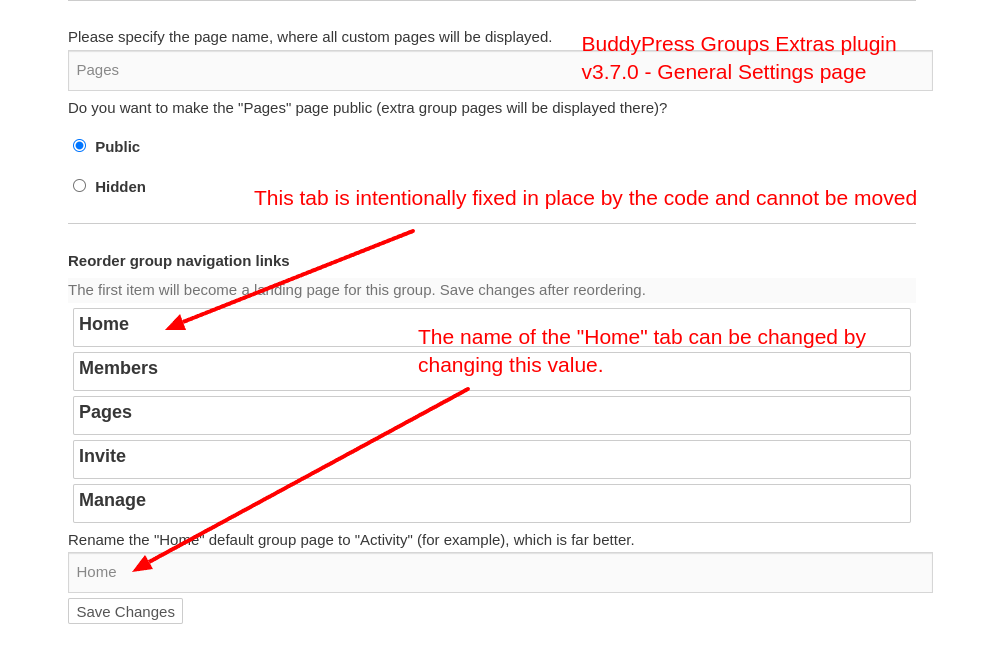
    Thanks for the screenshots, they do help. The page shown (General Settings) looks very similar to a page that is provided by the BuddyPress Groups Extras (BPGE) plugin, see the following screenshot:

    Truncated screenshot of BPGE plugin - General settings page

    As indicated in the screenshot, the Home or, in your case, the
    Activities tab is fixed in place by the code:

    
    if ( $nav['slug'] === 'home' ) {
    	$disabled = 'ui-state-disabled';
    }

    The above snippet can be found here and just indicates that the Home tab is disabled from being sortable. The following is what the element (li) has as classname (default ui-state-disabled) for a non sortable tab of which the only one is the Home tab.

    
    <li id="position_686f6d65" class="default ui-state-disabled">
         <strong>Home</strong>
    </li>

    While a sortable tab has default ui-sortable-handle as a classname.

    <li id="position_6d656d62657273" class="default ui-sortable-handle" style="">
          <strong>Members <span>1</span></strong>
    </li>

    The BPGE plugin author claims this change was due to:

    Group's "Activity"/"Home" navigation link is hard coded in BuddyPress to always be the first one, so disable its reordering.

    However, when I rollback from v3.7.0 to v3.6.10, the Home tab is now sortable and can be moved. So the reason for the change is not entirely true.

    Moving along, since the General Settings page from the BPGE plugin is similar to the page from your screenshots, we may be able to infer that there was a fork of some the code (the pages portion) from the BPGE plugin and was included in the BuddyBoss theme which AFAIK is a commercial (paid) theme, meaning I can’t verify the code within this theme due the status of free vs paid. If this is the case, then your resolve will have to come from the BuddyBoss developers. However, if the code that supports manage Page general setting resides elsewhere, e.g., custom code or 3rd party plugin, then the resolve is the responsibility of those who authored the code.

    As an aside, as it relates to the BPGE plugin, there is an appearance of wonkiness with the reordering of group tabs which appears to be a factor that caused the change to make the Home tab not sortable, however, I’m not sure if BuddyPress is causing the wonkiness,

    Having stated all of the above, it seems to me, the reason that you want the Pages tab to be the first tab is because you want that to be the landing page. Would this be a correct assumption? If so, there may be the possibility of changing the landing page to Pages, regardless of the tab order, which will depend on similar the code is similar enough to the BPGE plugin.

    #336986
    ukfish1
    Participant

    Hi

    We have copied over community builder for Joomla to Buddypress in Wordpres.

    All is great but I need to know how to be able to manually add new users to WordPress that will enable their profile to be displayed the same as the users that we have copied over from Community Builder.

    thanks

    Paul

    #336983
    michaeljohn23
    Participant

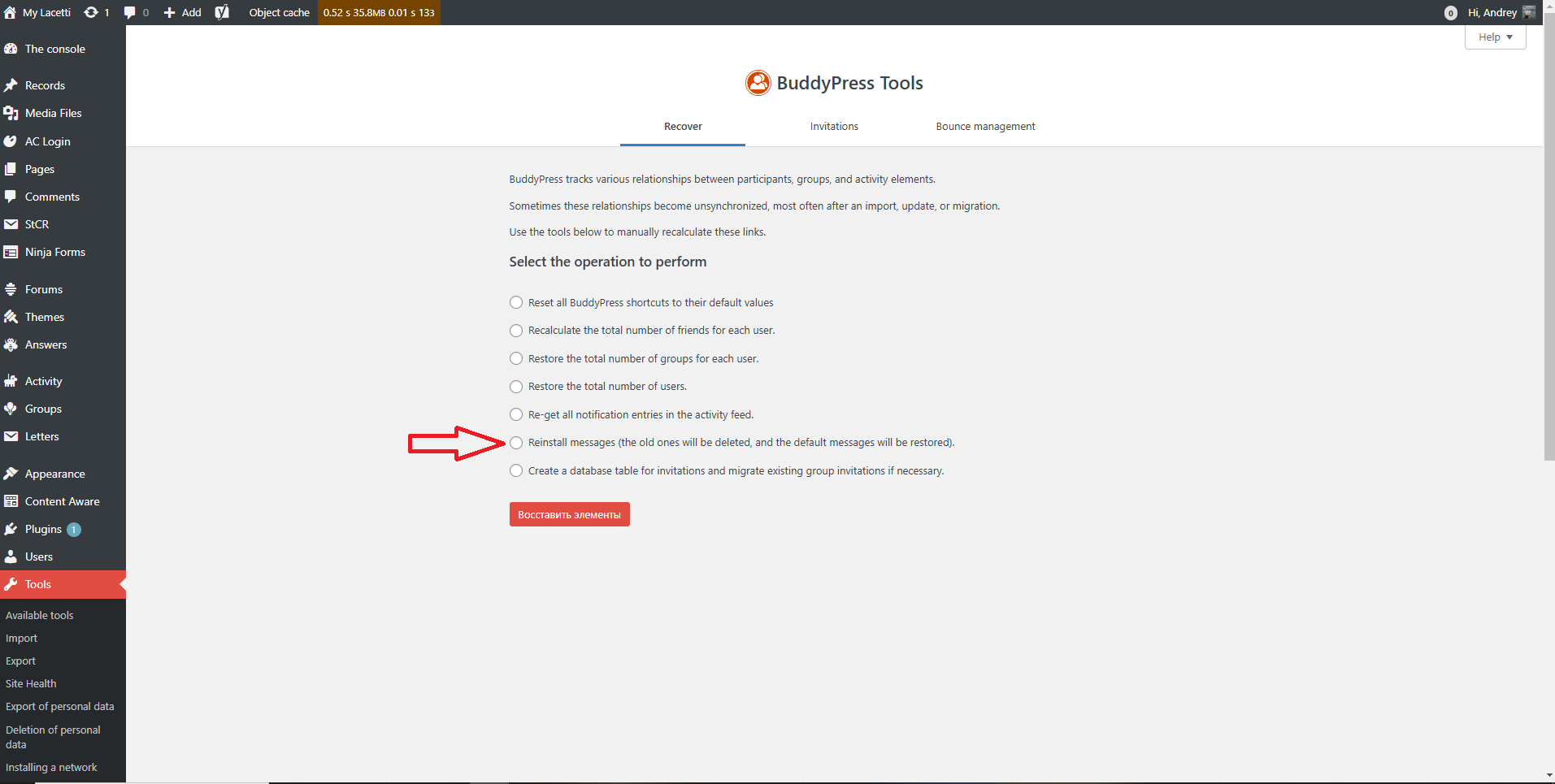
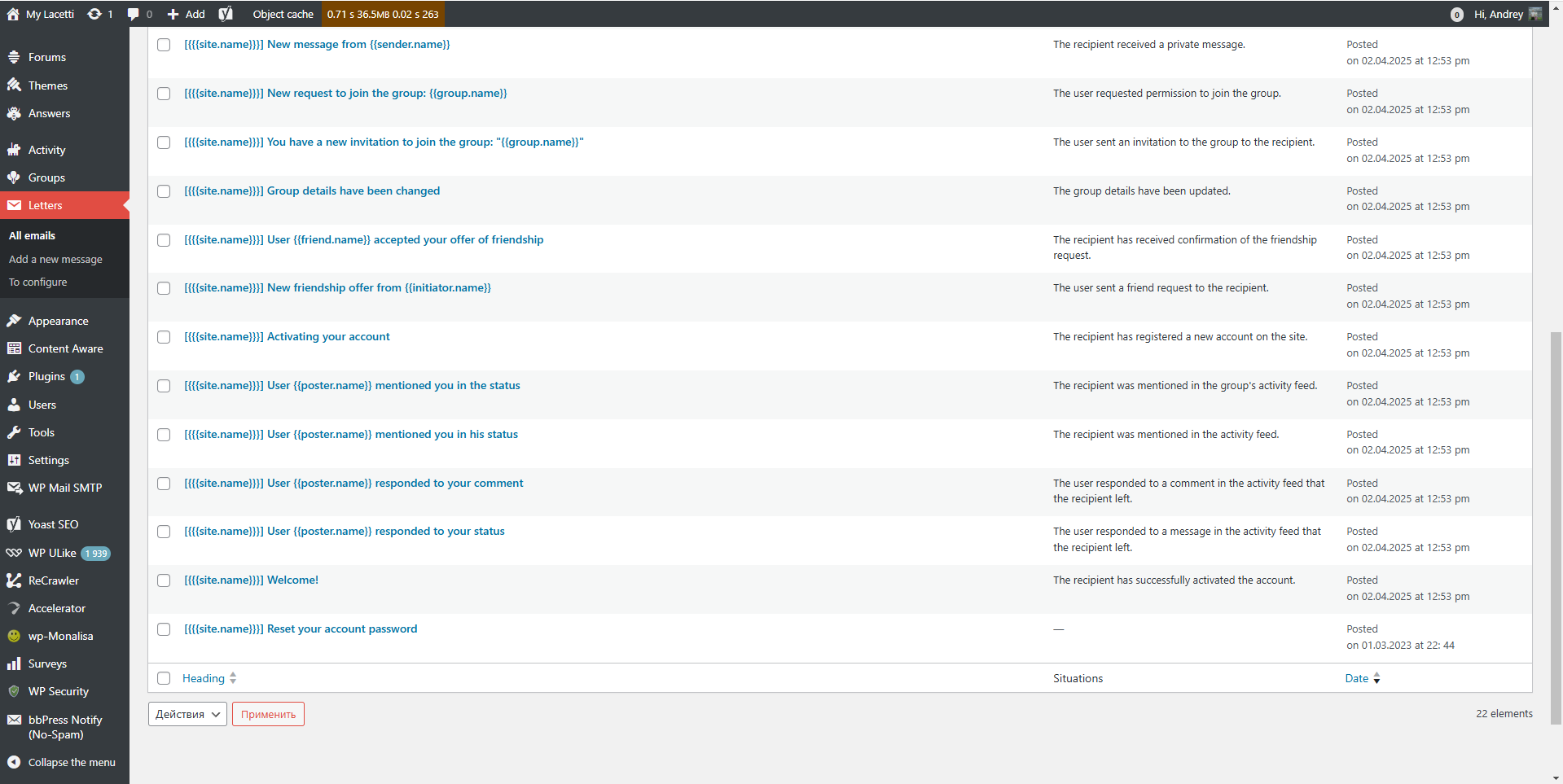
    It looks like the password reset trigger is missing or misconfigured. Please check your BuddyPress or email plugin settings to ensure the reset situation is enabled and linked to the correct template.

    capexpe
    Participant

    Hi

    I mentioned the same issue two months ago and I have not been able to fix it since.
    No answer to my message either

    https://buddypress.org/support/topic/activity-tab-cannot-be-moved-in-manage-page-general-settings-anymore/

    The Activity tab is the first tab menu and cannot be move to another place order in the menu. Except Activity on the first place, I can change the order of the tab menu

    Thanks for you help

    Kudzai V
    Participant

    Hello! I’m using the BuddyX theme with buddypress. When someone clicks the “x” delete conversation button, the whole conversation is deleted without any confirmation message asking if the user is sure. So if you accidentally click the x, the whole conversation is gone forever. Any way to avoid this? Or does anyone know php I can add to fix this? ChatGPT’s code didn’t work.

    emaralive
    Moderator

    2) … Also there, there is no way to change things here ? Add the thumbnail on the posts list for example, or separate the “comments” and “posts” tabs,…

    Things” can be changed programmatically. Additionally, BuddyPress does not come standard with “Posts” or “Comment” tabs. The only separation for these items is via the dropdown filter selection for “Posts” or “Comments” located in the Sitewide or User Activity streams which is standard for BuddyPress.

    3) OK, really confusing.
    And if the displyed name and real name arent the same, how can a user know the real @ he has to use to tag someone ?
    BTW, i’ve made some tests and even if i use @displayname or @username, it doesnt send a notification to the user,…

    Users typically figure out who is who and for @mentions, only the username is used for notifications. For example, a scenario where there are 2 users with the same displayname which happens to be Apple, however, each has a different username because usernames must be unique. Maybe a visual will help you digest this information:

    Screenshot of @mention using the displayname

    If you are having issues with notifications, that is a different issue and might be related to some external factor such as a plugin or theme that is interfering with the notification process.

    As for Main settings, yes, those available via a UI are limited, however, programmatically, there are plenty via constants, filter hooks and action hooks.

    #336897
    siliah
    Participant

    Hey everyone

    I’m Lila (hence the nickname Siliah, for the curious ones). 🙂

    I hope I’m posting this in the right place… I’m reaching out to your expert minds and kind hearts because I’m stuck on a little issue with BuddyPress.

    By default, the first profile tab that shows up is “Activity”, but I’d really love to change it to another section, like “Friends”. Does anyone know how I could do that, please?

    Huge thanks in advance for your help!

    Talk to you soon!

    Django
    Participant

    Unfortunately BuddyPress search doesn’t use WP_Query.

    The best you can do with BuddyPress search is to use the bp_search_query_results filter.

    
    function bp_exclude_from_search( $search_results ) {
        return array_filter( $search_results, function( $result ) {
            $excluded_post_ids = array( 1, 2, 3 );
            $excluded_post_types = array( 'custom_type', 'other_cpt' );
            if ( 
                ! in_array( get_post_type( $result->id, $excluded_post_ids ) ) 
                || ! in_array( get_post_type( $result->type, $excluded_post_types ) ) 
            ) {
                return true;
            };
        });
    };
    add_filter( 'bp_search_query_results', 'bp_exclude_from_search', 10 );
    
    #336884
    duyha83
    Participant

    Hello!
    Users have stopped receiving password reset letters. I looked in the “Letters” settings and in the menu for selecting situations for a letter there is no situation for resetting the password.
    The letter itself is there, but there is no situation for sending such a letter.
    Please tell me how to fix the situation?
    Please tell me how to fix the situation?
    The problem appeared around March 25
    BuddyPress 14.3.4
    WordPress 6.7.2
    edit: link removed

    #336869
    Patel Akshay
    Participant

    Here’s my function, and I want to add a placeholder for wp_editor(). However, there’s no default parameter available for this. How can I achieve it?

    I’m using BuddyPress, and the following function is used for the “What’s New” textarea. I have replaced the simple textarea with wp_editor().

    function show_whats_new_tinymce_editor($editor_id) {
        $current_user = wp_get_current_user();
        $user_display_name = !empty($current_user->display_name) ? $current_user->display_name : __('User', 'reign');
    
        $content = "What's new, {$user_display_name}?";
    
        $settings = array(
            'media_buttons' => false,
            'textarea_name' => 'comment',
            'textarea_rows' => 6,
            'teeny' => false,
            'tinymce' => array(
                'wpautop' => true,
                'toolbar1' => 'bold,italic,bullist,numlist,link,unlink,undo,redo,addmedia,addgif,videoembed,fullscreen',
                'toolbar2' => '',
                'branding' => false,
                'statusbar' => true, // Show status bar for resizing
                'resize' => true, // Allow resizing
                'height' => 200, // Set default height
                'extended_valid_elements' => 'a[href|target=_blank], iframe[src|width|height|frameborder|allowfullscreen]',
                'rel_list' => array(array('title' => 'No Follow', 'value' => 'nofollow')),
                'link_default_target' => '_blank'
            ),
            'quicktags' => false
        );
    
        $dark_mode = isset($_COOKIE['reign_dark_mode']) && $_COOKIE['reign_dark_mode'] === 'true';
        $settings['tinymce']['content_css'] = $dark_mode ? get_stylesheet_directory_uri() . '/assets/css/dark-mode-editor.css' : '';
    
        wp_editor($content, $editor_id, $settings);
    }
    mariedean68
    Participant

    We want to use BuddyPress for a social network on our website, but we also want to use it a second time for a completely different purpose.

    Is this allowed?

    Any help would be greatly appreciated.

    I don’t have the site live yet and haven’t downloaded BuddyPress yet either.

    emaralive
    Moderator

    Hello all. Versions 14.3.4, 12.5.3 & 11.4.4 are Security Releases. Please update, accordingly, when possible.

    BuddyPress 14.3.4, 12.5.3 & 11.4.4 Security Releases

    emaralive
    Moderator

    Hi,

    I’m not sure I, totally, understand your inquiry but, I’ll provide some information that may be of some help. The BP Nouveau template pack provides for use of the wp_editor() function configured as TinyMCE and by default provides 7 buttons, e.g.:

    • Bold
    • Italic
    • Bulleted list
    • Numbered (ordered) list
    • Blockquote
    • Link
    • Image

    Compose and Reply makes use of the same wp_editor and due the use of various filter hooks, the number of buttons can be altered by a plugin or someone implementing custom code. Depending on the code that is external to BuddyPress, there is opportunity to make various buttons available to different users.

    For the sake of simplicity, the following screenshot is a simple illustration:

    Screenshot of Private Message visual editor

    As for settings within BuddyPress, there isn’t a UI available for this purpose. However, some plugins that provide additional TinyMCE buttons, may offer UI settings.

    amnonmichaelcohen
    Participant

    In my standard BuddyPress I do not know how to RESTRICT the FIELD for entering new members Personal Profile URL.

    As of now, I am asking for it, but people/scammers are just entering 2-3 letters, so I do not think they are real potential/legitimate members.

    Standard BuddyPress does not have/grants me the option to restrict a new applicant’s application to enter specific sought information, say like URL, Phone Number and alike.

    Also, when I look at all new members’ applications, the Name and email and time appear, but specific field/information like Personal Profile URL are not on the page — a feature which will help me approve the legitimate new members and reject all the many fake/spammers I am getting by the hundreds…

    shawfactor
    Participant

    Gutenberg

    It is a standard

    Buddypress already supports it (to some extent) and will be integrated further in the future

    #336776
    siliah
    Participant

    Hello everyone,

    I would like to report a bug with BuddyPress that occurs after a member receives a notification informing them that they have been awarded the verification badge on their account.

    Here is the error that appears in the logs. Note that as long as the member has not deleted the notification indicating that they have received the verified badge, every page they visit on the site will generate an error in the logs. You can imagine the number of errors this can produce with many members online simultaneously.

    2025/03/20 19:40:39 [error] 5891#5891: *4127 FastCGI sent in stderr: "PHP message: PHP Warning: Undefined array key "name" in /www/site_734/public/wp-content/themes/theme/includes/functions/buddypress/theme-functions-buddypress-notification.php on line 268" while reading response header from upstream, client: 173.792.398.52, server: site.com, request: "POST /wp-admin/admin-ajax.php HTTP/2.0", upstream: "fastcgi://unix:/var/run/php8.2-fpm-site.sock:", host: "site.com:33800", referrer: "https://site.com/"

    hysteriah
    Participant

    I’m using the latest version of WordPress (v6.7.2) and BuddyPress (v 14.3.3), together with another plugin called “Modern Image Formats (v 2.5.0)” that converts all images to AVIF file type when uploading new images to reduce my HDD usage on my site. Whenever the “Modern Image Formats” plugin is acitvated, the uploading of a new profile image in BuddyPress crashes whenever it reaches the step to crop the image.

    Is there any hope for BuddyPress to support AVIF file types soon?

    #336660
    emaralive
    Moderator

    Hi,

    Try reading through the following document to see if the information provides some insight:

    Navigation menus

    #336659
    michaelc1
    Participant

    Hello,
    I am currently working on my new website https://learnhisword.org/
    I am using WordPress 6.7.2 and BuddyPress 14.3.3

    No menu items are showing at all in the menus section. Can’t add them either it seems.

    I am not using a Buddypress theme! I am using the Masteriyo LMS.

    #336657
    ukfish1
    Participant

    Hi

    I am new to BuddyPress. I have installed the plugin and am trying to configure it.

    When I try to visit some of the pages, they are displaying incorrectly, such as https://west5web-test.co.uk/activity/

    Any idea what this might be?

    Thanks

    Paul

    #336630

    In reply to: Multisite Idea

    valuser
    Participant

    You could check if this plugin still works. It segregates BuddyPress social networks in a multi network WordPress install so that each WP network has a different social network. One for each Network.

    You could also check if this plugin still works. It allows each site on an individual network have its own separate buddypress social network.

    It would appear that you may even, at present*, be able to run separate (though members shared) buddypress social networks on every site in a WP Multi Network setup.

    AFAIK they both still work in with WP 6.7.2, BP 14.3.3 PHP 8.3.11 MYSQL8.0.35 but you should check yourself if they still do. (i am not a developer or coder)

    *The Buddypress Development Team has stated that consideration has been given by the Team to perhaps in the long term to deprecate the multiblog feature sometime in the future. This (AFAIK) would not effect the first scenario but would effect the second

    asapadvisors
    Participant

    Hi,

    I am new to buddypress. I have implemented the Kleo theme. When I am trying to sign-up with non-custom emails viz: @gmail.com or @hotmail.com, etc. The registration verification email does not reach the mailbox.

    Kindly Help

    WordPress Version 6.7.2
    BuddyPress Version 14.3.3
    https://cfoforum.co.in

    #336617

    In reply to: Infinite replies

    davesadows
    Participant

    Hello,

    I’m trying to create custom commenting on a buddypress install. I basically would like to have 2 levels of nested comments, and infinite replies without the indentation causing comments to be unreadable. I found this code, but I think it’s specific to WordPress comments, not buddypress:

    Home » WordPress » How to Have Infinite Replies with WordPress Threaded Comments

    How to Have Infinite Replies with WordPress Threaded Comments
    WordPress doesn’t allow to have infinite replies beyond the maximum nested comment depth. In this tutorial, I’ll show you how to create a “Reply” link for all threaded comments, regardless of the depth.

    Table of Contents

    Code for Infinite WordPress Replies
    No Need to Modify Core WordPress Files
    Why Increasing the Max Depth via Code Doesn’t Work
    Allow Flat Inline Replies Like on Facebook
    Related to WordPress Comments:

    How to Disable Links in WordPress Comments
    How to Remove “Comments are Closed” from WordPress
    How to Block WordPress Comment Spam Using Cloudflare
    How to Display Error Messages in the WordPress Admin
    In this screenshot, I’ve set the nested comments level to three:

    WordPress Nested Comments Three Levels Deep
    WordPress Nested Comments Three Levels Deep
    WordPress will nest comment replies to this depth and then stop showing the “Reply” link at the bottom of every comment, as shown here:

    WordPress Comment Reply Missing on Maximum Depth
    WordPress Comment Reply Missing on Maximum Depth
    Because of this limitation, visitors can’t have an ongoing conversation on your site, thereby stifling debate. The code below fixes this problem.

    Code for Infinite WordPress Replies
    To solve the above problem, paste the following code into your theme’s functions.php file, or better yet, use a custom plugin for code insertion. Whichever way you choose, here’s the code you need:

    // Add a custom reply link for infinite comments

    function add_a_reply_link($comment) {
    $temp = get_comment_id();
    $comment_handle = get_comment($temp);
    // $comment_handle = get_comment(get_comment_id());
    $comment_link = get_comment_link($comment_handle);
    $comment_id = get_comment_id();
    $post_id = get_the_id();
    $author = get_comment_author();

    $comment= $comment . ‘<p>Reply</p>’;

    return $comment;
    }

    add_filter(‘get_comment_text’, ‘add_a_reply_link’);

    // Remove the default reply link

    function remove_reply_link() {
    return ”;
    }
    add_filter(‘comment_reply_link’, ‘remove_reply_link’)

Viewing 25 results - 251 through 275 (of 94,540 total)
Skip to toolbar