Search Results for 'buddypress'
-
AuthorSearch Results
-
July 28, 2012 at 1:53 pm #138092
In reply to: Enterprise Nation: a 64,000 member BuddyPress site
Eric Langley
ParticipantGreat to read about your success with BuddyPress and Enterprise Nation.
Customizing registration appears to be a must when creating a high load community. There is a lot of heavy lifting that needs to be done during signup which requires a custom process.
Interesting that you do not use and activation email.
The site appears to be locked down from a BuddyPress standpoint. No Activity Stream?
@neononcon you might want to check out WangGuard (free in WordPress plugins) for help in limiting spam registration.
~eric
July 28, 2012 at 1:47 pm #138090In reply to: BuddyPress Profile Privacy Extension
modemlooper
ModeratorAre you referring to the profile fields or the tabs?
July 28, 2012 at 1:44 pm #138089In reply to: Download 1.5.6
July 28, 2012 at 1:39 pm #138088ModeratorDid you upgrade on your live site? Never do this. Always have a testing setup so you avoid these situations.
Revert back to 1.5.6 https://wordpress.org/extend/plugins/buddypress/developers
July 28, 2012 at 1:31 pm #138087Participant@mercime thanks for the reply.
I did not realize how extensive the spam registration, comment and trackback issue is on WP/BP. I am curious though as to how these registrations are getting past the required fields.
In doing more research there are several models for limiting spam registration;
captcha, which appears to have been compromised through the use of attack tools and, IMHO, is unfriendly to users.
honeypot, which places a hidden field in the registration and when filled out registration is blocked.Currently I am testing WangGuard. It looks like it takes a more holistic approach treating spam registrations like a virus and building a database of bad domains.
I have not fully launched my site yet so I don’t know how effective it is.
Anyone else have a recommendation for methods/solutions for limiting spam registrations?
~eric
July 28, 2012 at 1:22 pm #138086In reply to: User Image Crop Redirecting To The Homepage…
leon89
Member@mercime With deafult plugins,buddypress and bp-default theme, cropping works…
I loaded everything back but loaded original buddypress plugin and everything looks OK.. i guess i will have to translate it again.. thnx anyway
July 28, 2012 at 8:48 am #138083In reply to: User Image Crop Redirecting To The Homepage…
@mercime
Participant@leon89 back up the theme and plugins you were translating and upload the original theme and plugins. Activate bp-default theme, then check if issue is resolved.
July 28, 2012 at 8:31 am #138082In reply to: My Picture Button
Participant== When clicking on your photo on main buddypress home page it doesnt do anything besides direct you back to the page your already at ==
It’s probably the theme you’re using. BP Default theme image avatar links by default to member’s Activity > Personal page
July 28, 2012 at 7:27 am #138081JoeMD
Member@juanmaguerrero Thanks, it’s brilliant! However, I just updated to BP 1.5.7 and it’s not compatable. Is there a way to revert to BP 1.5.6?
July 28, 2012 at 6:17 am #138079In reply to: Text Message Notifications for Groups
Participant@hpdesign sorry, no plugin to do what you wanted at this time. Either you’d have to code this yourself, or you’d need to hire a developer to do so or wait for someone to create a plugin and release it in WP Plugin Repo
July 28, 2012 at 6:09 am #138078Participant@elangley the thing is that whether you have BuddyPress or not, when you have open registration, expect spammers – bots and humans. There are human spammers who are paid by companies to post backlinks in as many websites as possible and those who spam just for the heck of it, and other than making your site by invitation only, you’d have to monitor membership in your site regular and be prepared to cull the spammers.
July 28, 2012 at 6:03 am #138077In reply to: Buddypress on Subdomain
Participant@pbarthmaier I did not find any issues when I moved BP from main site to subdomain blog id 3 in one installation way back BP 1.2++. I’m sure you know that you should always back up database and server files before making the change just to be safe
 July 28, 2012 at 5:52 am #138075
In reply to: Sidebar in Footer in Wootheme
Participant@pkmcilroy there are AJAX/JS conflicts with BP and Canvas Theme https://buddypress.org/community/groups/how-to-and-troubleshooting/forum/topic/woo-canvas-child-theme-customization-and-ajax/ Near the end of the topic, someone posted a link to a premium Canvas child theme which has BP compatibility. I will only suggest that if you’re going to purchase that child theme, wait till it’s been updated for BP 1.6 which will be coming out pretty soon.
July 28, 2012 at 3:59 am #138067In reply to: Buddypress and phpBB forums
newpress
Participantjust curious,
1. how large is your phpBB forum?
2. where you host it?
3. what is the hosting package? Price?
4. how many registered members you have?
5. how many members are online during any given time?July 27, 2012 at 9:21 pm #138063In reply to: Not showing up in plugins list
r-a-y
KeymasterThe Custom Community theme is a BuddyPress theme; you’ll still need to install the BuddyPress plugin though.
Follow the BuddyPress installation guide:
https://codex.buddypress.org/getting-started/setting-up-a-new-installation/Once you have BuddyPress setup, install the Custom Community theme.
Also, try asking the Custom Community support team for help as well:
July 27, 2012 at 9:11 pm #138062KeymasterBuddyPress does not come with an “Add New User” admin page. You are probably referring to WordPress’ User admin page.
I just took a look at your StackExchange thread and it appears you’re using WordPress Multisite:
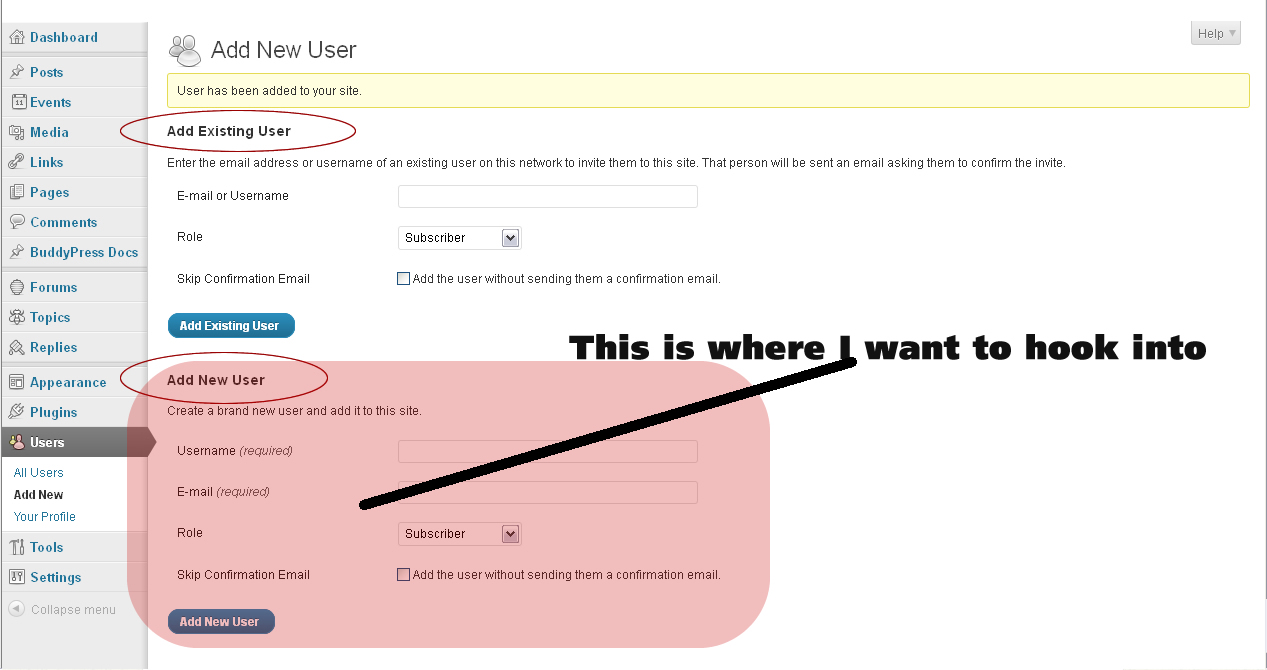
This is very important to know because you’ll need to run your script on the site that has BuddyPress installed.
Because of using WP Multisite, you’ll also have to change your hook to ‘wpmu_signup_user_notification‘.
The BuddyPress signup hooks I mention above only take effect on frontend registration (eg. testbp.org/register). Since you’re not using frontend registration, those hooks won’t work for you.
Is there any reason why you need multisite?
That will probably give you enough to go on.
July 27, 2012 at 8:56 pm #138061frank tredici
MemberMy Avatar Default was set already to Mystery Man.
So let me ask this…
Maybe it is not overwriting because it already saved the mystery man avatar to their profile? Is that what is happening?
I am trying to get BuddyPress to use my default avatar for all instances where the member has not yet loaded a picture (or avatar). But maybe my thinking is wrong…
Please confirm that I can or cannot overwrite the mystery man avatar, at anytime, on the fly?
Thanks @r-a-y !!
July 27, 2012 at 8:45 pm #138059MemberUghh…excuse my frustration.
Scope and Objective: to enable the Admin (me) to create user accounts. To capture the username created and pro grammatically write to an external file in order to allow user to authenticate though our private authentication method. And to enable new user to receive a welcome email at time they get setup.
I do not care anything about when/how/why/or where they login or activate themselves so as to appear in BuddyPress. That is all down stream stuff that has nothing to do with my process.
The only effective hook I have found is the `add_action(‘user_register’, ”);` Works like a charm.
However, in order to get the user to be seen by BuddyPress I need to go through step #2 and Add New User in the Buddypress Admin page. That is where I tell WP/BP they are allowed access to the “site” and it is also where they get their role assigned.
I have over 200 users to setup in the next week. If I could just cut down my process time by 50% — that is to eliminate the 2 step process and make it a 1 step process — I would be a little happier.
I need to get the Buddypress equivalent hook to WP’s `add_action(‘user_register’, ”);`
That is why I am asking for an enhancement to BP to get an equivalent hook. Down the road it will make my setup life easier.
July 27, 2012 at 8:24 pm #138057Keymaster@frank13 – I’m just re-reading this entire thread.
It looks like you’re registering users manually via the WP admin dashboard’s Users page, but then are wondering why these users do not show up in BP’s Members Directory.
When you register a user that way, they will not show up in BuddyPress’ members directory until they login.
You can bypass this programatically by adding a ‘last_activity’ user meta entry.
Read this thread for more details:
https://buddypress.org/community/groups/how-to-and-troubleshooting/forum/topic/make-all-members-active-1/#post-110469This hopefully addresses your problems!
July 27, 2012 at 8:18 pm #138056MemberI have some screen shots over here –> http://wordpress.stackexchange.com/questions/59649/how-to-hook-into-add-new-member-in-buddypress/59937#59937
They might help trigger something you have done or seen in your BP implementation process…
Thanks !!!
July 27, 2012 at 7:59 pm #138054In reply to: My Big Problem is Privacy Setting in Bp
juanmaguerrero
ParticipantHi, @raminjan
Here you’ve got a few powerful tutorials on how to get that
http://wpmu.org/how-to-build-a-facebook-style-members-only-wordpress-buddypress-site/
July 27, 2012 at 7:48 pm #138053In reply to: change profile layout (inside theme)
ParticipantHi, @streidl you just have to change the order of appearance of some elements, in concrete:
``
And all of it’s contents should go before:
`…`
You should move that immediately after `` opening tag appears.The files you want to tweak should be in your theme folder, something like
`/wp-content/plugins/buddypress/bp-themes//members/single/home.php`There you’ll see something like:
`
`Just move the “item-nav” before the header
 , hope it helps, cheersJuly 27, 2012 at 7:33 pm #138052Member
With some assistance from @r-a-y:
The bp_core_signup_user hook does something after BP has registered the user. Registering the user does not mean the user is activated yet.I ran a test:
`function myTest() {
echo ‘fingers are crossed’; exit;
}
add_action(‘bp_core_signup_user’, ‘myTest’);`I created a new user in the BuddyPress Add New User form. I checked the box to not send an email.
Results:
(1) add_action() interceptor did not echo and halt — not what I desired
(2) new user got an email — also, not what I desiredAny suggestions @r-a-y or other BP Guru’s? Thanks
July 27, 2012 at 7:17 pm #138051In reply to: bbPress 2.1 and BuddyPress 1.6 beta 2 Group Forums
gswaim
ParticipantI am building a fresh BuddyPress site and am still at the testing phase. I have the luxury of blowing it out and starting all over. I have tried probably 20+ combinations of BuddyPress 1.5.6, BuddyPress 1.6 RC-1, “BuddyPress Ready” themes, standard themes + template pack, bbPress lite set up via BP install as group forums, bbPress 2.1 set up as sitewide forums during the BuddyPress install, and bbPress 2.1 set up as BP group forums but not through the BP setup.. Whew… This makes my head hurt
My current, and I hope final combination:
WordPress 3.4.1
BuddyPress 1.6 RC-1
Genesis Framework + BuddyPress Theme Pack *
bbPress 2.1 Installed after the BuddyPress Install and set up to support BP group forums*(I tried their GenesisConnect plugin, but get closer to right by using the BuddyPress Theme Pack
All is well except I need the group forums to go full width (no sidebar). If I could tweak some code and make the sidebar for group forums go away I would be a happy camper.
Thanks in advance for any help on this!
Link to Site: http://184.175.77.145/~digitall/wp4
July 27, 2012 at 7:01 pm #138050ParticipantHi, @joemd clearly one of the best options and the one I use is http://buddydev.com/plugins/bp-gallery/ you will pay only 30 dollars if I remember well and have access to tons of premium plugins. That plugin BP Gallery is pretty complete, you can set it to work only with pictures or if you want also videos and music, hope it suits you
-
AuthorSearch Results


