Search Results for 'buddypress'
-
AuthorSearch Results
-
April 1, 2012 at 10:01 pm #132249
In reply to: Buddypress breaks https
Paul Wong-Gibbs
KeymasterJust committed a fix for what I found.
April 1, 2012 at 9:23 pm #132247In reply to: Problem editing xprofile fields
@mercime
ParticipantApril 1, 2012 at 7:12 pm #132243In reply to: Buddypress breaks https
KeymasterAfter spending an hour trying things, I’ve discovered that if you’re on https, the user avatar includes are always http.
EDIT: Made a ticket https://buddypress.trac.wordpress.org/ticket/4110
April 1, 2012 at 5:06 pm #132240aces
ParticipantApril 1, 2012 at 4:34 pm #132238In reply to: [RESOLVED]Hide pages from non-members
DRAGUIAN
MemberIt’s frustrating because that’s almost it. I leave the Header navigation as blank because my buddypress/wordpress pages automatically fill in that menu. So when I am logged in all the pages I want to see are there. I only made my homepage and about page available to the nonmembers, and that works fine too. However, when a user is logged off, they can still see all the pages available to a logged in user aswell as the pages which are available to them. So instead of having one smooth menu for the non member, theres the members menu and below it a non members menu. Note this is only for logged out members everything is fine as far as signed in users are concerned.
April 1, 2012 at 4:10 pm #132237In reply to: Buddypress breaks https
Hugo Ashmore
ParticipantPJ you do need to try and identify what files are the issue, Paul did ask that first time around, that info would allow both of us to have a clearer idea of what to look at.
Images paths are often the culprit in this sort of mixed resource scenario, which is why I mentioned them.
On a sidenote although it may seem an odd idea to run an entire site under https, there are those that advocate ALL sites changing to https regardless of whether they have obvious need for it such as payment gateway security.
April 1, 2012 at 3:42 pm #132234In reply to: [RESOLVED]Hide pages from non-members
ParticipantYou should make a child of bp-default and backup files and db just in case…
You don’t add or remove any pages from the code. The point is that it works from the built in wordpress default menu system. ( https://codex.wordpress.org/Navigation_Menus )
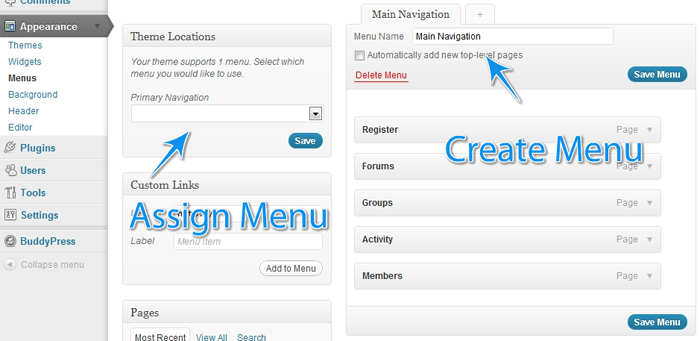
To get the second menu to appear – In your child theme’s functions.php file add:
`function register_my_menus() {
register_nav_menus( array(
‘primary’ => __( ‘Header Navigation’ ),
‘secondary-menu’ => __( ‘Alternative Menu’ ),
‘another-menu’ => __( ‘Another Menu’ )
) );
}
add_action( ‘init’, ‘register_my_menus’ );
`April 1, 2012 at 3:35 pm #132231In reply to: [RESOLVED]Hide pages from non-members
MemberJust buddypress original for now. So in the ‘menu_ID’ do I just replace that with a ‘(then my page ID’ then im guessing a comma, then ‘(page Id)’ right?
April 1, 2012 at 3:28 pm #132230In reply to: Buddypress breaks https
KeymasterYour browser’s warning says that some content is being served over http. You need to figure out *what* file is being requested then we can tell you if it’s a BuddyPress core problem, or your theme, or a plugin.
April 1, 2012 at 2:26 pm #132228In reply to: Buddypress breaks https
PJ
ParticipantPaul,
Ideally I’d like to have the whole site forced https since I have a private ssl. So, WP+BP in all https if possible.
I did a fresh install of WP and just installed BP, so I doubt it’s an image issue. Is there a way to go totally https?
I also went to Settings > General and changed WordPress Address (URL) to have an https rather than http. Anytime I click BP parts of the site it goes back to regular http.
April 1, 2012 at 1:55 pm #132226In reply to: [Resolved] Is this the correct Registration Page?
allentan
MemberI have reinstalled WP into a Sub-Folder. Still remain the same.
http://learningdigitalphotography.net/dev/registration
I think this plugin just don’t work…
April 1, 2012 at 1:02 pm #132223In reply to: [RESOLVED]Hide pages from non-members
MemberI prefer the first option of serving different menus whether the user is logged in or not. Should I put that code into the themes header or funtion.php? Do I need to add to the given code it to specify which pages I want to hide from logged out users. Using latest version of wordpress and buddypress
April 1, 2012 at 10:07 am #132157In reply to: Buddypress breaks https
ParticipantLikely image urls are the culprit as is often the case with ssl connections. A certain amount of googling will fill you in on the ins and outs of using SSL and the warnings that are generated (it’s not broken SSL it’s just a warning that the page request has mixed resources)
Possibly BP needs to be doing some checks to see how the server is configured with respect to SSL, not something I have had cause to look at with BP.
April 1, 2012 at 9:30 am #132220In reply to: Buddypress breaks https
KeymasterYou need to figure out and tell us what is being included over http. Also your WordPress and BuddyPress versions. Thanks.
April 1, 2012 at 9:28 am #132219In reply to: BuddyPress and BuddyPress
KeymasterBuddyPress Template (Pack) is an attempt to make it easier for people to understand how to get started to adapt their theme for BuddyPress. As it’s intended to be a single-use thing, it doesn’t make sense to go into BuddyPress core.
April 1, 2012 at 7:02 am #132217In reply to: Still getting spammers!! HELP!
Tina
ParticipantThanks! That was simple enough! (changing registration slug)…didn’t realize there was that feature in Buddypress now, and that it would be that easy! Here’s hoping it helps!
April 1, 2012 at 6:38 am #132216sarah_lena
MemberIs there a way to remove the “edit my profile” link that is next to the avatar in this new buddybar/adminbar merge?
April 1, 2012 at 2:00 am #132210In reply to: [Resolved] Is this the correct Registration Page?
Member@mercime If i do the WP reinstallation manually, will that affect my site and SEO of my site?
March 31, 2012 at 11:25 pm #132206In reply to: Search not working on the BuddyPress site
ParticipantThis is a known issue and will be addressed soon. You could use google in the meantime. Thank you for your patience.
March 31, 2012 at 11:23 pm #132205In reply to: [Resolved] Is this the correct Registration Page?
ParticipantMarch 31, 2012 at 10:50 pm #132203Participant== When i uncheck the boxes the right side of content gets cut short. It needs about 12-15px more. ==
That’s why I suggested in my previous post in D.) to copy styles used in Twenty Ten theme to correct the width of the BP elements. Look specifically for styles targetting #object-nav and #subnav
March 31, 2012 at 9:31 pm #132199In reply to: Search Buddypress Support Forums
ParticipantThe search issue is known and will be addressed soon. Thank you all for your patience.
March 31, 2012 at 9:24 pm #132198In reply to: Buddypress plugin of WordPress remote SQL Injection
ParticipantThat is why BP 1.5.5 was released https://buddypress.org/2012/03/buddypress-1-5-5/
https://buddypress.org/community/groups/installing-buddypress/forum/topic/1-5-5-imortant-update/
All users should upgrade BP ASAP.March 31, 2012 at 9:22 pm #132197Participant@faithcoach – One issue at a time, please. We’ll address the layout of the BP template files first.
Per http://faithteam.org/faithnotes/members and other BP pages which shows unstyled BP elements ==> Enable the CSS and JS of BuddyPress in dashboard menu Appearance > BP Compatibility, i.e., uncheck the two boxes to disable CSS and JS from BP and Save.
As for the Group Forums, you need to enable it first for each group. see https://codex.buddypress.org/getting-started/installing-group-and-sitewide-forums/4/#forums-faqs
March 31, 2012 at 9:01 pm #132196In reply to: Buddypress plugin of WordPress remote SQL Injection
shanebp
ModeratorReported to developers and fixed in version 1.5.5
-
AuthorSearch Results


